
症状
インストーラーカチカチ → 次へ → 次へ …
でインストールしたら以下エラー。
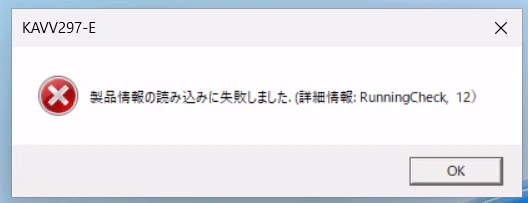
原因
【調査中】インストールログ( C:\Windows\Temp\HCDINST )見てみたら怪しそうなログが。これが犯人か?
P-CC2A12-44DL.LOG
Property(C): ISSCRIPT_VERSION_MISSING = このマシンには InstallScript エンジンがありません。ISScript.msi がある場合はそれを実行し、ない場合はサポート担当者にお問い合わせください。
ISScript.msi = Install Shield Scripting Runtime。インストールメディアの中にISScript.msiがないか探したけど入ってないや・・・
主犯は(多分)インストールスクリプト。共謀はDefender
イベントログ見てみると
障害が発生しているアプリケーション名: MsiExec.exe、バージョン: 5.0.22621.3880、タイム スタンプ: 0x2fec58e0
障害が発生しているモジュール名: ntdll.dll、バージョン: 10.0.22621.6630、タイム スタンプ: 0x7f2cc051
例外コード: 0xc0000374
例外コード: 0xc0000374=STATUS_HEAP_CORRUPTION(ヒープ破損)
らしい。主犯は(多分)インストールスクリプト。
でもインストールできてるマシンもある。違いと言えばDefenderの設定ぐらいか…?
↓
設定確認
Get-ProcessMitigation -Name C:\Windows\syswow64\MsiExec.exe
結果抜粋
Heap:
    TerminateOnError                   : ON
    Override HEAP                      : False
これをOFF
Set-ProcessMitigation -Name C:\Windows\syswow64\MsiExec.exe -Disable TerminateOnError
結果抜粋
Heap:
    TerminateOnError                   : OFF
    Override HEAP                      : False
↓
インストールできた!!!!!
忘れずに戻しとく
Set-ProcessMitigation -Name C:\Windows\syswow64\MsiExec.exe -Enable TerminateOnError
切り分けまでやる気力はない
この「TerminateOnError」、P1とかP2の機能じゃないみたいなので、プレーンな環境で無料版Defenderだけ入れてこれ有効にしてどうか、っていう切り分けは必要だけど、そこはもう開発元にお願いしよう。。。
2026/3/18追記:サポートから連絡来た
やっぱり「TerminateOnError」をONにすると再現するらしい。
インストーラーバージョンアップに期待。