1
1

Delete article

Deleted articles cannot be recovered.

Draft of this article would be also deleted.

Are you sure you want to delete this article?

JetBrains AIを使い始める時、まずDiscover Featuresをチェック

1
Last updated at Posted at 2025-12-28

JetBrainsの各種IDEで「JetBrains AI」を使い始める時は、まず「Discover Features」でどのような機能があるのか・どんなことができるのかチェクすることをおすすめします。

※ 本記事の内容、およびスクリーンショットは次のバージョンのものです。

  • JetBrains AI Assistant 253.29346.157
  • Rider 2025.3.1

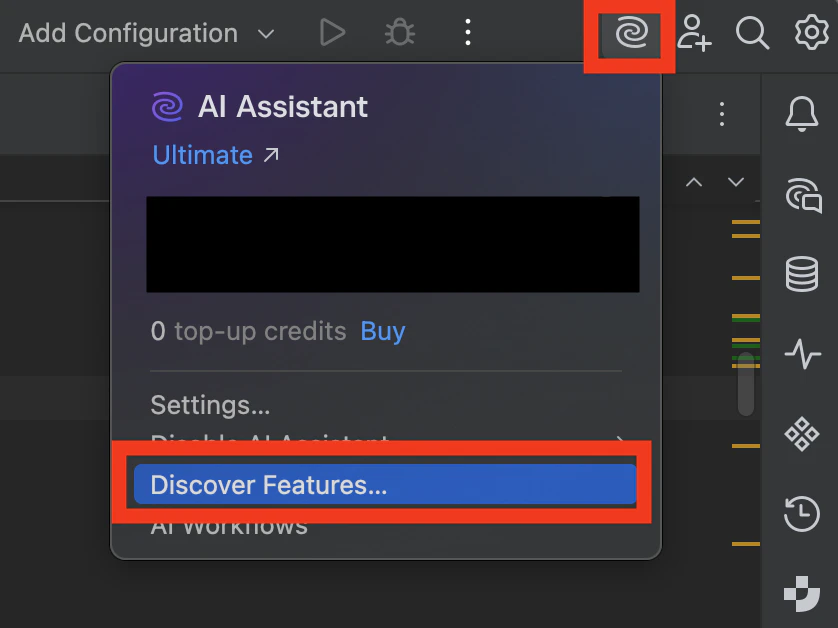
Toolbarの右側にあるAI AssistantのWidget(下図の右上の赤枠)をクリックし、下図のようなポップアップを開きます。そして、「Discover Features...」(下図の下部の赤枠)をクリックします。
スクリーンショット 2025-12-28 12.49.27.png

すると、下図のような「どのような機能があるのか・どんなことができるのか」の一例リストがAI Chat Windowとして表示されます。

スクリーンショット 2025-12-28 12.58.51.png

例として、上図赤枠で囲んだ「Explain code」をクリックしてみます。すると、下図のようにどのような手順で、どのようなことができるかがGIF付きで表示されます。

スクリーンショット 2025-12-28 13.05.01.png

「JetBrains IDEでAIを使ってみたいけれど、何から始めれば良いかわからない」という方は、まず「Discover Features」でどのような機能があるのか・どんなことができるのかチェクすることをおすすめします。

以下、関連リンク

1
1
0

Register as a new user and use Qiita more conveniently

  1. You get articles that match your needs
  2. You can efficiently read back useful information
  3. You can use dark theme
What you can do with signing up
1
1

Delete article

Deleted articles cannot be recovered.

Draft of this article would be also deleted.

Are you sure you want to delete this article?