
URP 17.5(Unity 6.5以上が必要)で追加される「Light2DProvider」により、Unityにおける2Dのライティングを柔軟に拡張できるようになります。
該当のリリースノートはこちら。
2D: Added extensibility support for Light2D and ShadowCaster2D components. Users can now implement custom provider classes to modify or extend their behavior.
マニュアルはこちら。
スクリプトリファレンスはこちら。
使い方を説明します。
まずLight2DProviderを継承したクラスを定義します。
using UnityEngine;
using UnityEngine.Rendering.Universal;

[System.Serializable]
public class SampleLight : Light2DProvider
{
    public override GUIContent ProviderName() => new("Sample Light");

    [SerializeField, Min(0f)] float size = 0.5f;

    public override Mesh GetMesh()
    {
        var halfSize = size / 2f;

        Mesh mesh = new Mesh
        {
            vertices = new[]
            {
                new Vector3(-halfSize, -halfSize, 0f),
                new Vector3(halfSize, -halfSize, 0f),
                new Vector3(halfSize, halfSize, 0f),
                new Vector3(-halfSize, halfSize, 0f),
            },
            triangles = new[] { 0, 1, 2, 0, 2, 3 }
        };

        mesh.RecalculateBounds();
        return mesh;
    }
}
つぎにLight2DクラスのLight Typeを設定します。Spot、Freeform、Sprite、Globalという既存のLightTypeに加えて、「Sample Light」がドロップダウンに追加されています。ドロップダウン中の名称は、ProviderNameメソッドの返り値に基づいた名称となります。
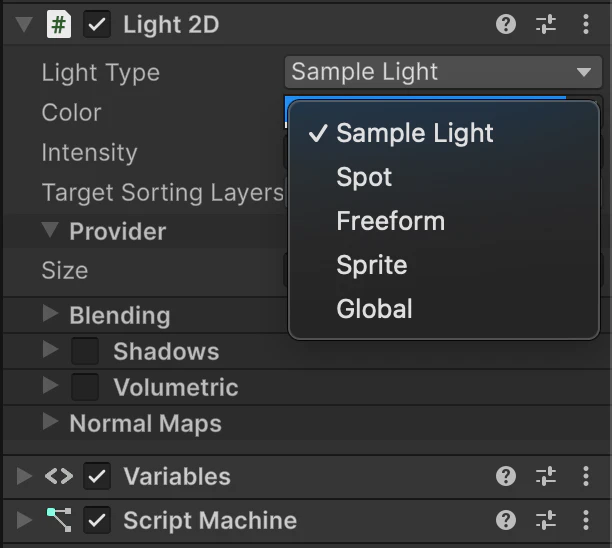
次のスクリーンショット中、Light2DコンポーネントのProivder下にある「Size」要素に注目してください。Light2DProviderを継承したクラス内で、SerializeField属性つきのフィールドを定義することで、インスペクターから値を設定することができます。この値は、Light2Dコンポーネントの一部としてシリアライズされるようです。

GetMeshメソッドを定義することで、ライトの形状を柔軟にコードで定義できます。URP 17.5(Unity 6.5以上が必要)時点の実装だと、GetMeshメソッドは毎フレーム呼ばれるようです。
また似たような機能として、2Dシャドウを拡張できる「ShadowShape2DProvider」が、URP 17.0(Unity 6.0以上が必要)から提供されています。
マニュアルはこちら(マニュアルは、Unity 6.5から新たに提供)
スクリプトリファレンスはこちら。