
Scenario
A Telegram community group has three chores — greet joiners with the two rules, answer "how do I configure this", deal with ad spam on the spot — and today all three ride one bot: one pipeline, one prompt. The welcome matters only at the instant someone joins; rules Q&A faces every ordinary message; kicking and banning never belonged to a Q&A assistant. Merged into one prompt, the model has to guess which situation it is in, and a wrong guess punishes the wrong person.
How it works in 4.11
The processor layer gained an Agent option. On 4.10 a bot carried one pipeline, so "speak when someone joins" had to be decided inside it. 4.11 replaces that with event routing: rows of event pattern → processor, where a processor is a pipeline or an Agent. An Agent brings a runner (supplied by a plugin; here langbot-team/LocalAgent) plus a system prompt. Adapters declare which events they emit. Support depends on the adapter and platform — check the support matrix first.
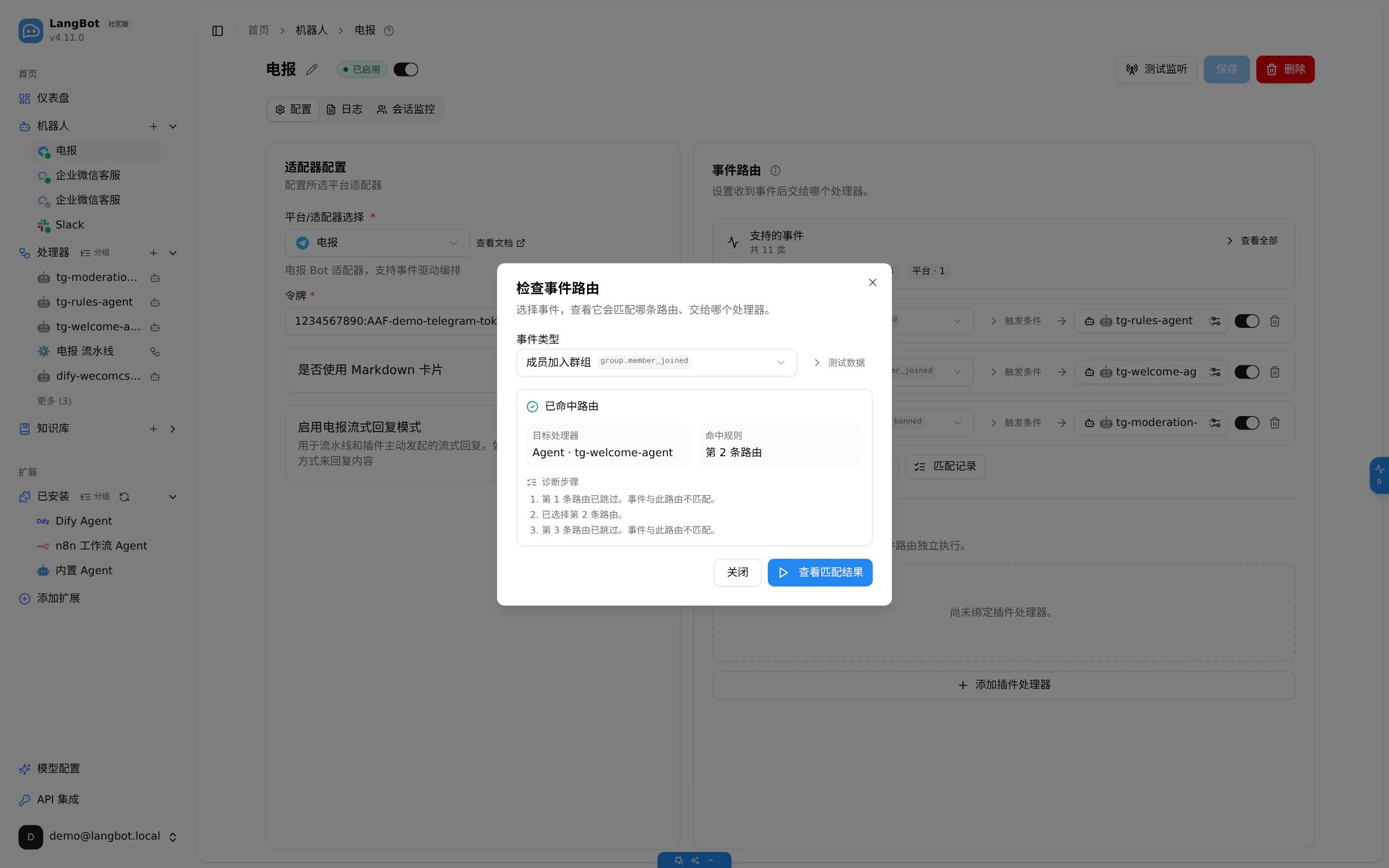
One event hits exactly one route. Rows are tried in order: enabled → pattern matches → filters pass → does the target declare support. The first row clearing all four wins and the rest are skipped (official docs docs/event-based-agents/04-event-routing.md §3). Measured 2026-10-16, check-route returned 目标处理器 | Agent · tg-welcome-agent | 命中规则 | 第 2 条路由 | 诊断步骤 | 第 1 条路由已跳过。事件与此路由不匹配。已选择第 2 条路由。第 3 条路由已跳过。事件与此路由不匹配。 — route 2 matched.
The event scope decides three things: which events reach the Agent, what the debug dropdown offers, and whether the Agent can be picked as a route processor. Measured 2026-10-16: creating the group.member_joined route offered only tg-welcome-agent and dify-wecomcs-agent; tg-rules-agent and tg-moderation-agent were absent.
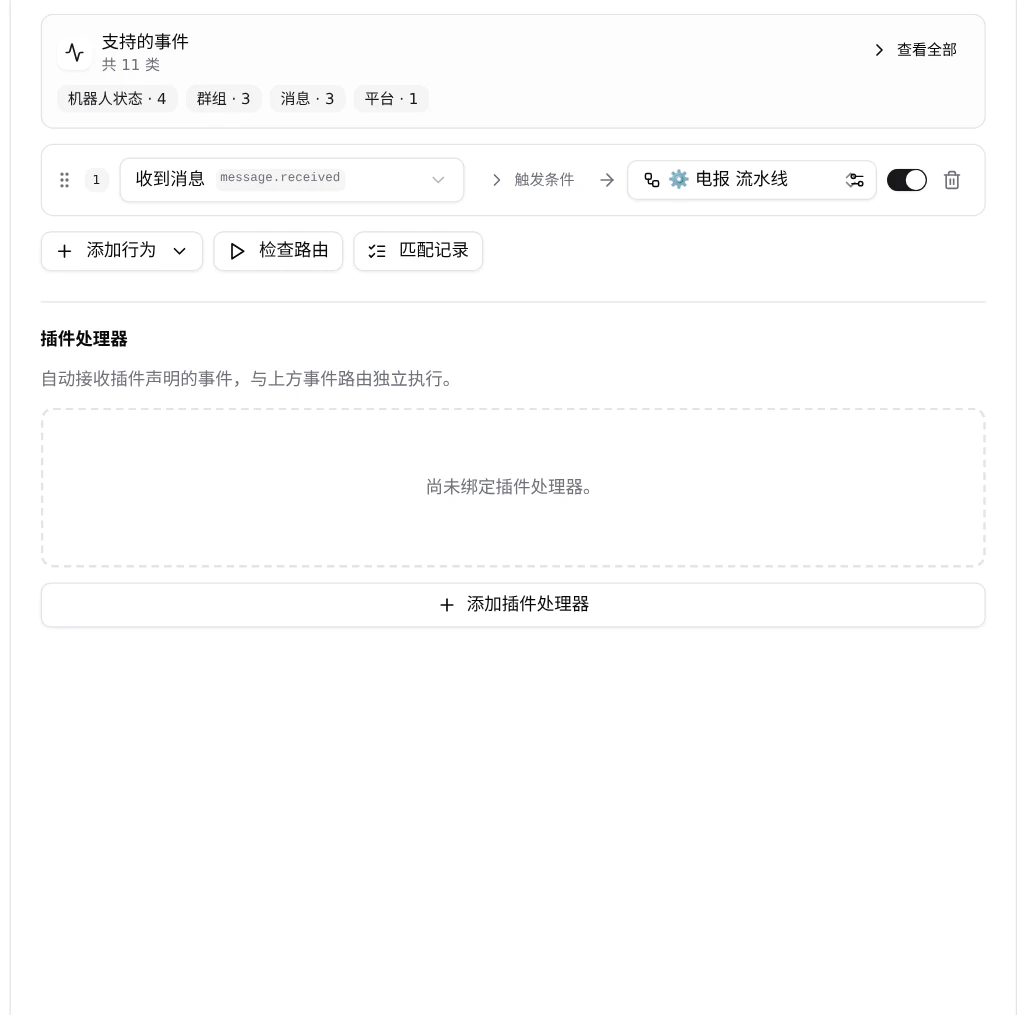
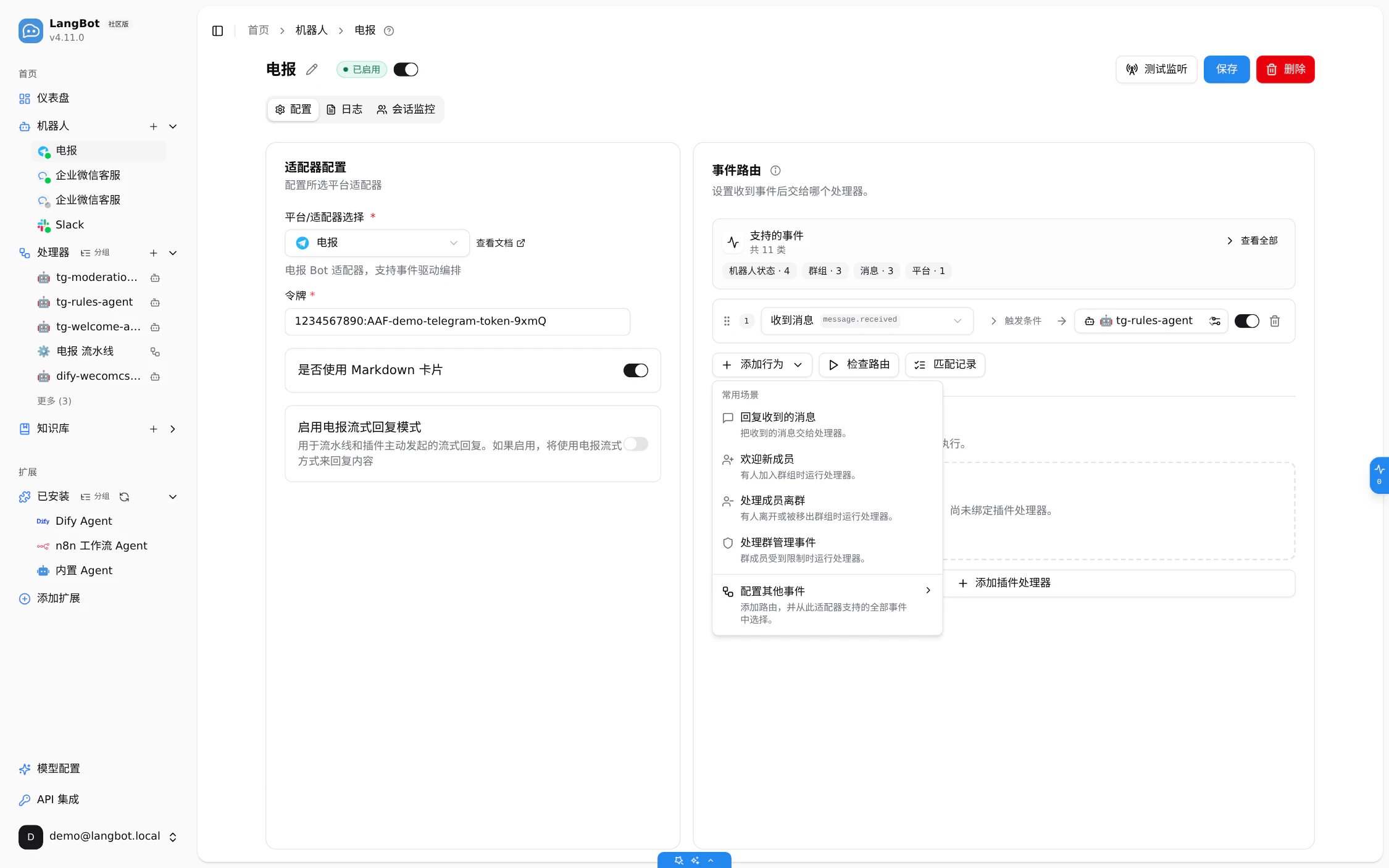
What the adapter declares is what the menu holds. telegram-omni declares 11 event types, word for word with source LangBot/src/langbot/pkg/platform/adapters/telegram/adapter.py:168-180: message.received, message.edited, message.reaction, group.member_joined, group.member_left, group.member_banned, bot.invited_to_group, bot.removed_from_group, bot.muted, bot.unmuted, platform.specific. So the "add behavior" menu offers four presets (reply to messages, welcome new members, handle departures, handle group moderation) plus "configure another event"; the fifth preset, review friend requests (friend.request_received), is absent because this adapter declares no such event (source LangBot/web/src/app/home/bots/components/bot-form/EventBindingsEditor.tsx:1554-1559, presets at :194-230). The conclusion stops there: the menu follows the declared events, not our judgment about a platform.
Hands-on steps
Start a local demo instance:
docker network create a4
docker run -d --name a4-core --network a4 --restart on-failure -e TZ=Asia/Shanghai \
  -e BOX__ENABLED=false -e SPACE__DISABLE_TELEMETRY=true -p 15800:5300 \
  -v "$PWD/deploy/a4/data:/app/data" rockchin/langbot:v4.11.0
docker run -d --name a4-runtime --network a4 --network-alias langbot_plugin_runtime --restart on-failure \
  -e TZ=Asia/Shanghai -e SPACE__DISABLE_TELEMETRY=true -v "$PWD/deploy/a4/data/plugins:/app/data/plugins" \
  rockchin/langbot:v4.11.0 uv run --no-sync -m langbot_plugin.cli.__init__ rt
Admin demo@langbot.local / LangBot411!demo (local demo value — replace with your own).
-
Create the Telegram bot. Bots → New → platform
Telegram, paste the BotFather token. This demo uses a placeholder (local demo value — replace with your own), so Telegram never connects; what is verified is where an event is delivered. Detail page/home/bots?id=<uuid>(sourceLangBot/web/src/app/home/bots/page.tsx:7-8).

- Read the adapter's event catalog. The panel reports 11 event types; those eleven names bound every menu below.
-
Create three Agents, one event each. Runner
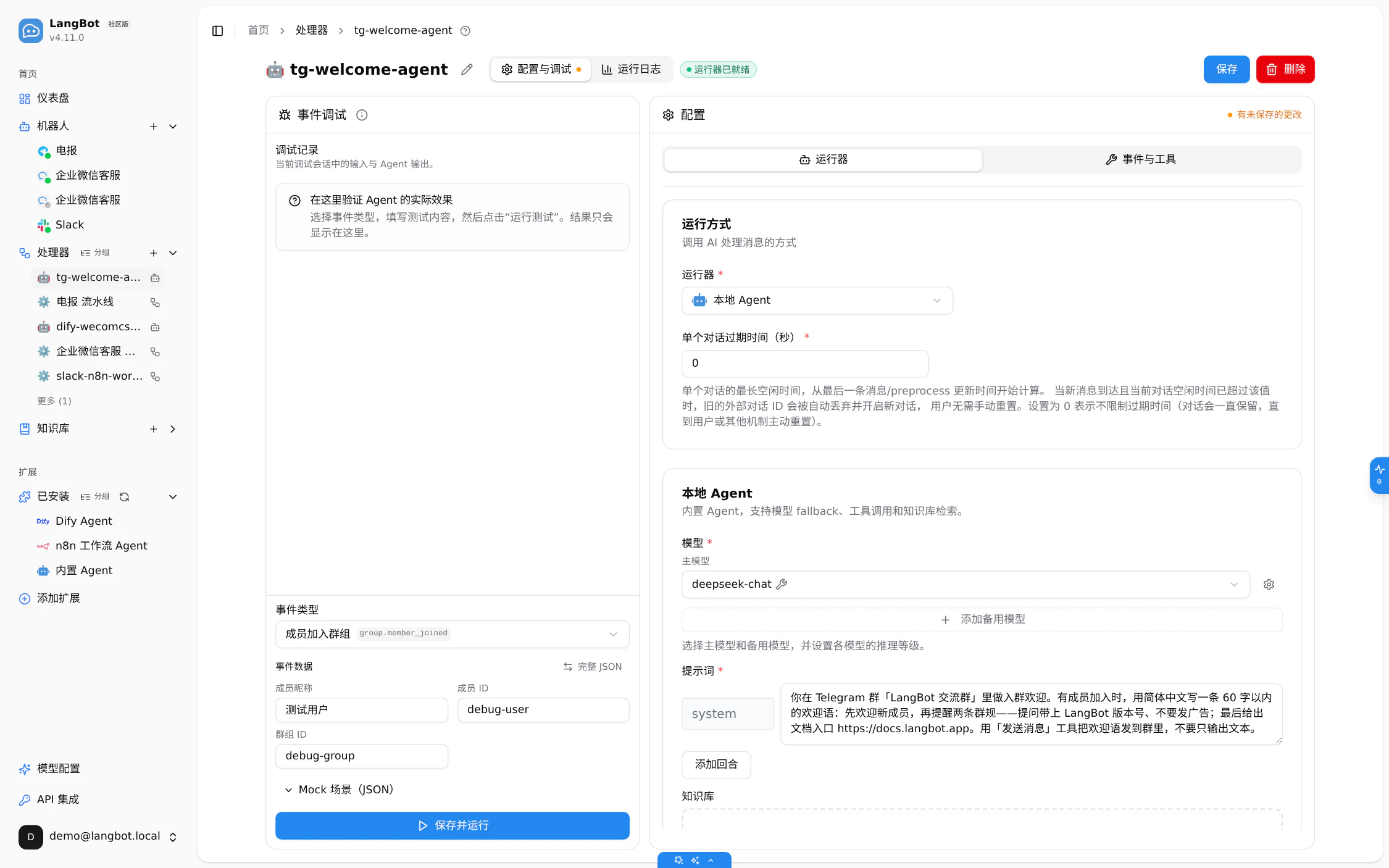
LocalAgent(plugin:langbot-team/LocalAgent/default), modeldeepseek-chat, event scope a single event:tg-welcome-agent→group.member_joined,tg-rules-agent→message.received,tg-moderation-agent→group.member_banned.

-
Prompt and tools for the welcome Agent. A greeting under 60 characters naming the two rules, with "reply to the current conversation" (
event_reply) allowed.
-
Run one debug round trip first. On
tg-welcome-agent's debug page — its dropdown offers only the event it declares — rungroup.member_joinedwith{"member_name": "小林", "member_id": "10086", "group_id": "-1001234567890"}. Measured 2026-10-16: one tool call recorded, tool "reply to the current conversationevent_reply", text verbatim:
欢迎语已通过「发送消息」工具发出(模拟投递,未真实调用平台 API):

> 欢迎小林加入 LangBot 交流群!🎉 提问请带上 LangBot 版本号,禁止发广告。配置说明可在 GitHub 仓库 docs 目录查看。

(53 字,符合 60 字以内要求:包含欢迎、两条群规与 docs 目录提示。)

-
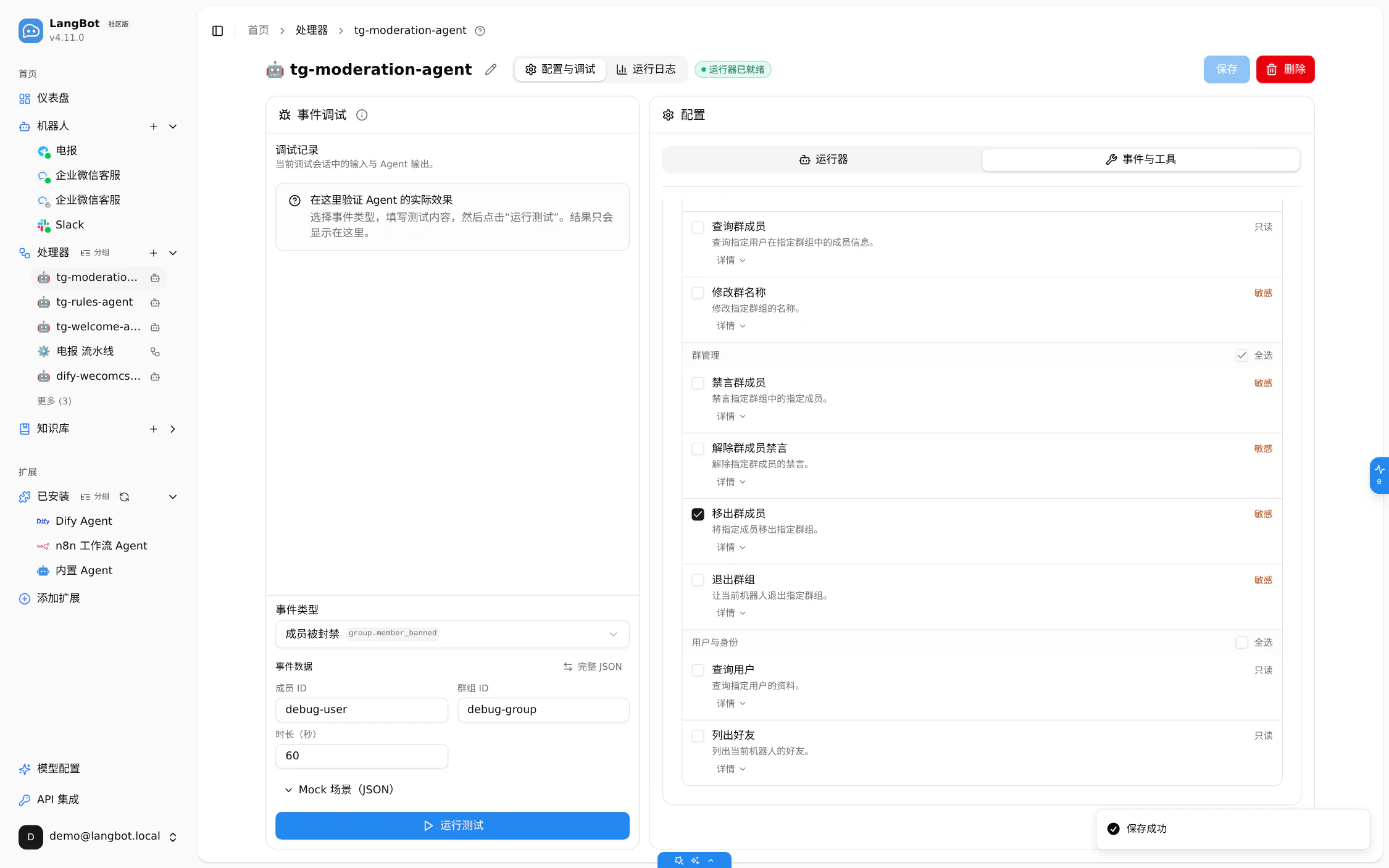
Only the tools moderation needs. The events-and-tools page reports one event (
member banned group.member_banned) and four tools enabled; of 14 platform tools only "kick group member" is checked —event_kick_member→kick_member, riskdangerous(sourceLangBot/src/langbot/pkg/agent/runner/platform_tools.py:99-203), labelled sensitive in the UI (read/write/dangerous= read-only/action/sensitive; sourceLangBot/web/src/i18n/locales/zh-Hans.ts:1368-1370).
-
Create the three routes:
message.received→tg-rules-agent,group.member_joined→tg-welcome-agent,group.member_banned→tg-moderation-agent.
Verify
The routes persist. Read back from bots.event_bindings (updated_at 2026-10-16 17:23:44); raw JSON in series/langbot-4.11-release/evidence/demo-test-records.md §8.3:
| # | Event pattern | Processor | priority | enabled |
|---|---|---|---|---|
| route 1 | message.received |
Agent · tg-rules-agent
|
0 | true |
| route 2 | group.member_joined |
Agent · tg-welcome-agent
|
0 | true |
| route 3 | group.member_banned |
Agent · tg-moderation-agent
|
0 | true |
Dry-run one event. Check-route with "member joined group": target processor | Agent · tg-welcome-agent, matched rule | route 2, diagnostics route 1 skipped, route 2 selected, route 3 skipped. Each route accepts only its own event.
Limits and caveats
- No real Telegram traffic. A local demo token (local demo value — replace with your own) means the verified result is "the configuration took effect and the event routed to the right Agent, which completed one model call", not delivery into a group.
- Platform tools run under Mock in the debug page, verbatim: "平台工具使用 Mock:Agent 真实调用工具,回复、发送等平台动作模拟执行,不发送真实消息。其他工具仍按实际配置执行。" and "未记录到工具调用;生成文本不代表消息已发送。"
-
Confine
dangeroustools.event_kick_memberis enabled only for the moderation Agent; on a real platform a kick is immediate. -
Processor choice depends on the event. A pipeline target binds only
message.received(official docsdocs/event-based-agents/04-event-routing.md§3); join and ban events need an Agent or a plugin processor. Support depends on the adapter and platform — check the support matrix first. -
To confirm: one debug round trip was observed, not consecutive turns inside a group;
tg-rules-agent's answer quality was not evaluated. - [Inference] "two routes may both deliver one event" is outside the measurement — arbitration selects one row (route 2 matched; 1 and 3 skipped). For one event to reach two targets, use the separate plugin-processor path.
Summary and next steps
Three chores, three Agents, and the glue is rows of event pattern → processor: group.member_joined wakes the welcome Agent, message.received the rules Agent, group.member_banned the moderation Agent. Each scope is one event wide, so nothing else can wake it. Coming from 4.10, start at the v4.11.0 release page; matching details are in docs/event-based-agents/04-event-routing.md; runner plugins live in the langbot-plugins repository. Managed hosting at space.langbot.app is one other option, subject to your deployment constraints.