
ステップ 0:準備
- 環境:Databricks Free Edition
- 目標:Liquid Clustering が動作するか確認する
ステップ 1:テーブル作成
from pyspark.sql.functions import rand

# 2,000,000行、category列を 0~9 の整数で作成
df = spark.range(0, 2_000_000).withColumn("category", (rand()*10).cast("int"))

# Delta テーブルとして保存
df.write.format("delta").mode("append").saveAsTable("liquid_test_tbl2")
最初の検証ではテーブルサイズが小さく、Liquid Clustering の挙動が確認しづらかったため、rand() を使って十分な行数を持つテーブルを作成しています。
ステップ 2:現状確認(有効化前)
%sql
DESCRIBE DETAIL liquid_test_tbl2;
SHOW TBLPROPERTIES liquid_test_tbl2;
現状の状態確認で意識して確認したポイントは以下になります。
- sizeInBytes(合計サイズ)
- numFiles(ファイル数)
実際の確認した結果になります。

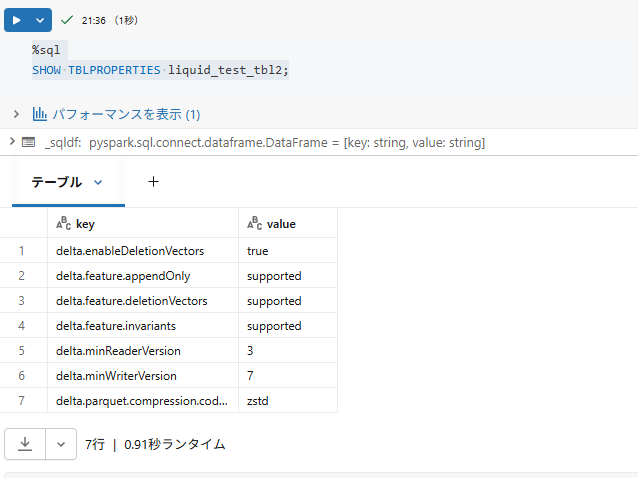
これを見ると、合計サイズは2920665(bytes)で、ファイル数は8となっています。
ステップ 3:クラスタリング対象列を指定
まず自動Liquid Clustering ではなく、手動のLiquid Clustering が有効になるかを確認します。
%sql
ALTER TABLE liquid_test_tbl2
CLUSTER BY (category)
ステップ 4:Optimize 実行
クラスタリングをトリガーするために、Optimizeを実行します
%sql
OPTIMIZE liquid_test_tbl2
ステップ 5:結果の確認
ステップ2の時と同様のコマンドで変化があったか確認します。実行した結果は以下になります。

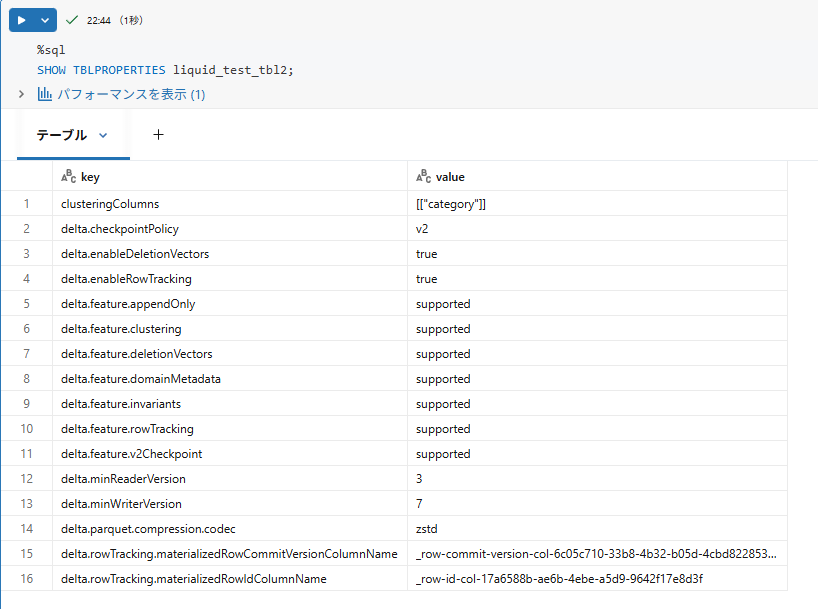
これを見ると以下のような変化があることが分かります。
| 項目 | 実行前 | 実行後 |
|---|---|---|
| サイズ(bytes) | 2,920,665 | 2879084 |
| ファイル数 | 8 | 1 |
また、clusteringColumns で[["category"]] が選択されていることや、delta.enableDeletionVectors delta.enableRowTrackingが有効になっていることが分かります。
Free Edition でも手動 Liquid Clustering は動作することが確認できました。ただ今回は小さなテーブルだったため、Liquid Clustering は動作するものの、効果はほとんど見えませんでした。
ステップ 6:自動Liquid Clusteringの有効化
先ほどのテーブルに対して、自動Liquid Clusteringの有効化を試してみます。
一度、クラスタリングキーを削除したのち、自動化を有効にするようにしました。
%sql
ALTER TABLE liquid_test_tbl2 CLUSTER BY NONE;
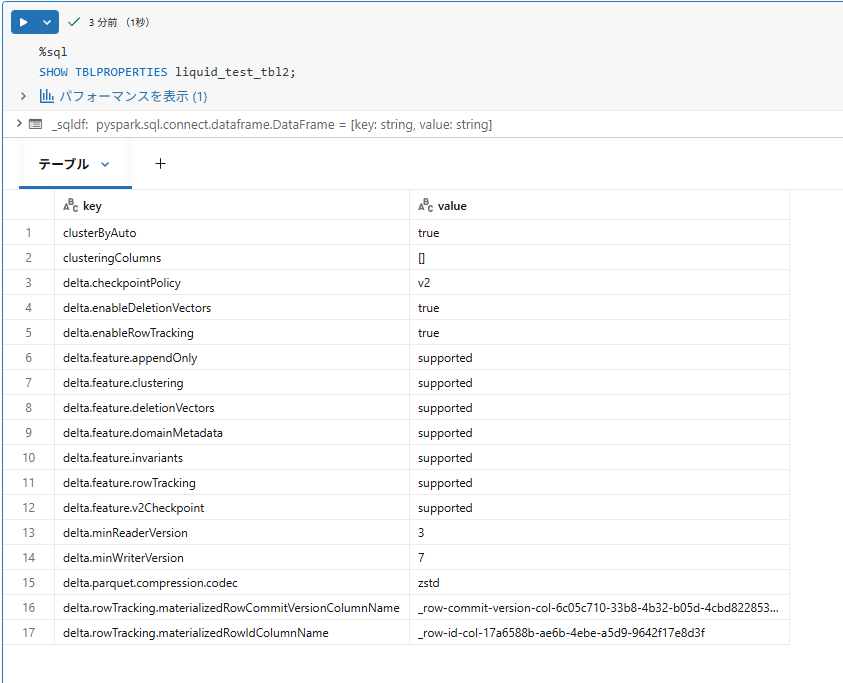
ALTER TABLE liquid_test_tbl2 CLUSTER BY AUTO;
ステップ 7:自動Liquid Clusteringの結果
テーブルプロパティを見ると以下のようになり、clusterByAutoが有効になっており自動Liquid Clusteringが成功しています。
ステップ 8:まとめ
- Free Edition でも、手動および自動 Liquid Clustering を有効化することができた
- 小さなテーブルでもLiquid Clusteringは動くが、規模が小さいと効果はほぼ見えなかった