

この記事はWano Group Advent Calendar 2025の4日目の記事です。
昨日は @ktat さんのログ監視におけるちょっとした工夫というか苦肉の策でした。
はじめに
昨日、2025年のre:Invent Day2で AWS Lambda Durable Functions が発表されました。
これは Lambda 関数に「チェックポイント/リプレイ」機構を組み込み、最大1年間の長時間実行や中断・再開を可能にする新機能です。Step Functions のようなワークフローを、普段使っている言語(JavaScript/Python)のコードで書けるようになる そうです。
新しいワークフローエンジン? 途中から実行可能なLambda...?
早速試してみました。
YAML/JSONをデプロイするタイプのワークフローエンジンの苦しみ
いままでワークフローエンジンとしてはAWS Step Functionsを使うことが多かったです。
特に巨大な動画を扱う弊サービスでは、Deep Archiveからの復元やMediaConvertのジョブ完了待ち、あるいはAWS外のSaaS待ちなどでの複雑な非同期フローでの利用がメインでした。
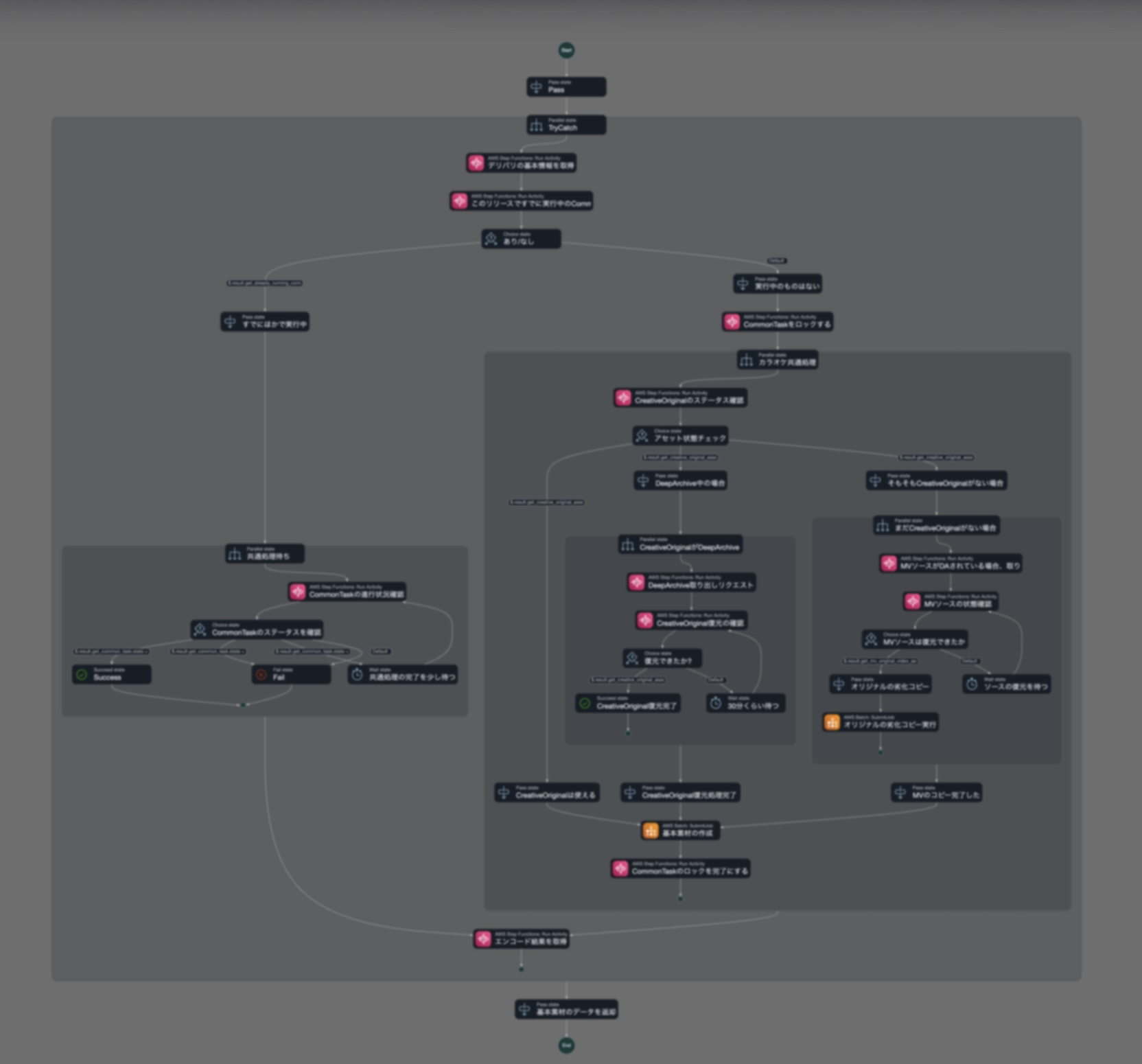
Step Functionsは視覚的にフローが見えてAWSの中でも好きなサービスですが、以下のような課題感がありました。
- Amazon States Language(JSON/YAML)のコンポーネントを覚える必要がちょっとある (GUIがありますが、それでもまあ正直おおげさ)
- 大幅にインフラのIaCとデプロイが増えるインフラかビジネスロジックか問題
- 正直GUIに落とし込まないとステートマシン(YAML)のレビューはしづらい
- 「外部APIを叩いて、完了を待って、結果で分岐」程度の処理でもステートマシン定義が必要
- メンバーが触るたびに「Step Functionsの書き方」をキャッチアップしてもらう必要がある
「外部SaaS待ち程度の簡単なケースでは...面倒なこと言わず普段書いてるコードでそのまま書けたらな...」と思うことが多かったので、今回のDurable Functionsは気になりました。
先に結論
Durable FunctionsはStep Functionsとほぼほぼ似た機能/体験を持ちつつも、まるで普通のバッチ処理のようにコードが記述でき、実行時に動的にワークフローを組み立てられる点が大きな違いでした。
Step Functionsでは事前にステートマシンを定義する必要がありますが、Durable Functionsではstepの結果に応じてif文で分岐するような、通常のプログラミングに近い書き方ができます。
学習コストが低い(普段使っている言語で書ける)点もStep Functionsと比較した際のメリットになりそうです。
| 観点 | Durable Functions | Step Functions |
|---|---|---|
| 記述方式 | コード(JS/Python(いまのところ)) | JSON(Amazon States Language) |
| 動的フロー | 実行時に分岐を決定可能 | 事前にステートマシン定義が必要 |
| 学習コスト | 低(普段の言語) | 中〜高(独自DSL) |
| 可視化 | なし | コンソールで視覚的に確認可能 |
| 最大実行時間 | 1年 | Standard: 1年 / Express: 5分 |
| デバッグ | CloudWatch Logs | 実行履歴が視覚的に見える |
| 成熟度 | 2025年12月発表 | 2016年〜実績多数 |
| リージョン | Ohio のみ(発表時点) | 全リージョン |
セットアップしてみる
オハイオリージョン(us-east-2)でのみ利用可能なようです。
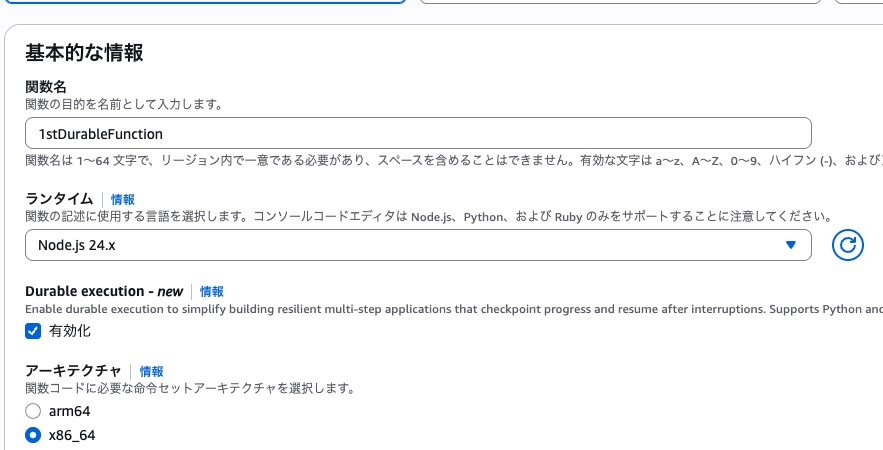
Durable Functions 有効化モードが生えています。
今回はNode.js 24で試してみます。
Lambdaの名前を「1stDyrableFunction」としてセットアップすると
「永続実行」というタブが生えています。
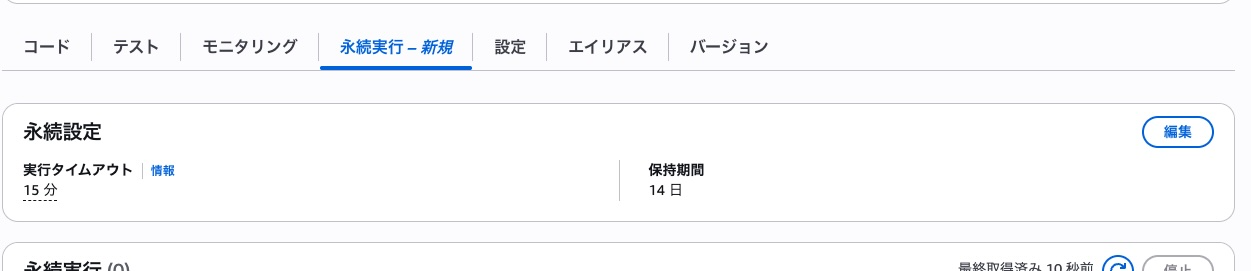
まずはうごかしてみた
作例
MediaConvertという動画/音声ファイルのエンコードサービスをDurable Functionsでオーケストレーションする例をClaudeくんに書いてもらいました。
流れとしては、
- S3に指定のソースファイルが存在するか最大10回チェック(30秒間隔)
- MediaConvertのエンドポイントを取得
- MediaConvertジョブを作成
- ジョブの完了を最大10回チェック(1分間隔)
- 成果物のS3パスを返す
みたいなかんじです。
なんだか...ものすごく、「NodeJSで普通に書いたバッチ処理」 っぽい見た目に見えます。
import { withDurableExecution } from "@aws/durable-execution-sdk-js";
import { S3Client, HeadObjectCommand } from "@aws-sdk/client-s3";
import {
  MediaConvertClient,
  CreateJobCommand,
  GetJobCommand,
  DescribeEndpointsCommand
} from "@aws-sdk/client-mediaconvert";

const BUCKET = "xxxxxxxxxxxxx";
const SOURCE_KEY = "source.mp4";
const OUTPUT_PREFIX = "output/";
const MEDIACONVERT_ROLE = "arn:aws:iam::xxxxxxxxxxx:role/OhioMediaConvertRole";

const s3 = new S3Client({ region: "us-east-2" });

export const handler = withDurableExecution(
  async (event, context) => {
    context.logger.info("=== Durable Function Started ===");

    // Step 1: S3ファイル存在確認(30秒間隔、最大10回)
    context.logger.info(`Checking for source file: s3://${BUCKET}/${SOURCE_KEY}`);

    const sourceCheckResult = await context.waitForCondition(
      async (state, ctx) => {
        ctx.logger.info(`S3 check attempt ${state.attempt}`);
        try {
          await s3.send(new HeadObjectCommand({ Bucket: BUCKET, Key: SOURCE_KEY }));
          ctx.logger.info("✓ Source file found!");
          return { ...state, found: true };
        } catch (e) {
          if (e.name === "NotFound") {
            ctx.logger.info("✗ Source file not found, will retry...");
            return { ...state, attempt: state.attempt + 1, found: false };
          }
          throw e;
        }
      },
      {
        initialState: { attempt: 1, found: false },
        waitStrategy: (state) => state.found || state.attempt > 10
          ? { shouldContinue: false }
          : { shouldContinue: true, delay: { seconds: 30 } }
      }
    );

    if (!sourceCheckResult.found) {
      context.logger.error("Source file not found after max attempts");
      return {
        status: "failed",
        reason: "Source file not found after 10 attempts"
      };
    }

    // Step 2: MediaConvert エンドポイント取得
    context.logger.info("Getting MediaConvert endpoint...");
    const endpoint = await context.step("get-mediaconvert-endpoint", async (stepContext) => {
      stepContext.logger.info("Calling DescribeEndpoints API");
      const mc = new MediaConvertClient({ region: "us-east-2" });
      const res = await mc.send(new DescribeEndpointsCommand({}));
      const url = res.Endpoints?.[0]?.Url;
      stepContext.logger.info(`Endpoint: ${url}`);
      return url;
    });

    const mediaConvert = new MediaConvertClient({
      region: "us-east-2",
      endpoint
    });

    // Step 3: MediaConvert ジョブ作成
    context.logger.info("Creating MediaConvert job...");
    const jobId = await context.step("create-mediaconvert-job", async (stepContext) => {
      stepContext.logger.info(`Input: s3://${BUCKET}/${SOURCE_KEY}`);
      stepContext.logger.info(`Output: s3://${BUCKET}/${OUTPUT_PREFIX}`);

      const response = await mediaConvert.send(new CreateJobCommand({
        Role: MEDIACONVERT_ROLE,
        Settings: {
          Inputs: [{
            FileInput: `s3://${BUCKET}/${SOURCE_KEY}`,
            AudioSelectors: { "Audio Selector 1": { DefaultSelection: "DEFAULT" } },
            VideoSelector: {}
          }],
          OutputGroups: [{
            Name: "File Group",
            OutputGroupSettings: {
              Type: "FILE_GROUP_SETTINGS",
              FileGroupSettings: {
                Destination: `s3://${BUCKET}/${OUTPUT_PREFIX}`
              }
            },
            Outputs: [{
              ContainerSettings: { Container: "MP4" },
              VideoDescription: {
                CodecSettings: {
                  Codec: "H_264",
                  H264Settings: {
                    RateControlMode: "QVBR",
                    QvbrSettings: { QvbrQualityLevel: 7 },
                    MaxBitrate: 5000000
                  }
                }
              },
              AudioDescriptions: [{
                CodecSettings: {
                  Codec: "AAC",
                  AacSettings: { Bitrate: 128000, CodingMode: "CODING_MODE_2_0", SampleRate: 48000 }
                }
              }]
            }]
          }]
        }
      }));

      stepContext.logger.info(`✓ Job created: ${response.Job?.Id}`);
      return response.Job?.Id;
    });

    // Step 4: ジョブ完了待ち(1分間隔、最大10回)
    context.logger.info(`Waiting for job ${jobId} to complete...`);

    const jobResult = await context.waitForCondition(
      async (state, ctx) => {
        ctx.logger.info(`Job check attempt ${state.attempt} for ${state.jobId}`);
        const response = await mediaConvert.send(new GetJobCommand({ Id: state.jobId }));
        const status = response.Job?.Status;

        ctx.logger.info(`Job status: ${status}`);

        if (status === "COMPLETE") {
          ctx.logger.info("✓ Job completed successfully!");
          return {
            ...state,
            status: "COMPLETE",
            outputGroupDetails: response.Job?.OutputGroupDetails
          };
        } else if (status === "ERROR") {
          ctx.logger.error(`✗ Job failed: ${response.Job?.ErrorMessage}`);
          return { ...state, status: "ERROR", error: response.Job?.ErrorMessage };
        }

        ctx.logger.info(`Job still ${status}, will retry...`);
        return { ...state, attempt: state.attempt + 1, status };
      },
      {
        initialState: { jobId, attempt: 1, status: "SUBMITTED", outputGroupDetails: null, error: null },
        waitStrategy: (state) =>
          state.status === "COMPLETE" || state.status === "ERROR" || state.attempt > 10
            ? { shouldContinue: false }
            : { shouldContinue: true, delay: { seconds: 60 } }
      }
    );

    if (jobResult.status === "ERROR") {
      return { status: "failed", reason: jobResult.error, jobId };
    }

    if (jobResult.status !== "COMPLETE") {
      return { status: "failed", reason: "Job did not complete after 10 minutes", jobId };
    }

    // Step 5: 成果物情報を報告
    const outputPath = jobResult.outputGroupDetails?.[0]?.OutputDetails?.[0]?.OutputFilePaths?.[0];
    const outputKey = outputPath?.replace(`s3://${BUCKET}/`, "") || `${OUTPUT_PREFIX}source.mp4`;

    context.logger.info("=== Workflow Complete ===");
    context.logger.info(`Output: ${outputPath}`);

    return {
      status: "success",
      jobId,
      source: { bucket: BUCKET, key: SOURCE_KEY },
      output: { bucket: BUCKET, key: outputKey, fullPath: outputPath }
    };
  }
);
ただしポーリング用のインターバル処理などは、普通のJSのコードでwait書いたりしちゃうと、当然プロセスは動いてて課金対象になるばかりか、実行時間トータル15min制限のほうで引っかかっちゃうので駄目です。 所定の方法(waitStrategy)を使いましょう。
実行
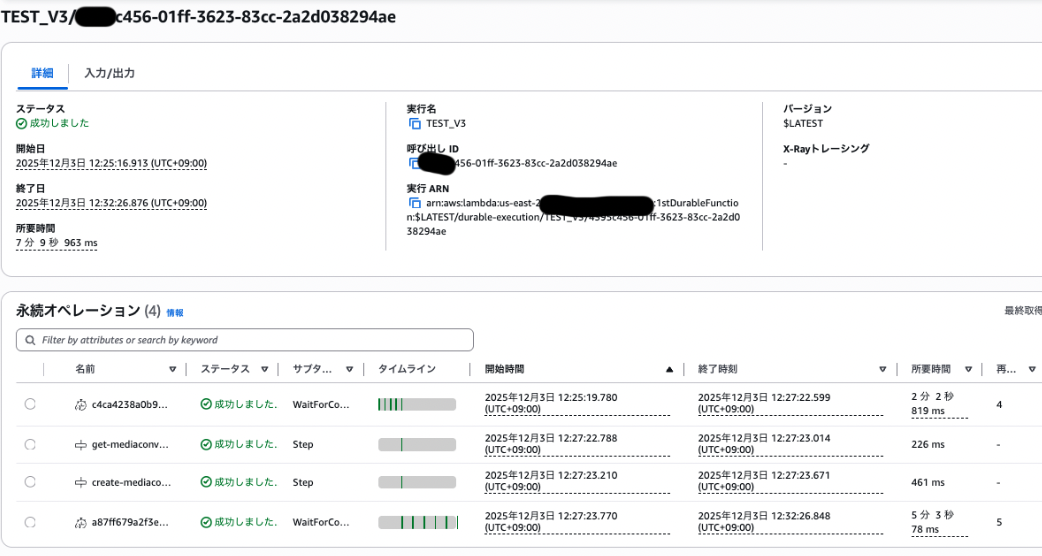
エンコードは5分近くかかりましたが、
Lambdaの実行時間(課金時間)はトータルで数秒で済んでいます。
できそうな機能と制限
Q.メモリ凍結/共有できるの?
グローバル変数やletみたいなとこに状態格納しておけるか? みたいな問いですが、
できません(残念)。
Durable Functionsはチェックポイント/リプレイ方式を採用しており、再開時は関数が最初から再実行されます。グローバル変数やクロージャに保存した値はリプレイ時に失われます。
だそうです。
状態を保持したい場合は context.step() の戻り値として取得し、後続の処理で使う必要があります。
なまじバッチ処理みたいな同期コードに見えるので書きたくなっちゃうかと思うので、注意が必要そう。
// ❌ NG: グローバル変数での状態管理
let cachedData = null;
const handler = withDurableExecution(async (event, context) => {
  cachedData = await fetchSomething(); // リプレイ時に消える
});

// ✅ OK: stepの戻り値で状態管理
const handler = withDurableExecution(async (event, context) => {
  const data = await context.step("fetch-data", async () => {
    return await fetchSomething(); // チェックポイントに保存される
  });
});
状態を引き回したい場合はどんどんバケツリレーするしかないのかも。
Q. tmpフォルダなどつかいまわせるの?
通常のLambdaのライフサイクルと一緒で基本的にできないみたいです。 リプレイ時に別のLambdaインスタンスで実行される可能性があるため、/tmp に書き込んだファイルは次回実行時に存在する保証がありません。
大きなデータを扱う場合はS3やDynamoDBに保存し、そのキー/パスをstepの戻り値として保持するのがベストプラクティスです。
この辺の考え方はStep Functionsと結局は同様です。
Q. waitForTaskTokenみたいのある?
あります。 context.waitForCallback() が相当します。
さきほど書いたサンプルではエンコードステータス確認をポーリングモデルで実装しましたが、AWS内のサービスや外部システムからのコールバックで即時に次のステップに移りたい場合にはこちらを使います。
const approval = await context.waitForCallback(
  async (callbackToken, ctx) => {
    // 外部システムにトークンを渡す(メール、Slack等)
    await sendApprovalRequest(callbackToken);
  },
  { timeout: { hours: 24 } } // タイムアウト必須
);
外部からは Lambda API の SendCallbackResponse を呼び出して結果を返します。Step Functions の SendTaskSuccess / SendTaskFailure に相当する機能です。
Q. 並列実行できる?
できます。 context.parallel() と context.map() が用意されています。
// 複数の独立した処理を並列実行
const [userInfo, inventory, pricing] = await context.parallel([
  () => context.step("get-user", async () => fetchUser(userId)),
  () => context.step("get-inventory", async () => checkInventory(itemId)),
  () => context.step("get-pricing", async () => getPricing(itemId))
]);

// 配列に対して並列処理(同時実行数制限付き)
const results = await context.map(
  items,
  (item) => context.step(`process-${item.id}`, async () => processItem(item)),
  { maxConcurrency: 5 }
);
AWS Lambda Durable Functionsならではの特徴
参考: Best practices
実行時に動的にワークフローを組み立てられる
これは Step Functionsとの大きな違い です。 明確に良いところかも。
Step Functionsでは、ステートマシン(分岐構造)を事前にJSONで定義する必要があります。実行時に「このデータの値によって次に呼ぶLambdaを変える」といった動的なフロー構築は、Choice Stateなどで事前に分岐パターンを定義しておく必要があります。
一方、Durable Functionsでは stepの結果に応じてif文で分岐し、次に実行するstepを動的に決められます。通常のプログラミングに近い感覚で書けそうで、これは嬉しいなと思いました。
const handler = withDurableExecution(async (event, context) => {
  const orderType = await context.step("get-order-type", async () => {
    return await fetchOrderType(event.orderId);  // DBから取得
  });

  // stepの結果で分岐 → リプレイ時もキャッシュから同じ値が返る → 同じ分岐になる
  if (orderType === "premium") {
    await context.step("premium-flow", async () => processPremium());
  } else {
    await context.step("standard-flow", async () => processStandard());
  }
});
※ただし、決定論的・冪等性のある実装にしなくてはならない
SDKは「stepの実行順序とstep名」を記録しており、リプレイ時に異なるstepが来ると不整合エラーになります。そのため、分岐条件は必ずstepから得た値(=キャッシュされる値)に基づく必要があります。randomとかタイムスタンプとか駄目。
// ❌ NG: step外で非決定的な値を取得し、それで分岐
const handler = withDurableExecution(async (event, context) => {
  if (Date.now() > someTimestamp) {  // リプレイ時に値が変わる!
    await context.step("branch-a", ...);
  }
  const randomId = Math.random();  // リプレイ時に値が変わる!
});
UUIDやタイムスタンプで外部フォルダとか作る予定なんだけど...などのケースではどうなるか?
step内で生成する分にはキャッシュ対象になるので大丈夫そう。
  const handler = withDurableExecution(async (event, context) => {
    // ❌ NG: step外でUUID生成
    // const folderId = crypto.randomUUID();  // リプレイ時に値が変わる

    // ✅ OK: step内でUUID生成(キャッシュされる)
    const folderId = await context.step("generate-folder-id", async () => {
      return crypto.randomUUID();
    });

    // ✅ OK: step内でタイムスタンプ生成
    const timestamp = await context.step("get-timestamp", async () => {
      return new Date().toISOString();
    });

    // これらの値はリプレイ時も同じ値が返る
    const folderPath = `output/${timestamp}/${folderId}`;

    await context.step("create-folder", async () => {
      // S3にフォルダ作成など
    });
  });
また、stepには retryStrategy オプションでリトライ設定が可能です。(StepFunctionsもそうですが、リトライを使う場合、外部APIやDB操作は冪等性を意識する必要があります。)
await context.step("call-external-api", async () => {
  // ...
}, {
  retryStrategy: createRetryStrategy({
    maxAttempts: 3,
    backoffRate: 2,
    initialInterval: 1000
  })
});
冪等性を担保するには:
- トークンやIDをstep内で生成し、外部API呼び出しに含める
- DB操作はcheck-before-writeパターンか条件付き更新を使用
まとめ
参考: Lambda durable functions(公式ドキュメントトップ)
当初は「コードで書けるStep Functions」程度の印象でしたが、普通のif文などで動的にワークフローを組み立てられる点はStep Functionsにはない明確なメリットでした。stepの結果に応じてif文で次の処理を決められるのは、通常のプログラミングに近い感覚で書けて良いです。
向いているケース:
- Step Functionsの学習コストを避けたい
- 既存のLambda資産をそのまま活かしたい
- 実行時のデータに応じて動的にフローを変えたい
向いていないケース:
- ワークフロー全体の可視化・デバッグGUIが必要
- 本番運用の実績・安定性を重視
個人的には、外部SaaSのような「数分〜数十分待つだけ」のユースケースに加えて、条件分岐が複雑になりがちな業務フローもGUI込みより場合によっては見やすいかもしれないと思えましたので、良い選択肢になりそうです。
東京リージョン対応とGo言語でのSDK提供を待って、実践で使っていきたいと思います。
明日は @kotobuki5991 さんの「データ分析の流れとかデータ準備とか、概念だけでもざっくり知っておきたい」です。