
この記事は、https://qiita.com/kitazaki/items/a59fad56db2d6ec99ee0 の続編です。(メモ)
環境
Windows10
Moodable SDK 4.5(4.5以上)
M5Stack_core2 (esp32/m5stack_core2) ※M5Stackではメモリが足りません
する事
フォントの用意
必要のフォントは
*-Regular-18
*-Medium-12
*-Medium-18
ここでは、\tmp\fontに
フォントファイル
https://fonts.google.com/download/next-steps
ツール
http://www.angelcode.com/products/bmfont/
設定ファイル
https://raw.githubusercontent.com/nakamura001/JIS_CharacterSet/master/SHIFTJIS_custom/SHIFTJIS_custom_win_bom_utf8.txt
を詰め込みます。
brotlicommon.dll
brotlidec.dll
bz2.dll
fontbm.exe
freetype.dll
libpng16.dll
zlib1.dll

NotoSansJP-Black.ttf
NotoSansJP-Bold.ttf
NotoSansJP-ExtraBold.ttf
NotoSansJP-ExtraLight.ttf
NotoSansJP-Light.ttf
NotoSansJP-Medium.ttf
NotoSansJP-Regular.ttf
NotoSansJP-SemiBold.ttf
NotoSansJP-Thin.ttf

SHIFTJIS_custom_win_bom_utf8.txt
使用するフォントを作成します。
c:\tmp\font>fontbm --font-file NotoSansJP-Regular.ttf --data-format bin --color 0,0,0 --font-size 18 --chars-file SHIFTJIS_custom_win_bom_utf8.txt --kerning-pairs regular --output Noto-Regular-18

c:\tmp\font>fontbm --font-file NotoSansJP-Medium.ttf --data-format bin --color 0,0,0 --font-size 18 --chars-file SHIFTJIS_custom_win_bom_utf8.txt --kerning-pairs regular --output Noto-Medium-18

c:\tmp\font>fontbm --font-file NotoSansJP-Medium.ttf --data-format bin --color 0,0,0 --font-size 12 --chars-file SHIFTJIS_custom_win_bom_utf8.txt --kerning-pairs regular --output Noto-Medium-12
生成された以下のファイルをc:\tmp\mcuに移動
pngファイル名の”_0”は削除
Noto-Medium-12.fnt
Noto-Medium-12.png
Noto-Medium-18.fnt
Noto-Medium-18.png
Noto-Regular-18.fnt
Noto-Regular-18.png
flowの準備
前記事にコメントノードを追加します。
コメントノードは名前を"moddable_manifest"にします。
内容は
{
  "resources": {
    "*-mask": ["c:\\tmp\\mcu\\*"]
  },
  "config": {
    "DASHBOARD_FONT": "Noto"
  }
}
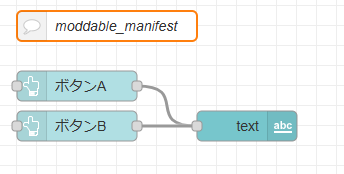
flows.json
[
    {
        "id": "2850f35f75df23f3",
        "type": "tab",
        "label": "フロー 1",
        "disabled": false,
        "info": "",
        "env": [],
        "_mcu": {
            "mcu": true
        }
    },
    {
        "id": "6f25147b3fbdcb14",
        "type": "ui_button",
        "z": "2850f35f75df23f3",
        "name": "",
        "group": "e6c51ee3d8c53c19",
        "order": 0,
        "width": 0,
        "height": 0,
        "passthru": false,
        "label": "ボタンA",
        "tooltip": "",
        "color": "",
        "bgcolor": "",
        "className": "",
        "icon": "",
        "payload": "A",
        "payloadType": "str",
        "topic": "topic",
        "topicType": "msg",
        "_mcu": {
            "mcu": true
        },
        "x": 200,
        "y": 100,
        "wires": [
            [
                "e21165264019e11a"
            ]
        ]
    },
    {
        "id": "e21165264019e11a",
        "type": "ui_text",
        "z": "2850f35f75df23f3",
        "group": "e6c51ee3d8c53c19",
        "order": 2,
        "width": 0,
        "height": 0,
        "name": "",
        "label": "",
        "format": "{{msg.payload}}",
        "layout": "row-left",
        "className": "",
        "_mcu": {
            "mcu": true
        },
        "x": 370,
        "y": 140,
        "wires": []
    },
    {
        "id": "0847560dfe136935",
        "type": "ui_button",
        "z": "2850f35f75df23f3",
        "name": "",
        "group": "e6c51ee3d8c53c19",
        "order": 1,
        "width": 0,
        "height": 0,
        "passthru": false,
        "label": "ボタンB",
        "tooltip": "",
        "color": "",
        "bgcolor": "",
        "className": "",
        "icon": "",
        "payload": "B",
        "payloadType": "str",
        "topic": "topic",
        "topicType": "msg",
        "_mcu": {
            "mcu": true
        },
        "x": 200,
        "y": 140,
        "wires": [
            [
                "e21165264019e11a"
            ]
        ]
    },
    {
        "id": "ae4ee17869ca773b",
        "type": "comment",
        "z": "2850f35f75df23f3",
        "name": "moddable_manifest",
        "info": "{\n  \"resources\": {\n    \"*-mask\": [\"c:\\\\tmp\\\\mcu\\\\*\"]\n  },\n  \"config\": {\n    \"DASHBOARD_FONT\": \"Noto\"\n  }\n}\n",
        "_mcu": {
            "mcu": true
        },
        "x": 230,
        "y": 40,
        "wires": []
    },
    {
        "id": "e6c51ee3d8c53c19",
        "type": "ui_group",
        "name": "デフォルト",
        "tab": "9d37bb202717d924",
        "order": 1,
        "disp": false,
        "width": "6",
        "collapse": false,
        "className": "",
        "_mcu": {
            "mcu": false
        }
    },
    {
        "id": "9d37bb202717d924",
        "type": "ui_tab",
        "name": "ホーム",
        "icon": "dashboard",
        "disabled": false,
        "hidden": false,
        "_mcu": {
            "mcu": false
        }
    }
]
ui_template.jsの修正が必要ですが、本家にマージされるまでは
https://github.com/NW-Lab/node-red-mcu のdevelopブランチで確認できます。