1
0

Delete article

Deleted articles cannot be recovered.

Draft of this article would be also deleted.

Are you sure you want to delete this article?

Xcode の使用で肥大化していくシミュレーターファイルの削除方法

1
Posted at

はじめに

Xcodeでアプリ開発をしていると関連ファイルでストレージが圧迫されていきます。
シミュレーターを整理したつもりでしたが、まだ残っていたのでシステムデータで100GB以上占領されていました。
image.png
シミュレーターのバージョンが上がるたびに増えていくので、削除方法を忘れないように備忘として残します。

削除方法

Xcode → Settings → Components → Other Installed Platforms
から不要なシミュレータを削除する。
自分の場合、最新のシミュレーターしか現状は使用していないためそれ以外を削除しました。
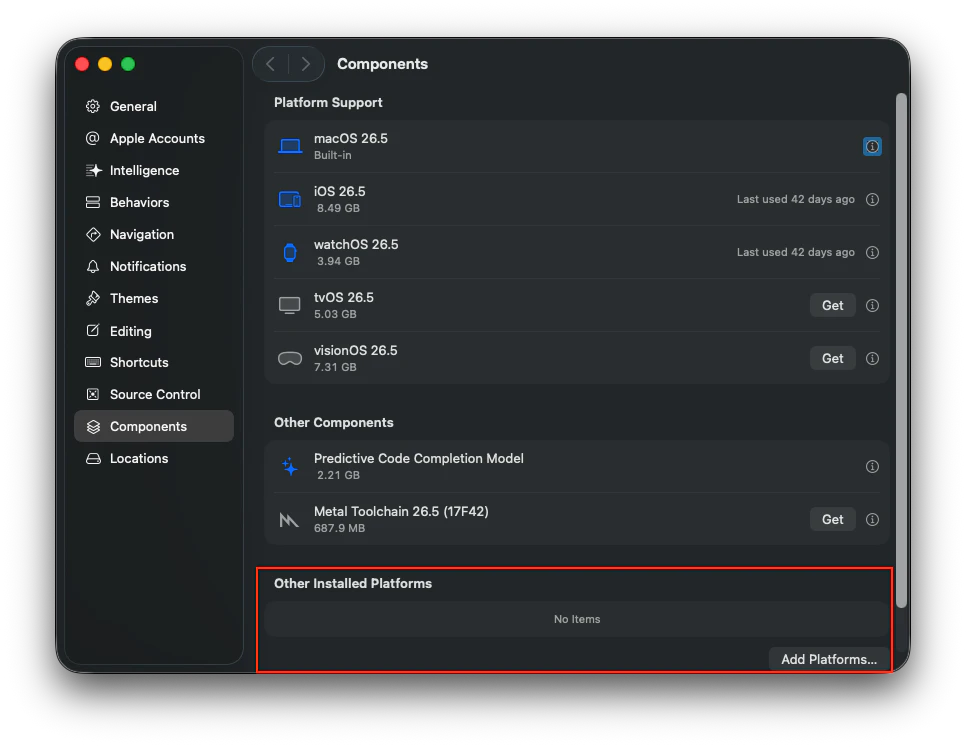
スクリーンショット 2026-07-12 16.06.32.png

1つ当たり8GBくらいあると思うのでかなり容量が空きました。

image.png

シミュレーター関連のファイルも外付けに移動できるようになって欲しいですね・・・

1
0
0

Register as a new user and use Qiita more conveniently

  1. You get articles that match your needs
  2. You can efficiently read back useful information
  3. You can use dark theme
What you can do with signing up
1
0

Delete article

Deleted articles cannot be recovered.

Draft of this article would be also deleted.

Are you sure you want to delete this article?