
以前の投稿を「USBキーボード入力版」に進化(?)させました。ご利用は自己責任で計画的に(時々、静電気の関係か画面が乱れます)。
1.Windows 11 Pro
2.Arduino IDE 2.3.6
3.ボードは、ESP32-S3 DevKitC-1 N16 (16MB Flash)
    Arduino IDE上では「ESP32S3 Dev Module」
4.ボードマネージャはSD関係でエラーが出るので
    "esp32 by Espressif Systems 3.0.0"
5.次のツールオプションを設定してコンパイル
    Partition Schem:"Huge APP ...
6.ライブラリマネージャーで「EspUsbHost」をインストール
    コンパイルエラーが出るので、スケッチフォルダー内に
    "EspUsbHost.h"と"EspUsbHost.cpp"を配置
    "EspUsbHost.h"には、'\','|','_'が使えるように情報を追加
7.USB Type-A メスコネクタを外付け、そこにUSBキーボード(orレシーバー)を接続
    「ELECOM製 2.4GHz Wireless キーボード」も使用できました
8.TFTモジュール内蔵のmicroSDカードスロットを利用
TFTモジュールの接続、設定(LovyanGFXライブラリ)は上記過去投稿をご覧ください。
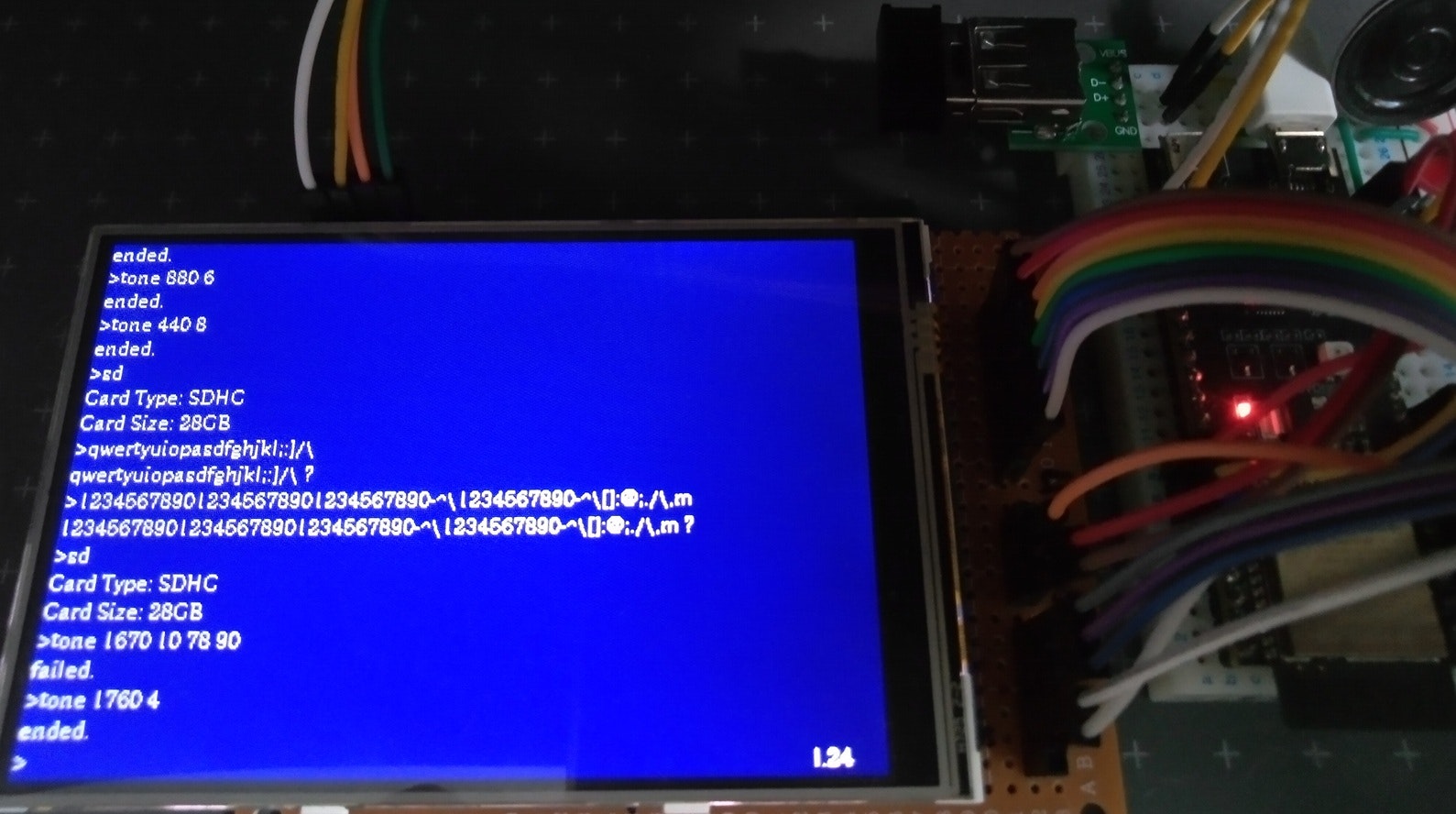
今回は、3つのコマンド(機能)のみ実装してみました。
1.microSDカード情報の表示
2.周波数と時間を指定し音を出す
3.行数が増えたら「^」キーで前スクロールができる
microSDカードスロットの接続は次です。
| ESP32-S3 | microSDカードスロット |
|---|---|
| 10 | SD_CS |
| 11(MOSI) | SD_DI |
| 13(MISO) | SD_DO |
| 12 | SD_SCK |
| 3V3 | モジュール本体の3V3端子 |
| GND | GND |
音を出すtone用の接続です。
| ESP32-S3 | パッシブ小型スピーカー |
|---|---|
| 14 | (330Ω+LED+)端子 |
| GND | 残りの端子 |
キーボード用USBコネクタの接続です。
| ESP32-S3 | USB Type-A メスコネクタ |
|---|---|
| 19(D-) | D- |
| 20(D+) | D+ |
| 5V | VBUS |
| GND | GND |
ArduinoIDEのスケッチと同じフォルダー内に、次のファイルを保存しておきます。(詳しくは上記過去投稿を)
EspUsbHost.cpp
EspUsbHost.h('\','|','_'が使えるように情報を追加)
myLovyanGFX.hpp
スケッチ本体です。
S3_Dos_UsbKeyboard_0.ino
#include "myLovyanGFX.hpp"
#include "SD.h"
#include "EspUsbHost.h"
#include <string>
#include <vector>
using namespace std;

// Display
#define WIDTH 480
#define HEIGHT 320
#define cellX 8                         // character width
#define cellY 16                        // line feed step
#define COLS (int)(WIDTH / cellX)       //60
#define ROWS (int)(HEIGHT / cellY) - 1  //19
#define NAVY 0x0002
LGFX t;  // LGFXのインスタンスを作成。
int8_t CurY = 0;
int16_t by = 0;
int16_t pastY = 0;  // 前スクロールのため

// SD Card
#define SD_CS 10  // SD Card chip select
#define SPI_MOSI 11
#define SPI_MISO 13
#define SPI_SCK 12

void set_pri(uint16_t x, uint16_t y, String s) {
  Serial.println(s);
  t.fillRect(x, y, WIDTH - x, cellY, NAVY);
  t.setCursor(x, y);
  t.print(s);
}

std::vector<String> l_buffer;
String cmd;
volatile bool _inputFlg = false;
uint8_t _ASCI = 0, _KCOD = 0, _MODI = 0;
class MyEspUsbHost : public EspUsbHost {
  void onKeyboardKey(uint8_t ascii, uint8_t keycode, uint8_t modifier) {
    _ASCI = ascii;
    _KCOD = keycode;
    _MODI = modifier;

    if (ascii == 10 || ascii == 13) {  // LF, CR
      l_buffer.push_back(">" + cmd);   // stack command string
      ++by;
      if (CurY < ROWS - 1) ++CurY;
      _inputFlg = true;  // break;

    } else if (cmd.length() == 0 && ascii == 94) { // "^"で前スクロール
      if ((2 + by - ROWS + pastY) > 0) {
        pastY--;  // 前スクロール
        ascr();
        t.setCursor(55 * cellX, (ROWS - 1) * cellY);
        t.print("l." + (String)(by - 1 + pastY));
      }
    } else {
      if (31 < ascii && ascii < 127) {
        if (pastY < 0) {
          pastY = 0;
          ascr();
        }
        cmd = cmd + (char)ascii;
      } else if (ascii == 8 && cmd.length() > 0) {  // BackSpace
        cmd = cmd.substring(0, cmd.length() - 1);
      }
      set_pri(0, CurY * cellY, ">" + cmd);  // update command string
    }
  };
};

MyEspUsbHost usbHost;
TaskHandle_t thp;
void GetKey(void* args) {
  while (1) {
    delay(1);
    usbHost.task();
  }
}

void SD_Info() {
  uint8_t cardType = SD.cardType();  // カード情報
  String s = "Card Type: ";
  if (cardType == CARD_MMC) s += "MMC";
  else if (cardType == CARD_SD) s += "SDSC";
  else if (cardType == CARD_SDHC) s += "SDHC";
  else s += "UNKNOWN";
  pri_both(s);

  uint64_t cardSize = SD.cardSize() / (1024 * 1024 * 1024);
  s = "Card Size: " + (String)(cardSize) + "GB";
  pri_both(s);
}

const int PWM_PIN = 14; // for "tone"

void setup() {
  Serial.begin(115200);
  Serial.println("\n\rDOS command console start...");

  t.init();
  t.setRotation(1);
  t.setBaseColor(NAVY);
  t.clear();
  t.setFreeFont(&fonts::lgfxJapanMinchoP_12);  //&lgfx::fonts::Font2);
  t.setTextSize(1);
  t.setTextWrap(false, false);
  t.setTextColor(TFT_WHITE, NAVY);

  SD.begin(SD_CS, SPI, 24000000, "/sd");

  usbHost.begin();
  usbHost.setHIDLocal(HID_LOCAL_Japan_Katakana);
  xTaskCreateUniversal(GetKey, "Get Key", 4096 * 2, NULL, 3, &thp, CONFIG_ARDUINO_RUNNING_CORE);
  Serial.println("ESP32-S3 Keyboard Test Start");

  ledcAttach(PWM_PIN, 24000, 8);  // for tone
}

void loop() {
  cmd = "";
  set_pri(0, CurY * cellY, ">" + cmd);
  t.setCursor(55 * cellX, CurY * cellY);
  t.print("l." + (String)by);

  _inputFlg = false;
  while (_inputFlg == false) { ; }
  //pri_both(cmd);

  if (cmd.length() > 5 && cmd.substring(0, 4) == "tone") {
    int n = 2;     // "tone freq duration"
    String za[n];  // freq, duration
    int co[n];
    bool flag = true;
    if (split(cmd.substring(5), ' ', za, n) != n) flag = false;
    for (int i = 0; i < n; i++) {
      if (!(co[i] = za[i].toInt())) {
        flag = false;
        break;
      }
    }
    if (flag) {
      ledcWriteTone(PWM_PIN, co[0]);  // freq
      delay(co[1] * 500);             // duration
      ledcWriteTone(PWM_PIN, 0);
      pri_both("ended.");
    } else {
      pri_both("failed.");
    }

  } else if (cmd.substring(0, 2) == "sd") {  // SD information
    SD_Info();

  } else {
    pri_both(cmd + " ?");
  }
}

// パラメータを切り出す
int split(String data, char delimiter, String* dst, int num) {
  int index = 0;
  int len = data.length();
  for (int i = 0; i < len; i++) {
    char tmp = data.charAt(i);
    if (tmp == delimiter) {
      index++;
      if (index > num - 1) return -1;
    } else {
      dst[index] += tmp;
    }
  }
  return index + 1;
}

void pri_both(String s) {
  Serial.println(s);

  l_buffer.push_back(s);  //tString(s);
  t.fillRect(0, CurY * cellY, WIDTH, cellY, NAVY);
  t.setCursor(0, CurY * cellY);
  t.print(s);
  ++by;
  if (CurY < ROWS - 1) ++CurY;
  ascr();
}

void ascr() { // TFT下端に達したらスクロール
  if (by >= ROWS) {
    t.clear();
    for (int y = 0; y < ROWS; y++) {
      t.setCursor(0, y * cellY);
      t.print(l_buffer[2 + by - ROWS + pastY + y]);
    }
    CurY = ROWS - pastY;
  }
}
今後、機能を付け加えてみます。最後まで見ていただきありがとうございました。