
はじめに
Unity向けオンラインゲーム作成SDK「Photon Fusion 2」には、キャラクター操作を簡単に実装できる公式アドオン Simple KCC が用意されています。
今回は Simple KCC の挙動を理解するために、
- 俯瞰の三人称視点カメラ
- クリックした地点への移動
- スペースキーでジャンプ
といった基本操作ができる ミニサンプル を作成しました。
公式ドキュメント
環境
- Unity 6000.3.19f1
- Fusion 2.1.1
作成した内容
今回作成したサンプルでは、以下のような挙動を実装しています。
- マウスクリックした地点へキャラクターが移動
- 移動方向へキャラクターが自然に向きを変える
- スペースキーでジャンプ
- Simple KCC の Move / Jump / LookRotation を利用
Fusion のネットワーク同期を使いながら、Simple KCC の基本機能を確認できる構成です。
作業手順
※ Photon のアプリケーションID作成・設定は省略します。
Simple KCC インストール
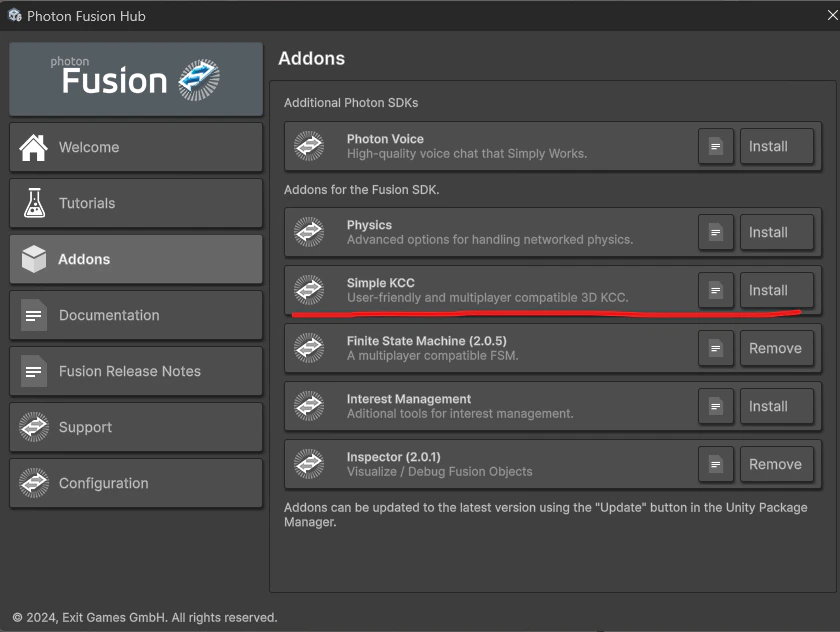
- メニューから
Tools -> Photon -> Fusion Hubを選択する - Addonsから "Simple KCC" をインストールする
シーンとNetwork Runnerの準備
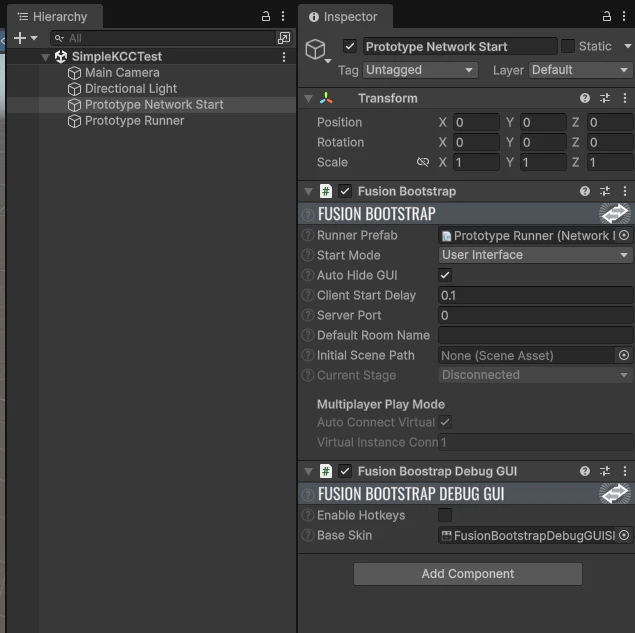
- 新しいシーンを作成する
- Hierarchyを右クリックでメニューを開く
-
Fusion -> Scene -> Setup Networking in the Sceneで簡易ネットワーク接続処理を追加
ステージオブジェクト作成とカメラの準備
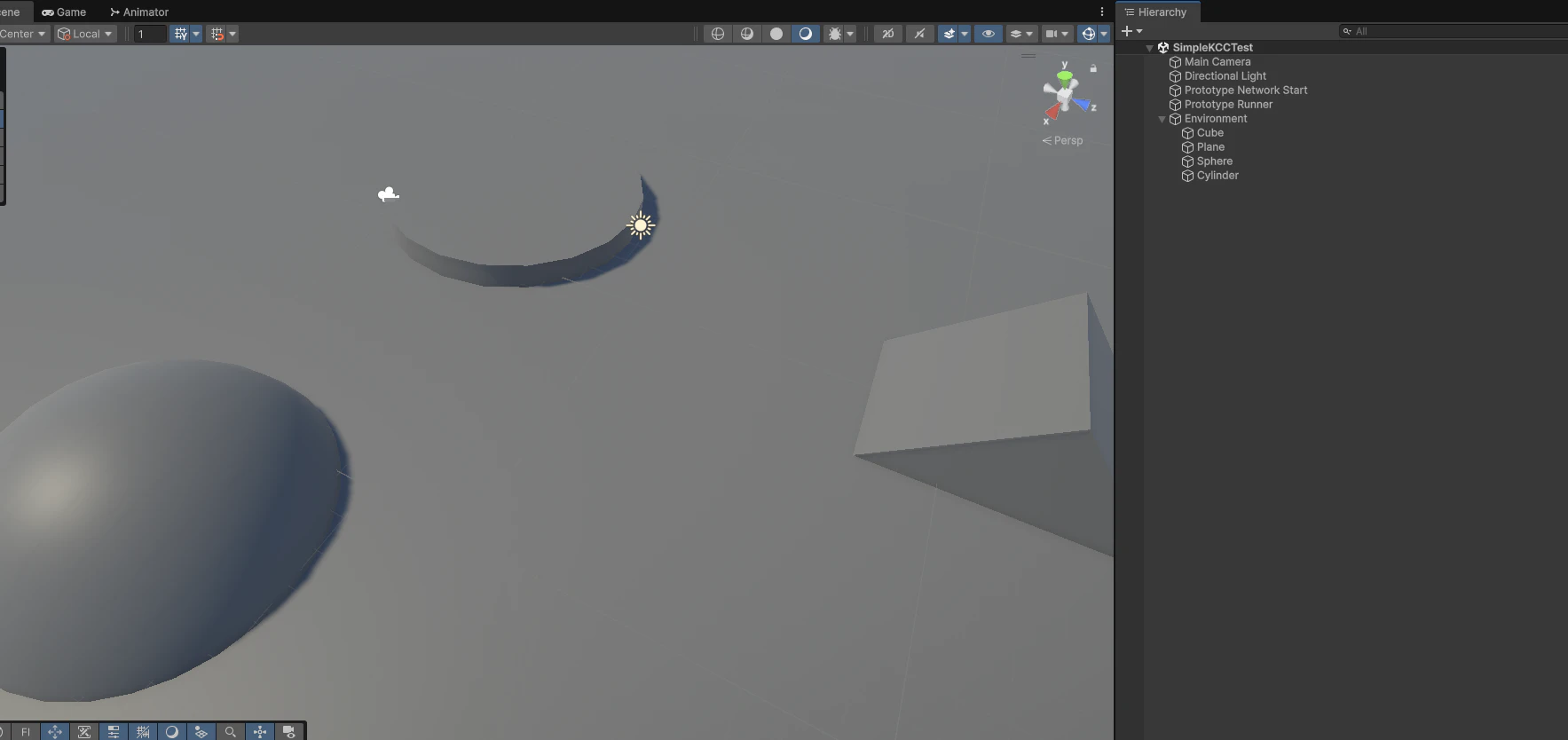
- 地面と適当に障害物のオブジェクトを設置する
- カメラを俯瞰の三人称視点になるように調整する
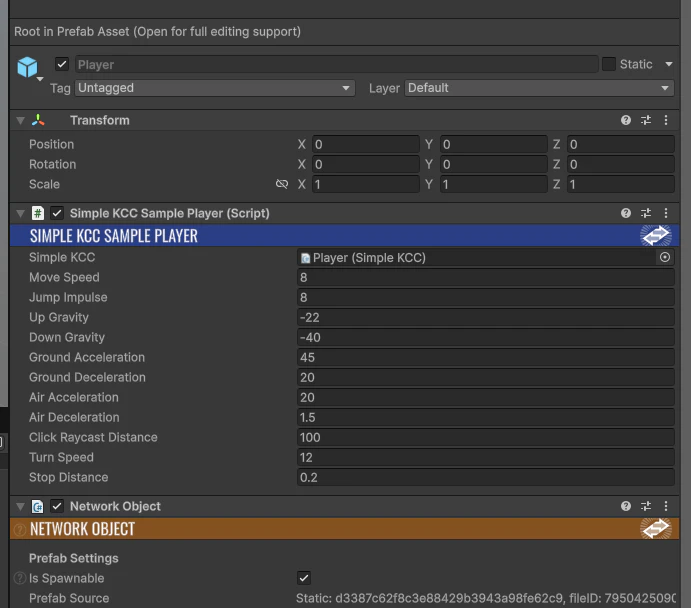
プレイヤーオブジェクト作成
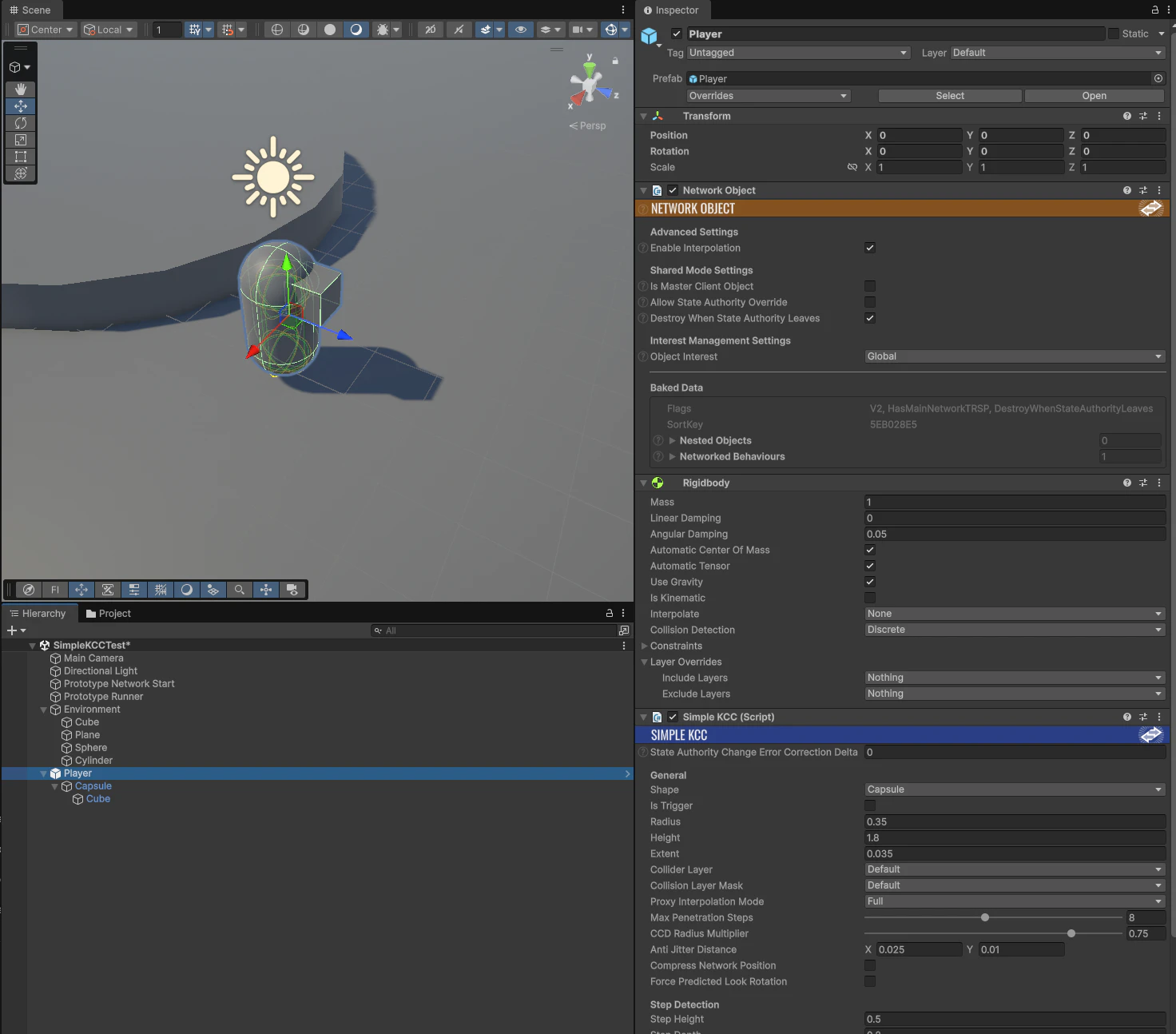
- プレイヤー用オブジェクトを作成する
- 以下のコンポーネントをアタッチ
- Network Object
- SimpleKCC
- Rigidbody
- 動的にスポーンするために
Playerをプレハブ化する
プレイヤースクリプト作成
- SimpleKCCを使った、キャラクターを動かすスクリプトを作成する
- 作成した
SimpleKCCSamplePlayerをPlayerプレハブにアタッチする
SimpleKCCSamplePlayercs
using Fusion;
using Fusion.Addons.SimpleKCC;
using UnityEngine;

namespace SimpleKCCSample
{
    // クリックで移動先を指定し、スペースでジャンプできるようにするプレイヤー制御スクリプト。
    // 役割としては入力受付 → ネットワーク同期状態の更新 → SimpleKCCへ移動/回転/ジャンプを反映する流れです。
    public class SimpleKCCSamplePlayer : NetworkBehaviour, IBeforeUpdate
    {
        [SerializeField] private SimpleKCC _simpleKCC;

        // 移動・ジャンプの挙動を調整するためのパラメータ。
        [SerializeField] private float _moveSpeed = 8f;
        [SerializeField] private float _jumpImpulse = 8f;
        [SerializeField] private float _upGravity = -22f;
        [SerializeField] private float _downGravity = -40f;
        [SerializeField] private float _groundAcceleration = 45f;
        [SerializeField] private float _groundDeceleration = 20f;
        [SerializeField] private float _airAcceleration = 20f;
        [SerializeField] private float _airDeceleration = 1.5f;
        [SerializeField] private float _clickRaycastDistance = 100f;
        [SerializeField] private float _turnSpeed = 12f;
        [SerializeField] private float _stopDistance = 0.2f;

        // ネットワーク同期対象の移動状態。
        // これらはサーバー側で管理され、他クライアントへ反映される。
        [Networked] private Vector3 _moveVelocity { get; set; }
        [Networked] private Vector3 _moveDestination { get; set; }
        [Networked] private bool _hasMoveDestination { get; set; }
        [Networked] private bool _jumpRequested { get; set; }

        // オブジェクト生成時に必要な初期化処理を行う。
        public override void Spawned()
        {
            if (_simpleKCC == null)
            {
                _simpleKCC = GetComponent<SimpleKCC>();
            }

            ResetMovementState();
        }

        // 入力を受け取り、次の固定更新で使う状態を記録する。
        // ここでは「クリックで移動先を決める」「スペースでジャンプ要求する」の2つを処理する。
        void IBeforeUpdate.BeforeUpdate()
        {
            if (Object == null || HasStateAuthority == false)
            {
                return;
            }

            if (Input.GetMouseButtonDown(0) == true)
            {
                if (TryGetClickTarget(out Vector3 target) == true)
                {
                    _moveDestination = target;
                    _hasMoveDestination = true;
                }
            }

            _jumpRequested = Input.GetKeyDown(KeyCode.Space);
        }

        // 固定タイムステップで実行されるメイン処理。
        // ここで「目標地点に向かう速度」を決め、移動・回転・ジャンプをまとめて適用する。
        public override void FixedUpdateNetwork()
        {
            if (_simpleKCC == null)
            {
                return;
            }

            Vector3 desiredMoveVelocity = Vector3.zero;

            if (_hasMoveDestination == true)
            {
                Vector3 currentPosition = _simpleKCC.Transform.position;
                Vector3 delta = _moveDestination - currentPosition;
                delta.y = 0f;

                if (delta.sqrMagnitude > _stopDistance * _stopDistance)
                {
                    desiredMoveVelocity = delta.normalized * _moveSpeed;
                }
                else
                {
                    StopMovement();
                }
            }

            ApplyMovement(desiredMoveVelocity);
            ApplyRotation();
            _jumpRequested = false;
        }

        // 現在の状態から実際の移動速度を算出し、SimpleKCCへ反映する。
        // 地上/空中で加速度を変え、必要ならジャンプもここで付与する。
        private void ApplyMovement(Vector3 desiredMoveVelocity)
        {
            float acceleration = desiredMoveVelocity == Vector3.zero
                ? (_simpleKCC.IsGrounded == true ? _groundDeceleration : _airDeceleration)
                : (_simpleKCC.IsGrounded == true ? _groundAcceleration : _airAcceleration);

            _moveVelocity = Vector3.Lerp(_moveVelocity, desiredMoveVelocity, acceleration * Runner.DeltaTime);

            _simpleKCC.SetGravity(_simpleKCC.RealVelocity.y >= 0f ? _upGravity : _downGravity);

            Vector3 moveVelocity = _moveVelocity;
            if (_simpleKCC.ProjectOnGround(moveVelocity, out Vector3 projectedMoveVelocity) == true)
            {
                moveVelocity = Vector3.Normalize(projectedMoveVelocity) * _moveSpeed;
            }

            float jumpImpulse = 0f;
            if (_jumpRequested == true && _simpleKCC.IsGrounded == true)
            {
                jumpImpulse = _jumpImpulse;
            }

            _simpleKCC.Move(moveVelocity, jumpImpulse);
        }

        // 移動方向に向けてキャラクターの向きを滑らかに変える。
        private void ApplyRotation()
        {
            if (_moveVelocity.sqrMagnitude <= 0.001f)
            {
                return;
            }

            Vector3 forwardDirection = new Vector3(_moveVelocity.x, 0f, _moveVelocity.z);
            if (forwardDirection.sqrMagnitude <= 0.001f)
            {
                return;
            }

            Quaternion targetRotation = Quaternion.LookRotation(forwardDirection, Vector3.up);
            Vector2 currentLookRotation = _simpleKCC.GetLookRotation(true, true);
            Quaternion currentRotation = Quaternion.Euler(currentLookRotation.x, currentLookRotation.y, 0f);
            Quaternion blendedRotation = Quaternion.Slerp(currentRotation, targetRotation, _turnSpeed * Runner.DeltaTime);
            Vector2 blendedLookRotation = new Vector2(blendedRotation.eulerAngles.x, blendedRotation.eulerAngles.y);
            _simpleKCC.SetLookRotation(blendedLookRotation);
        }

        // 目標地点に到達したら移動状態をリセットする。
        private void StopMovement()
        {
            _hasMoveDestination = false;
            _moveVelocity = Vector3.zero;
        }

        // スポーン時や移動開始前に状態を初期化する。
        private void ResetMovementState()
        {
            _moveVelocity = Vector3.zero;
            _moveDestination = transform.position;
            _hasMoveDestination = false;
            _jumpRequested = false;
        }

        // 画面上のマウス位置から、地面上のターゲット位置を取得する。
        // まず地面平面に対するレイキャストを試み、失敗した場合は近くのコライダーにヒットした位置を使う。
        private bool TryGetClickTarget(out Vector3 target)
        {
            target = Vector3.zero;

            Camera camera = Camera.main;
            if (camera == null)
            {
                return false;
            }

            Ray ray = camera.ScreenPointToRay(Input.mousePosition);
            Plane groundPlane = new Plane(Vector3.up, Vector3.zero);

            if (groundPlane.Raycast(ray, out float distance) == true)
            {
                target = ray.GetPoint(distance);
                return true;
            }

            if (Physics.Raycast(ray, out RaycastHit hit, _clickRaycastDistance) == true)
            {
                target = hit.point;
                return true;
            }

            return false;
        }
    }
}
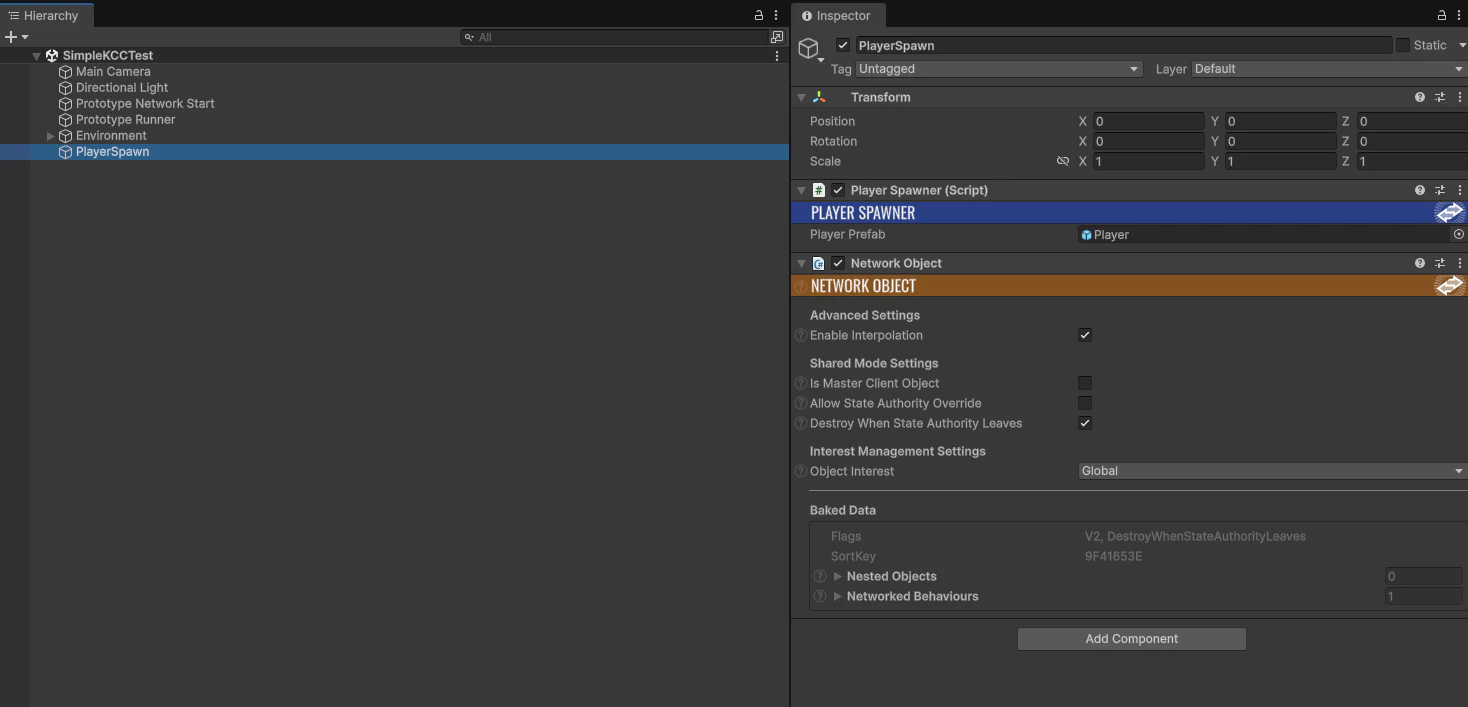
PlayerSpawnを作成する
- シーン内に、スポーン設定を入れるオブジェクト
PlayerSpawnを作成する -
Assets\Photon\FusionDemos\Fusion-Intro-Shared\Scripts\PlayerSpawner.csとNetwork Objectをアタッチする -
PlayerSpawnerに先ほど作成したPlayerを設定する
動作動画
