
昨日の記事のつづきだが、本家のNDL古典籍OCRもGoogle Colaboratoryで動かしてみることにした。しかし、mmcv==2.1.0とnumpy==1.22.4の縛りがきつくて、python3.10でGPU版PyTorch 2.1.2を使う方法でしか、私(安岡孝一)には動かせなかった。
!apt install python3.10 python3.10-dev python3.10-distutils
import os,sys
v=".".join(sys.version.split(".")[0:2])
!update-alternatives --remove-all python3
!update-alternatives --install /usr/bin/python3 python3 /usr/bin/python3.10 1
!update-alternatives --install /usr/bin/python3 python3 /usr/bin/python{v} 2
url="https://github.com/ndl-lab/ndlkotenocr_cli"
d=os.path.basename(url)
!test -d {d} || git clone --depth=1 {url}
!test -d {d}/ndlcli || ( cd {d} && ln -s cli ndlcli )
!test -d /root/kotenocr_cli || ln -s `pwd`/{d} /root/kotenocr_cli
!( echo '%s/from cli.core/from ndlcli.core/' ; echo wq ) | ex -s {d}/main.py
url="https://lab.ndl.go.jp/dataset/ndlkotensekiocr/layoutmodel/ndl_kotenseki_layout_ver3.pth"
f=f"{d}/src/ndl_kotenseki_layout/models/{os.path.basename(url)}"
!test -f {f} || ( mkdir -p `dirname {f}` && curl -L {url} -o {f} )
url="https://lab.ndl.go.jp/dataset/ndlkotensekiocr/trocr/model-ver2.zip"
f=os.path.basename(url)
!test -f {f} || curl -LO {url}
r=f"{d}/src/text_kotenseki_recognition"
!test -d {r}/{f.replace(".zip","")} || ( P=`pwd` ; cd {r} && unzip $$P/{f} )
!echo 1 | update-alternatives --config python3
!apt install python3-pip
!pip install -r {d}/requirements.txt
!pip install torch==2.1.2 torchvision==0.16.2
!pip install mmcv==2.1.0 -f https://download.openmmlab.com/mmcv/dist/cu121/torch2.1/index.html
!echo 2 | update-alternatives --config python3
img="http://kanji.zinbun.kyoto-u.ac.jp/db-machine/toho/L/B0010001.jpg"
f=os.path.basename(img)
!test -f {f} || curl -LO {img}
!test -d {d}/img || ( cd {d} && ln -s .. img )
!rm -rf outdir
!( cd {d} && python3.10 main.py infer . ../outdir -a )
!cat outdir/{d}/txt/*.txt
with open(f'outdir/{d}/json/{f.replace(".jpg",".json")}',"r",encoding="utf-8") as r:
  import json
  j=json.load(r)
s=f'<svg xmlns="http://www.w3.org/2000/svg" width="{j["imginfo"]["img_width"]}" height="{j["imginfo"]["img_height"]}">\n'
for z in j["contents"]:
  t=z[4]
  x,y=(z[0]+z[2])/2,(z[1]+z[3])/2
  w,h=z[2]-z[0],z[3]-z[1]
  s+=f'<text transform="scale({w},{h/len(t)})" x="{x/w}" y="{y/h*len(t)}" text-anchor="middle" font-size="1" font-family="sans-serif" writing-mode="vertical-rl">{t}</text>\n'
s+='</svg>'
from IPython.display import SVG,display
display(SVG(s))
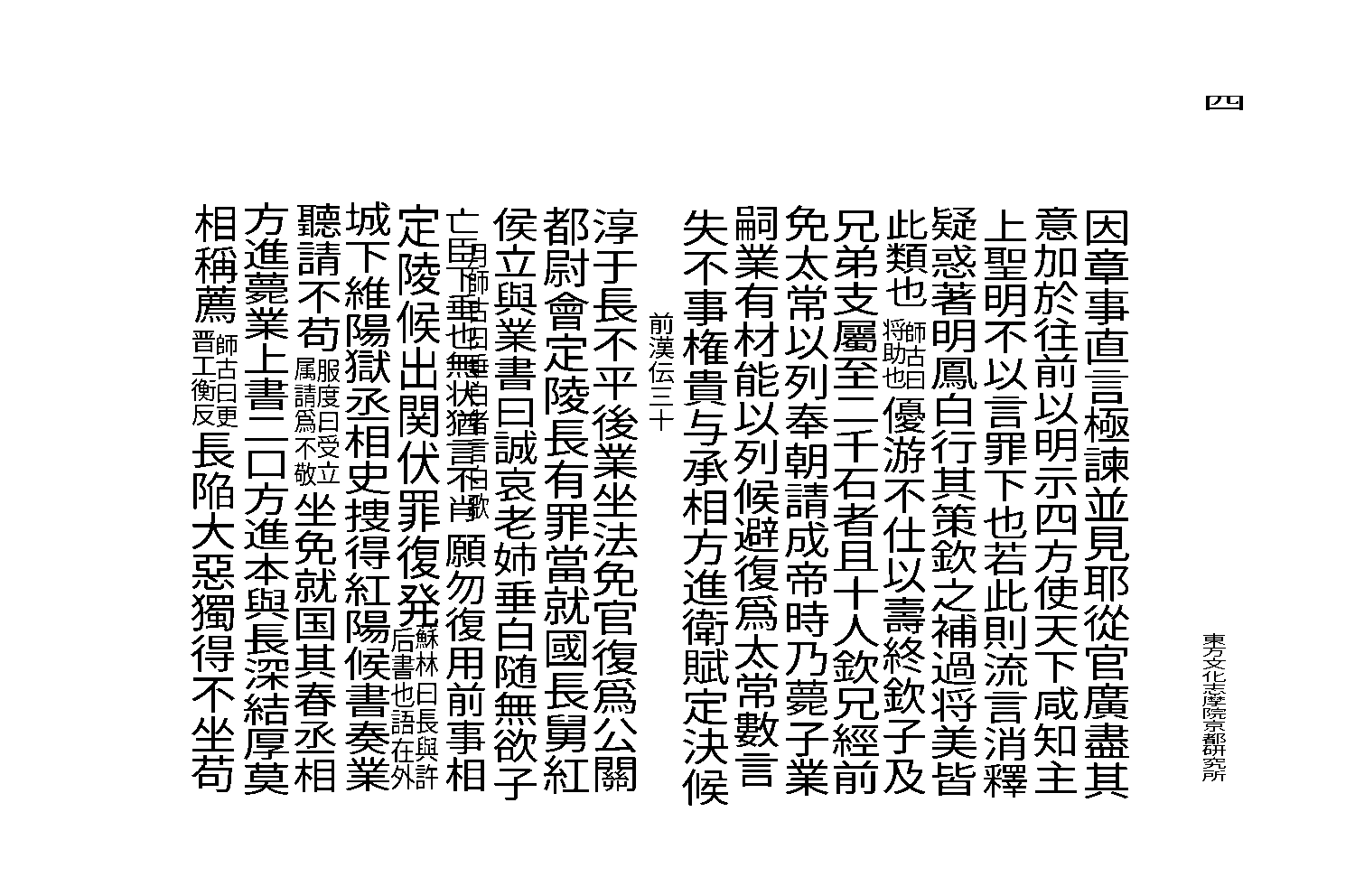
セッション再起動のメッセージを「キャンセル」しつつ、『漢書零片』を読み込ませてSVGに変換したところ、私の手元では以下の結果が出力された。
四東方文化志摩院京都研究所因章事直言極諫並見耶從官廣盡其意加於往前以明示四方使天下咸知主上聖明不以言罪下也若此則流言消釋疑惑著明鳳白行其策欽之補過将美皆此類也師古曰将助也優游不仕以壽終欽子及兄弟支屬至二千石者且十人欽兄經前免太常以列奉朝請成帝時乃薨子業嗣業有材能以列候避復爲太常數言失不事権貴与承相方進衛賦定決候前漢伝三十淳于長不平後業坐法免官復爲公關都尉會定陵長有罪當就國長舅紅侯立與業書曰誠哀老姉垂白随無欲子月師古曰垂白者言白歌亡臣下垂也無状猶言不肖願勿復用前事相蘇林曰長與許定陵候出関伏罪復発后書也語在外城下維陽獄丞相史捜得紅陽候書奏業聽請不苟服度曰受立属請爲不敬坐免就国其春丞相方進薨業上書二口方進本與長深結厚莫相稱薦師古曰更晋工衡反長陥大惡獨得不坐苟
かなり読めているようだが、インストールの手間を考えると、NDL古典籍OCR-Liteに軍配が上がる。うーん、せめてPyTorchを、もう少し最近のものに出来ないかしら。