(1) Blenderの外でのデータ作成
npzファイルに粒子データを全て保存する。
Nstar : 粒子数
Nt : 時間ステップ数
(2)
import bpy
import numpy as np
import os

# ===== ユーザー設定 =====
Nstar = 1000


NPZ_PATH = "/Users/..../posions_%06d.npz" % (Nstar)
# safer
if not os.path.isfile(NPZ_PATH):
    raise RuntimeError(f"NPZ not found: {NPZ_PATH}")

FRAME_START = 1
SNAP_START = 0
FPS = 30

# Stars / handler 名は固定
STARS_NAME = "Stars"
HANDLER_TAG = "_NSD_POS_HANDLER"

# ===== npz 読み込み =====
data = np.load(NPZ_PATH)
POS = data["pos"]  # (nframe, nstar, 3)
nframe, nstar, dim = POS.shape
assert dim == 3

# safer
if POS.shape[1] != Nstar:
    raise RuntimeError(f"nstar mismatch: file has {POS.shape[1]}, expected {Nstar}")

# ===== Stars オブジェクト取得(なければ作るが、通常は既存を使う)=====
stars = bpy.data.objects.get(STARS_NAME)
if stars is None:
    # どうしても無いときだけ作る(この場合はGNはもちろん無い)
    mesh = bpy.data.meshes.new(STARS_NAME + "Mesh")
    stars = bpy.data.objects.new(STARS_NAME, mesh)
    bpy.context.collection.objects.link(stars)

mesh = stars.data

# ===== メッシュ頂点数が一致するか? =====
same_count = (len(mesh.vertices) == nstar)

# ===== メッシュだけ安全に差し替え(頂点数が違う時だけ)=====
if not same_count:
    # 新しいメッシュを作って差し替える(Starsオブジェクトは残す=GN残る)
    new_mesh = bpy.data.meshes.new(STARS_NAME + "Mesh")
    new_mesh.from_pydata([tuple(map(float, POS[0, i])) for i in range(nstar)], [], [])
    new_mesh.update()

    old_mesh = stars.data
    stars.data = new_mesh

    # 古いメッシュを他が使っていなければ削除(安全)
    if old_mesh.users == 0:
        bpy.data.meshes.remove(old_mesh)

    mesh = stars.data
    print(f"[NSD] Rebuilt mesh: nstar={nstar}")
else:
    # 初期フレーム座標だけ反映(見た目の即時更新)
    arr0 = POS[0].astype(np.float32).ravel()
    mesh.vertices.foreach_set("co", arr0)
    mesh.update()
    print(f"[NSD] Reused existing mesh: nstar={nstar}")

# ===== 既存の自分のハンドラだけ削除(clear()しない=他を壊さない)=====
def remove_our_handlers():
    keep = []
    for h in bpy.app.handlers.frame_change_pre:
        if getattr(h, "__name__", "") == HANDLER_TAG:
            continue
        keep.append(h)
    bpy.app.handlers.frame_change_pre[:] = keep

remove_our_handlers()

# ===== handler 登録(高速 foreach_set)=====
def _nsd_update(scene):
    f = scene.frame_current
    k = (f - FRAME_START) + SNAP_START
    if k < 0:
        k = 0
    if k >= nframe:
        k = nframe - 1

    m = bpy.data.objects[STARS_NAME].data
    arr = POS[k].astype(np.float32).ravel()
    m.vertices.foreach_set("co", arr)
    m.update()

# ハンドラ識別用に名前を付ける(削除に使う)
_nsd_update.__name__ = HANDLER_TAG

bpy.app.handlers.frame_change_pre.append(_nsd_update)

# ===== タイムライン設定 =====
scene = bpy.context.scene
scene.frame_start = FRAME_START
scene.frame_end = FRAME_START + nframe - 1
scene.render.fps = FPS

print(f"[NSD] Handler registered. Frames {scene.frame_start}..{scene.frame_end}, nstar={nstar}, npz={NPZ_PATH}")
(3) Camera
import bpy
import math

scene = bpy.context.scene
cam = bpy.data.objects.get("Camera")
if cam is None:
    raise RuntimeError("Camera object not found")

# ---- helper: look-at constraint ----
empty = bpy.data.objects.get("CamTarget")
if empty is None:
    empty = bpy.data.objects.new("CamTarget", None)
    bpy.context.collection.objects.link(empty)

# ターゲットは原点(NSD中心)に置く
empty.location = (0.0, 0.0, 0.0)

# カメラに Track To 制約(常に中心を見る)
con = cam.constraints.get("TrackToCenter")
if con is None:
    con = cam.constraints.new(type='TRACK_TO')
    con.name = "TrackToCenter"
con.target = empty
con.track_axis = 'TRACK_NEGATIVE_Z'
con.up_axis = 'UP_Y'

# ---- keyframes: camera motion ----
# 3点を打つ:遠景 → 斜め上俯瞰 → face-on
# 距離はお好みで調整(まずは大きめでOK)
key = [
 (0, (-8.0, 0., 0.0)),
 (20, (-8.0, 0., 0.0)),
 (30, (-4.0, 0., 0.0)),
 (50, (-3.0, 0.0, 4.0)),
 (60, (-0.5, 0.0, 4.0)),
 (70, (-0.5, 0.0, 4.0)),
 (99, (-0.5, 0.0, 4.0)),
 (100, (-0.5, 0.0, 4.0)),
]

for fr, loc in key:
    scene.frame_set(fr)
    cam.location = loc
    cam.keyframe_insert(data_path="location")

# 補間を滑らかに(イーズイン・アウト)
for fc in cam.animation_data.action.fcurves:
    for kp in fc.keyframe_points:
        kp.interpolation = 'BEZIER'

print("Camera keyframes set. Play timeline to preview.")
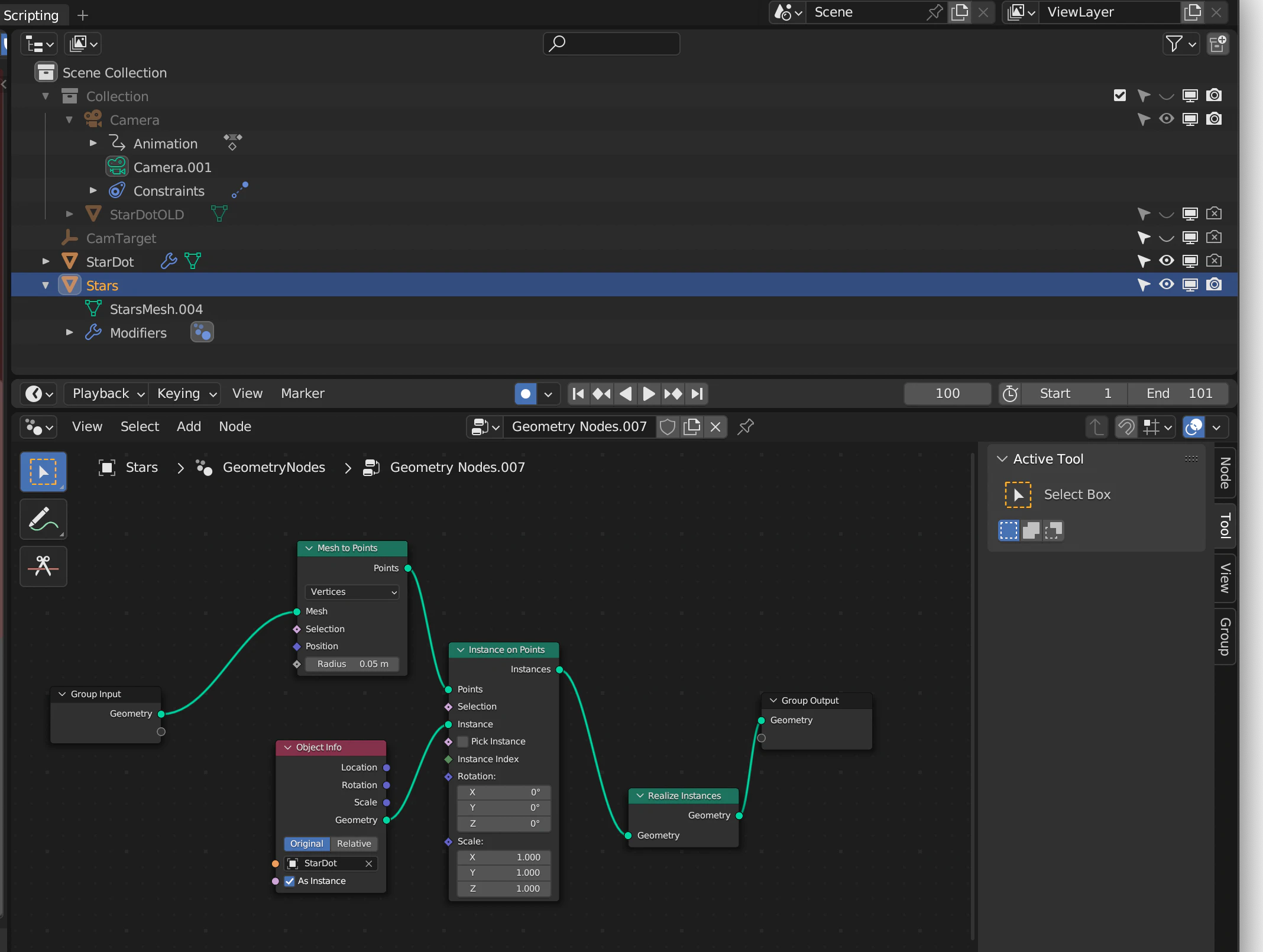
(4) StarDot, Stars