

まとめ
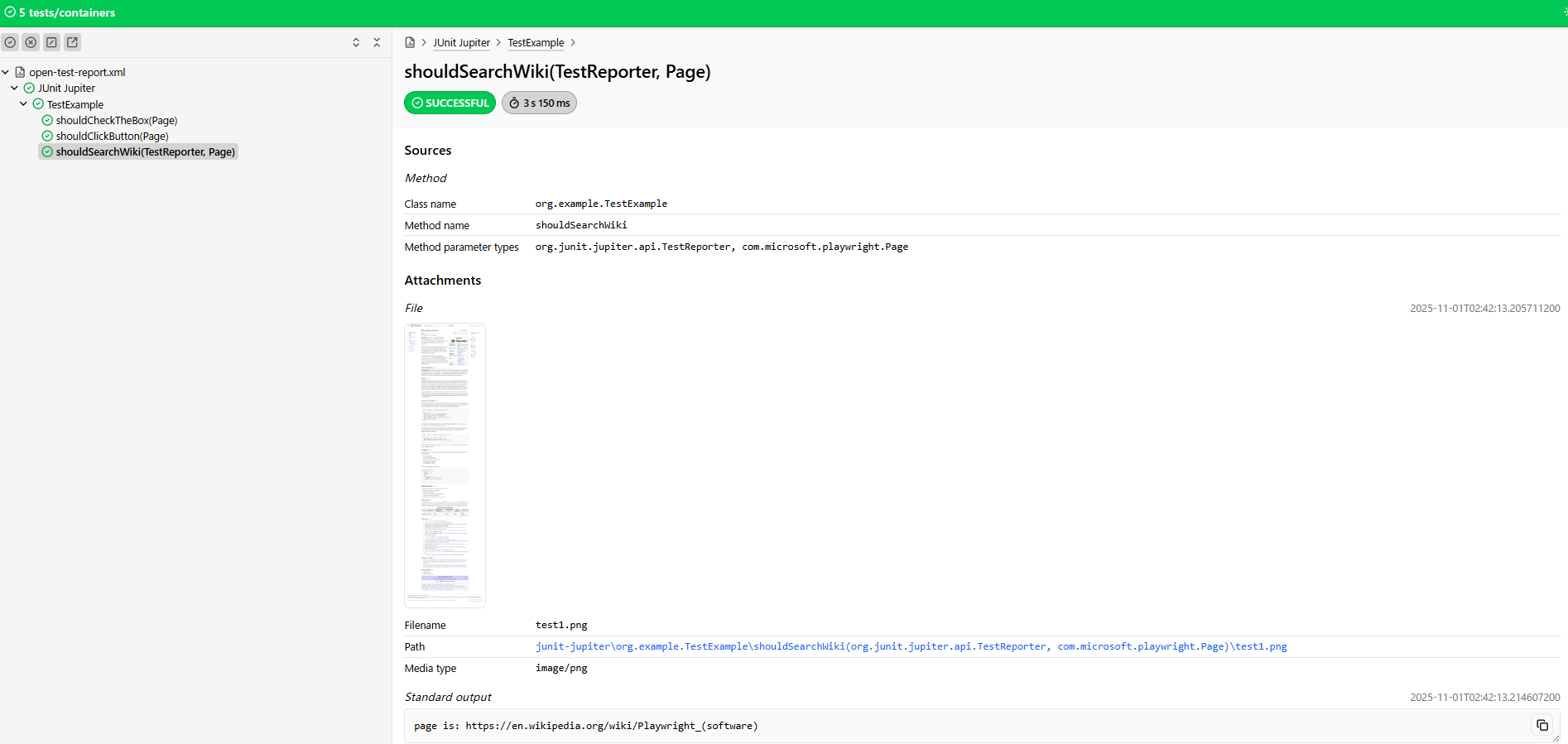
Junit5やJUnit6では、OpenTestReportingを用いて画像や動画などを添付できる
Playwrightなどの画像や動画の取得に長けたフレームワークと併用することにより、Excelスクショペタペタをなくすことができる。
そもそもOpenTestReportingとは?
JunitXMLを新しく標準化した形式。
ユースケース
Playwright-Javaで取得したスクリーンショットをHTMLレポートに添付し、表示する。
(Nodejs版Playwirghtでできることと同じ内容を実施する)
実例
pom
要点は、下記
-
junit.platform.reporting.open.xml.enabled = trueにすること -
junit-platform-reportingを依存関係に追加すること
src/test/resources/junit-platform.properties
junit.platform.reporting.open.xml.enabled=true
pom.xml
<?xml version="1.0" encoding="UTF-8"?>
<project xmlns="http://maven.apache.org/POM/4.0.0"
         xmlns:xsi="http://www.w3.org/2001/XMLSchema-instance"
         xsi:schemaLocation="http://maven.apache.org/POM/4.0.0 http://maven.apache.org/xsd/maven-4.0.0.xsd">
  <modelVersion>4.0.0</modelVersion>

  <groupId>org.example</groupId>
  <artifactId>examples</artifactId>
  <version>1.56.0</version>
  <name>Playwright Client Examples</name>
  <properties>
    <project.build.sourceEncoding>UTF-8</project.build.sourceEncoding>
    <playwright.version>1.56.0</playwright.version>
  </properties>
  <dependencyManagement>
    <dependencies>
      <dependency>
        <groupId>org.junit</groupId>
        <artifactId>junit-bom</artifactId>
        <version>5.14.0</version>
        <type>pom</type>
        <scope>import</scope>
      </dependency>
    </dependencies>
  </dependencyManagement>
  <dependencies>
    <dependency>
      <groupId>com.microsoft.playwright</groupId>
      <artifactId>playwright</artifactId>
      <version>${playwright.version}</version>
    </dependency>
    <dependency>
      <groupId>org.junit.jupiter</groupId>
      <artifactId>junit-jupiter-api</artifactId>
      <scope>test</scope>
    </dependency>
    <dependency>
      <groupId>org.junit.jupiter</groupId>
      <artifactId>junit-jupiter</artifactId>
    </dependency>
    <dependency>
      <groupId>org.junit.platform</groupId>
      <artifactId>junit-platform-reporting</artifactId>
      <version>1.14.0</version>
      <scope>test</scope>
    </dependency>
  </dependencies>
  <build>
    <plugins>
      <plugin>
        <groupId>org.apache.maven.plugins</groupId>
        <artifactId>maven-compiler-plugin</artifactId>
        <version>3.12.1</version>
        <configuration>
          <source>1.8</source>
          <target>1.8</target>
        </configuration>
      </plugin>
      <plugin>
        <groupId>org.codehaus.mojo</groupId>
        <artifactId>exec-maven-plugin</artifactId>
        <executions>
          <execution>
            <id>generate-open-test-report</id>
            <phase>test</phase>
            <goals>
              <goal>exec</goal>
            </goals>
          </execution>
        </executions>
        <configuration>
          <includePluginDependencies>true</includePluginDependencies>
          <executable>java</executable>
          <arguments>
            <argument>-classpath</argument>
            <classpath/>
            <argument>org.opentest4j.reporting.cli.ReportingCli</argument>
            <argument>html-report</argument>
            <argument>-o</argument>
            <argument>${project.build.directory}/open-test-report.html</argument>
            <argument>${project.build.directory}/open-test-report.xml</argument>
          </arguments>
        </configuration>
        <dependencies>
          <dependency>
            <groupId>org.opentest4j.reporting</groupId>
            <artifactId>open-test-reporting-cli</artifactId>
            <version>0.2.5</version>
          </dependency>
        </dependencies>
      </plugin>
    </plugins>
  </build>
  <repositories>
    <repository>
      <id>snapshots-repo</id>
      <url>https://oss.sonatype.org/content/repositories/snapshots</url>
      <releases><enabled>false</enabled></releases>
      <snapshots><enabled>true</enabled></snapshots>
    </repository>
  </repositories>
</project>
PlaywrightVideoPublisher.java
package org.example;

import com.microsoft.playwright.Video;
import com.microsoft.playwright.impl.junit.PageExtension;
import org.junit.jupiter.api.MediaType;
import org.junit.jupiter.api.extension.AfterTestExecutionCallback;
import org.junit.jupiter.api.extension.ExtensionContext;

public class PlaywrightVideoPublisher implements AfterTestExecutionCallback {

  @Override
  public void afterTestExecution(ExtensionContext context) {
    PageExtension.getOrCreatePage(context).onClose(page -> {
      Video video = page.video();
      if (video != null) {
        context.publishFile("video.webm", MediaType.parse("video/webm"), video::saveAs);
      }
    });
  }
}
TestExample.java
package org.example;

import com.microsoft.playwright.Browser;
import com.microsoft.playwright.Page;
import com.microsoft.playwright.junit.Options;
import com.microsoft.playwright.junit.OptionsFactory;
import com.microsoft.playwright.junit.UsePlaywright;
import com.microsoft.playwright.options.AriaRole;
import org.junit.jupiter.api.MediaType;
import org.junit.jupiter.api.Test;
import org.junit.jupiter.api.TestReporter;
import org.junit.jupiter.api.extension.ExtendWith;

import java.nio.file.Files;
import java.nio.file.Path;
import java.nio.file.Paths;

import static com.microsoft.playwright.assertions.PlaywrightAssertions.assertThat;
import static org.junit.jupiter.api.Assertions.assertEquals;

@UsePlaywright(TestExample.CustomOptions.class)
@ExtendWith(PlaywrightVideoPublisher.class)
public class TestExample {
  private static final Path RECORD_VIDEO_DIR = Paths.get("videos/");
  public static class CustomOptions implements OptionsFactory {
    @Override
    public Options getOptions() {
      return new Options()
        .setHeadless(false)
        .setContextOptions(new Browser.NewContextOptions()
                             .setRecordVideoSize(1920,1080)
                             .setRecordVideoDir(RECORD_VIDEO_DIR));
    }
  }


  @Test
  void shouldCheckTheBox(Page page) {
    page.setContent("<input id='checkbox' type='checkbox'></input>");
    page.locator("input").check();
    assertEquals(true, page.evaluate("window['checkbox'].checked"));
  }

  @Test
  void shouldSearchWiki(TestReporter testReporter, Page page) {
    page.navigate("https://en.wikipedia.org/wiki/Main_Page");
    page.getByRole(AriaRole.SEARCHBOX, new Page.GetByRoleOptions().setName("Search Wikipedia")).click();
    page.getByRole(AriaRole.COMBOBOX, new Page.GetByRoleOptions().setName("Search Wikipedia")).fill("playwright");
    page.getByRole(AriaRole.LINK, new Page.GetByRoleOptions().setName("Playwright (software) End-to-")).click();
    System.out.println("page is: " + page.url());

    assertThat(page).hasURL("https://en.wikipedia.org/wiki/Playwright_(software)");

    // これでスクリーンショット取れる
    byte[] shot = page.screenshot(new Page.ScreenshotOptions().setFullPage(true));
    testReporter.publishFile("test1.png", MediaType.IMAGE_PNG,file -> Files.write(file, shot));
  }
}
テスト実施
exec-maven-pluginが自動的にReportingCliを起動する
mvn test
結果
実例を参照。