
はじめに
古い Visual C++ 6.0(VC6)の .dsp ファイルを使用したプロジェクトを Modern Visual Studio(VC2005 〜 VC2026)環境へ移行する際、プロジェクトファイルの自動変換に頼らず「空の Win32 プロジェクト」から手動で再構築する手順と、必要となるコード修正ポイントをまとめました。
1. 新規プロジェクトの作成とファイル追加
- 新しい Visual Studio で「空の Win32 プロジェクト」(または「空のプロジェクト」)を作成します。
- 既存のソースファイル(
*.cpp、*.h、*.rcなど)をプロジェクトに追加します。 - プロジェクトのプロパティを開き、[構成プロパティ] -> [全般] -> [MFC の使用] を 「共有 DLL で MFC を使う」(または「スタティック ライブラリで MFC を使う」)に設定します。
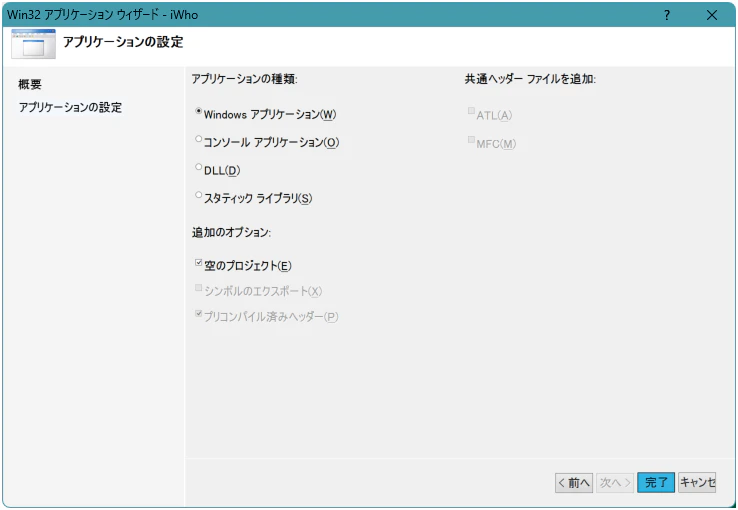
2. コードの修正ポイント
DoModal() の戻り値の型変更
64ビット環境や Modern VC では DoModal() の戻り値が INT_PTR に変更されています。int で受けている場合は INT_PTR へ変更します。
// 変更前
// int nResponse = dlg.DoModal();

// 変更後
INT_PTR nResponse = dlg.DoModal();
セキュア関数(_stscanf_s)への対応
VC2005(_MSC_VER >= 1400)以降では、従来の C ランタイム関数に対して警告やエラーが発生する場合があります。コンパイラバージョンで分岐して対応します。
int f_count = 0;
#if (_MSC_VER >= 1400)
    f_count = ::_stscanf_s(strIP.c_str(), _T("172.%d."), &nSecond);
#else
    f_count = ::_stscanf  (strIP.c_str(), _T("172.%d."), &nSecond);
#endif
3. プリコンパイル済みヘッダーの設定
- ソースファイル一覧から
StdAfx.cpp(またはpch.cpp)を右クリックし、[プロパティ] を開きます。 - [構成プロパティ] -> [C/C++] -> [プリコンパイル 済みヘッダー] に移動します。
-
[プリコンパイル済みヘッダー] を 「作成 (/Yc)」 に設定します。
(※プロジェクト全体のデフォルト設定は「使用 (/Yu)」にしておきます)
4. Winsock 関連の非推奨警告(C4996)への対処(VC2022 / VC2026)
Modern Visual Studio で Winsock の旧 API(::gethostbyname、::inet_ntoa、::inet_addr、::gethostbyaddr など)を使用している場合、C4996 エラー(Use getaddrinfo() or GetAddrInfoW() instead...)が発生してビルドが停止することがあります。
旧 API をそのまま使用する場合は、StdAfx.h の先頭(afxwin.h などのインクルード前)に以下のマクロ定義を追加します。
#ifndef _WINSOCK_DEPRECATED_NO_WARNINGS
#define _WINSOCK_DEPRECATED_NO_WARNINGS
#endif

#include <afxwin.h>
ソースコードおよび詳細情報
- GitHub リポジトリ: IwaoMISH/iWho - GitHub
-
各プロパティ設定画面のスクリーンショットと詳細解説: 新規プロジェクト作成時の具体的な選択画面については、ブログにて画像付きで詳しく公開しています。
VC6 MFC プロジェクトの移行 - IwaoDev
※ 本記事の構成および文章の作成には、生成 AI を利用しています。