

マウントとは
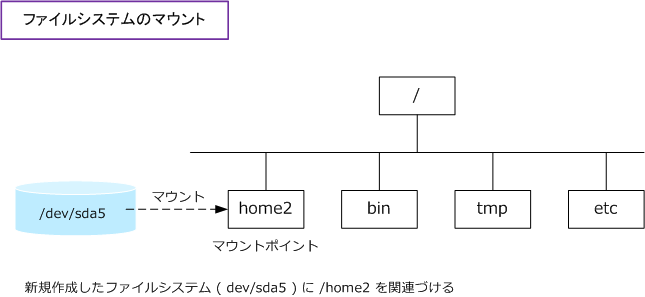
パーティションとディレクトリを関連づける作業のこと。
これによって、接続した機器が認識され使える状態になる。
マウントしたファイルシステムが結合されるディレクトリをマウントポイントと呼ぶ。
- マウントされると、ファイルやディレクトリを作成したり、利用することができるようになる。
- マウントされないと、ファイルシステムはLinuxシステムからは見れない。(データは存在してもアクセスできない。)
一時的に mount コマンドでマウントしても、システム再起動で消えてしまいます。
そこで必要なのがマウントの恒久化。2つの作業が必要になります。
マウントの恒久化
① /etc/fstabファイルの編集
② mountコマンドの実行、または再起動(init 6)の実行
恒久化に必要な作業。 /etc/fstabファイルの編集を行わずにmountコマンドだけを実行した場合、再起動後に無効になっています。
① /etc/fstabファイルの編集
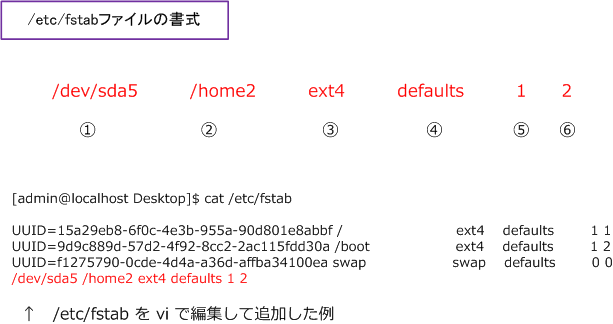
①マウントするデバイスファイル名
②マウントポイント
③ファイルシステムのsqlappほた類
④マウントオプション:ここで性能を決める
⑤dump:dmpコマンドによるバックアップ対象となるか指定
⑥fsck:システム起動時にfsckコマンドでチェックを行うときの順序を指定
② mountコマンドの実行、または再起動(init 6)の実行
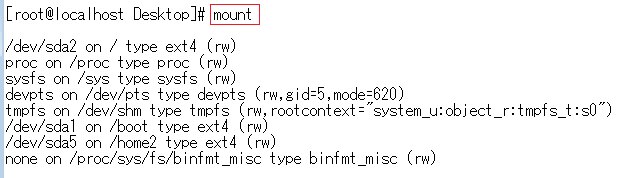
現在のファイルシステムのマウント状態は、mountコマンドの実行で確認できる。
/etc/fstabファイルの編集を行なったあと、mountコマンドを実行か再起動する必要がある。
参考:
https://www.infraexpert.com/infra/linux28.html
https://wa3.i-3-i.info/word13188.html