

Logic Apps閉域とMI認証
本記事記述および実装内容は、多くの部分をAIで処理しており、人間チェックは甘いです
はじめに
Logic Apps Standard を閉域化したいとき、ASE v3 を使うべきか、
host storage を Managed Identity 認証にできるのかで迷うことがあります。
今回、非 ASE の Logic Apps Standard を VNet Integration と
Private Endpoint で閉域化し、User-assigned Managed Identity
(UAMI) で host storage 認証をどこまで置き換えられるか検証しました。
対象読者は次のような方です。
- Logic Apps Standard を閉域構成で使いたい
- host storage の接続文字列をできるだけ排除したい
- ASE v3 を使うべきか判断したい
- Bicep で再現可能な構成を知りたい
結論
- ✅ 非 ASE でも、Blob / Queue / Table の host storage は
UAMI 認証で動作しました。 - ✅ Logic Apps Standard の閉域化は、VNet Integration と
Private Endpoint で実現できました。 - ⚠️ Azure Files は SMB の Microsoft Entra 認証に未対応です。
SKU や ASE 有無に関係なく、Files は接続文字列が必要です。 - ⚠️ Workflow Extension が
AzureWebJobsStorageを
接続文字列としても要求します。
そのため、現時点で真の MI-only 構成ではなく、
MI 設定と Key Vault 参照を併設するハイブリッド構成が必要でした。
この記事での「MI 化」は、Blob / Queue / Table の host storage
データプレーンを UAMI 認証にする、という意味です。
Azure Files の SMB マウントは別枠で、接続文字列が残ります。
アーキテクチャ
主な構成は次の通りです。
| 要素 | 内容 |
|---|---|
| VNet | 10.50.0.0/16 |
| Subnet |
snet-logicapp と snet-pe
|
| Private Endpoint | blob / queue / table / file / sites の 5 本 |
| Private DNS Zone | blob / queue / table / file / azurewebsites の 5 個 |
| Logic Apps plan | Workflow Standard WS1
|
| Storage |
Standard_LRS, public network access disabled |
| NSG |
snet-logicapp から SMB 445 outbound を明示許可 |
| UAMI roles | Blob Owner / Queue Contributor / Table Contributor |
| Key Vault role | Key Vault Secrets User |
構築の要点
Logic Apps 流の app setting キー名を使う
ここが一番重要でした。
Functions の identity-based connection 設定をそのまま使うと、
Logic Apps Standard の host storage では期待通りに動きませんでした。
| パターン | キー名 | 結果 |
|---|---|---|
| ❌ Functions 流 |
__credential=managedidentity + __clientId=<GUID>
|
起動失敗 |
| ✅ Logic Apps 流 |
__credentialType + __managedIdentityResourceId
|
動作 |
採用した設定は次の形です。
AzureWebJobsStorage__credentialType = managedIdentity
AzureWebJobsStorage__managedIdentityResourceId = <UAMI resourceId>
AzureWebJobsStorage__accountName = <storage account name>
AzureWebJobsStorage__blobServiceUri = https://<storage>.blob.core.windows.net
AzureWebJobsStorage__queueServiceUri = https://<storage>.queue.core.windows.net
AzureWebJobsStorage__tableServiceUri = https://<storage>.table.core.windows.net
AzureWebJobsStorage = @Microsoft.KeyVault(SecretUri=https://<kv>.vault.azure.net/secrets/<secret>/)
WEBSITE_CONTENTAZUREFILECONNECTIONSTRING = @Microsoft.KeyVault(SecretUri=https://<kv>.vault.azure.net/secrets/<secret>/)
AzureWebJobsSecretStorageType = Files
Bicep の主要部分
Logic App には UAMI を割り当て、Key Vault reference も同じ UAMI で
解決させます。
resource logicApp 'Microsoft.Web/sites@2024-04-01' = {
  name: logicAppName
  location: location
  tags: tags
  kind: 'functionapp,workflowapp'
  identity: {
    type: 'UserAssigned'
    userAssignedIdentities: {
      '${uamiId}': {}
    }
  }
  properties: {
    serverFarmId: appServicePlan.id
    publicNetworkAccess: 'Disabled'
    virtualNetworkSubnetId: snetLogicAppId
    vnetRouteAllEnabled: true
    keyVaultReferenceIdentity: uamiId
  }
}
app settings は、MI 用の分解キーと AzureWebJobsStorage の
Key Vault 参照を併設します。
resource appSettings 'Microsoft.Web/sites/config@2024-04-01' = {
  parent: logicApp
  name: 'appsettings'
  properties: {
    AzureWebJobsStorage__credentialType: 'managedIdentity'
    AzureWebJobsStorage__managedIdentityResourceId: uamiId
    AzureWebJobsStorage__accountName: storageAccountName
    AzureWebJobsStorage__blobServiceUri: 'https://${storageAccountName}.blob.${environment().suffixes.storage}'
    AzureWebJobsStorage__queueServiceUri: 'https://${storageAccountName}.queue.${environment().suffixes.storage}'
    AzureWebJobsStorage__tableServiceUri: 'https://${storageAccountName}.table.${environment().suffixes.storage}'
    AzureWebJobsStorage: '@Microsoft.KeyVault(SecretUri=https://${keyVaultName}${environment().suffixes.keyvaultDns}/secrets/${fileConnSecretName}/)'
    WEBSITE_CONTENTAZUREFILECONNECTIONSTRING: '@Microsoft.KeyVault(SecretUri=https://${keyVaultName}${environment().suffixes.keyvaultDns}/secrets/${fileConnSecretName}/)'
    AzureWebJobsSecretStorageType: 'Files'
  }
}
UAMI には Storage と Key Vault のロールを付与します。
// UAMI -> Storage
// - Storage Blob Data Owner
// - Storage Queue Data Contributor
// - Storage Table Data Contributor

// UAMI -> Key Vault
// - Key Vault Secrets User
デプロイ
cd logic-app-private
azd env new <env-name>
azd env set AZURE_LOCATION japaneast
azd up
検証後は次で削除できました。
azd down --force --purge
ハマったポイントと解決策
Workflow Extension が接続文字列も要求する
MI 用の分解キーだけを設定し、AzureWebJobsStorage 自体を消すと、
Workflow Extension の初期化で失敗しました。
例外の発生箇所は次のコンポーネントでした。
Microsoft.Azure.Workflows.WebJobs.Extensions.WorkflowExtensionProvider.Initialize
Value cannot be null. (Parameter 'connectionString')
つまり、Functions runtime 側は MI 用の分解キーを解釈できても、
Workflow Extension 側は AzureWebJobsStorage を接続文字列としても
読みます。
そのため、次のハイブリッド構成にしました。
| 用途 | 設定 | 認証 |
|---|---|---|
| Blob host storage | AzureWebJobsStorage__blobServiceUri |
UAMI |
| Queue host storage | AzureWebJobsStorage__queueServiceUri |
UAMI |
| Table host storage | AzureWebJobsStorage__tableServiceUri |
UAMI |
| Workflow Extension 用 | AzureWebJobsStorage |
Key Vault 参照 |
| Files content | WEBSITE_CONTENTAZUREFILECONNECTIONSTRING |
KV 参照 |
App setting には平文の AccountKey= が出ない構成にしています。
ただし Storage Account 側では Azure Files 用に Shared Key が必要です。
Azure Files SMB は Entra OAuth 未対応
Azure Functions の公式チュートリアルには、次の記載があります。
Azure Files is an example of a service that doesn't yet support Microsoft
Entra authentication for Server Message Block (SMB) file shares.
これは Logic Apps / Functions / App Service の SKU ではなく、
Azure Files の SMB マウント側の制約です。
そのため、ASE v3 にしても Files の MI 認証はできません。
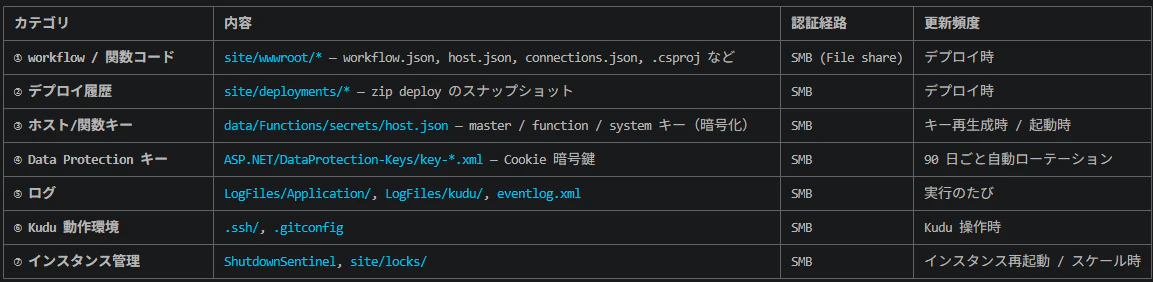
Azure Files の中身
Azure Files の中身は以下の通り
content-pioq2bvneff7s (5120 GiB クォータ、実使用は数 MB 程度) の中身は 7 カテゴリ:
 content-pioq2bvneff7s/
 ├── site/                         ← アプリ本体(アクティブな実行コード)
 │   ├── wwwroot/                  ← ★ ここがあなたが書いた workflow
 │   │   ├── host.json             (Logic Apps host 設定)
 │   │   └── ping-workflow/        (workflow.json + connections.json)
 │   ├── deployments/              ← zip deploy 履歴
 │   │   ├── active                (現在 active な deployment ID)
 │   │   ├── latest.json           (最新メタデータ)
 │   │   └── <commit-hash>/        (各デプロイのスナップショット)
 │   └── locks/                    ← 排他制御用
 ├── data/Functions/
 │   └── secrets/host.json         ← マスター/関数/system キー (暗号化済)
 ├── ASP.NET/DataProtection-Keys/  ← Cookie/トークン暗号鍵 (90日ローテ)
 ├── LogFiles/
 │   ├── Application/              (アプリ stdout/stderr)
 │   ├── kudu/                     (SCM 操作ログ)
 │   └── eventlog.xml
 ├── .ssh/                         (Kudu Bash 用 SSH 設定)
 ├── .gitconfig                    (Kudu git 操作用)
 └── ShutdownSentinel              (インスタンス停止検知用 sentinel)
SMB 445 outbound を明示許可する
Logic App の content share は Azure Files です。
閉域構成で File Private Endpoint に到達させるため、
snet-logicapp の NSG に 445/TCP outbound を明示しました。
resource nsgLogicApp 'Microsoft.Network/networkSecurityGroups@2024-05-01' = {
  name: 'nsg-snet-logicapp'
  location: location
  tags: tags
  properties: {
    securityRules: [
      {
        name: 'AllowOutboundSmbToVNet'
        properties: {
          direction: 'Outbound'
          access: 'Allow'
          protocol: 'Tcp'
          destinationAddressPrefix: 'VirtualNetwork'
          destinationPortRange: '445'
        }
      }
    ]
  }
}
検証結果
S1 から S11 の v1 検証と、UAMI 化した v2 追加検証はすべて PASS でした。
| ID | 確認内容 | 結果 |
|---|---|---|
| S1 | 全リソースの provision 成功 | ✅ |
| S2 | Storage の public network access disabled | ✅ |
| S3 | Logic App の public network access disabled | ✅ |
| S4 | 5 本の Private Endpoint が Approved | ✅ |
| S5 | 必要な RBAC が付与済み | ✅ |
| S6 | 外部から Logic App HTTPS が 403 | ✅ |
| S6b | 外部から SCM / Kudu が 403 | ✅ |
| S7 | 5 個の Private DNS Zone が VNet link 済み | ✅ |
| S8 | 外部から Storage が 403 | ✅ |
| S9 | 閉域下で workflow run が Succeeded | ✅ |
| S10 | app settings に平文 AccountKey= なし |
✅ |
| S11 |
azd down --force --purge で削除可能 |
✅ |
| S5b | UAMI 割当と Storage data roles を確認 | ✅ |
| S9b | UAMI 構成で Recurrence workflow 成功 | ✅ |
| S10b | MI 設定と Files の KV 参照を確認 | ✅ |
v2 で確認した app settings
AzureWebJobsStorage__credentialType = managedIdentity
AzureWebJobsStorage__managedIdentityResourceId = <UAMI resourceId>
AzureWebJobsStorage__accountName = <storage account name>
AzureWebJobsStorage__blobServiceUri = https://<storage>.blob.core.windows.net
AzureWebJobsStorage__queueServiceUri = https://<storage>.queue.core.windows.net
AzureWebJobsStorage__tableServiceUri = https://<storage>.table.core.windows.net
AzureWebJobsSecretStorageType = Files
WEBSITE_CONTENTSHARE = <content share name>
AzureWebJobsStorage = @Microsoft.KeyVault(SecretUri=https://<kv>.vault.azure.net/secrets/<secret>/)
WEBSITE_CONTENTAZUREFILECONNECTIONSTRING = @Microsoft.KeyVault(SecretUri=https://<kv>.vault.azure.net/secrets/<secret>/)
リソース
dev 用途では、主なコストは WS1、Private Endpoint、Storage、
Key Vault、Application Insights です。
ASE v3 を使う構成よりは軽く、閉域化そのものが目的なら
非 ASE の Standard 構成で十分検討できます。
検証後は azd down --force --purge で削除する運用が前提です。
まとめ
- 非 ASE の Logic Apps Standard でも閉域化は可能でした。
- Blob / Queue / Table の host storage は UAMI 認証で動作しました。
- Logic Apps では
__credentialTypeと
__managedIdentityResourceIdを使うのがポイントでした。 - Azure Files SMB は Entra OAuth 未対応のため、Files は MI 化できません。
- Workflow Extension が
AzureWebJobsStorageを接続文字列としても
要求するため、現時点ではハイブリッド構成が現実解です。
「閉域化できるか」と「Shared Key を完全に消せるか」は別問題です。
前者は非 ASE でも可能でしたが、後者は Azure Files の制約により
現時点では達成できませんでした。