0
0

Delete article

Deleted articles cannot be recovered.

Draft of this article would be also deleted.

Are you sure you want to delete this article?

More than 1 year has passed since last update.

JenkinsでToo many authentication failuresが出たら

0
Last updated at Posted at 2024-10-01

JenkinsでToo many authentication failuresが出たらトライしてみるといいことです。
(ほぼ自分用のメモです)

1. Credential登録情報の確認

秘密鍵

~/path/to/ssh/.ssh/id_rsa

の中身をJenkinsのCredentialsに貼り付けるのですが、改行文字までしっかり入れる必要あります。
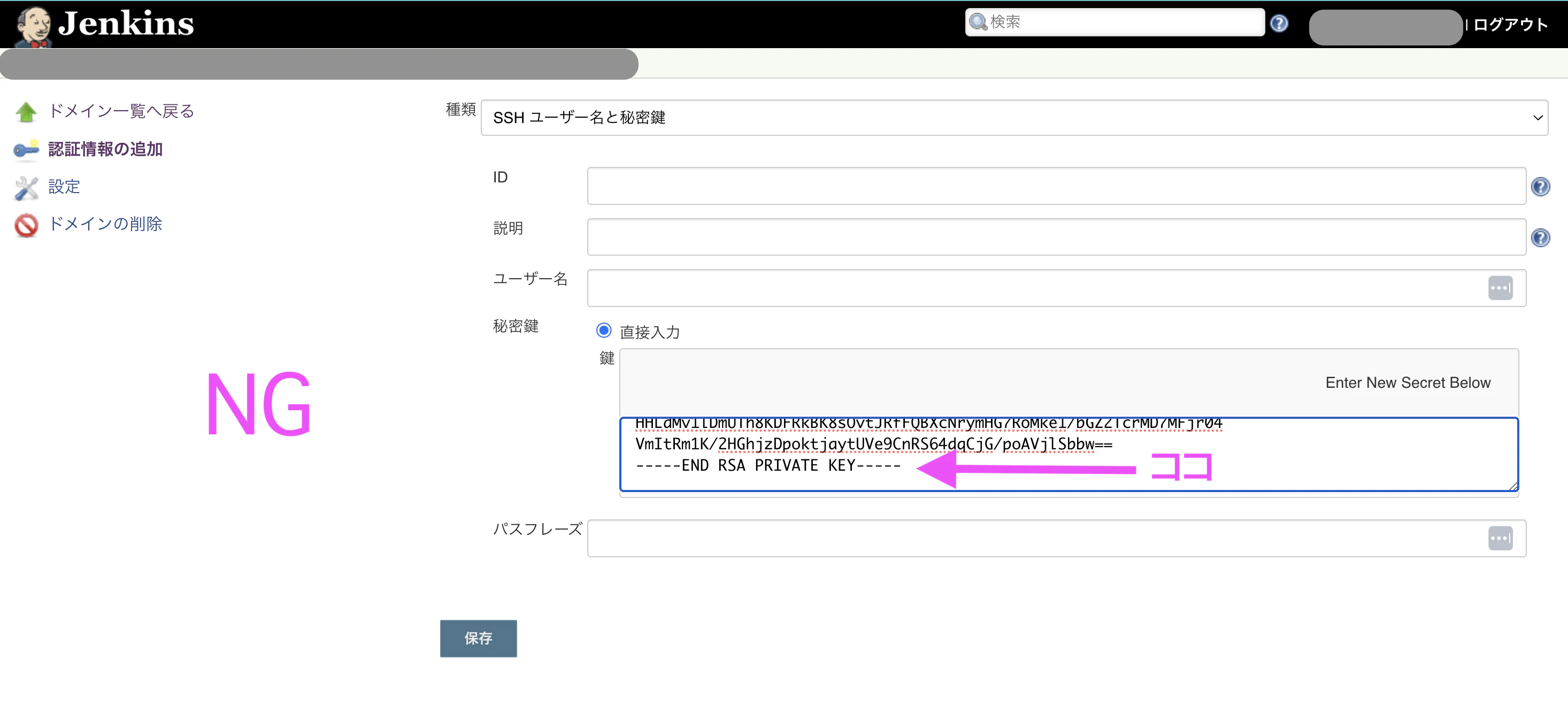
スクリーンショット 2024-10-01 13.14.45.png
スクリーンショット 2024-10-01 13.17.05.png
改行文字が抜けてるとssh-addできなくて失敗します。

2. Permissionの確認

ssh/scp先で

$ chmod 600 ~/path/to/ssh/.ssh/authorized_keys
$ chmod 600 ~/path/to/ssh/.ssh/id_rsa

して読み書き権限付与しておきましょう。

3. -o "IdentitiesOnly=yes"の追加

ssh  -o "IdentitiesOnly=yes" user@hostname

SSHクライアントは指定された鍵ファイルのみを使用し、他の鍵ファイルやエージェントに登録されている鍵を使用しません。

0
0
0

Register as a new user and use Qiita more conveniently

  1. You get articles that match your needs
  2. You can efficiently read back useful information
  3. You can use dark theme
What you can do with signing up
0
0

Delete article

Deleted articles cannot be recovered.

Draft of this article would be also deleted.

Are you sure you want to delete this article?