
基本トピック
Detectron2の概要
Detectron2はObject DetectionやSegmentationのアルゴリズムを試すにあたって用いられるPyTorchベースのライブラリです。
Detectron2が取り扱っているタスク
Detectron2は主に下記の4つのタスクを取り扱っています。
| タスク名 | 概要 |
|---|---|
| Detection | Object Detection |
| Instance Segmentation | Object Detection + 推論したBounding Box内でのセグメンテーション |
| Keypoints | Object Detection + 推論したBounding Box内での特徴点の検出 |
| Panoptic Segmentation | 全てのピクセルについてセグメンテーションを行う |
Detectron2のインストール
上記の記載に基づいて下記などによってインストールすることができます。
$ pip install torch torchvision torchaudio --index-url https://download.pytorch.org/whl/cu124
$ pip install opencv-python pandas matplotlib
$ pip install watchdog colorama fvcore cloudpickle omegaconf pycocotools
$ git clone https://github.com/facebookresearch/detectron2.git
$ python -m pip install -e detectron2
筆者環境ではpython -m pip install -e detectron2の実行がうまくいかなかったのでdetectron2直下に実行ファイルを置き、必要に応じてパスなどを修正しました。
特にfrom vision.fair.detectron2.demo.predictor import VisualizationDemoなどによって読み込むVisualizationDemoがdemo/predictor.pyに実装されていることに注意しておくと良いと思います。
Detectron2を用いた推論とfinetuningの手順まとめ
Detectron2を用いた推論
# Copyright (c) Facebook, Inc. and its affiliates.
import argparse
import glob
import multiprocessing as mp
import numpy as np
import os
import tempfile
import time
import warnings
import cv2
import tqdm

from detectron2.config import get_cfg
from detectron2.data.detection_utils import read_image
from detectron2.utils.logger import setup_logger

from vision.fair.detectron2.demo.predictor import VisualizationDemo

...


def main() -> None:
    mp.set_start_method("spawn", force=True)
    args = get_parser().parse_args()
    setup_logger(name="fvcore")
    logger = setup_logger()
    logger.info("Arguments: " + str(args))

    cfg = setup_cfg(args)

    demo = VisualizationDemo(cfg)

    if args.input:
        if len(args.input) == 1:
            args.input = glob.glob(os.path.expanduser(args.input[0]))
            assert args.input, "The input path(s) was not found"
        for path in tqdm.tqdm(args.input, disable=not args.output):
            # use PIL, to be consistent with evaluation
            img = read_image(path, format="BGR")
            start_time = time.time()
            predictions, visualized_output = demo.run_on_image(img)
    ...

if __name__ == "__main__":
    main()  # pragma: no cover
上記のdemo.pyについて下記のコマンドなどを実行することでInstance Segmentationを行うことができます。
$ python demo.py --config-file configs/COCO-InstanceSegmentation/mask_rcnn_R_50_FPN_3x.yaml --input data/input.jpg --output results/ --opts MODEL.WEIGHTS detectron2://COCO-InstanceSegmentation/mask_rcnn_R_50_FPN_3x/137849600/model_final_f10217.pkl
・実行結果
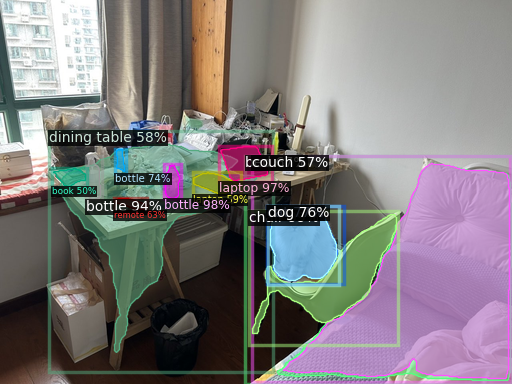
--opts MODEL.WEIGHTS detectron2://COCO-InstanceSegmentation/mask_rcnn_R_50_FPN_3x/137849600/model_final_f10217.pklを指定しないとうまく推論できないので実行時には注意しておくと良いと思います。
Detectron2を用いたfinetuning
以下、COCOを用いたInstance Segmentationのfinetuningの流れについて確認します。まずは下記を実行することでデータセットの取得と解凍を行います。
$ mkdir -p datasets/coco
$ cd datasets/coco
$ wget http://images.cocodataset.org/annotations/annotations_trainval2017.zip
$ wget http://images.cocodataset.org/zips/train2017.zip
$ wget http://images.cocodataset.org/zips/val2017.zip
$ wget http://images.cocodataset.org/zips/test2017.zip
$ unzip annotations_trainval2017.zip
$ unzip train2017.zip
$ unzip val2017.zip
$ unzip test2017.zip
$ cd ../../
次に下記を実行することでCOCOを用いたInstance Segmentationのfinetuningを実行することができます。
$ python train_net.py --config-file configs/COCO-InstanceSegmentation/mask_rcnn_R_50_FPN_1x.yaml --num-gpus 1 SOLVER.IMS_PER_BATCH 2 SOLVER.BASE_LR 0.0025 SOLVER.MAX_ITER 100
SOLVER.MAX_ITERはデフォルトでは90,000ですが時間がかかる(2080Ti環境で5時間程度)ので、動作確認の際は100に設定して一度動かしておく方が良いと思います。
下記が各MAX_ITERに対応する推論スコアです。
d2.evaluation.coco_evaluation INFO: Per-category bbox AP:
| category      | AP    | category     | AP    | category       | AP    |
|:--------------|:------|:-------------|:------|:---------------|:------|
| person        | 0.096 | bicycle      | 0.000 | car            | 0.000 |
| motorcycle    | 0.000 | airplane     | 0.000 | bus            | 0.000 |
| train         | 0.000 | truck        | 0.000 | boat           | 0.000 |
| traffic light | 0.000 | fire hydrant | 0.000 | stop sign      | 0.000 |
| parking meter | 0.000 | bench        | 0.000 | bird           | 0.000 |
| cat           | 0.000 | dog          | 0.000 | horse          | 0.000 |
| sheep         | 0.000 | cow          | 0.000 | elephant       | 0.000 |
| bear          | 0.000 | zebra        | 0.000 | giraffe        | 0.000 |
| backpack      | 0.000 | umbrella     | 0.000 | handbag        | 0.000 |
| tie           | 0.000 | suitcase     | 0.000 | frisbee        | 0.000 |
| skis          | 0.000 | snowboard    | 0.000 | sports ball    | 0.000 |
| kite          | 0.000 | baseball bat | 0.000 | baseball glove | 0.000 |
| skateboard    | 0.000 | surfboard    | 0.000 | tennis racket  | 0.000 |
| bottle        | 0.000 | wine glass   | 0.000 | cup            | 0.000 |
| fork          | 0.000 | knife        | 0.000 | spoon          | 0.000 |
| bowl          | 0.000 | banana       | 0.000 | apple          | 0.000 |
| sandwich      | 0.000 | orange       | 0.000 | broccoli       | 0.000 |
| carrot        | 0.000 | hot dog      | 0.000 | pizza          | 0.000 |
| donut         | 0.000 | cake         | 0.000 | chair          | 0.000 |
| couch         | 0.000 | potted plant | 0.000 | bed            | 0.000 |
| dining table  | 0.000 | toilet       | 0.000 | tv             | 0.000 |
| laptop        | 0.000 | mouse        | 0.000 | remote         | 0.000 |
| keyboard      | 0.000 | cell phone   | 0.000 | microwave      | 0.000 |
| oven          | 0.000 | toaster      | 0.000 | sink           | 0.000 |
| refrigerator  | 0.000 | book         | 0.000 | clock          | 0.000 |
| vase          | 0.000 | scissors     | 0.000 | teddy bear     | 0.000 |
| hair drier    | 0.000 | toothbrush   | 0.000 |                |       |
d2.evaluation.coco_evaluation INFO: Per-category bbox AP:
| category      | AP     | category     | AP     | category       | AP     |
|:--------------|:-------|:-------------|:-------|:---------------|:-------|
| person        | 29.424 | bicycle      | 2.257  | car            | 15.519 |
| motorcycle    | 11.511 | airplane     | 14.203 | bus            | 18.633 |
| train         | 18.766 | truck        | 6.929  | boat           | 1.847  |
| traffic light | 6.205  | fire hydrant | 19.727 | stop sign      | 31.527 |
| parking meter | 8.903  | bench        | 2.574  | bird           | 4.204  |
| cat           | 11.508 | dog          | 12.682 | horse          | 11.971 |
| sheep         | 12.252 | cow          | 14.848 | elephant       | 18.599 |
| bear          | 23.378 | zebra        | 27.619 | giraffe        | 26.688 |
| backpack      | 1.117  | umbrella     | 8.384  | handbag        | 1.089  |
| tie           | 2.839  | suitcase     | 2.847  | frisbee        | 20.776 |
| skis          | 1.610  | snowboard    | 0.133  | sports ball    | 25.553 |
| kite          | 9.254  | baseball bat | 0.454  | baseball glove | 9.866  |
| skateboard    | 3.403  | surfboard    | 1.606  | tennis racket  | 9.041  |
| bottle        | 12.828 | wine glass   | 5.637  | cup            | 15.646 |
| fork          | 0.434  | knife        | 0.495  | spoon          | 0.397  |
| bowl          | 11.782 | banana       | 2.544  | apple          | 1.421  |
| sandwich      | 6.057  | orange       | 9.191  | broccoli       | 5.242  |
| carrot        | 1.370  | hot dog      | 0.677  | pizza          | 12.517 |
| donut         | 4.995  | cake         | 6.210  | chair          | 4.464  |
| couch         | 6.674  | potted plant | 5.480  | bed            | 9.214  |
| dining table  | 6.643  | toilet       | 21.149 | tv             | 20.977 |
| laptop        | 17.688 | mouse        | 13.261 | remote         | 0.824  |
| keyboard      | 8.244  | cell phone   | 5.030  | microwave      | 4.244  |
| oven          | 1.613  | toaster      | 0.000  | sink           | 6.870  |
| refrigerator  | 3.468  | book         | 0.450  | clock          | 27.928 |
| vase          | 6.454  | scissors     | 0.000  | teddy bear     | 9.344  |
| hair drier    | 0.000  | toothbrush   | 0.000  |                |        |
デフォルトではdetectron2://ImageNetPretrained/MSRA/R-50.pklのfinetuningを行っています。分類タスクの学習modelを用いてfinetuningを行っていることから十分なエポック数の学習が必要になると理解しておくと良いと思います。