
今回やりたいこと
前回の構成に機器管理VLANとIPを追加し、SSHできるようにします。そして、NTPサーバを構築して各機器をそこに時刻同期させます。
NTPサーバは、サーバ集約SWを追加してそこに接続させます。
ということで構成図としては以下になります。
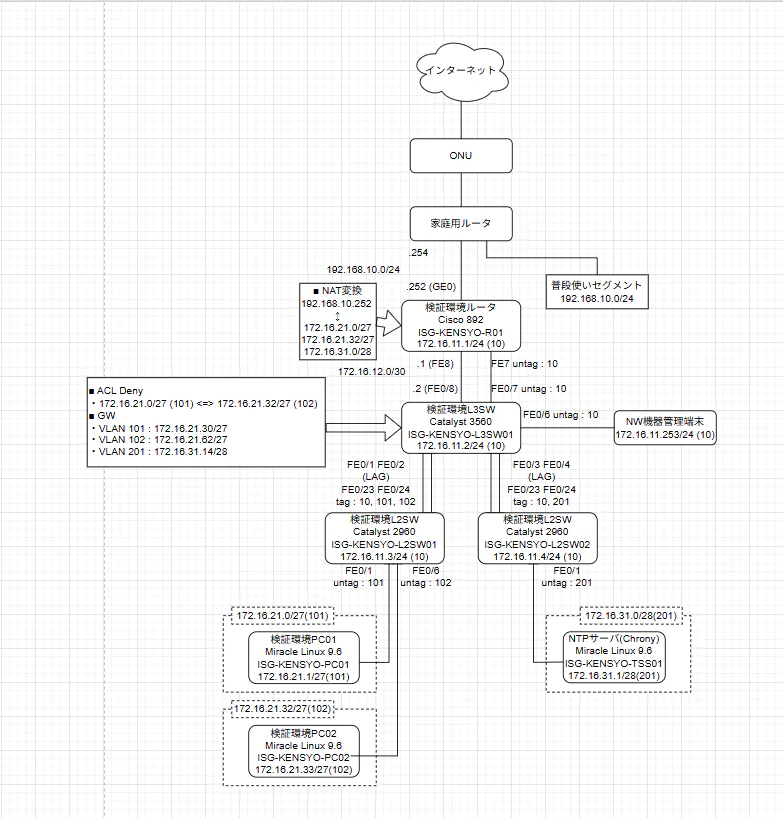
実務では好ましくはないのかもしれませんが、今回はユーザ利用端末及びNW機器から同一のntpサーバに同期しに行けるようにします。
ルータ - L3SW間の2本目の線は、機器管理専用に増やしたものです。
IPアドレス VLAN設計
まずは機器管理VLANとIPについて、どこを使用するか考えます。
IPは前回予約しておいた以下の範囲を使用します。VLANは10とします。
また、NW機器管理端末用のIPアドレスと、接続ポートに設定するIPも以下の通り用意します。
- 172.16.11.0/24 (VLAN 10)
| IPアドレス | 使用用途 |
|---|---|
| 172.16.11.1 | ISG-KENSYO-R01 (Cisco 892) |
| 172.16.11.2 | ISG-KENSYO-L3SW01 (Catalyst 3650) |
| 172.16.11.3 | ISG-KENSYO-L2SW01 (Catalyst 2960) |
| 172.16.11.4 | ISG-KENSYO-L2SW02 (Catalyst 2960) |
| 172.16.11.5 ~ 172.16.11.252 | 未使用 |
| 172.16.11.253 | NW機器管理端末 |
| 172.16.11.254 | NW機器管理端末接続ポート |
次にNTPサーバ用のIPとVLANを考えます。
VLANはサーバ IoT用の端から使用しますので、VLAN 201をNTPサーバ用にします。
IPアドレスもサーバ IoT用の端から使用します。172.16.31.0/24を使用しますが、/24だと無駄が多いので、/28でサブネット化し、最大13台(GW分を除く)をNTPサーバに割り振れるようにしておきます。
まとめると以下の通りになります。
-
172.16.31.0/24
IPアドレス 使用用途 172.16.31.0/28 NTPサーバ用 172.16.31.16/28 ~ 172.16.31.240/28 他サーバのための拡張用 -
172.16.31.0/28 (VLAN 201)
IPアドレス 使用用途 172.16.31.1/28 TSS01 ※TimeSyncServer01 172.16.31.2/28 ~ 172.16.31.13/28 未使用 172.16.31.14/28 GW
-
ポート収容
以下に、前回から変更点がある機器と、新規機器のポート収容を記載します。
【変更】ISG-KENSYO-L3SW01 (Catalyst 3560)
| Interface | TorA | 速度 | duplex | NWセグメント | 接続先 |
|---|---|---|---|---|---|
| FE 0/1 ~ 0/2 (LAG) |
Trunk | auto | auto | 172.16.11.0/28 (10) 172.16.21.0/27 (101) 172.16.21.32/27 (102) |
ISG-KENSYO-L2SW01 |
| FE 0/3 ~ 0/4 (LAG) |
Trunk | auto | auto | 172.16.11.0/28 (10) 172.16.21.0/27 (101) 172.16.21.32/27 (102) |
ISG-KENSYO-L2SW02 |
| FE 0/5 | - | - | - | - | - |
| FE 0/6 | Access | auto | auto | 172.16.11.0/24 | NW機器管理端末 |
| FE 0/7 | Access | auto | auto | 172.16.11.0/24 | ISG-KENSYO-R01(管) |
| FE 0/8 | - | auto | auto | 172.16.12.0/30 | ISG-KENSYO-R01 |
【新規】ISG-KENSYO-L2SW02 (Catalyst 2960)
| Interface | TorA | 速度 | duplex | NWセグメント | 接続先 |
|---|---|---|---|---|---|
| FE 0/1 | Access | auto | auto | 172.16.31.0/28 (201) | TSS01 |
| FE 0/2 ~ 0/22 | - | - | - | - | - |
| FE 0/23 ~ 24 (LAG) |
Trunk | auto | auto | 172.16.11.0/28 (10) 172.16.31.0/28 (201) |
ISG-KENSYO-L3SW01 |
構築 設定変更後show runとNTPサーバ構築手順
以下に設定変更後及び新規機器構築後のshow run、NTPサーバ(Chrony)の構築手順を記載します。
【設定変更】ISG-KENSYO-R01 (Cisco 892)
ISG-KENSYO-R01#show run
Building configuration...

Current configuration : 2123 bytes
!
! Last configuration change at 22:48:30 JTC Sat Mar 21 2026
! NVRAM config last updated at 22:49:31 JTC Sat Mar 21 2026
! NVRAM config last updated at 22:49:31 JTC Sat Mar 21 2026
version 15.2
service timestamps debug datetime msec
service timestamps log datetime msec
no service password-encryption
!
hostname ISG-KENSYO-R01
!
boot-start-marker
boot-end-marker
!
!
!
no aaa new-model
clock timezone JTC 9 0
!
!
ip cef
!
!
!
!


!
!
!
!
ip domain name isg-kensyo.jp
no ipv6 cef
!
!
!
!
!
multilink bundle-name authenticated
!
!
!
!
!
!
license udi pid CISCO892-K9 sn FGL182322S2
!
!
username <ユーザ名> privilege 15 password 0 <パスワード>
!
redundancy
!
!
!
!
!
!
!
!
!
!
!
!
!
!
interface BRI0
 no ip address
 encapsulation hdlc
 shutdown
 isdn termination multidrop
!
interface FastEthernet0
 no ip address
!
interface FastEthernet1
 no ip address
!
interface FastEthernet2
 no ip address
!
interface FastEthernet3
 no ip address
!
interface FastEthernet4
 no ip address
!
interface FastEthernet5
 no ip address
!
interface FastEthernet6
 no ip address
!
interface FastEthernet7
 switchport access vlan 10
 no ip address
!
interface FastEthernet8
 ip address 172.16.12.1 255.255.255.252
 ip nat inside
 ip virtual-reassembly in
 duplex auto
 speed auto
!
interface GigabitEthernet0
 ip address 192.168.10.252 255.255.255.0
 ip nat outside
 ip virtual-reassembly in
 duplex auto
 speed auto
!
interface Vlan1
 no ip address
!
interface Vlan10
 ip address 172.16.11.1 255.255.255.0
!
ip forward-protocol nd
no ip http server
no ip http secure-server
!
!
ip nat inside source list LABtoRegular interface GigabitEthernet0 overload
ip route 0.0.0.0 0.0.0.0 192.168.10.254
ip route 172.16.21.0 255.255.255.224 172.16.12.2
ip route 172.16.21.32 255.255.255.224 172.16.12.2
ip route 172.16.31.0 255.255.255.240 172.16.12.2
!
ip access-list standard LABtoRegular
 permit 172.16.21.0 0.0.0.31
 permit 172.16.21.32 0.0.0.31
 permit 172.16.31.0 0.0.0.15
!
!
!
!
control-plane
!
!
!
!
mgcp profile default
!
!
!
!
!
!
line con 0
line aux 0
line vty 0 4
 login local
 transport input ssh
!
ntp source Vlan10
ntp server 172.16.31.1
!
end

ISG-KENSYO-R01#
- 補足 SSH設定手順
ip domain name isg-kensyo.jp
crypto key generate rsa
username <ユーザ名> privilege 15 password 0 <パスワード>
line vty 0 4
login local
transport input ssh
【設定変更】ISG-KENSYO-L3SW01 (Catalyst 3560)
ISG-KENSYO-L3SW01#show run
Building configuration...

Current configuration : 4294 bytes
!
! NVRAM config last updated at 22:53:10 JTC Sat Mar 21 2026
!
version 12.2
no service pad
service timestamps debug datetime msec
service timestamps log datetime msec
no service password-encryption
!
hostname ISG-KENSYO-L3SW01
!
boot-start-marker
boot-end-marker
!
!
username <ユーザ名> privilege 15 password 0 <パスワード>
!
!
no aaa new-model
clock timezone JTC 9
system mtu routing 1500
authentication mac-move permit
ip subnet-zero
ip routing
ip domain-name isg-kensyo.jp
!
!
!
!
crypto pki trustpoint TP-self-signed-348868480
 enrollment selfsigned
 subject-name cn=IOS-Self-Signed-Certificate-348868480
 revocation-check none
 rsakeypair TP-self-signed-348868480
!
!
crypto pki certificate chain TP-self-signed-348868480
 certificate self-signed 01
 <省略>
  quit
!
!
!
spanning-tree mode pvst
spanning-tree etherchannel guard misconfig
spanning-tree extend system-id
!
vlan internal allocation policy ascending
!
!
!
!
interface Port-channel1
 switchport trunk encapsulation dot1q
 switchport trunk allowed vlan 10,101,102
 switchport mode trunk
!
interface Port-channel2
 switchport trunk encapsulation dot1q
 switchport trunk allowed vlan 10,201
 switchport mode trunk
!
interface FastEthernet0/1
 switchport trunk encapsulation dot1q
 switchport trunk allowed vlan 10,101,102
 switchport mode trunk
 channel-group 1 mode active
!
interface FastEthernet0/2
 switchport trunk encapsulation dot1q
 switchport trunk allowed vlan 10,101,102
 switchport mode trunk
 channel-group 1 mode active
!
interface FastEthernet0/3
 switchport trunk encapsulation dot1q
 switchport trunk allowed vlan 10,201
 switchport mode trunk
 channel-group 2 mode active
!
interface FastEthernet0/4
 switchport trunk encapsulation dot1q
 switchport trunk allowed vlan 10,201
 switchport mode trunk
 channel-group 2 mode active
!
interface FastEthernet0/5
!
interface FastEthernet0/6
 switchport access vlan 10
 switchport mode access
!
interface FastEthernet0/7
 switchport access vlan 10
 switchport mode access
!
interface FastEthernet0/8
 no switchport
 ip address 172.16.12.2 255.255.255.252
!
interface GigabitEthernet0/1
!
interface Vlan1
 no ip address
 shutdown
!
interface Vlan10
 ip address 172.16.11.2 255.255.255.0
!
interface Vlan101
 ip address 172.16.21.30 255.255.255.224
 ip access-group deny10to20 in
!
interface Vlan102
 ip address 172.16.21.62 255.255.255.224
 ip access-group deny20to10 in
!
interface Vlan201
 ip address 172.16.31.14 255.255.255.240
!
ip classless
ip route 0.0.0.0 0.0.0.0 172.16.12.1
ip http server
ip http secure-server
!
!
ip access-list extended deny10to20
 deny   ip 172.16.21.0 0.0.0.31 172.16.21.32 0.0.0.31
 permit ip any any
ip access-list extended deny20to10
 deny   ip 172.16.21.32 0.0.0.31 172.16.21.0 0.0.0.31
 permit ip any any
!
ip sla enable reaction-alerts
!
!
!
line con 0
line vty 0 4
 login local
 transport input ssh
line vty 5 15
 login
!
ntp source Vlan10
ntp server 172.16.31.1
end

ISG-KENSYO-L3SW01#
【設定変更】ISG-KENSYO-L2SW01 (Catalyst 2960)
こちら機器が古く、cryptoコマンドが使えなかったためTelnet接続にしました。
ip domain-nameは今は不要ですが、他と設定をなるべく合わせるために設定しています。
ISG-KENSYO-L2SW01#show run
Building configuration...

Current configuration : 1986 bytes
!
! Last configuration change at 22:55:35 JTC Sat Mar 21 2026
! NVRAM config last updated at 22:55:58 JTC Sat Mar 21 2026
!
version 12.2
no service pad
service timestamps debug uptime
service timestamps log uptime
no service password-encryption
!
hostname ISG-KENSYO-L2SW01
!
!
username <ユーザ名> privilege 15 password 0 <パスワード>
no aaa new-model
clock timezone JTC 9
system mtu routing 1500
ip subnet-zero
!
ip domain-name isg-kensyo.jp
!
!
!
!
!
!
spanning-tree mode pvst
spanning-tree extend system-id
!
vlan internal allocation policy ascending
!
!
interface Port-channel1
 switchport trunk allowed vlan 10,101,102
 switchport mode trunk
!
interface FastEthernet0/1
 switchport access vlan 101
 switchport mode access
!
interface FastEthernet0/2
!
interface FastEthernet0/3
!
interface FastEthernet0/4
!
interface FastEthernet0/5
!
interface FastEthernet0/6
 switchport access vlan 102
 switchport mode access
!
interface FastEthernet0/7
!
interface FastEthernet0/8
!
interface FastEthernet0/9
!
interface FastEthernet0/10
!
interface FastEthernet0/11
!
interface FastEthernet0/12
!
interface FastEthernet0/13
!
interface FastEthernet0/14
!
interface FastEthernet0/15
!
interface FastEthernet0/16
!
interface FastEthernet0/17
!
interface FastEthernet0/18
!
interface FastEthernet0/19
!
interface FastEthernet0/20
!
interface FastEthernet0/21
!
interface FastEthernet0/22
!
interface FastEthernet0/23
 switchport trunk allowed vlan 10,101,102
 switchport mode trunk
 channel-group 1 mode active
!
interface FastEthernet0/24
 switchport trunk allowed vlan 10,101,102
 switchport mode trunk
 channel-group 1 mode active
!
interface GigabitEthernet0/1
!
interface GigabitEthernet0/2
!
interface Vlan1
 no ip address
 no ip route-cache
 shutdown
!
interface Vlan10
 ip address 172.16.11.3 255.255.255.0
 no ip route-cache
!
ip http server
!
control-plane
!
!
line con 0
line vty 0 4
 login local
 transport input telnet
line vty 5 15
 login
!
ntp source Vlan10
ntp server 172.16.31.1
end

ISG-KENSYO-L2SW01#
- 補足 Telnet接続設定
username <ユーザ名> privilege 15 password 0 <パスワード>
line vty 0 4
login local
transport input telnet
【新規構築】ISG-KENSYO-L2SW02 (Catalyst 2960)
こちら機器が古く、cryptoコマンドが使えなかったためTelnet接続にしました。
ip domain-nameは今は不要ですが、他と設定をなるべく合わせるために設定しています。
ISG-KENSYO-L2SW02#show run
Building configuration...

Current configuration : 1922 bytes
!
! Last configuration change at 22:57:43 JTC Sat Mar 21 2026
! NVRAM config last updated at 22:57:55 JTC Sat Mar 21 2026
!
version 12.2
no service pad
service timestamps debug uptime
service timestamps log uptime
no service password-encryption
!
hostname ISG-KENSYO-L2SW02
!
!
username <ユーザ名> privilege 15 password 0 <パスワード>
no aaa new-model
clock timezone JTC 9
system mtu routing 1500
ip subnet-zero
!
ip domain-name isg-kensyo.jp
!
!
!
!
!
!
spanning-tree mode pvst
spanning-tree extend system-id
!
vlan internal allocation policy ascending
!
!
interface Port-channel1
 switchport trunk allowed vlan 10,201
 switchport mode trunk
!
interface FastEthernet0/1
 switchport access vlan 201
 switchport mode access
!
interface FastEthernet0/2
!
interface FastEthernet0/3
!
interface FastEthernet0/4
!
interface FastEthernet0/5
!
interface FastEthernet0/6
!
interface FastEthernet0/7
!
interface FastEthernet0/8
!
interface FastEthernet0/9
!
interface FastEthernet0/10
!
interface FastEthernet0/11
!
interface FastEthernet0/12
!
interface FastEthernet0/13
!
interface FastEthernet0/14
!
interface FastEthernet0/15
!
interface FastEthernet0/16
!
interface FastEthernet0/17
!
interface FastEthernet0/18
!
interface FastEthernet0/19
!
interface FastEthernet0/20
!
interface FastEthernet0/21
!
interface FastEthernet0/22
!
interface FastEthernet0/23
 switchport trunk allowed vlan 10,201
 switchport mode trunk
 channel-group 1 mode active
!
interface FastEthernet0/24
 switchport trunk allowed vlan 10,201
 switchport mode trunk
 channel-group 1 mode active
!
interface GigabitEthernet0/1
!
interface GigabitEthernet0/2
!
interface Vlan1
 no ip address
 no ip route-cache
 shutdown
!
interface Vlan10
 ip address 172.16.11.4 255.255.255.0
 no ip route-cache
!
ip http server
!
control-plane
!
!
line con 0
line vty 0 4
 login local
 transport input telnet
line vty 5 15
 login
!
ntp source Vlan10
ntp server 172.16.31.1
end

ISG-KENSYO-L2SW02#
【新規構築】NTPサーバ(Chrony)構築手順
- 初期設定
- chronyのインストール状態確認
# dnf list installed chrony - なければインストール
# dnf install chrony - conf編集
# vim /etc/chrony.conf - 以下を追記し、必要に応じて既存の不要部分をコメントアウト
server ntp.nict.jp iburst
allow 172.16.21.0/27
allow 172.16.21.32/27
allow 172.16.11.0/24
- ファイアウォールの設定
- ファイアウォールの許可設定確認
# firewall-cmd --list-service - ntpがなければ以下を実行
# firewall-cmd --add-service=ntp --permanent - ファイアウォールの許可設定確認
# firewall-cmd --list-service - リロード
# firewall-cmd --reload
- サービスの再起動及び確認
- サービスの確認
# systemctl status chronyd - サービスの再起動
# systemctl restart chronyd - サービスの確認
# systemctl status chronyd
- 上位サーバとの同期確認とクライアントの確認
- 上位サーバとの同期確認
# chronyc tracking
# chronyc sources -v - クライアントの確認
# chronyc clients
今後の予定
無線APの追加