
みなさんテンキーって使ってますか?私は使ってません。
なのでテンキーを有効活用するためにPythonでテンキー入力をガラケー入力に変換できるシステムを作りました。
システムの実行の様子
実行環境
Python 3.6 以降
Windowsのみ対応
導入が必要なライブラリ
| ライブラリ名 | 説明 |
|---|---|
| mozcpy | 日本語から漢字などに変換するためのライブラリ |
| jaconv | 日本語からカタカナや半角カタカナに変換するためのライブラリ |
コード
コード(Python3)
import tkinter as tk
from tkinter import font
from tkinter import scrolledtext
import time
import mozcpy
import jaconv

converter = mozcpy.Converter()

keys = ["7","8","9","4","5","6","1","2","3","0","Tab","asterisk"]
key_name = keys[:]+["slash","minus","plus","Return","period"]

KEY_TENKEYS  = key_name[:10].copy()
KEY_TAB      = key_name[10]
KEY_ASTERISK = key_name[11]
KEY_SLASH    = key_name[12]
KEY_MINUS    = key_name[13]
KEY_PLUS     = key_name[14]
KEY_ENTER    = key_name[15]
KEY_PERIOD   = key_name[16]

key_index_to_button = [3,4,5,6,7,8,9,10,11,12,0,2]

Hiragana = [
    "あいうえお",
    "かきくけこ",
    "さしすせそ",
    "たちつてと",
    "なにぬねの",
    "はひふへほ",
    "まみむめも",
    "やゆよ",
    "らりるれろ",
    "わをんー",
    " ",
    "?!。、"
]

Alphabet = [
    "@#/&_",
    "abc",
    "def",
    "ghi",
    "jkl",
    "mno",
    "pqrs",
    "tuv",
    "wxyz",
    ".,?!",
    " ",
    "'\"()"
]

Number = [
    "7",
    "8",
    "9",
    "4",
    "5",
    "6",
    "1",
    "2",
    "3",
    "0",
    " ",
    ".+-*/"
]

Symbol = [
    "☆♪→",
    "¥$€",
    "%°#",
    "◯*・",
    "+×÷",
    "<=>",
    "「」_",
    ":;ー",
    "^|\",
    "()~…",
    " ",
    "{}【】"
]

Shift_Hiragana =[
    "「」",
    "()",
    "【】",
    ",.",
    "。",
    "、",
    "¥$",
    "ー~",
    "々〆",
    "{}",
    " ",
    "!?"
]

Shift_Alphabet = [i.upper() for i in Alphabet[:]]

Shift_Number = [
    "七",
    "八",
    "九",
    "四",
    "五",
    "六",
    "一",
    "二",
    "三",
    "〇",
    " ",
    "十百千万"
]

Shift_Symbol = Symbol[:]

letters = Hiragana[:]

modes = ["Hiragana","Alphabet","Number","Symbol",
         "Shift_Hiragana","Shift_Alphabet","Shift_Number","Shift_Symbol"]
mode_japanese = {
    "Hiragana":"ひらがな",
    "Alphabet":"アルファベット",
    "Number":"数字",
    "Symbol":"記号",
    "Shift_Hiragana":"括弧・記号 (シフトキー押下中)",
    "Shift_Alphabet":"アルファベット大文字 (シフトキー押下中)",
    "Shift_Number":"漢数字 (シフトキー押下中)",
    "Shift_Symbol":"記号 (シフトキー押下中)"
}

key_bind = {
    "Hiragana":(["あ","か","さ","た","な","は","ま","や","ら","わ"],20),
    "Alphabet":(Alphabet[:-1],10),
    "Number":(Number[:-1],20),
    "Symbol":(Symbol[:-1],10),
    "Shift_Hiragana":(Shift_Hiragana[:-1],15),
    "Shift_Alphabet":(Shift_Alphabet[:-1],10),
    "Shift_Number":(Shift_Number[:-1],20),
    "Shift_Symbol":(Shift_Symbol[:-1],10)
}

henkan_bind = {
    "Hiragana":"濁音\n小",
    "Alphabet":"大/小",
    "Number":"全角\n半角",
    "Symbol":"全角\n半角",
    "Shift_Hiragana":"----",
    "Shift_Alphabet":"----",
    "Shift_Number":"----",
    "Shift_Symbol":"全角\n半角"
}

Kigou_bind = {
    "Hiragana":"!?\n。、",
    "Alphabet":"' \"()",
    "Number":".+ -\n*/",
    "Symbol":"{}\n【】",
    "Shift_Hiragana":"!?",
    "Shift_Alphabet":"' \"()",
    "Shift_Number":"十百\n千万",
    "Shift_Symbol":"{}\n【】"
}

type_mode = "Hiragana"  # "Hiragana", "Alphabet", "Number", "Symbol"

Table = "aAbBcCdDeEfFgGhHiIjJkKlLmMnNoOpPqQrRsStTuUvVwWxXyYzZ@#/&_.,?!" \
"11223344556677889900"\
"??!!、,。.'\"().+-*/☆↑♪↓→←¥\\$$€£%%°&##◯○**・・++×*÷/<<==>>「[」]__::;;ー-^^||\\\(())~~…‥{{}}【〈】〉"\
"ー  あぁいぃうぅゔえぇおぉかがきぎくぐけげこごさざしじすずせぜそぞただちぢつっづてでとどなにぬねのはばぱひびぴふぶぷへべぺほぼぽまみむめもやゃゆゅよょらりるれろわをん"\
"〇一二三四五六七八九十百千万々〆~"

able_time = {
    "あ":1,
    "い":1,
    "う":2,
    "え":1,
    "お":1,
    "かきくけこ":1,
    "さしすせそ":1,
    "た":1,
    "ち":1,
    "つ":2,
    "て":1,
    "と":1,
    "なにぬねの":0,
    "はひふへほ":2,
    "まみむめも":0,
    "やゆよ":1,
    "らりるれろ":0,
    "わをんー":0,
    " ":1,
    " ":0,
    "@#/&_":0,
    "abc":1,
    "def":1,
    "ghi":1,
    "jkl":1,
    "mno":1,
    "pqrs":1,
    "tuv":1,
    "wxyz":1,
    ".,?!":0,
    "7":1,
    "8":1,
    "9":1,
    "4":1,
    "5":1,
    "6":1,
    "1":1,
    "2":1,
    "3":1,
    "0":1,
    "?!。、":1,
    "'\"()":0,
    ".+-*/":0,
    "☆♪→":1,
    "¥$€":1,
    "%°#":1,
    "◯*・":1,
    "+×÷":1,
    "<=>":1,
    "「」_":1,
    ":;ー":1,
    "^|\":1,
    "()~…":1,
    "{}【】":1
}

for i in Shift_Hiragana + Shift_Alphabet + Shift_Number + Shift_Symbol:
    able_time.setdefault(i,0)

pressed_keys = set()

def on_key_release(event):
    if event.keysym in pressed_keys:
        pressed_keys.remove(event.keysym)
        if event.keysym in keys:
            key_index = keys.index(event.keysym)
            buttons[key_index_to_button[key_index]].configure(background="SystemButtonFace")
        if event.keysym == KEY_PERIOD:
            buttons[-5].configure(background="SystemButtonFace")
        if event.keysym == KEY_SLASH:
            buttons[1].configure(background="SystemButtonFace")
        if event.keysym == "BackSpace":
            buttons[-4].configure(background="SystemButtonFace")
        if event.keysym == KEY_MINUS:
            buttons[-3].configure(background="SystemButtonFace")
        if event.keysym == KEY_ENTER:
            buttons[-1].configure(background="SystemButtonFace")
        if event.keysym == KEY_PLUS:
            buttons[-2].configure(background="SystemButtonFace")
            global type_mode
            if (now:=modes.index(type_mode)) > 3 and not capslock:
                type_mode = modes[now-4]
                change_mode(KEY_PLUS)

def check_table(text,big_text):
    if big_text in able_time:
        return able_time[big_text]
    else:
        return able_time[text]

def write_textbox(content):
    textbox.configure(state="normal")
    textbox.insert("end",content)
    textbox.configure(state="disabled")
    textbox.see("end")

def replace_last_textbox(content):
    textbox.configure(state="normal")
    textbox.delete("end-2c","end-1c")
    textbox.insert("end-1c",content)
    textbox.configure(state="disabled")
    textbox.see("end")

def replace_custom_textbox(start,end,content):
    textbox.configure(state="normal")
    textbox.delete(start,end)
    textbox.insert(start,content)
    textbox.configure(state="disabled")
    textbox.see("end")

def replace_kouho_labels(kouhos=[],select = None):
    global kouho
    if kouhos == []:
        kouho = []
    styled_kouho = [i if len(i)<=10 else i[:10]+"..." for i in kouhos.copy()]
    for i in range(10):
        if i < len(kouhos):
            kouho_label[i].config(text=f"{i}:{styled_kouho[i]}",background="SystemButtonFace")
        else:
            kouho_label[i].config(text=f"{i}:",background="SystemButtonFace")
    if select is not None:
        kouho_label[select].config(background="lightyellow")

def copy_to_clipboard():
    root.clipboard_clear()
    root.clipboard_append(textbox.get("1.0","end-1c"))
    if not hasattr(root, 'window2') or not root.window2.winfo_exists():
        root.window2 = tk.Toplevel(root)
        root.window2.title("コピー完了")
        label_copy = tk.Label(root.window2, text="テキストがクリップボードにコピーされました。", font=("Arial", 10))
        label_copy.pack(padx=10, pady=10)
        button_ok = tk.Button(root.window2, text="OK (Enter)", command=root.window2.destroy)
        button_ok.pack(padx=10, pady=10,fill="x")
        root.window2.bind(f"<{KEY_ENTER}>",lambda event:root.window2.destroy())
    root.window2.bind("<KeyRelease>", on_key_release)
    root.window2.focus_set()

def quit_garakey():
    if not hasattr(root, 'quitcheck') or not root.quitcheck.winfo_exists():
        root.quitcheck = tk.Toplevel(root)
        root.quitcheck.title("終了確認")
        label_quit = tk.Label(root.quitcheck, text="本当に終了しますか?", font=("Arial", 10))
        label_quit.pack(padx=10, pady=10)
        button_yes = tk.Button(root.quitcheck, text="はい (Enter)", command=root.destroy)
        button_yes.pack(padx=10, pady=5,side="left",expand=True,fill="x")
        button_no = tk.Button(root.quitcheck, text="いいえ (BackSpace)", command=root.quitcheck.destroy)
        button_no.pack(padx=10, pady=5,side="right",expand=True,fill="x")
        root.quitcheck.bind(f"<{KEY_ENTER}>",lambda event:root.destroy())
        root.quitcheck.bind("<BackSpace>",lambda event:root.quitcheck.destroy())
    root.quitcheck.bind("<KeyRelease>", on_key_release)
    root.quitcheck.focus_set()

start = time.time()
pushed_time=0
letters_result = ""
now_push = "や"
last_pushed = "KP_Add"
last_bigletter="やゆよ"
temp_text = ""
temp_start = 1.0
temp_end = 1.0
selected_kouho = 0
now_kouho = ""
kouho = []
capslock = False

def search_kouho(temp_text):
    kouho = converter.convert(temp_text,n_best=10)
    if temp_text in kouho:
        kouho.remove(temp_text)
    kouho.insert(0,temp_text)
    kouho = kouho[:10]
    replace_kouho_labels(kouho,0)
    return kouho

def on_key(event):
    pressed_keys.add(event.keysym)
    global last_pushed
    global pushed_time
    global start
    global now_push
    global letters_result
    global last_bigletter
    global temp_text
    global temp_start
    global temp_end
    global type_mode
    global selected_kouho
    global now_kouho
    global kouho
    global capslock
    pushed = event.keysym
    if event.keysym in key_name[:12] and (not KEY_MINUS in pressed_keys):
        key_index = keys.index(pushed)
        if type_mode == "Hiragana" and key_index==10 and temp_text!="":
            kouho = search_kouho(temp_text)
            selected_kouho += 1
            selected_kouho %= len(kouho)
            replace_kouho_labels(kouho,selected_kouho)
            replace_custom_textbox(temp_start,temp_end,kouho[selected_kouho])
            now_kouho = kouho[selected_kouho]
            temp_end = textbox.index("end - 1c")
            textbox.tag_add("underline", temp_start, temp_end)
        else:
            is_update = False
            if last_pushed == pushed and time.time()-start< 0.5 and (letters[0]!="7" or key_index==11):
                is_update = True
                pushed_time+=1
                pushed_time%=len(letters[key_index])
            else:
                pushed_time = 0
                last_pushed = pushed
            start = time.time()
            now_push=letters[key_index][pushed_time]
            if is_update:
                letters_result=letters_result[:-1]+now_push
                replace_last_textbox(now_push)
                if type_mode == "Hiragana":
                    temp_text = temp_text[:-1]+now_push
                    now_kouho = now_kouho[:-1] + now_push
                    kouho = search_kouho(temp_text)
            else:
                letters_result += now_push
                write_textbox(now_push)
                if type_mode == "Hiragana":
                    temp_text += now_push
                    now_kouho = now_kouho + now_push
                    kouho = search_kouho(temp_text)
            if temp_start == 1.0 and type_mode == "Hiragana":
                temp_start = textbox.index("end - 2c")
            temp_end = textbox.index("end - 1c")
            if type_mode != "Hiragana":
                textbox.tag_remove("underline", "1.0", "end")
                replace_kouho_labels()
                temp_start = 1.0
                temp_end = 1.0
                temp_text = ""
                now_kouho = ""
            textbox.tag_add("underline", temp_start, temp_end)
            last_bigletter = letters[key_index]
            buttons[key_index_to_button[key_index]].configure(background="lightyellow")
    elif pushed == "BackSpace" and not KEY_MINUS in pressed_keys:
        letters_result = letters_result[:-1]
        last_pushed = pushed
        buttons[-4].configure(background="lightyellow")
        if type_mode == "Hiragana":
            temp_text = temp_text[:-1]
            now_kouho = now_kouho[:-1]
            if now_kouho == "":
                temp_text = ""
                now_kouho = ""
                selected_kouho = 0
                temp_start = 1.0
                temp_end = 1.0
                textbox.tag_remove("underline", "1.0", "end")
                replace_kouho_labels()
            else:
                temp_end = textbox.index("end - 1c")
                textbox.tag_add("underline", temp_start, temp_end)
                kouho = search_kouho(temp_text)
        replace_last_textbox("")
    elif KEY_PLUS in pressed_keys and not KEY_MINUS in pressed_keys:
        if last_pushed == KEY_PLUS and time.time()-start<0.2:
            capslock = not capslock
        start = time.time()
        buttons[-2].configure(background="lightyellow")
        last_pushed == KEY_PLUS
        if (now:=modes.index(type_mode)) < 4:
            type_mode=modes[now+4]
            change_mode(pushed)
    elif pushed == KEY_PERIOD:
        able = check_table(now_push,last_bigletter)
        if last_pushed == "BackSpace":
            return
        elif last_pushed==pushed:
            pushed_time += 1
        else:
            pushed_time=1
        pushed_time %= able+1
        last_pushed = pushed
        replace_last_textbox(Table[Table.index(now_push)+pushed_time])
        if type_mode == "Hiragana":
            temp_text = temp_text[:-1]+Table[Table.index(now_push)+pushed_time]
            now_kouho = now_kouho[:-1]+Table[Table.index(now_push)+pushed_time]
            textbox.tag_add("underline", temp_start, temp_end)
            kouho = search_kouho(temp_text)
        letters_result=letters_result[:-1]+Table[Table.index(now_push)+pushed_time]
        buttons[-5].configure(background="lightyellow")
    elif pushed == KEY_SLASH:
        temp_text = ""
        temp_start = 1.0
        temp_end = 1.0
        textbox.tag_remove("underline", "1.0", "end")
        replace_kouho_labels()
        if modes.index(type_mode)>3:
            type_mode = modes[0]
        else:
            type_mode = modes[(modes.index(type_mode)+1)%3]
        buttons[1].configure(background="lightyellow")
        change_mode(pushed)

    elif pushed == KEY_ENTER:
        if temp_text != "" and type_mode == "Hiragana":
            if now_kouho == "":
                now_kouho = temp_text
            replace_custom_textbox(temp_start,temp_end,now_kouho)
            replace_kouho_labels()
            now_kouho = ""
            selected_kouho = 0
            temp_text = ""
            temp_start = 1.0
            temp_end = 1.0
        else:
            letters_result += "\n"
            write_textbox("\n")
        buttons[-1].configure(background="lightyellow")
    elif KEY_MINUS in pressed_keys:
        buttons[-3].configure(background="lightyellow")
        if type_mode == "Hiragana" and kouho != []:
            pressing_number = pressed_keys & {"0","1","2","3","4","5","6","7","8","9",
                                              "KP_0","KP_1","KP_2","KP_3","KP_4","KP_5","KP_6","KP_7","KP_8","KP_9"}
            if pressing_number == set():
                if KEY_ASTERISK in pressed_keys:
                    now_kouho = jaconv.hira2kata(temp_text)
                    replace_custom_textbox(temp_start,temp_end,now_kouho)
                    replace_kouho_labels(kouho)
                    textbox.tag_add("underline", temp_start, temp_end)
                if KEY_TAB in pressed_keys:
                    now_kouho = jaconv.z2h(jaconv.hira2hkata(temp_text),digit=True,ascii=True)
                    replace_custom_textbox(temp_start,temp_end,now_kouho)
                    replace_kouho_labels(kouho)
                    textbox.tag_add("underline", temp_start, temp_end)
                return
            number = int(pressing_number.pop())
            if number >= len(kouho):
                number = len(kouho)-1
            selected_kouho = number
            replace_kouho_labels(kouho,selected_kouho)
            replace_custom_textbox(temp_start,temp_end,kouho[selected_kouho])
            now_kouho = kouho[selected_kouho]
            temp_end = textbox.index("end - 1c")
            textbox.tag_add("underline", temp_start, temp_end)
            return
        elif KEY_TENKEYS[0] in pressed_keys:
            buttons[3].configure(background="lightyellow")
            type_mode = modes[0]
            capslock = False
            change_mode(pushed)
        elif KEY_TENKEYS[1] in pressed_keys:
            buttons[4].configure(background="lightyellow")
            type_mode = modes[1]
            capslock = False
            change_mode(pushed)
        elif KEY_TENKEYS[2] in pressed_keys:
            buttons[5].configure(background="lightyellow")
            type_mode = modes[2]
            capslock = False
            change_mode(pushed)
        elif KEY_TENKEYS[3] in pressed_keys:
            buttons[6].configure(background="lightyellow")
            type_mode = modes[4]
            capslock = True
            change_mode(pushed)
        elif KEY_TENKEYS[4] in pressed_keys:
            buttons[7].configure(background="lightyellow")
            type_mode = modes[5]
            capslock = True
            change_mode(pushed)
        elif KEY_TENKEYS[5] in pressed_keys:
            buttons[8].configure(background="lightyellow")
            type_mode = modes[6]
            capslock = True
            change_mode(pushed)
        elif KEY_ASTERISK in pressed_keys:
            buttons[2].configure(background="lightyellow")
            type_mode = modes[3]
            change_mode(pushed)
        elif KEY_PLUS in pressed_keys:
            buttons[-2].configure(background="lightyellow")
            copy_to_clipboard()
        elif "BackSpace" in pressed_keys:
            quit_garakey()
        else:
            return
        temp_text = ""
        temp_start = 1.0
        temp_end = 1.0
        textbox.tag_remove("underline", "1.0", "end")
    label.config(text = letters_result)

def change_mode(pushed):
    global pushed_time
    global last_pushed
    if type_mode == "Hiragana":
        letters[:] = Hiragana[:]
    elif type_mode == "Alphabet":
        letters[:] = Alphabet[:]
    elif type_mode == "Number":
        letters[:] = Number[:]
    elif type_mode == "Symbol":
        letters[:] = Symbol[:]
    elif type_mode == modes[4]:
        letters[:] = Shift_Hiragana[:]
    elif type_mode == modes[5]:
        letters[:] = Shift_Alphabet[:]
    elif type_mode == modes[6]:
        letters[:] = Shift_Number[:]
    elif type_mode == modes[7]:
        letters[:] = Shift_Symbol[:]
    pushed_time = 0
    last_pushed = pushed
    mode_label.config(text=f"現在のモード: {mode_japanese[type_mode]}"+("  <CAPSロック中>"if capslock else ""))
    b_index = 0
    for b in buttons[3:-5]:
        b.configure(text=key_bind[type_mode][0][b_index],font=("Arial",key_bind[type_mode][1]))
        b_index += 1
    buttons[-5].configure(text=henkan_bind[type_mode])
    buttons[2].configure(text=Kigou_bind[type_mode])

root = tk.Tk()
root.title("GaraKey / ガラキー v2.0")
bigframe = tk.Frame(root)
bigframe.pack()
bigframe.config(width=800)
bigframe.pack_propagate(False)
mode_label = tk.Label(root, text=f"現在のモード: {mode_japanese[type_mode]}", font=("Arial", 12),anchor="w", justify="left")
label = tk.Label(root, text="結果がここに表示されます", font=("Arial", 16),anchor="w", justify="left",background="lightgray")
right_frame = tk.Frame(root)
frame = tk.LabelFrame(right_frame, text="キーバインド", padx=10, pady=10)
kouho_frame = tk.LabelFrame(root, text="候補一覧", padx=10, pady=10)
kouho_label = [tk.Label(kouho_frame, text=f"{i}:",anchor="w",justify="left",font=("Arial",10)) for i in range(10)]
box_frame = tk.Frame(root)
textbox = tk.Text(box_frame, height=10, font=("Arial",16),state="normal")
textscroll = tk.Scrollbar(box_frame)
label2 = tk.Label(frame, text="test")

textscroll.pack(side="right",fill="y")
textbox.config(yscrollcommand=textscroll.set)
textscroll.config(command=textbox.yview)
textbox.pack(side="left",fill="both",expand=True)

copy_button = tk.Button(right_frame, text="コピー", command=copy_to_clipboard)
quit_button = tk.Button(right_frame, text="終了", command=quit_garakey)

blank = tk.PhotoImage(width=1, height=1)

buttons = [tk.Button(frame, text=i, width=30, height=30,pady=0,padx=0,state=tk.DISABLED,font=("Arial",key_bind[type_mode][1]),image=blank,compound="c")
           for i in key_bind[type_mode][0]]

buttons = [tk.Button(frame, text=i, width=30, height=30,pady=0,padx=0,state=tk.DISABLED,font=("Arial",10),image=blank,compound="c")
           for i in ["␣","モード\n切替",Kigou_bind[type_mode]]] + buttons

buttons.append(tk.Button(frame, text="濁音\n小", width=30, height=30,pady=0,padx=0,state=tk.DISABLED,font=("Arial",10),image=blank,compound="c"))


button_id = 0
for i in buttons[:-1]:
    i.grid(row=button_id//3, column=button_id%3, padx=0, pady=0,columnspan=1 if button_id!=12 else 2,sticky="nsew")
    button_id += 1
buttons[-1].grid(row=4, column=2, padx=0, pady=0,sticky="nsew")

buttons+=[tk.Button(frame, text=["Back\nSpace","Fn","+","Enter"][i], width=30, height=30,pady=0,padx=0,state=tk.DISABLED,font=("Arial",[8,15,20,8][i]),image=blank,compound="c")
           for i in range(4)]

for i in range(5):
    kouho_label[i].grid(row=0, column=i, padx=2, pady=2,sticky="w")
    kouho_label[i+5].grid(row=1, column=i, padx=2, pady=2,sticky="w")
    kouho_frame.columnconfigure(i, weight=1)

buttons[-4].grid(row=0, column=3, padx=0, pady=0,sticky="nsew")
buttons[-3].grid(row=1, column=3, padx=0, pady=0,sticky="nsew")
buttons[-2].grid(row=2, column=3, padx=0, pady=0,sticky="nsew")
buttons[-1].grid(row=3, column=3, padx=0, pady=0,sticky="nsew",rowspan=2)

frame.pack(padx=0, pady=10,side="top",anchor="n")
copy_button.pack(padx=5, pady=2,side="top",anchor="n",fill="x")
quit_button.pack(padx=5, pady=2,side="top",anchor="n",fill="x")

mode_label.pack(padx=5, pady=5,side="top",anchor="w")
right_frame.pack(padx=10, pady=10,side="right",anchor="n")
kouho_frame.pack(padx=5,pady=5,side="bottom",anchor="w",fill="x",expand=True)
box_frame.pack(padx=5, pady=5,side="top",anchor="w")

default_font = font.Font(root, font=("Arial", 16))
underline_font = font.Font(root, font=("Arial", 16))
underline_font.configure(underline=True)
textbox.tag_configure("underline", font=underline_font)

textbox.insert("1.0", "")
textbox.configure(state="disabled")

root.resizable(False, False)
root.bind("<Key>", on_key)
root.bind("<KeyRelease>", on_key_release)


root.mainloop()
基本の使い方
1.入力の基本
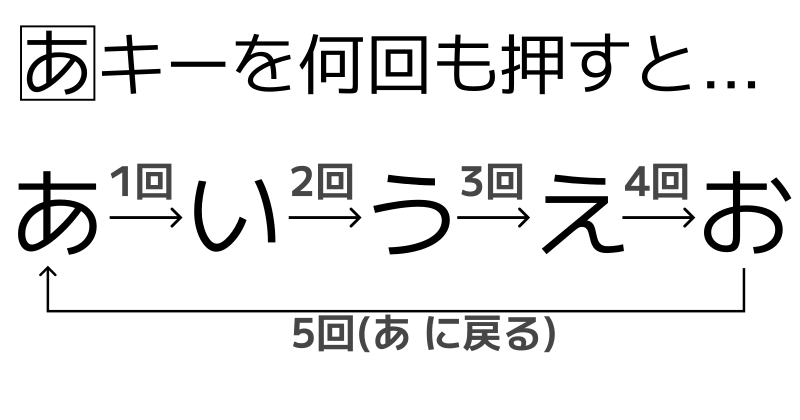
ガラケーやフリック入力に代表されるように数字のキーの連打で文字を選択します。
2.濁音や半濁音、促音の入力
濁音などはキーの連打では入力できません。.キー(以下 : 変換キー)を押すことで変換候補へ変換できます。
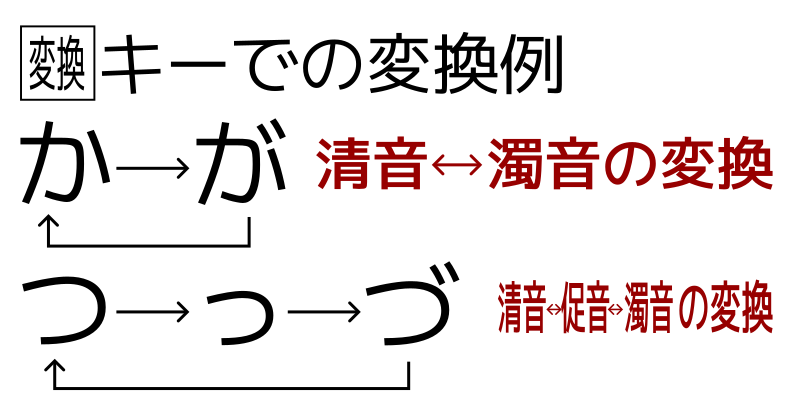
この他にも英語の大文字・小文字変換などに変換を使います。
3.ひらがなからの変換
入力したひらがなの文字列は漢字などに変換することができます。
変換にはTabキーを用います。変換の大体のやり方は普段の入力と同じです。

またはFn(-) + 数字 でその数字に対応した変換の中身を一発で出すことも可能です。
例えば上記の例ならばFn(-) + 4で一発で「嵯峨」を出せます。
4.シフトキーと入力モード切替
ガラキーには4つの入力モードである「ひらがな」「アルファベット」「数字」「記号」があり、
そのうち記号以外の三つは/キーで切り替えられます。
(記号モードはFn(-) + *のショートカットで切り替えられます)
また+キーを押すことでシフトキーモードとなり、連打するとCapsLockとなります。
シフトキーモードでは英語の大文字を直接入力したり特殊記号を簡単に入力することができます。

5.コピーと終了
UIの右下の「コピー」ボタンでそれぞれ内容のコピーを、「終了」ボタンでガラキーを終了できます。
解説
1.入力システム
例えば「お」を入力したいときは「あ」のボタンを5回押すことになります。
この時入力システムは単に連続入力回数を数えるだけでは不十分で例えば「はは」という文字列を正しく入力できません。
そこで直前の入力との時間差を測って一定以上の時間が経過した場合は連続入力を打ち切って新しく文字を入力するようにしました。

2.変換テーブルの実装
入力したい文字のうち例えば「だ」や「A」などは直接は入力できません。
そこで活躍するのが変換機能、そして変換テーブルです。
変換テーブル
Table = "aAbBcCdDeEfFgGhHiIjJkKlLmMnNoOpPqQrRsStTuUvVwWxXyYzZ@#/&_.,?!" \
"11223344556677889900"\
"??!!、,。.'\"().+-*/☆↑♪↓→←¥\\$$€£%%°&##◯○**・・++×*÷/<<==>>「[」]__::;;ー-^^||\\\(())~~…‥{{}}【〈】〉"\
"ー  あぁいぃうぅゔえぇおぉかがきぎくぐけげこごさざしじすずせぜそぞただちぢつっづてでとどなにぬねのはばぱひびぴふぶぷへべぺほぼぽまみむめもやゃゆゅよょらりるれろわをん"\
"〇一二三四五六七八九十百千万々〆~"
辞書でそれぞれの文字に変換できる文字の種類を割り当てることも考えました。
しかし、それでは登録にかなりの時間がかかるので一つの長い文字列をテーブルとしました。
基底となる文字(「あ」や「a」)のテーブル上の場所を取得し変換可能回数の中で読み進めています。

3.ショートカット
1.変換のショートカット
画面下には10個まで変換候補が表示されていますが例えば以下の例で8番目の「適」を入力するのに8回変換をするのは面倒です。
「てき」の変換候補 8番目に入力したい「適」がある

そこでFnとされているマイナスキーとテンキーの数字を組み合わせることでこれを一発で入力できるようにしてあります。
例えば上記の例ならFn(-) + 8で8番目である「適」が入力できます。
さらにFn(-) + Tabで半角カナに、Fn(-) + *でカタカナに変換することができます。
2.入力モードのショートカット
かなの変換がない状態でFnと数字/記号を入力すると以下に示したようなモードに切り替えられます。
| 入力 | モード |
|---|---|
| 4 | 記号(ひらがなシフト) |
| 5 | 英大文字(英語シフト) |
| 6 | 漢数字(数字シフト) |
| 7 | ひらがな |
| 8 | 英語 |
| 9 | 数字 |
| * | 記号 |
3.その他機能のショートカット
「コピー」はFn + "+"で、「終了」はFn + BackSpaceでも代用できます。
まとめ
以上がガラキーの使い方から簡単なシステム面の解説となります。
みなさんもテンキーしかキーボードがないという時にぜひご活用ください。