
ScrollMetrics とは
今このスクロールがどんな「状態」にあるかの情報を保持するクラス。
読み取り専用でスクロール中のある瞬間の情報をスナップショット的に保持する。
ScrollMetrics が「状態」を保持する一方で、ScrollPhysics や Simulation は「状態」を保持しない。
ScrollMetrics は mixin で実装されている。
mixin ScrollMetrics {}
copyWith() で生成できる
ScrollMetrics の実装クラス FixedScrollMetrics は以下のインプットをもとに生成できる。
反対に ScrollMetrics が保持する、このインプット以外の情報は内部の計算によって提供される情報であることがわかる。
mixin ScrollMetrics {
  ScrollMetrics copyWith({
    double? minScrollExtent,
    double? maxScrollExtent,
    double? pixels,
    double? viewportDimension,
    AxisDirection? axisDirection,
    double? devicePixelRatio,
  }) {
    return FixedScrollMetrics(
      minScrollExtent:
          minScrollExtent ??
          (hasContentDimensions ? this.minScrollExtent : null),
      maxScrollExtent:
          maxScrollExtent ??
          (hasContentDimensions ? this.maxScrollExtent : null),
      pixels: pixels ?? (hasPixels ? this.pixels : null),
      viewportDimension:
          viewportDimension ??
          (hasViewportDimension ? this.viewportDimension : null),
      axisDirection: axisDirection ?? this.axisDirection,
      devicePixelRatio: devicePixelRatio ?? this.devicePixelRatio,
    );
  }
}
getter しか保持しない
ScrollMetrics は getter しか持っていない。
mixin ScrollMetrics {
  double get minScrollExtent;
  double get maxScrollExtent;
  bool get hasContentDimensions;
  double get pixels;
  bool get hasPixels;
  double get viewportDimension;
  bool get hasViewportDimension;
  AxisDirection get axisDirection;
  Axis get axis => axisDirectionToAxis(axisDirection);
  bool get outOfRange => pixels < minScrollExtent || pixels > maxScrollExtent;
  bool get atEdge => pixels == minScrollExtent || pixels == maxScrollExtent;
  double get extentBefore => math.max(pixels - minScrollExtent, 0.0);
  double get extentInside {
    return viewportDimension - clampDouble(minScrollExtent - pixels, 0, viewportDimension) - clampDouble(pixels - maxScrollExtent, 0, viewportDimension);
  }
  double get extentAfter => math.max(maxScrollExtent - pixels, 0.0);
  double get extentTotal => maxScrollExtent - minScrollExtent + viewportDimension;
  double get devicePixelRatio;
}
NotificationListener で監視できる
スクロール中の ScrollMetrics は NotificationListener で監視できる。
NotificationListener<ScrollNotification>(
  onNotification: (notification) {
    final metrics = notification.metrics;
  },
  child: ,
)
Flutter の座標軸

「量」を表す指標と「位置」を表す指標
- 量(距離)を表す
-
xxxExtent/extentXXX minScrollExtent/maxScrollExtent
-
- 位置(座標)を表す
viewport
スクロールさせるコンテンツを抱える PageView や SingleChildScrollView などを、内部のコンテンツを見るための「窓」として捉える概念。
この「窓」に相当するものを viewport と呼ぶ。
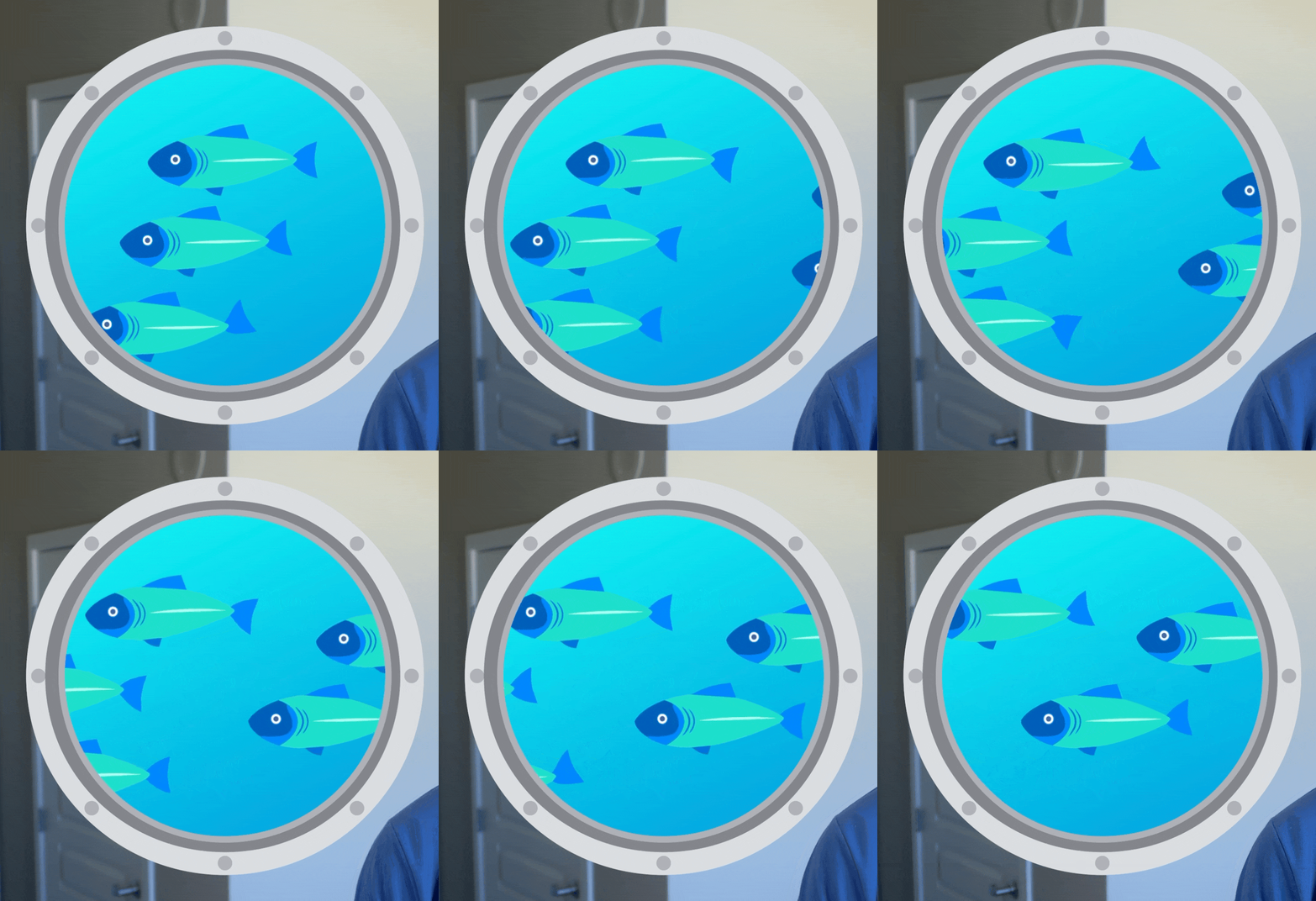
https://www.youtube.com/watch?v=LUqDNnv_dh0&t=248s
※ 正確には viewport は Widget そのものではなく、PageView や SingleChildScrollView が内部で生成する RenderViewport によって実現されている。
ScrollMetrics の情報を理解する
サンプルアプリを使って、実際に触りながら各プロパティが指す情報を理解したい。
ソースコード
import 'dart:math';
import 'dart:math' as math;
import 'dart:ui';

import 'package:flutter/material.dart';

class ScrollMetricsObserver extends StatefulWidget {
  const ScrollMetricsObserver({super.key});

  @override
  State<ScrollMetricsObserver> createState() => _ScrollMetricsObserverState();
}

class _ScrollMetricsObserverState extends State<ScrollMetricsObserver> {
  List<_Height100> children = [];

  double? minScrollExtent;
  double? maxScrollExtent;
  bool? hasContentDimensions;
  double? pixels;
  bool? hasPixels;
  double? viewportDimension;
  bool? hasViewportDimension;
  AxisDirection? axisDirection;
  Axis? axis;
  bool? outOfRange;
  bool? atEdge;
  double? extentBefore;
  double? extentInside;
  double? extentAfter;
  double? extentTotal;
  double? devicePixelRatio;

  @override
  Widget build(BuildContext context) {
    return Column(
      children: [
        const SizedBox(height: 30),
        _MyController(
          itemCount: children.length,
          onTapPlus: () => setState(() {
            children.add(_Height100(
              color: Color((Random().nextDouble() * 0xFFFFFF).toInt() << 0)
                  .withAlpha(255),
            ));
          }),
          onTapMinus: () => setState(() {
            if (children.isEmpty) return;
            children.removeLast();
          }),
        ),
        const SizedBox(height: 30),
        Row(
          spacing: 40,
          children: [
            const SizedBox(width: 50),
            NotificationListener<ScrollNotification>(
              onNotification: (notification) {
                setState(() {
                  final metrics = notification.metrics;
                  minScrollExtent = metrics.minScrollExtent;
                  maxScrollExtent = metrics.maxScrollExtent;
                  hasContentDimensions = metrics.hasContentDimensions;
                  pixels = metrics.pixels;
                  hasPixels = metrics.hasPixels;
                  viewportDimension = metrics.viewportDimension;
                  hasViewportDimension = metrics.hasViewportDimension;
                  axisDirection = metrics.axisDirection;
                  axis = metrics.axis;
                  outOfRange = metrics.outOfRange;
                  atEdge = metrics.atEdge;
                  extentBefore = metrics.extentBefore;
                  extentInside = metrics.extentInside;
                  extentAfter = metrics.extentAfter;
                  extentTotal = metrics.extentTotal;
                  devicePixelRatio = metrics.devicePixelRatio;
                });
                return false;
              },
              child: Stack(
                children: [
                  _MyViewport(
                    child: Column(children: children),
                  ),
                  Positioned(
                    left: 15,
                    top: 135,
                    child: Transform.rotate(
                      angle: math.pi / 180 * 90,
                      child: const Text(
                        '300',
                        style: TextStyle(color: Colors.white, fontSize: 20),
                      ),
                    ),
                  ),
                ],
              ),
            ),
            Column(
              crossAxisAlignment: CrossAxisAlignment.start,
              spacing: 1.5,
              children: [
                Text('minScrollExtent: $minScrollExtent'),
                Text('maxScrollExtent: $maxScrollExtent'),
                Text('hasContentDimensions: $hasContentDimensions'),
                Text('pixels: $pixels'),
                Text('viewportDimension: $viewportDimension'),
                Text('hasPixels: $hasPixels'),
                Text('hasViewportDimension: $hasViewportDimension'),
                Text('outOfRange: $outOfRange'),
                Text('atEdge: $atEdge'),
                Text('extentBefore: $extentBefore'),
                Text('extentInside: $extentInside'),
                Text('extentAfter: $extentAfter'),
                _EmphasisText(text: Text('extentTotal: $extentTotal')),
                Text('devicePixelRatio: $devicePixelRatio'),
              ],
            )
          ],
        ),
      ],
    );
  }
}

class _MyController extends StatelessWidget {
  const _MyController({
    required this.itemCount,
    required this.onTapPlus,
    required this.onTapMinus,
  });

  final int itemCount;
  final VoidCallback onTapPlus;
  final VoidCallback onTapMinus;

  @override
  Widget build(BuildContext context) {
    return Row(
      mainAxisAlignment: MainAxisAlignment.center,
      spacing: 10,
      children: [
        Container(
          width: 100,
          height: 100,
          decoration: const BoxDecoration(
            color: Colors.red,
            borderRadius: BorderRadius.all(Radius.circular(100)),
          ),
          child: IconButton(
            onPressed: onTapPlus,
            icon: const Icon(Icons.exposure_plus_1),
            iconSize: 35,
          ),
        ),
        Container(
          width: 100,
          height: 100,
          decoration: const BoxDecoration(
            color: Colors.blue,
            borderRadius: BorderRadius.all(Radius.circular(100)),
          ),
          child: IconButton(
            onPressed: onTapMinus,
            icon: const Icon(Icons.exposure_minus_1_outlined),
            iconSize: 35,
          ),
        ),
        Text('item count: $itemCount'),
      ],
    );
  }
}

class _MyViewport extends StatelessWidget {
  const _MyViewport({required this.child});

  final Widget child;

  @override
  Widget build(BuildContext context) {
    return Stack(
      children: [
        SizedBox(
          height: 300,
          width: 300,
          child: ScrollConfiguration(
            behavior: ScrollConfiguration.of(context).copyWith(
              dragDevices: PointerDeviceKind.values.toSet(),
            ),
            child: SingleChildScrollView(
              // clipBehavior: Clip.none,
              child: child,
            ),
          ),
        ),
        IgnorePointer(
          child: Container(
            height: 300,
            width: 300,
            decoration: BoxDecoration(
              border: Border.all(
                color: Colors.red,
                width: 3.0,
                strokeAlign: BorderSide.strokeAlignOutside,
              ),
            ),
          ),
        ),
        Positioned(
          left: 10,
          child: CustomPaint(
            size: const Size(100, 300),
            painter: _MyCustomPainter(),
          ),
        ),
      ],
    );
  }
}

class _Height100 extends StatelessWidget {
  const _Height100({required this.color});

  final Color color;

  @override
  Widget build(BuildContext context) {
    return Stack(
      children: [
        Container(color: color, height: 100),
        Positioned(
          right: 10,
          child: CustomPaint(
            size: const Size(30, 100),
            painter: _MyCustomPainter(),
          ),
        ),
        Positioned(
          right: 2,
          top: 35,
          child: Transform.rotate(
            angle: math.pi / 180 * 90,
            child: const Text(
              '100',
              style: TextStyle(color: Colors.white, fontSize: 18),
            ),
          ),
        ),
      ],
    );
  }
}

class _MyCustomPainter extends CustomPainter {
  @override
  void paint(Canvas canvas, Size size) {
    final height = size.height;
    final path = Path()
      ..moveTo(0, 10)
      ..lineTo(10, 2)
      ..lineTo(20, 10)
      ..moveTo(10, 2)
      ..lineTo(10, height - 2)
      ..lineTo(0, height - 10)
      ..moveTo(10, height - 2)
      ..lineTo(20, height - 10);

    canvas.drawPath(
      path,
      Paint()
        ..style = PaintingStyle.stroke
        ..strokeWidth = 2
        ..color = Colors.white,
    );
  }

  @override
  bool shouldRepaint(covariant CustomPainter oldDelegate) => false;
}

class _EmphasisText extends StatelessWidget {
  const _EmphasisText({
    super.key,
    required this.text,
    this.isSubContent = false,
  });

  final Text text;
  final bool isSubContent;

  @override
  Widget build(BuildContext context) {
    return Container(
      decoration: BoxDecoration(
        border: Border.all(
          color: Colors.red,
          width: isSubContent ? 1 : 2,
          strokeAlign: BorderSide.strokeAlignOutside,
        ),
      ),
      child: text,
    );
  }
}
minScrollExtent / maxScrollExtent
double
The minimum in-range value for pixels. / The maximum in-range value for pixels.
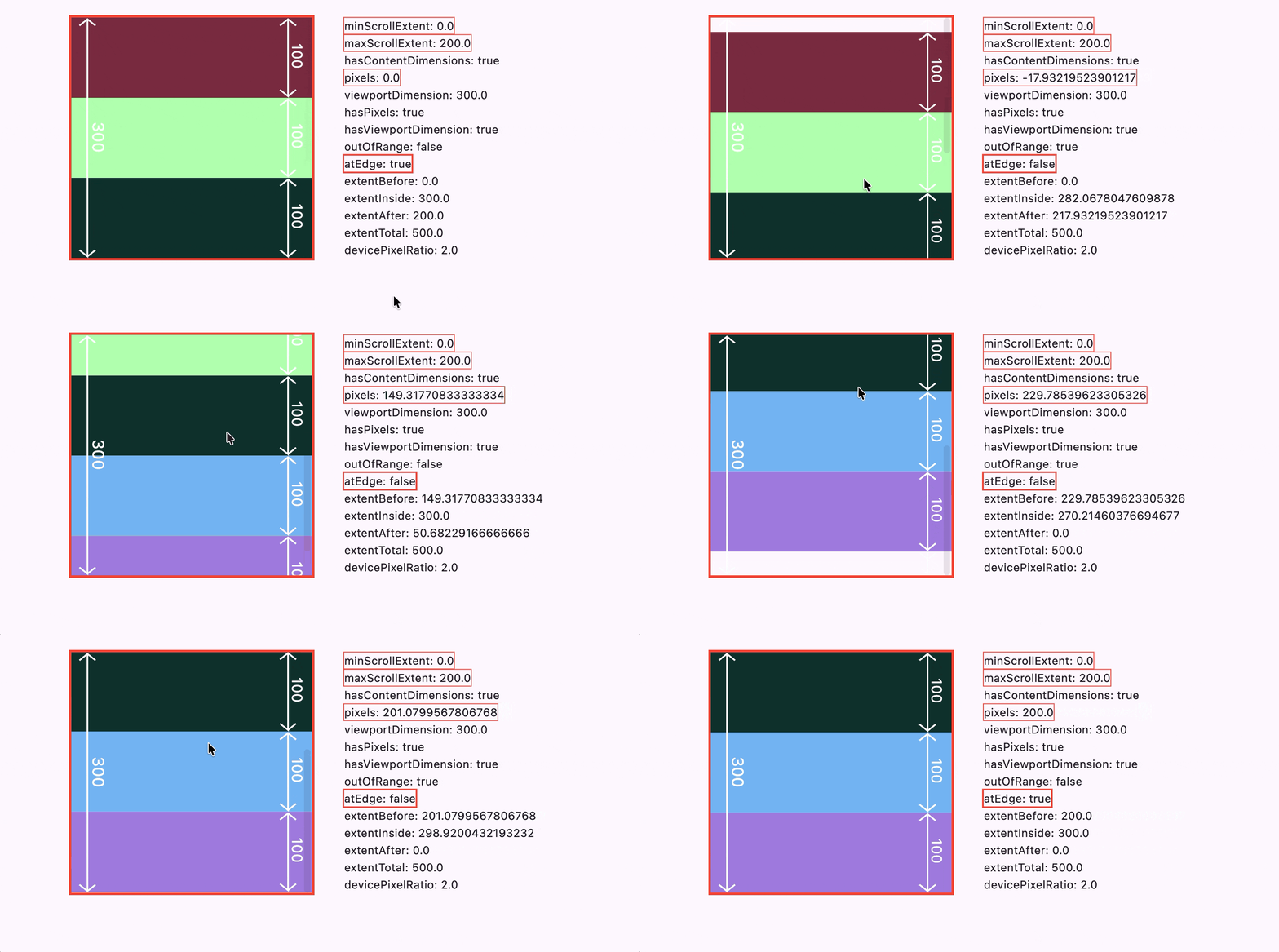
指を離したあとのスクロールが ScrollPhysics と Simulation によって、最終的に安定して停止させることができる位置(pixels)の最小値 / 最大値。


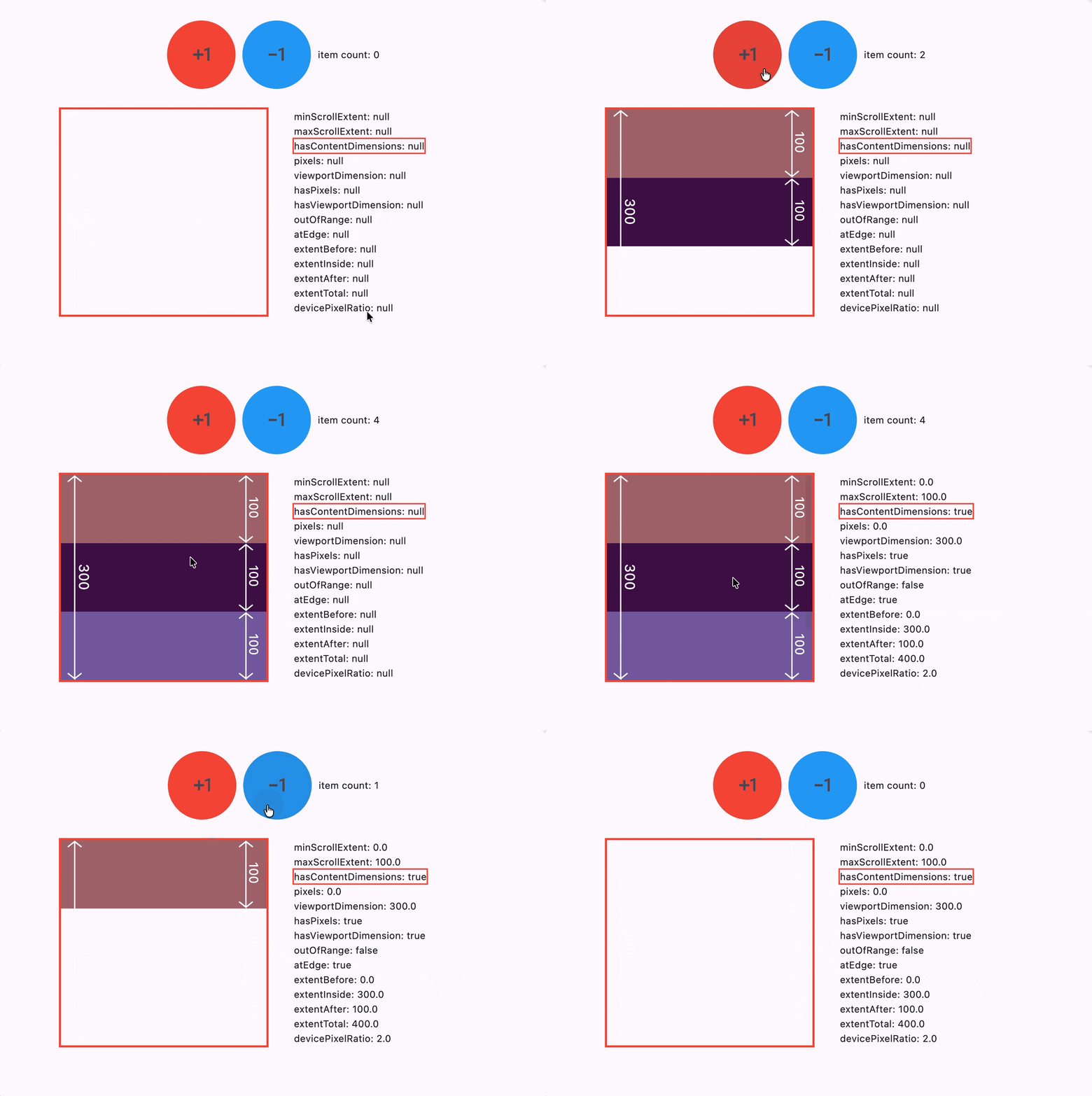
hasContentDimensions
bool
Whether the viewportDimension property is available.
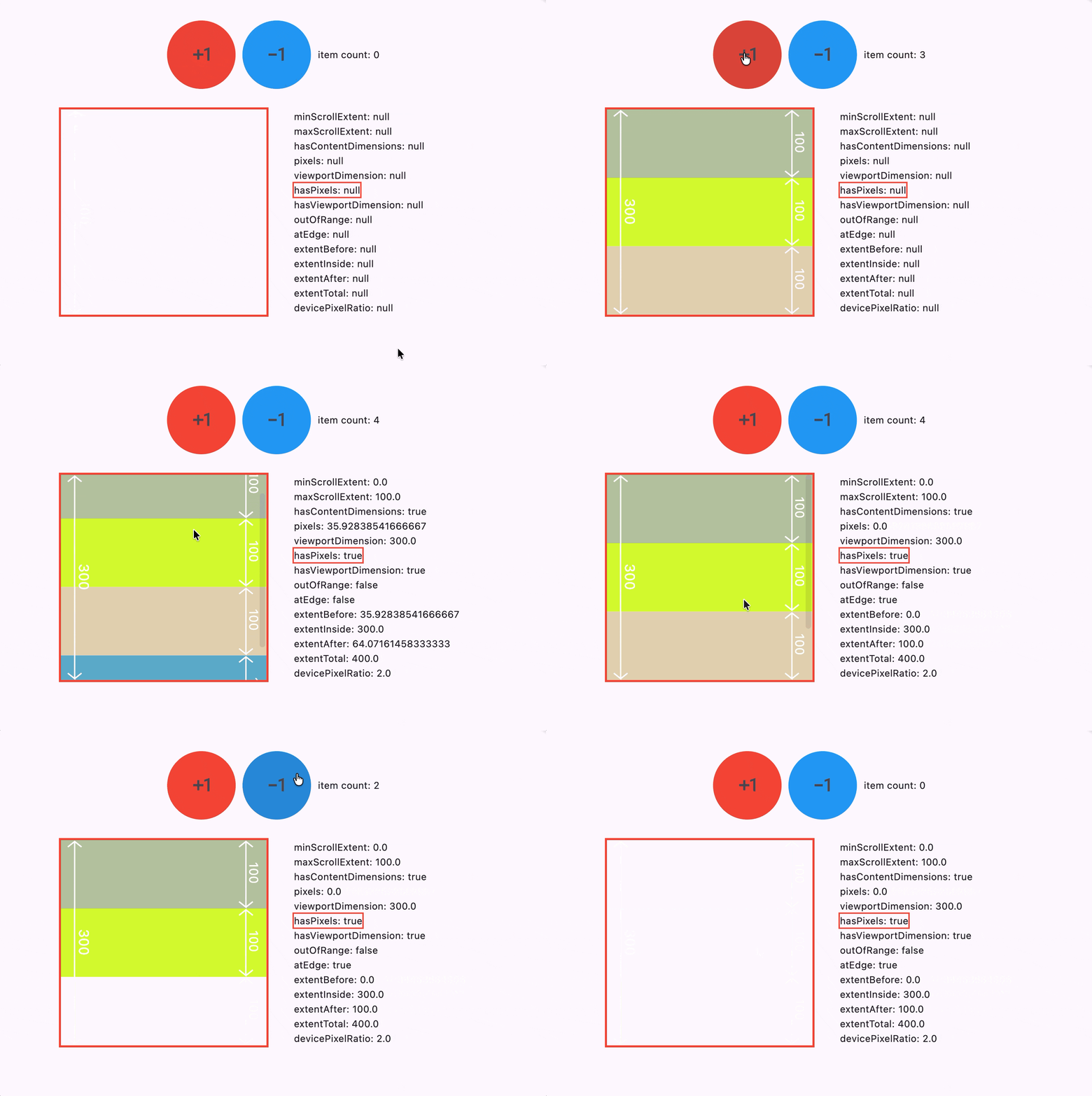
minScrollExtent と maxScrollExtent が利用可能かどうか。
初回描画直後は、まだ取得できない。
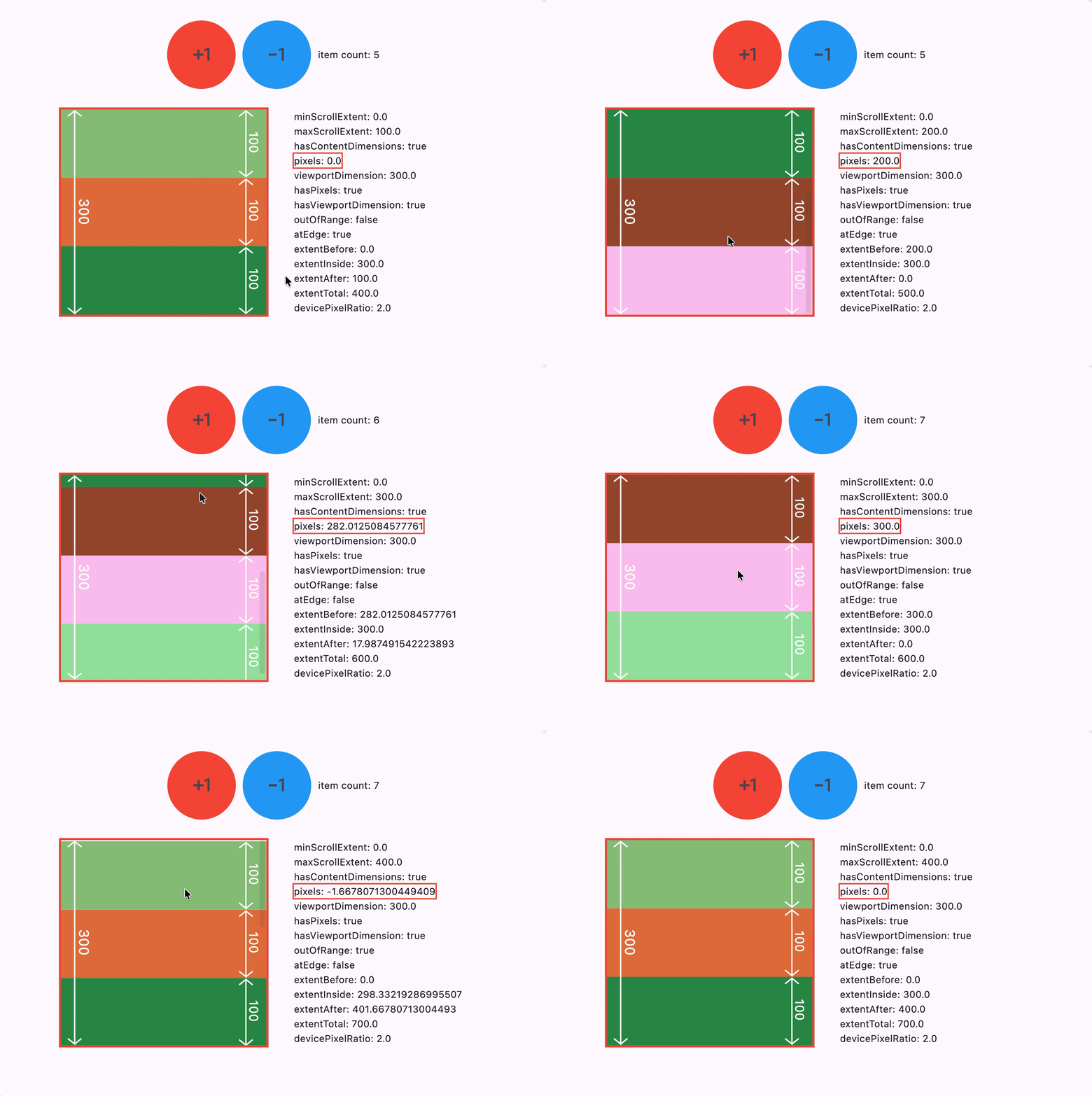
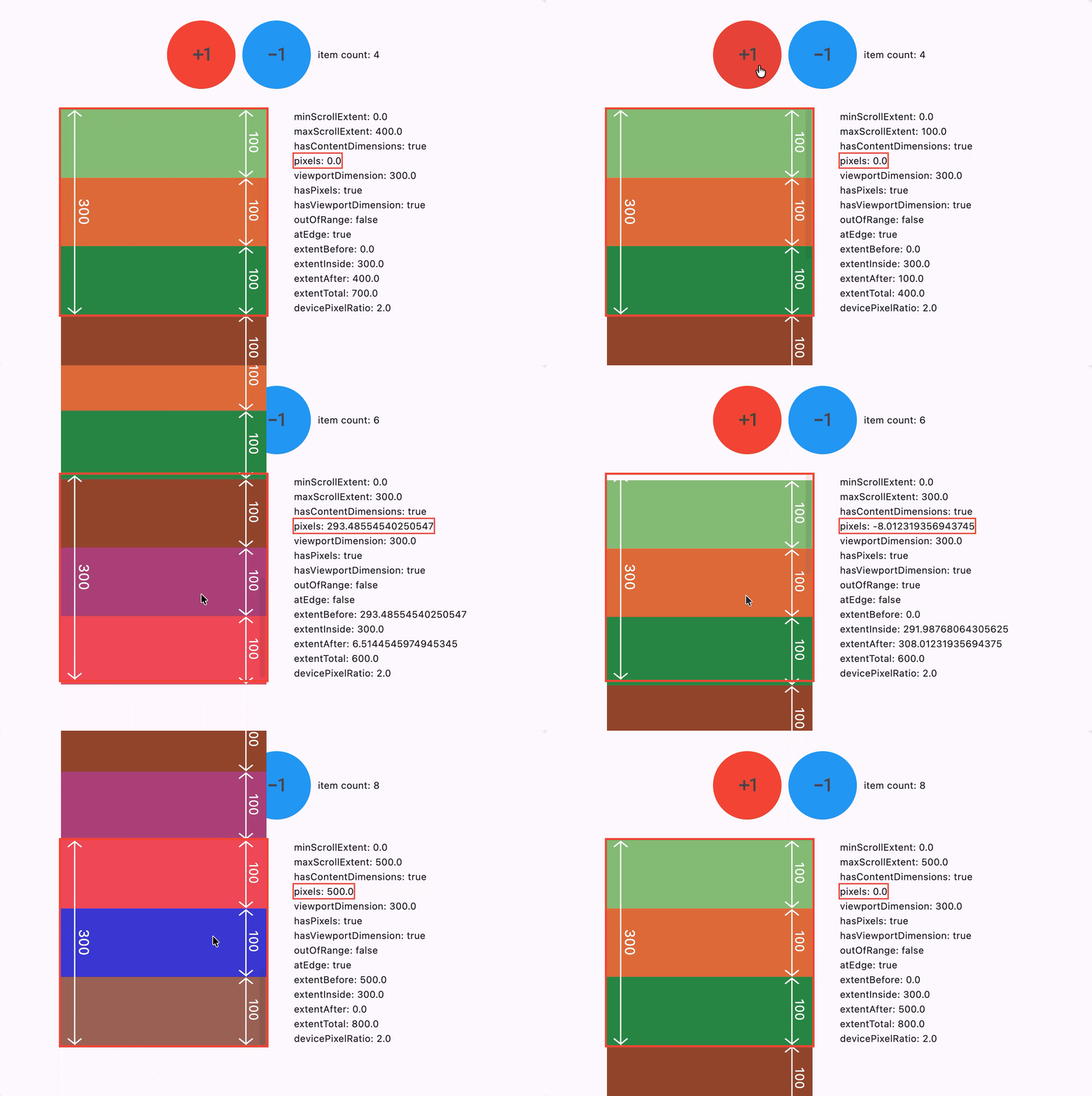
pixels
double
The current scroll position, in logical pixels along the axisDirection.
スクロール開始点(minScrollExtent)からスクロールした量・距離。
上端からどれだけスクロールしたか。
hasPixels
bool
Whether the pixels property is available.
picels が利用可能かどうか。
初回描画直後は、まだ取得できない。
viewportDimension
double
The extent of the viewport along the axisDirection.
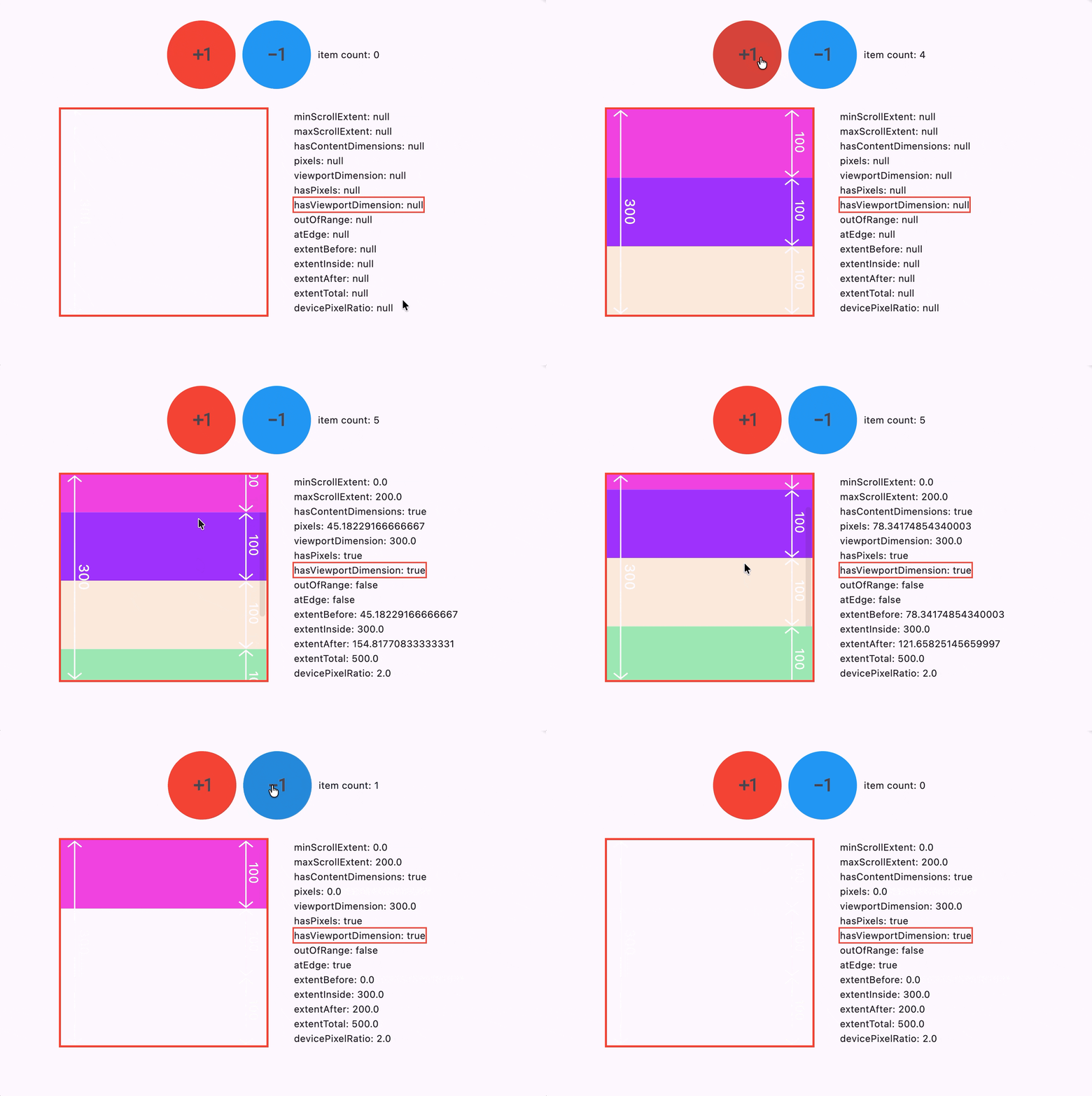
表示領域のサイズ。
縦スクロールなら「高さ」、横スクロールなら「幅」。

hasViewportDimension
bool
Whether the viewportDimension property is available.
viewportDimension が利用可能かどうか。
初回描画直後は、まだ取得できない。
axis / axisDirection
Axis / AxisDirection
The axis in which the scroll view scrolls. / The direction in which the scroll view scrolls.
スクロール可能な方向。
enum Axis {
  horizontal,
  vertical,
}
enum AxisDirection {
  up,
  right,
  down,
  left,
}

outOfRange
bool
Whether the pixels value is outside the minScrollExtent and maxScrollExtent.
pixels が minScrollExtent / maxScrollExtent の範囲外かどうか。

atEdge
bool
Whether the pixels value is exactly at the minScrollExtent or the maxScrollExtent.
pixels が minScrollExtent / maxScrollExtent と一致しているかどうか。
extentBefore / extentAfter
double
The quantity of content conceptually "above" the viewport in the scrollable. This is the content above the content described by extentInside.
/ The quantity of content conceptually "below" the viewport in the scrollable. This is the content below the content described by extentInside.
-
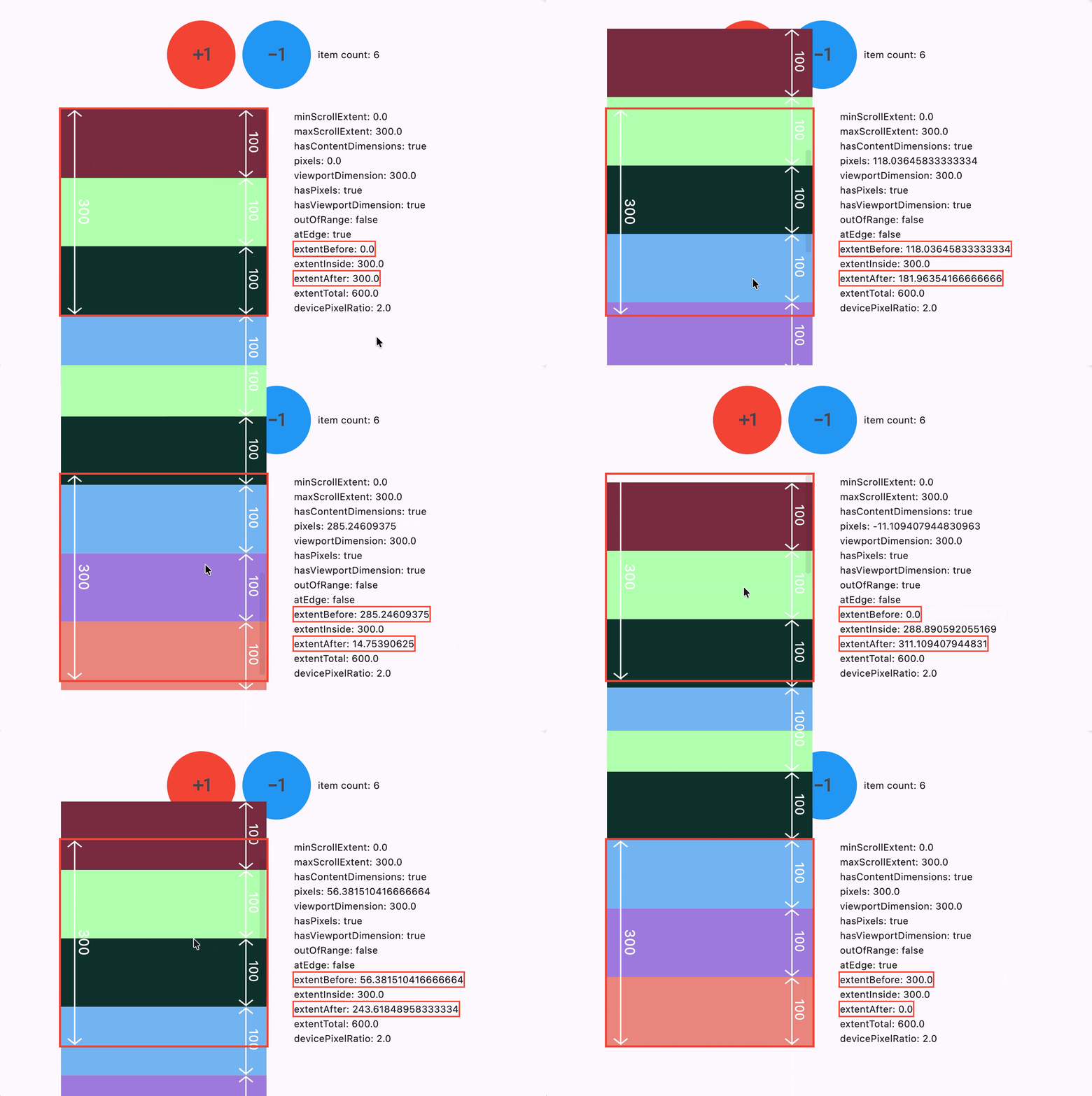
extentBefore- viewport の開始位置より「前」に存在するコンテンツ量
-
minScrollExtent == 0の時は、スクロールした量
-
extentAfter- viewport の終了位置より「後」に存在するコンテンツ量
- 残りのスクロール可能な量
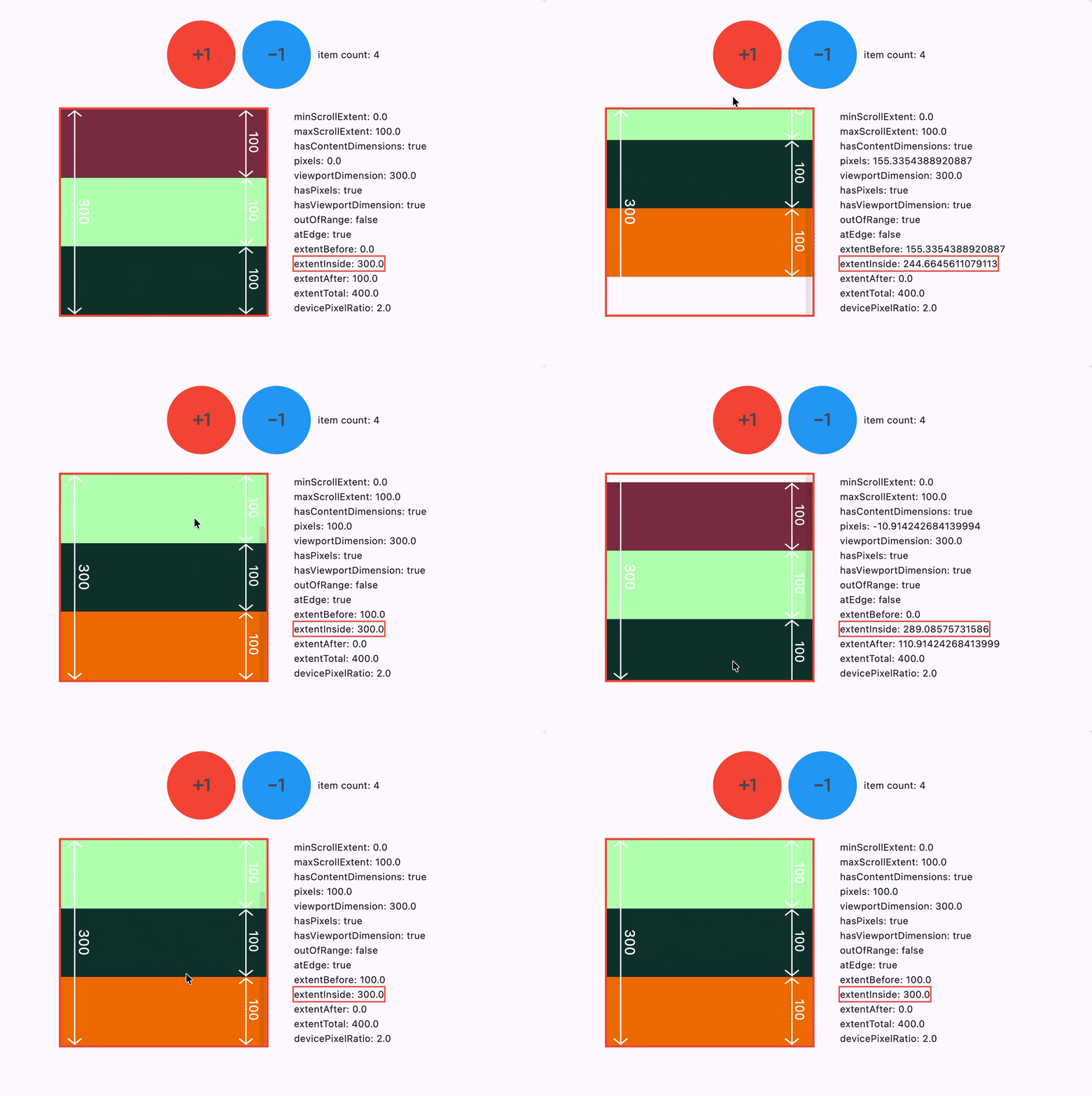
extentInside
double
The quantity of content conceptually "inside" the viewport in the scrollable (including empty space if the total amount of content is less than the viewportDimension).
viewport 内にいるコンテンツ量。

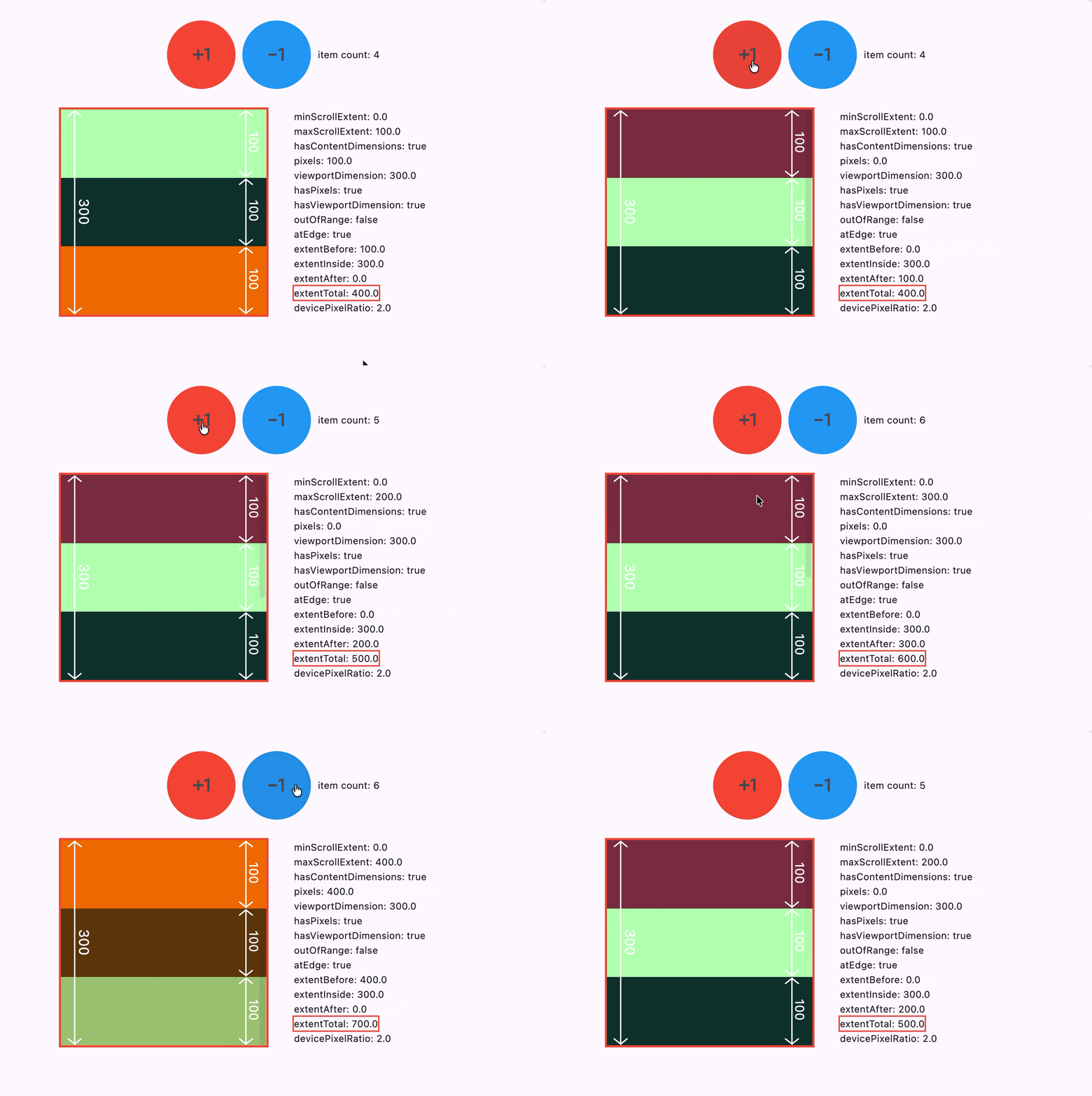
extentTotal
double
The total quantity of content available.
コンテンツの総量。
devicePixelRatio
double
The FlutterView.devicePixelRatio of the view that the Scrollable associated with this metrics object is drawn into.
Flutter が扱う pixel(論理ピクセル)が物理ディスプレイ上で何 pixel(物理ピクセル)で表示されれいるか。
devicePixelRatio = 2 の場合、Flutter で指定した 1 pixel(height、width など)は、ディスプレイ上では 2 pixel 分で表示されている。
私の環境では、ノート PC 上のディスプレイでは 2 でしたが、アプリを外部接続したディスプレイ上に移動させ、再起動したところ、1 になりました。