
はじめに
PageView はスクロールやスワイプを、必ずページの区切り位置で止めることができる。
PageView(
  children: const [
    Item(title: 'Item 1', color: Colors.red),
    Item(title: 'Item 2', color: Colors.blue),
    Item(title: 'Item 3', color: Colors.yellow),
  ],
)

しかし、何らかの事情で List<Widget> ではなく Widget でしかパラメータに渡せない場合にはうまく利用することができない。
これをカスタム PageView を作ることによって解消する。
実現方法
Flutter では「指が離れたあと、どう動いて、どこで止まるか」を ScrollPhysics が決定している。
これを自前でカスタマイズすることによって、任意の位置で停止するページングを実現させる。
ScrollPhysics
「ユーザによるスクロール操作後の動き(慣性、スナップ位置)」を制御するクラス。
慣性によってスクロール位置をどこで停止させるかを createBallisticSimulation() によって決めている。
ScrollPhysics はインターフェースとして利用され、Flutter 標準では以下の実装クラスが提供されている。

AlwaysScrollableScrollPhysicsBouncingScrollPhysicsCarouselScrollPhysicsClampingScrollPhysicsFixedExtentScrollPhysics-
NeverScrollableScrollPhysics- スクロールを許可しないように実装されている
-
PageScrollPhysics- ページの境界で止まるように実装されている
RangeMaintainingScrollPhysics
velocity
単位時間あたりの移動 pixel 量。どの方向に、どれくらいの勢いで指を離したか。
物理分野では「速さ + 向き」を指し、アジャイル開発では「単位時間あたりにどれだけ前に進めたか」「勢い」「進み具合」を指すことがある。
Flutter では velocity は 1 秒あたりのフリック量(pixel)を指す。

正 の velocity → 下方向 or 右方向
負 の velocity → 上方向 or 左方向
Tolerance
distance、time、velosity から構成される「閾値(絶対値)」を保持するクラス(デフォルト値は 3 つとも全て ±0.001)。
スワイプ時に指を離した後、プルプルと震えるような UI の動きを防ぐために利用される。
class Tolerance({
  double distance = _epsilonDefault,
  double time = _epsilonDefault,
  double velocity = _epsilonDefault,
})

static const double _epsilonDefault = 1e-3;
-
distance- 閾値未満の距離の差なら「位置は一致している」と判断する
time-
velocity- 閾値未満の速度なら「止まっている」と判断する
スワイプやスクロールでは、指が離れた後も慣性によって少しだけ余韻で動いている。
また、スクロール位置は double 型で管理されている。
ユーザがスクロール操作を行った際に、慣性が「もう止まっている」と判断するために純粋な double 値同士の比較をしてしまうと、double 値同士が一致する条件が厳しくなってしまう。
これによって毎 frame 毎に微小な差分が検出され、バネ処理が何度も発火してしまい、プルプルと震える動きになってしまう。
この記事内では Tolerance は、「このくらいの誤差ならもう止まっているとみなせる」という距離の許容値(閾値)として使用している。
Simulation(abstract class)
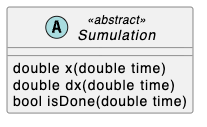
時間とともに状態がどう変わるかを表す抽象クラス。
継承したサブクラスが表現する物理モデル(慣性、バネ、摩擦)に基づいて、「時間 time における位置と速度」を返す責務を持つ。
-
double x(double time)-
timeに対応する位置(position / offset など)
-
-
double dx(double time)-
timeに対応するvelocity
-
-
bool isDone(double time)- シュミレーションが完了しているかどうか
SpringSimulation
Simulation を継承したクラス。
バネ(spring)に引っ張られて、最終的に着地点(end)に止まるような動きを実現する。
class SpringSimulation extends Simulation (
    SpringDescription spring,
    double start,
    double end,
    double velocity, {
    bool snapToEnd = false,
    super.tolerance,
  })
ScrollSpringSimulation
SpringSimulation を imlements した、スクロール専用の Simulation クラス。
/// A [SpringSimulation] where the value of [x] is guaranteed to have exactly the
/// end value when the simulation [isDone].
class ScrollSpringSimulation extends SpringSimulation {
  /// Creates a spring simulation from the provided spring description, start
  /// distance, end distance, and initial velocity.
  ///
  /// See the [SpringSimulation.new] constructor on the superclass for a
  /// discussion of the arguments' units.
  ScrollSpringSimulation(super.spring, super.start, super.end, super.velocity, {super.tolerance});

  @override
  double x(double time) => isDone(time) ? _endPosition : super.x(time);
}
RenderAbstractViewport
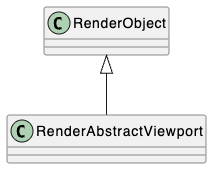
表示領域よりもコンテンツの量が大きい(スクロールが必要な)場合の RenderObject の共通ロジックを持つ抽象クラス。
viewport 内にある子 RenderObject を「どの位置に表示するためには、どれだけスクロールすべきか」を計算する共通ロジックが提供される。
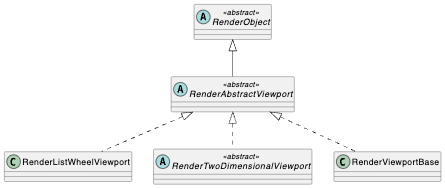
getOffsetToReveal()
指定した RenderObject target が viewport 内の指定位置(alignment)に表示されるために必要なスクロール量を RevealedOffset として返す。
RevealedOffset getOffsetToReveal(
  RenderObject target,
  double alignment, {
  Rect? rect,
  Axis? axis,
})
alignment を 0.0 とした場合、viewport と target の上端が一致するまでの RevealedOffset が取得できる。1.0 とした場合、viewport と target の下端が一致するまでの RevealedOffset が取得できる。
リストアイテム数 2 個の場合
まずはリストアイテム数が 2 個であることを前提にして実装方法を検討する。
リストアイテムは Item として作成する。
Item は height: 350、width: 500 を持つウィジェット。
class Item extends StatelessWidget {
  const Item({super.key, required this.title, required this.color});
  final String title;
  final Color color;

  @override
  Widget build(BuildContext context) {
    return Stack(
      children: [
        Container(
          color: color,
          height: 350,
          width: 500,
        ),
        Text(title),
      ],
    );
  }
}

Item を内部的に複数保持するウィジェットを Items とする。
class Items extends StatelessWidget {
  const Items({super.key});

  @override
  Widget build(BuildContext context) {
    return Column(
      mainAxisAlignment: MainAxisAlignment.center,
      children: [
        Item(title: 'first', color: Colors.red),
        Item(title: 'second', color: Colors.blue),
      ],
    );
  }
}
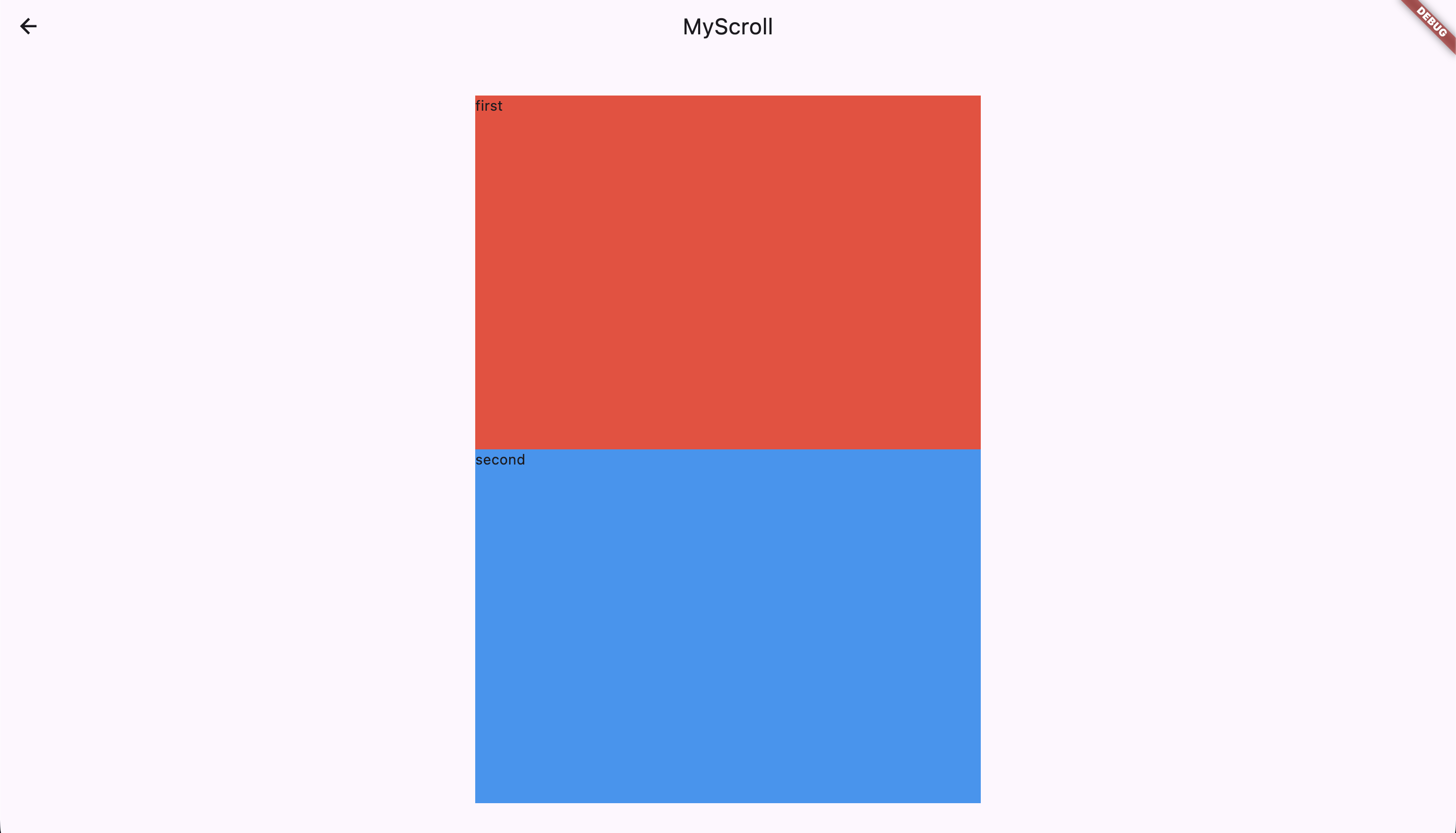
これを height: 300 の viewport (窓)でページングさせる。
class MyScroll extends StatelessWidget {
  @override
  Widget build(BuildContext context) {
    return Container(
      decoration: BoxDecoration(
        border: Border.all(
        color: Colors.black, // 👈 viewport に黒い枠線をつけています
        width: 4.0,
      )),
      height: 300,
      child: Items(),
    );
  }
}
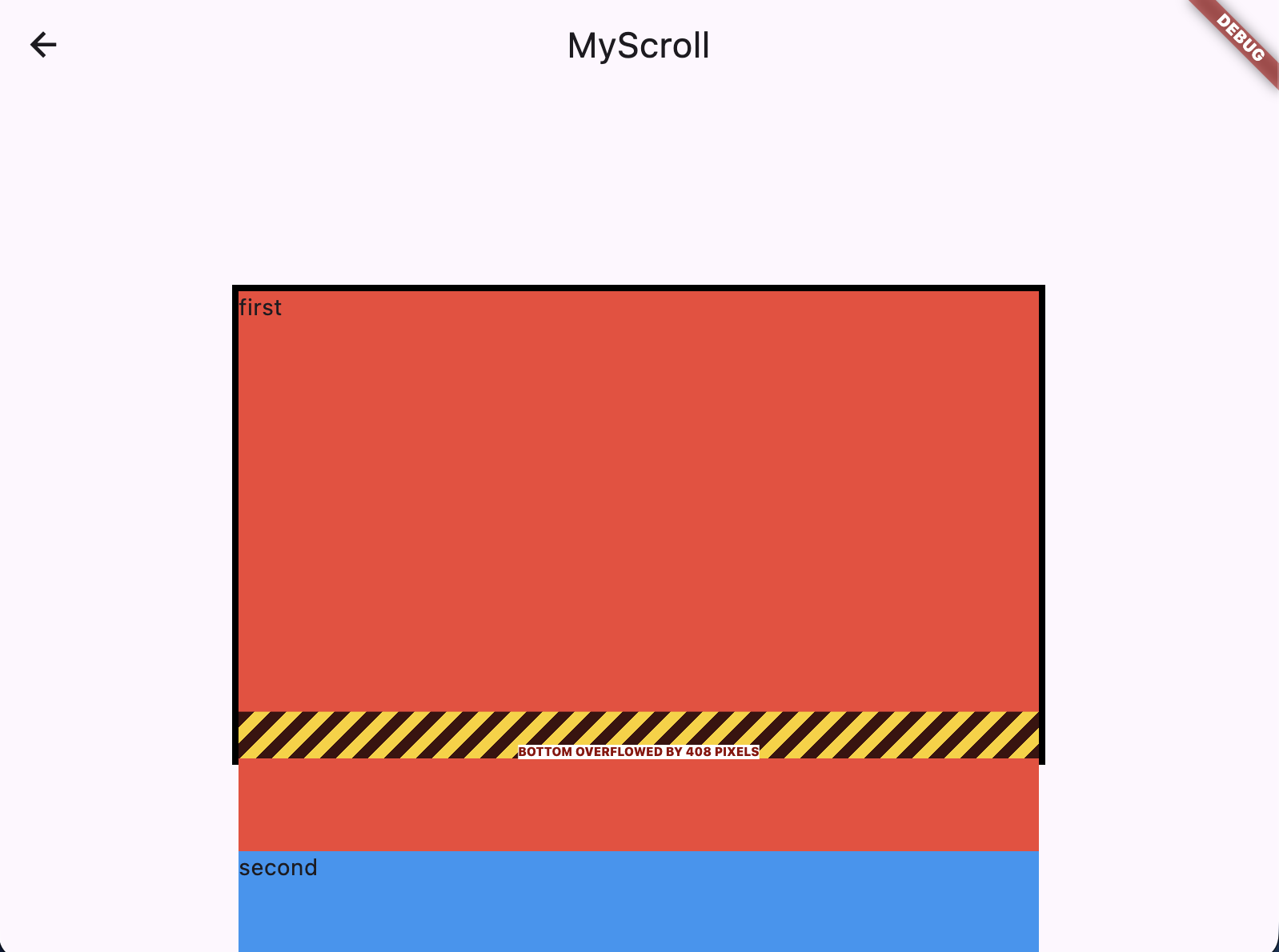
スクロールとスワイプを可能にする
スクロールを可能とするために Items を SingleChildScrollView でラップする。
さらに、PC のエミュレータ上でもスワイプができるように ScrollConfiguration でさらにラップする(自前の MyScrollBehavior を作成しておく)。
class MyScroll extends StatelessWidget {
  @override
  Widget build(BuildContext context) {
    return ScrollConfiguration(
      behavior: MyScrollBehavior(), // 👈
      child: Container(
        decoration: BoxDecoration(
            border: Border.all(
          color: Colors.black,
          width: 4.0,
        )),
        height: 300,
        child: SingleChildScrollView( // 👈
          child: Items(),
        ),
      ),
    );
  }
}

class MyScrollBehavior extends ScrollBehavior {
  @override
  Set<PointerDeviceKind> get dragDevices => PointerDeviceKind.values.toSet();
}

2 つ目の Item がトップに停止する位置を取得する
GlobalKey、RenderObject、RenderAbstractViewport.getOffsetToReveal() を使用して、2 つ目のアイテムの上端が viewport のちょうど上端と一致するまでに必要なスクロール量を取得する 。
Padding がないため、「1 つ目のアイテムの高さ」としても良い。

class _MyScrollState extends State<MyScroll> {
  final key1 = GlobalKey();
  final key2 = GlobalKey();
  double? offsetToReveal2;

  @override
  void initState() {
    super.initState();
    // RenderObject は描画後でないと取得できないため addPostFrameCallback を使用する
    WidgetsBinding.instance.addPostFrameCallback((_) {
      getOffsetToReveal2();
    });
  }

  void getOffsetToReveal2() {
    final context = key2.currentContext;
    if (context == null) return;

    // RenderObject は描画後でないと取得できない
    final renderObject = context.findRenderObject();
    if (renderObject == null) return;

    final viewport = RenderAbstractViewport.of(renderObject);
    final offset = viewport.getOffsetToReveal(renderObject, 0.0).offset;

    setState(() {
      offsetToReveal2 = offset;
    });
  }

  @override
  Widget build(BuildContext context) {
    return ScrollConfiguration(
      behavior: MyScrollBehavior(),
      child: Container(
        decoration: BoxDecoration(
            border: Border.all(
          color: Colors.black,
          width: 4.0,
        )),
        height: 300,
        child: SingleChildScrollView(
          child: Items(
            keys: [key1, key2], // 👈
          ),
        ),
      ),
    );
  }
}

class Items extends StatelessWidget {
  const Items({super.key, required this.keys});

  final List<GlobalKey> keys; // 👈

  @override
  Widget build(BuildContext context) {
    return Column(
      mainAxisAlignment: MainAxisAlignment.center,
      children: [
        Item(key: keys[0], title: 'first', color: Colors.red),
        Item(key: keys[1], title: 'second', color: Colors.blue),
      ],
    );
  }
}
カスタム ScrollPhysics を定義する
Flutter の PageView で使用される PageScrollPhysics を参考にしながら、カスタム ScrollPhysics(MyScrollPhysics) を定義する。
MyScrollPhysics では 2 つ目の Item がトップに停止する位置を取得する で取得した offsetToReveal2 を使用する。
class MyScrollPhysics extends ScrollPhysics {
  const MyScrollPhysics({
    required this.offsetToReveal2,
    super.parent,
  });

  final double offsetToReveal1 = 0.0;
  final double? offsetToReveal2;
}
PageScrollPhysics
/// Scroll physics used by a [PageView].
///
/// These physics cause the page view to snap to page boundaries.
///
/// See also:
///
///  * [ScrollPhysics], the base class which defines the API for scrolling
///    physics.
///  * [PageView.physics], which can override the physics used by a page view.
class PageScrollPhysics extends ScrollPhysics {
  /// Creates physics for a [PageView].
  const PageScrollPhysics({super.parent});

  @override
  PageScrollPhysics applyTo(ScrollPhysics? ancestor) {
    return PageScrollPhysics(parent: buildParent(ancestor));
  }

  double _getPage(ScrollMetrics position) {
    if (position is _PagePosition) {
      return position.page!;
    }
    return position.pixels / position.viewportDimension;
  }

  double _getPixels(ScrollMetrics position, double page) {
    if (position is _PagePosition) {
      return position.getPixelsFromPage(page);
    }
    return page * position.viewportDimension;
  }

  double _getTargetPixels(
    ScrollMetrics position,
    Tolerance tolerance,
    double velocity,
  ) {
    double page = _getPage(position);
    if (velocity < -tolerance.velocity) {
      page -= 0.5;
    } else if (velocity > tolerance.velocity) {
      page += 0.5;
    }
    return _getPixels(position, page.roundToDouble());
  }

  @override
  Simulation? createBallisticSimulation(
    ScrollMetrics position,
    double velocity,
  ) {
    // If we're out of range and not headed back in range, defer to the parent
    // ballistics, which should put us back in range at a page boundary.
    if ((velocity <= 0.0 && position.pixels <= position.minScrollExtent) ||
        (velocity >= 0.0 && position.pixels >= position.maxScrollExtent)) {
      return super.createBallisticSimulation(position, velocity);
    }
    final Tolerance tolerance = toleranceFor(position);
    final double target = _getTargetPixels(position, tolerance, velocity);
    if (target != position.pixels) {
      return ScrollSpringSimulation(
        spring,
        position.pixels, // start
        target, // end
        velocity, // velocity
        tolerance: tolerance,
      );
    }
    return null;
  }

  @override
  bool get allowImplicitScrolling => false;
}
applyTo をオーバーライドする
Flutter 公式サイトによると、カスタム ScrolPhysics を作成した場合 applyTo() をオーバーライドする必要があるとのことだった。
When implementing a subclass, you must override applyTo so that it returns an appropriate instance of your subclass. Otherwise, classes like Scrollable that inform a ScrollPosition will combine them with the default ScrollPhysics object instead of your custom subclass.
サブクラスを実装する際は、applyTo()をオーバーライドして、サブクラスの適切なインスタンスを返すようにする必要があります。そうしないと、ScrollableなどのScrollPositionを通知するクラスは、カスタムサブクラスではなく、デフォルトのScrollPhysicsオブジェクトと結合してしまいます。
https://api.flutter.dev/flutter/widgets/ScrollPhysics-class.html
class MyScrollPhysics extends ScrollPhysics {
  const MyScrollPhysics({
    required this.offsetToReveal2,
    super.parent,
  });

  final double offsetToReveal1 = 0.0;
  final double? offsetToReveal2;

  @override
  MyScrollPhysics applyTo(ScrollPhysics? ancestor) {
    return MyScrollPhysics(
      offsetToReveal2: offsetToReveal2,
      parent: buildParent(ancestor),
    );
  }
}
createBallisticSimulation() をオーバーライドする
ScrollPhysics は、止まる位置、慣性の計算、スナップするかどうかを createBallisticSimulation() によって「指が離れたあと、どう動いて、どこで止まるか」を決めている。
Flutter PageView の PageScrollPhysics を参考にしながら、これをオーバーライドする。
createBallisticSimulation() が null を返した場合、「何もしない」ことを意味する。
PageScrollPhysics
@override
Simulation? createBallisticSimulation(
  ScrollMetrics position,
  double velocity,
) {
  // If we're out of range and not headed back in range, defer to the parent
  // ballistics, which should put us back in range at a page boundary.
  if ((velocity <= 0.0 && position.pixels <= position.minScrollExtent) ||
      (velocity >= 0.0 && position.pixels >= position.maxScrollExtent)) {
    return super.createBallisticSimulation(position, velocity);
  }
  final Tolerance tolerance = toleranceFor(position);
  final double target = _getTargetPixels(position, tolerance, velocity);
  if (target != position.pixels) {
    return ScrollSpringSimulation(
      spring,
      position.pixels,
      target,
      velocity,
      tolerance: tolerance,
    );
  }
  return null;
}

double _getTargetPixels(
  ScrollMetrics position,
  Tolerance tolerance,
  double velocity,
) {
  double page = _getPage(position);
  if (velocity < -tolerance.velocity) {
    page -= 0.5;
  } else if (velocity > tolerance.velocity) {
    page += 0.5;
  }
  return _getPixels(position, page.roundToDouble());
}
@override
// 「速いスワイプかどうか」を判断するための閾値
static const double _velocityThreshold = 300.0;

Simulation? createBallisticSimulation(
  ScrollMetrics position,
  double velocity,
) {
  // 1 回目の描画時は offsetToReveal2 が null で渡ってくる
  // addPostFrameCallback() で取得した offsetToReveal2 は 2 回目の描画時に渡ってくる
  if (offsetToReveal2 == null) {
    return super.createBallisticSimulation(position, velocity);
  }

  // PageScrollPhysics の丸パクリ
  if ((velocity <= 0.0 && position.pixels <= position.minScrollExtent) ||
      (velocity >= 0.0 && position.pixels >= position.maxScrollExtent)) {
    return super.createBallisticSimulation(position, velocity);
  }

  final double currentOffset = position.pixels;
  final double targetOffset = _getTargetPixels(
    currentOffset: currentOffset,
    velocity: velocity,
  );

  // すでに揃っているなら何もしない
  if ((targetOffset - currentOffset).abs() <
      toleranceFor(position).distance) {
    return null;
  }

  // PageView と同じ方法でスナップさせる
  return ScrollSpringSimulation(
    spring,
    currentOffset, // start
    targetOffset, // end
    velocity, // velocity
    tolerance: toleranceFor(position),
  );
}

// offsetToReveal1 か offsetToReveal2 のいずれかを返す
double _getTargetPixels({
  required double currentOffset,
  required double velocity,
}) {
  if (offsetToReveal2 == null) {
    return offsetToReveal1;
  }

  // 下向きの「速い」スワイプの場合
  if (velocity > _velocityThreshold) {
    return offsetToReveal2!;
  }

  // 上向きの「速い」スワイプの場合
  if (velocity < -_velocityThreshold) {
    return offsetToReveal1;
  }

  // 指が離れて、慣性による移動も終わった時、1 つ目と 2 つ目 の Item いずれか近い方で止める
  final double distanceToFirst = (currentOffset - offsetToReveal1).abs();
  final double distanceToSecond = (currentOffset - offsetToReveal2!).abs();

  return distanceToFirst < distanceToSecond
      ? offsetToReveal1
      : offsetToReveal2!;
}
※ toleranceFor(position).distance
MyScrollPhysics を SingleChildScrollView.physics に設定する
MyScrollPhysics を SingleChildScrollView.physics に設定する。
ScrollPhysics は immutable なオブジェクト。setState() による再描画でプロパティに変更を加えても再生成されなかった(差し変わらず、再利用されている様子)ため、SingleChildScrollView の key に ValueKey を使用して、SingleChildScrollView ごとまとめて差し変わるようにした。
SingleChildScrollView(
  key: ValueKey(offsetToReveal2),
  physics: MyScrollPhysics(
    offsetToReveal2: offsetToReveal2 ?? 0.0,
  ),
  child: ,
),
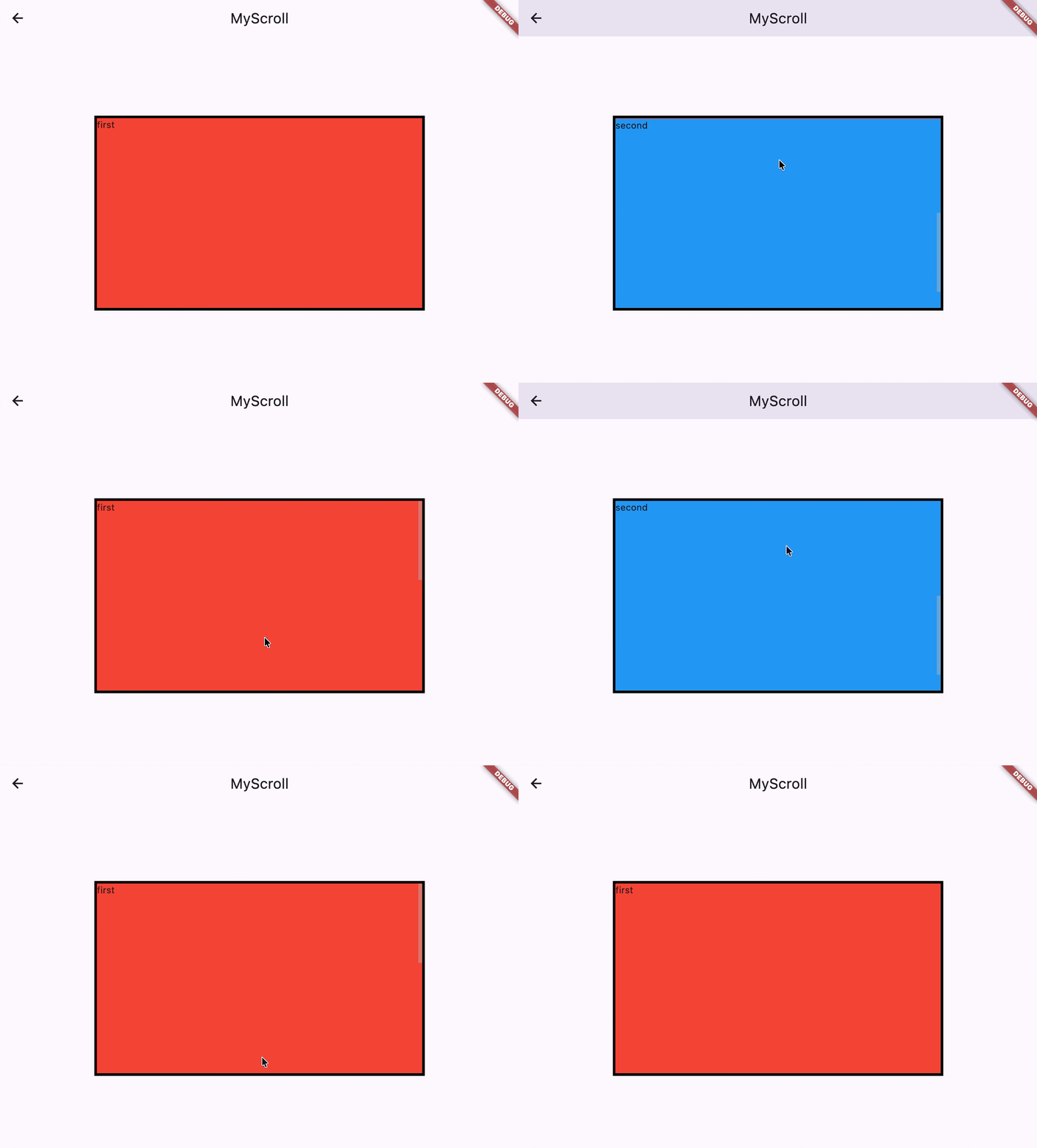
完成版
import 'dart:ui';

import 'package:flutter/material.dart';
import 'package:flutter/rendering.dart';

class MyScroll extends StatefulWidget {
  const MyScroll({super.key});

  @override
  State<MyScroll> createState() => _MyScrollState();
}

class _MyScrollState extends State<MyScroll> {
  final key1 = GlobalKey();
  final key2 = GlobalKey();
  double? offsetToReveal2;

  @override
  void initState() {
    super.initState();
    WidgetsBinding.instance.addPostFrameCallback((_) {
      getOffsetToReveal2();
    });
  }

  void getOffsetToReveal2() {
    final context = key2.currentContext;
    if (context == null) return;

    final renderObject = context.findRenderObject();
    if (renderObject == null) return;

    final viewport = RenderAbstractViewport.of(renderObject);

    final offset = viewport.getOffsetToReveal(renderObject, 0.0).offset;

    setState(() {
      offsetToReveal2 = offset;
    });
  }

  @override
  Widget build(BuildContext context) {
    return ScrollConfiguration(
      behavior: MyScrollBehavior(),
      child: Container(
        decoration: BoxDecoration(
            border: Border.all(
          color: Colors.black,
          width: 4.0,
        )),
        height: 300,
        child: SingleChildScrollView(
          key: ValueKey(offsetToReveal2),
          physics: MyScrollPhysics(
            offsetToReveal2: offsetToReveal2 ?? 0.0,
          ),
          child: Items(
            keys: [key1, key2],
          ),
        ),
      ),
    );
  }
}

class Items extends StatelessWidget {
  const Items({super.key, required this.keys});

  final List<GlobalKey> keys;

  @override
  Widget build(BuildContext context) {
    return Column(
      mainAxisAlignment: MainAxisAlignment.center,
      children: [
        Item(key: keys[0], title: 'first', color: Colors.red),
        Item(key: keys[1], title: 'second', color: Colors.blue),
      ],
    );
  }
}

class Item extends StatelessWidget {
  const Item({super.key, required this.title, required this.color});
  final String title;
  final Color color;

  @override
  Widget build(BuildContext context) {
    return Stack(
      children: [
        Container(
          color: color,
          height: 350,
          width: 500,
        ),
        Text(title),
      ],
    );
  }
}

class MyScrollBehavior extends ScrollBehavior {
  @override
  Set<PointerDeviceKind> get dragDevices => PointerDeviceKind.values.toSet();
}

class MyScrollPhysics extends ScrollPhysics {
  const MyScrollPhysics({
    required this.offsetToReveal2,
    super.parent,
  });

  final double offsetToReveal1 = 0.0;
  final double? offsetToReveal2;

  /// 「速いスワイプかどうか」を判断するための閾値
  static const double _velocityThreshold = 300.0;

  @override
  MyScrollPhysics applyTo(ScrollPhysics? ancestor) {
    return MyScrollPhysics(
      offsetToReveal2: offsetToReveal2,
      parent: buildParent(ancestor),
    );
  }

  @override
  Simulation? createBallisticSimulation(
    ScrollMetrics position,
    double velocity,
  ) {
    // 1 回目の描画時は offsetToReveal2 が null で渡ってくる
    // addPostFrameCallback() で取得した offsetToReveal2 は 2 回目の描画時に渡ってくる
    if (offsetToReveal2 == null) {
      return super.createBallisticSimulation(position, velocity);
    }

    // PageScrollPhysics の丸パクリ
    if ((velocity <= 0.0 && position.pixels <= position.minScrollExtent) ||
        (velocity >= 0.0 && position.pixels >= position.maxScrollExtent)) {
      return super.createBallisticSimulation(position, velocity);
    }

    final double currentOffset = position.pixels;
    final double targetOffset = _getTargetPixels(
      currentOffset: currentOffset,
      velocity: velocity,
    );

    // すでに揃っているなら何もしない
    if ((targetOffset - currentOffset).abs() <
        toleranceFor(position).distance) {
      return null;
    }

    // PageView と同じ方法でスナップさせる
    return ScrollSpringSimulation(
      spring,
      currentOffset, // start
      targetOffset, // end
      velocity, // velocity
      tolerance: toleranceFor(position),
    );
  }

  // offsetToReveal1 か offsetToReveal2 のいずれかを返す
  double _getTargetPixels({
    required double currentOffset,
    required double velocity,
  }) {
    if (offsetToReveal2 == null) {
      return offsetToReveal1;
    }

    // 下向きの「速い」スワイプの場合
    if (velocity > _velocityThreshold) {
      return offsetToReveal2!;
    }

    // 上向きの「速い」スワイプの場合
    if (velocity < -_velocityThreshold) {
      return offsetToReveal1;
    }

    // 指が離れて、慣性による移動も終わった時、1 つ目と 2 つ目 の Item いずれか近い方で止める
    final double distanceToFirst = (currentOffset - offsetToReveal1).abs();
    final double distanceToSecond = (currentOffset - offsetToReveal2!).abs();

    return distanceToFirst < distanceToSecond
        ? offsetToReveal1
        : offsetToReveal2!;
  }
}
リストアイテム数 n 個の場合
Items が n 個のリストアイテムを含んでいる場合。
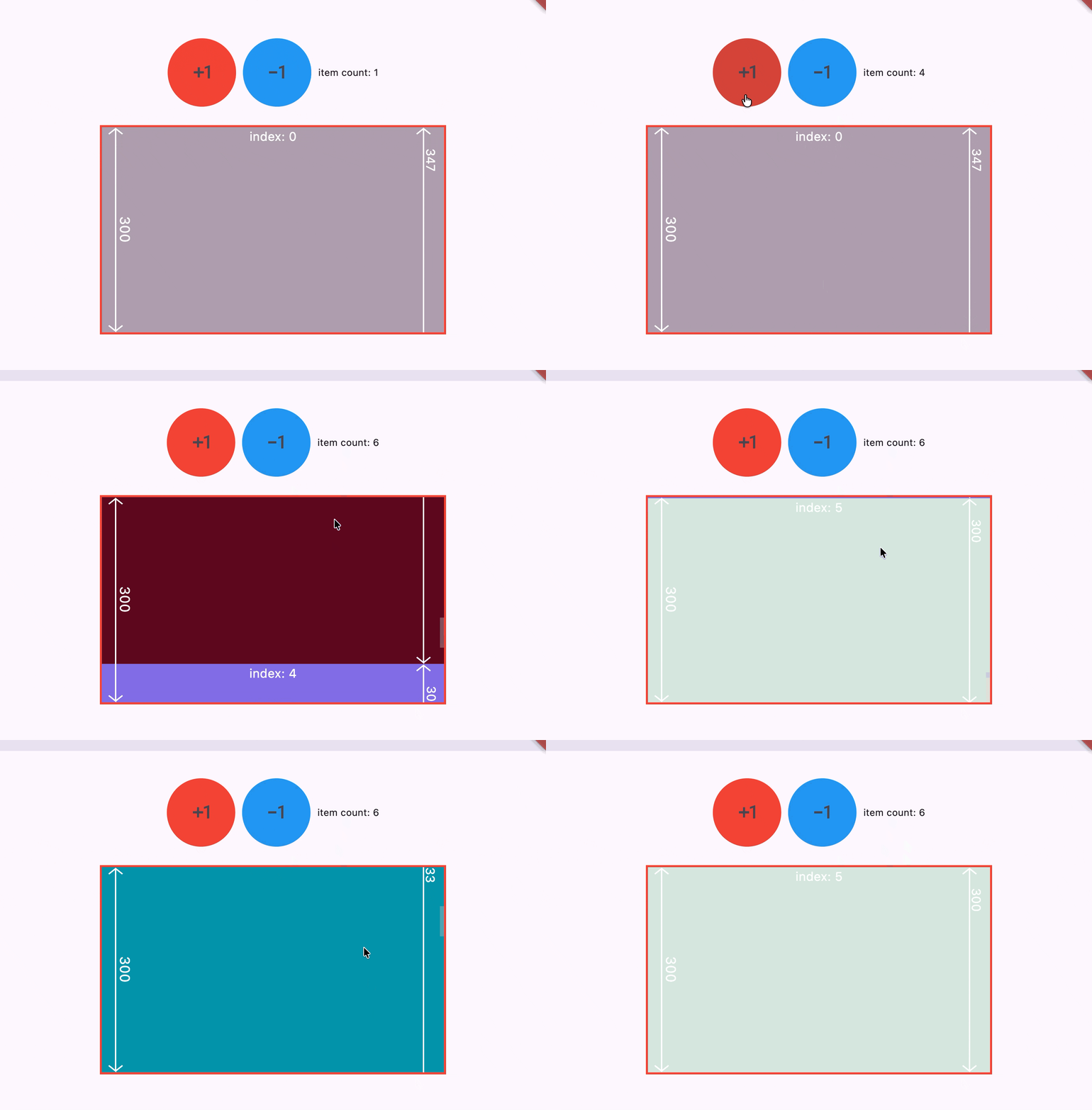
ソースコード
import 'dart:math';
import 'dart:math' as math;
import 'dart:ui';

import 'package:flutter/material.dart';
import 'package:flutter/rendering.dart';

class MyScroll extends StatefulWidget {
  const MyScroll({super.key});

  @override
  State<MyScroll> createState() => _MyScrollState();
}

class _MyScrollState extends State<MyScroll> {
  List<GlobalKey> keys = [];
  List<Color> colors = [];
  List<double> heights = [];
  List<double> offsetsToRevealNext = [];

  @override
  void initState() {
    super.initState();
    addItem();

    WidgetsBinding.instance.addPostFrameCallback((_) {
      getOffsetToRevealNext();
    });
  }

  void addItem() {
    keys.add(GlobalKey());
    colors.add(createColor());
    heights.add(createHeight());
  }

  void removeItem() {
    if (keys.length < 2) return;
    keys.removeLast();
    colors.removeLast();
    heights.removeLast();
  }

  Color createColor() {
    return Color(
      (Random().nextDouble() * 0xFFFFFF).toInt(),
    ).withAlpha(255);
  }

  double createHeight() {
    return Random().nextInt(500).toDouble().clamp(300, 500);
  }

  void getOffsetToRevealNext() {
    offsetsToRevealNext.clear();
    for (var key in keys) {
      final context = key.currentContext;
      if (context == null) break;

      final renderObject = context.findRenderObject();
      if (renderObject == null) break;

      final viewport = RenderAbstractViewport.of(renderObject);
      final offset = viewport.getOffsetToReveal(renderObject, 0.0).offset;
      offsetsToRevealNext.add(offset);
    }
    setState(() {});
  }

  @override
  Widget build(BuildContext context) {
    return Column(
      spacing: 30,
      children: [
        const SizedBox(height: 10),
        _MyController(
          itemCount: keys.length,
          onTapPlus: () {
            setState(() {
              addItem();
            });
            WidgetsBinding.instance.addPostFrameCallback((_) {
              getOffsetToRevealNext();
            });
          },
          onTapMinus: () {
            setState(() {
              removeItem();
            });
            WidgetsBinding.instance.addPostFrameCallback((_) {
              getOffsetToRevealNext();
            });
          },
        ),
        _MyViewport(
          offsetsToRevealNext: offsetsToRevealNext,
          child: Items(
            keys: keys,
            colors: colors,
            heights: heights,
          ),
        )
      ],
    );
  }
}

class _MyViewport extends StatelessWidget {
  const _MyViewport({required this.child, required this.offsetsToRevealNext});

  final Widget child;
  final List<double> offsetsToRevealNext;

  @override
  Widget build(BuildContext context) {
    return Stack(
      children: [
        SizedBox(
          height: 300,
          width: 500,
          child: ScrollConfiguration(
            behavior: MyScrollBehavior(),
            child: SingleChildScrollView(
              physics: MyScrollPhysics(
                offsetsToRevealNext: offsetsToRevealNext,
              ),
              child: child,
            ),
          ),
        ),
        IgnorePointer(
          child: Container(
            height: 300,
            width: 500,
            decoration: BoxDecoration(
              border: Border.all(
                color: Colors.red,
                width: 3.0,
                strokeAlign: BorderSide.strokeAlignOutside,
              ),
            ),
          ),
        ),
        Positioned(
          left: 10,
          child: CustomPaint(
            size: const Size(100, 300),
            painter: _MyCustomPainter(),
          ),
        ),
        Positioned(
          left: 15,
          top: 135,
          child: Transform.rotate(
            angle: math.pi / 180 * 90,
            child: const Text(
              '300',
              style: TextStyle(color: Colors.white, fontSize: 20),
            ),
          ),
        ),
      ],
    );
  }
}

class Items extends StatelessWidget {
  const Items({
    super.key,
    required this.keys,
    required this.colors,
    required this.heights,
  });

  final List<GlobalKey> keys;
  final List<Color> colors;
  final List<double> heights;

  @override
  Widget build(BuildContext context) {
    return Column(
      children: [
        for (var i = 0; i < keys.length; i++) ...{
          Item(
            key: keys[i],
            color: colors[i],
            height: heights[i],
            title: 'index: $i',
          ),
        }
      ],
    );
  }
}

class _MyController extends StatelessWidget {
  const _MyController({
    required this.itemCount,
    required this.onTapPlus,
    required this.onTapMinus,
  });

  final int itemCount;
  final VoidCallback onTapPlus;
  final VoidCallback onTapMinus;

  @override
  Widget build(BuildContext context) {
    return Row(
      mainAxisAlignment: MainAxisAlignment.center,
      spacing: 10,
      children: [
        Container(
          width: 100,
          height: 100,
          decoration: const BoxDecoration(
            color: Colors.red,
            borderRadius: BorderRadius.all(Radius.circular(100)),
          ),
          child: IconButton(
            onPressed: onTapPlus,
            icon: const Icon(Icons.exposure_plus_1),
            iconSize: 35,
          ),
        ),
        Container(
          width: 100,
          height: 100,
          decoration: const BoxDecoration(
            color: Colors.blue,
            borderRadius: BorderRadius.all(Radius.circular(100)),
          ),
          child: IconButton(
            onPressed: onTapMinus,
            icon: const Icon(Icons.exposure_minus_1_outlined),
            iconSize: 35,
          ),
        ),
        Text('item count: $itemCount'),
      ],
    );
  }
}

class Item extends StatelessWidget {
  const Item({
    super.key,
    required this.title,
    required this.color,
    required this.height,
  });
  final String title;
  final Color color;
  final double height;

  @override
  Widget build(BuildContext context) {
    return Stack(
      children: [
        Container(
          color: color,
          height: height,
          width: 500,
        ),
        Align(
          alignment: AlignmentGeometry.topCenter,
          child: Text(title,
              style: const TextStyle(
                color: Colors.white,
                fontSize: 18,
              )),
        ),
        Positioned(
          right: 10,
          child: CustomPaint(
            size: Size(30, height),
            painter: _MyCustomPainter(),
          ),
        ),
        Positioned(
          right: 2,
          top: 35,
          child: Transform.rotate(
            angle: math.pi / 180 * 90,
            child: Text(
              '${height.toInt()}',
              style: const TextStyle(color: Colors.white, fontSize: 18),
            ),
          ),
        ),
      ],
    );
  }
}

class _MyCustomPainter extends CustomPainter {
  @override
  void paint(Canvas canvas, Size size) {
    final height = size.height;
    final path = Path()
      ..moveTo(0, 10)
      ..lineTo(10, 2)
      ..lineTo(20, 10)
      ..moveTo(10, 2)
      ..lineTo(10, height - 2)
      ..lineTo(0, height - 10)
      ..moveTo(10, height - 2)
      ..lineTo(20, height - 10);

    canvas.drawPath(
      path,
      Paint()
        ..style = PaintingStyle.stroke
        ..strokeWidth = 2
        ..color = Colors.white,
    );
  }

  @override
  bool shouldRepaint(covariant CustomPainter oldDelegate) => false;
}

class MyScrollBehavior extends ScrollBehavior {
  @override
  Set<PointerDeviceKind> get dragDevices => PointerDeviceKind.values.toSet();
}

class MyScrollPhysics extends ScrollPhysics {
  const MyScrollPhysics({
    required this.offsetsToRevealNext,
    super.parent,
  });

  final List<double> offsetsToRevealNext;

  /// PageScrollPhysics と同じく
  /// 「速いスワイプかどうか」を判断するための閾値
  static const double _velocityThreshold = 300.0;

  @override
  MyScrollPhysics applyTo(ScrollPhysics? ancestor) {
    return MyScrollPhysics(
      offsetsToRevealNext: offsetsToRevealNext,
      parent: buildParent(ancestor),
    );
  }

  double _getTargetPixels({
    required ScrollMetrics metrics,
    required double currentOffset,
    required double velocity,
  }) {
    if (offsetsToRevealNext.isEmpty) {
      return 0.0;
    }

    for (var i = 1; i < offsetsToRevealNext.length; i++) {
      final previous = offsetsToRevealNext[i - 1];
      final next = offsetsToRevealNext[i];
      if (currentOffset > previous && currentOffset < next) {
        // 下向きの「速い」スワイプの場合
        if (velocity > _velocityThreshold) {
          return next;
        }
        // 上向きの「速い」スワイプの場合
        if (velocity < -_velocityThreshold) {
          return previous;
        }

        final distanceToPrevious =
            (offsetsToRevealNext[i - 1] - currentOffset).abs();
        final distanceToNext = (offsetsToRevealNext[i] - currentOffset).abs();
        if (distanceToPrevious < distanceToNext) {
          return previous;
        }
        return next;
      } else if (currentOffset > offsetsToRevealNext.last) {
        return offsetsToRevealNext.last;
      }
    }
    return currentOffset;
  }

  @override
  Simulation? createBallisticSimulation(
    ScrollMetrics position,
    double velocity,
  ) {
    if (offsetsToRevealNext.isEmpty) {
      return super.createBallisticSimulation(position, velocity);
    }

    // PageScrollPhysics の丸パクリ
    if ((velocity <= 0.0 && position.pixels <= position.minScrollExtent) ||
        (velocity >= 0.0 && position.pixels >= position.maxScrollExtent)) {
      return super.createBallisticSimulation(position, velocity);
    }

    final double currentOffset = position.pixels;
    final double targetOffset = _getTargetPixels(
      metrics: position,
      currentOffset: currentOffset,
      velocity: velocity,
    );

    // すでに揃っているなら何もしない
    if ((targetOffset - currentOffset).abs() <
        toleranceFor(position).distance) {
      return null;
    }

    // PageView と同じ方法でスナップさせる
    return ScrollSpringSimulation(
      spring,
      currentOffset, // start
      targetOffset, // end
      velocity, // velocity
      tolerance: toleranceFor(position),
    );
  }
}