
WinForms の TreeView をエクスプローラースタイルにする方法
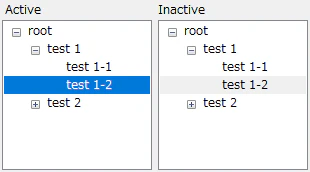
通常のツリービュー
- 非アクティブ時に選択状態が見え難い
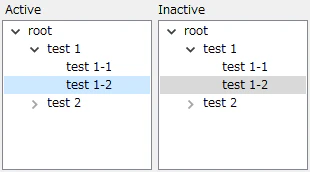
エクスプローラースタイル
- 展開記号が矢印
- 非アクティブ時も選択状態が見え易い
サンプルコード
using System;
using System.Runtime.InteropServices;
using System.Windows.Forms;

static class NativeMethods
{
	[DllImport("uxtheme.dll", ExactSpelling = true, CharSet = CharSet.Unicode)]
	public static extern int SetWindowTheme(IntPtr hwnd, string pszSubAppName, string pszSubIdList);
}

static void InitializeTreeView(TreeView tv)
{
	tv.FullRowSelect = true;
	tv.HideSelection = false;
	tv.ShowLines = false;

	NativeMethods.SetWindowTheme(tv.Handle, "explorer", null);
}