
はじめに
新しいサービスを企画したり、市場参入戦略を見直す場面では、社内に蓄積されたデータ資産(過去のプロジェクトレポート、顧客分析、売上推移、ユーザー行動ログなど)は非常に重要です。
しかし、これらは本質的に 過去を振り返るための情報 です。
一方で、市場環境や競合状況は常に動き続けています。
- 競合の新機能リリース
- 業界トレンドの変化
- 顧客ニーズの移り変わり
- 法制度・規制のアップデート
こうした いま起きていること は、社内データだけでは捉えきれません。
そこで、Web上の情報をもっと手軽に集めて、競合や市場の動きを自動で追えるAIエージェントを実際に作ってみることにしました。
本記事では、その過程で得られた知見とあわせて、Google ADKとBright Data MCPによるWebリサーチAIエージェント構築の手順を紹介します。
構成と流れ
今回作成したエージェントは、次のような仕組みで動きます。
作ったのは、次のようなエージェントです。
テーマを入力すると → Web上の情報を自動で取得 → 重要ポイントを整理 → そのままレポートとしてまとめる
この一連の処理を、役割ごとに分担した3つのサブエージェントが連携して進める構成になっています。
🔹Planner: 調査テーマを「検索クエリ」に落とし込む役割
例:「○○市場の競合動向が知りたい」
↓
- テーマをいくつかのWeb検索クエリに分解
- 3〜5件の多角的なクエリを自動生成
いわば、調査の出発点をつくる担当です。
🔹Researcher: Web検索・スクレイピング担当
Planner が生成したクエリに基づき、
- SERP(検索結果)を取得
- 上位ページの抽出
- 必要なページへ遷移
- 本文テキストの抽出
といった処理を行います。
対象となるのは、主に以下のような公開Web情報:
- ニュースサイト
- 競合他社の公式ページ
- 業界ブログ・技術ブログ
- レビューサイト
- 市場分析記事 など
特に今回、Bright Data MCPのブラウザ操作ツールを組み合わせることで、AIが自分でWebを見に行くような動作を実現できたのが大きなポイントでした。
🔹Publisher: レポート化を担当するまとめ役
Researcherが集めた大量テキストを、
- 市場トレンド
- 競合の特徴
- 機会とリスク
- 注目すべき変化
などの観点で、最終的にMarkdown形式のレポートとしてまとめます。
手動で行う場合は 検索 → 情報収集 → 読み比べ → メモ → レポート化 という一連の作業に多くの時間と手間がかかりますが、今回のワークフローではこれらをほぼ自動化できたことで、必要なときにすぐ市場分析を実行できる環境が整いました。
実際に動かしてみると、自分では気づけなかった競合施策や新しい業界トレンドが自然と浮かび上がり、過去の資料だけでは得られなかった視点が手に入るようになった点が非常に印象的でした。
なぜGoogle ADKとBright Data MCPを選んだのか?
-
Google ADK を使った理由
Google ADK(Agent Development Kit)は、- 複数ステップのAIワークフローを構築できる
- サブエージェントを自然に構成できる
- 「どの順番で何をするか」を明確に定義できる
という特徴があります。
今回のような、Planner → Researcher → Publisherという流れのある処理を作るには非常に相性が良かったです。
-
Bright Data MCPを組み合わせた理由
Google ADK単体では、Web閲覧やスクレイピングができません。そこで Bright Data MCP のツール群を組み合わせると、AI から安全かつ柔軟に外部ツールを呼び出せるようになりました。具体的には、次のような操作が可能になります。- 検索エンジンのSERP(検索結果)取得
- ブラウザ操作(URL移動、クリック、フォーム入力など)
- Webページ本文のテキスト抽出
- Amazon/Instagram/LinkedIn など主要サイト向けの構造化データAPI
※Bright Data MCPで利用可能なツール一覧はAppendixにまとめています。
この仕組みによって、AIに「実際のWebを見に行ってもらい、必要な情報をその場で取ってくる」という、これまで手動でしかできなかった一連の作業を自動化できるようになりました。
特に、市場調査や競合分析のようにリアルタイム性が求められる場面では、Bright Dataの安定したWebアクセス基盤が大きな強みとして機能します。
実施プロセス
1. 前提条件
- Python 3.10+
- Node.js v18+
- GeminiのAPI Key (今回は無料のGemini Tierを使用)
- Bright Dataのアカウント(無料枠あり)
2. プロジェクト構成
Google ADKは特定のディレクトリ構成を期待するので、以下のように作ります:
google_adk_mcp_agent/
  ├── .env
  ├── web_search_agent/
  │      ├── __init__.py
  │      └── agent.py
  └── .venv/
google_adk_mcp_agentの中に、web_search_agentというサブフォルダを作成します。
このサブフォルダには、エージェントのコアロジックが含まれ、以下の2つのファイルが必要です:
-
__init__.py:agent.pyからロジックをエクスポートします -
agent.py:Google ADKエージェントの定義が含まれています
Step 1. 仮想環境と依存ライブラリの準備
mkdir google_adk_mcp_agent
cd google_adk_mcp_agent

python3 -m venv .venv
source .venv/bin/activate # macOSで仮想環境を有効

pip install google-adk python-dotenv
Step 2. Bright Data MCP Serverのセットアップ
まず、Bright Dataのアカウントを取得します。
- 「アカウント設定」の画面でAPIキーを取得します
- 「Web Access」でブラウザ認証情報を取得します
- Create API
- Web Unlocker APIを選んで、次へ
- 完成!
- 認証用のUsernameとPasswordを取得
- Create API
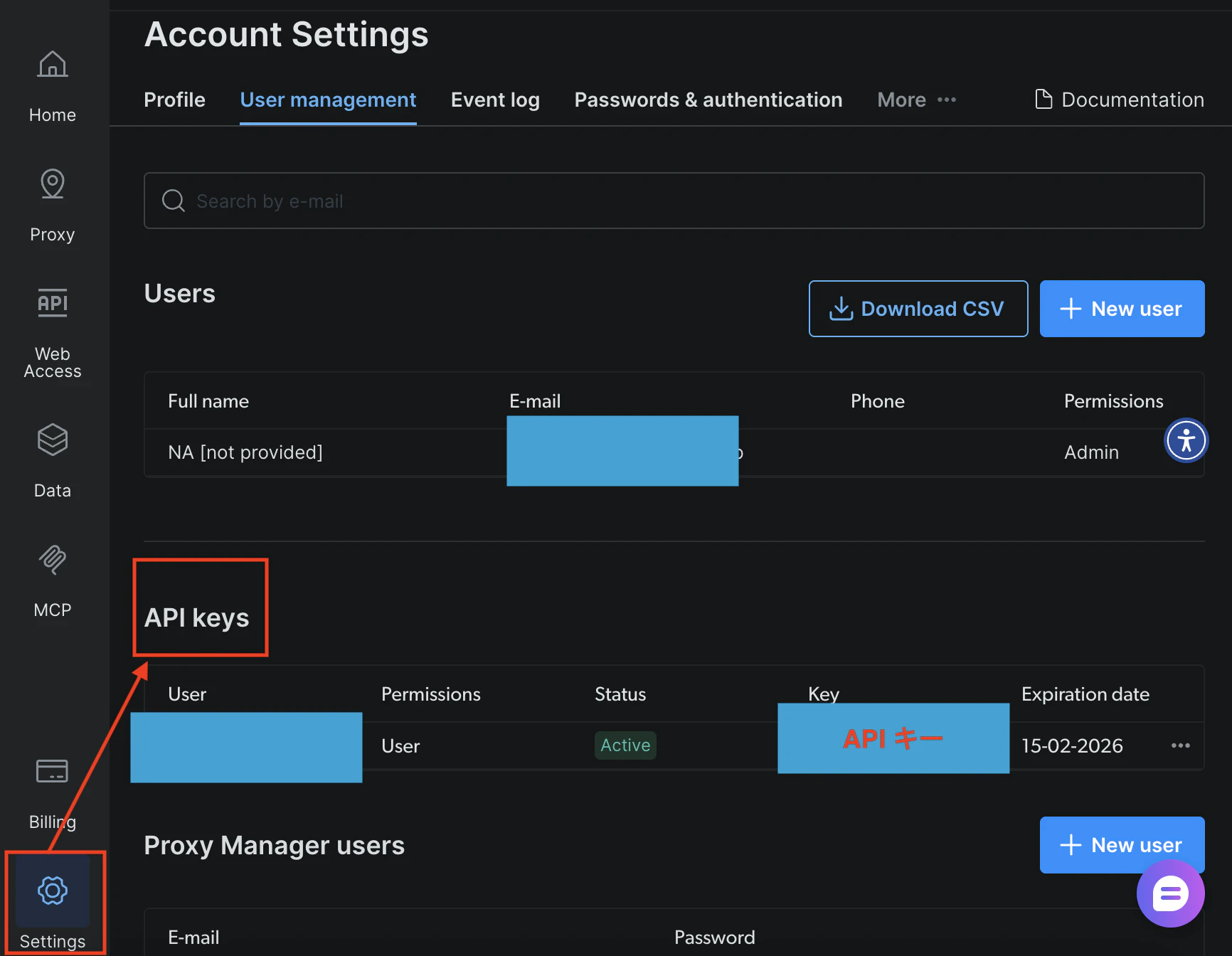


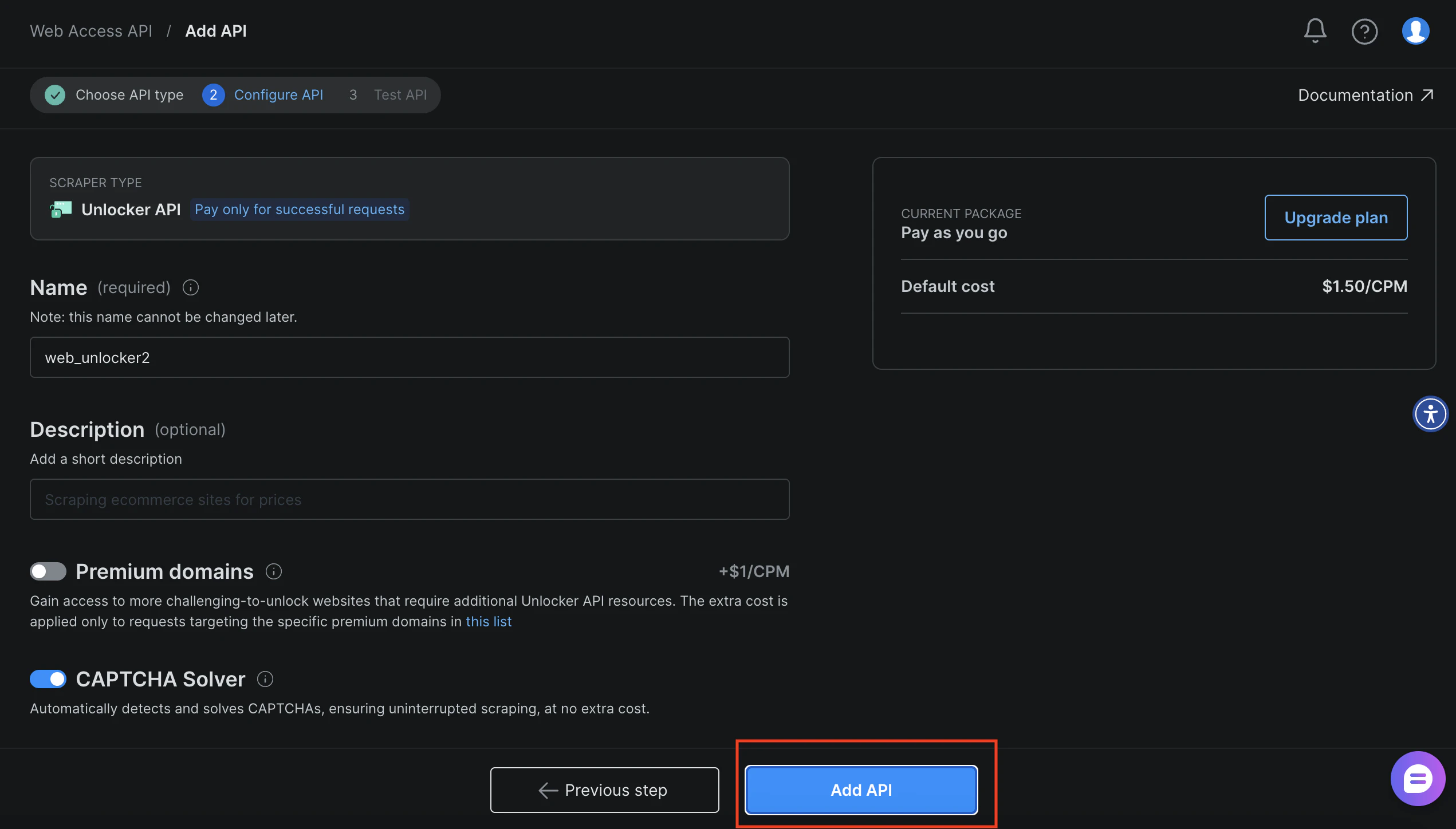

次に、Node.js環境にBright Data MCPサーバーをインストール:
npm install -g @brightdata/mcp
Step 3. APIキーを.envに設定
# Google ADKがVertex AIと統合するかどうかを決定します。Gemini APIを使用する場合は"False"に設定します。
GOOGLE_GENAI_USE_VERTEXAI="False"
GOOGLE_API_KEY="あなたのGemini APIキー"

BRIGHT_DATA_API_TOKEN="あなたのBright Data API TOKEN"
BRIGHT_DATA_BROWSER_AUTH="username:password"
Step4. エージェントを定義
1. Planner(検索クエリ生成)
ユーザーが入力した質問やテーマを分析し、検索エンジンに入力するイメージのクエリへと分解します。
- 抽象的な質問 → 具体的な検索クエリへ
- 3〜5件のクエリを JSON で返す
- 後続の Researcher がそのまま利用できる形式に整形する
例:
Q:「AIエージェントの最新事例を教えて」
→
A: 「AIエージェントの事例 2025」「マルチエージェン」「自律エージェントの実例」など
# Define the functions for the creation of the required sub-agents
def create_planner_agent():
    return Agent(
        name="planner",
        model="gemini-2.5-flash",
        description="Breaks down user input into focused search queries for research purposes.",
        instruction="""
        あなたは「リサーチ計画アシスタント」です。以下の手順に従って動作してください。
        1. ユーザーが入力したテーマや質問内容を分析する。
        2. その内容をもとに、検索エンジンで実際に入力しそうな検索クエリを3〜5個に分解して作成する。互いに視点が異なり、テーマを幅広くカバーできることが重要です。
        3. 結果は次の JSON 形式で出力してください:
        {
            "queries": ["query1", "query2", "query3"]
        }
        【制約】
        - 作成するクエリは「検索エンジンにそのまま入力する言い回し」で記述すること。
        """,
        output_key="search_queries"
    )
2. Researcher(Web検索+スクレイピング)
Plannerが作ったクエリを使って実際にBright Data MCPを呼び出し、
-
search_engineでGoogle風検索 - 上位URLを抽出
-
scraping_browser_navigateでページに移動 -
scraping_browser_get_textで本文抽出
という「実行フェーズ」を担当する部分です。
Bright Data MCPを使うことで、
AIが本当に「ウェブを見る」→ テキストを抽出する → 要点化する
という、通常のLLMでは不可能な「リアルタイム性+ソース付き回答」を実現できます。
def create_researcher_agent(mcp_tools):
    return Agent(
        name="researcher",
        model="gemini-2.5-flash",
        description="Performs web searches and extracts key insights from web pages using the configured tools.",
        instruction="""
        あなたは「Webリサーチ専用エージェント」です。以下の手順に従って処理を行ってください。
        1. plannerから受け取った検索クエリ一覧を入力とする。
        2. 各クエリについて、`search_engine`ツールを使ってGoogleの検索結果を取得する。
        3. 得られた検索結果の中から、最も関連性が高い上位3つのURLを選ぶ。
        4. 選んだ各URLを`scraping_browser_navigate`ツールに渡してページへアクセスする。
        5. 各ページに対し、`scraping_browser_get_text`ツールを使って本文テキストを抽出する。
        6. 抽出したテキストを分析し、重要なポイントを次のJSON形式で要約して返す:
        [
            {
                "url": "https://example.com",
                "insights": [
                    "主要なインサイト1",
                    "主要なインサイト2"
                ]
            },
            ...
        ]

        【制約】
        - 使用できるツールは `search_engine`、`scraping_browser_navigate`、`scraping_browser_get_text` の3つのみです。
        """,
        tools=mcp_tools
    )
3. Publisher(レポート生成)
Researcherが返したJSONを受け取り、Markdown形式のレポートとして読みやすくまとめる部分です。
- 章立て(#, ##, ###)による構造化
- URL へのリンクも保持
- 抽出結果をただ並べるのではなく、ストーリーとして整理
- 最後に簡潔な結論を書く
これで「単なるスクレイピング結果」ではなく、「読めるレポート」として仕上げてくれます!
def create_publisher_agent():
    return Agent(
        name="publisher",
        model="gemini-2.5-flash",
        description="Synthesizes research findings into a comprehensive, well-structured final document.",
        instruction="""
        あなたは「専門的なレポートライター」です。researcher agentから渡される構造化データをもとに、読みやすく洞察に富んだレポートを作成してください。

        【レポート作成ガイドライン】
        - Markdown形式を用いて構成すること
            - タイトル(#)、サブタイトル、導入文
            - 章構成(##)、節構成(###)
            - 結論(##)を必ず含める

        - researcher agentが提供したURLは、必要に応じて文中に適切にリンクとして組み込むこと
        - 文章トーンは「専門的・客観的・情報価値の高い」スタイルを維持すること
        - ただ findings(抽出結果)を並べるだけでなく、
            - 内容を整理
            - 関連性を示し
            - 重要な示唆・示唆される背景・傾向
            を含め、1つのストーリーとして理解しやすいレポートにまとめること
        """
    )
Step5. Bright Data MCPの統合(MCP Integration)
前のステップでも触れましたが、今回のエージェント構成ではResearcherが、Bright Data Web MCP Serverが提供するツール群に依存しています。
具体的には:
- search_engine(SERP検索)
- scraping_browser_navigate(ブラウザ移動)
- scraping_browser_get_text(ページ本文抽出)
といったMCPツールが使われています。
これらのツールはBright Data MCP Serverを起動したときに提供されるもので、Google ADK側から利用できるようにするには、まず「MCP Toolsetをロード」する処理をコード内で実装する必要があります。
Google ADKでは、このMCP連携を非常にシンプルに扱えるようにMCPToolset.from_server()というメソッドが用意されています。(ありがたい! )
)
async def initialize_mcp_tools_async():
    print("Connecting to Bright Data MCP...")
    tools, exit_stack = await MCPToolset.from_server(
        connection_params=StdioServerParameters(
            command="npx",
            args=["-y", "@brightdata/mcp"],
            env={
                "API_TOKEN": BRIGHT_DATA_API_TOKEN,
                "BROWSER_AUTH": BRIGHT_DATA_BROWSER_AUTH,
            }
        )
    )
    print(f"MCP Toolset created successfully with {len(tools)} tools")
    tool_names = [tool.name for tool in tools]
    print(f"Available tools include: {', '.join(tool_names)}")

    print("MCP initialization complete!")

    return tools, exit_stack

def initialize_mcp_tools():
    """Synchronous wrapper to initialize MCP tools"""
    global _mcp_tools, _exit_stack
    if _mcp_tools is None:
        try:
            loop = asyncio.get_event_loop()
            if loop.is_running():
                # If there's already a running loop, we need a different approach
                # Create a new event loop in a thread
                import concurrent.futures

                def run_async():
                    new_loop = asyncio.new_event_loop()
                    asyncio.set_event_loop(new_loop)
                    try:
                        return new_loop.run_until_complete(initialize_mcp_tools_async())
                    finally:
                        new_loop.close()

                with concurrent.futures.ThreadPoolExecutor() as executor:
                    _mcp_tools, _exit_stack = executor.submit(run_async).result()
            else:
                _mcp_tools, _exit_stack = loop.run_until_complete(initialize_mcp_tools_async())
        except RuntimeError:
            # No event loop exists, create one
            _mcp_tools, _exit_stack = asyncio.run(initialize_mcp_tools_async())

    return _mcp_tools, _exit_stack
Step6. Root Agentを作成
- ルートエージェントとは?
簡単に言うと…
すべてのサブエージェントを束ねて、正しい順番で呼び出す親エージェント Google ADKの「実行エントリーポイント」である存在
だと私が理解しております。
Google ADK にはいくつかのエージェントタイプがあります:
- 通常の Agent(単体エージェント)
- ループ型 Agent
- 条件分岐系 Agent
- SequentialAgent(順番実行)
- デバッグ用途の Agent
など。
今回は 「Planner → Researcher → Publisher」 という複数のサブエージェントを順番に実行させたいケース では、SequentialAgentを使うのが最適でした。
def create_root_agent():
    try:
        # Load the MCP tools
        mcp_tools, exit_stack = initialize_mcp_tools()
    except Exception as e:
        print(f"Warning: Could not initialize MCP tools: {e}")
        mcp_tools = []
        exit_stack = None

    # Define an agent that applies the configured sub-agents sequentially
    root_agent = SequentialAgent(
        name="web_research_agent",
        description="An agent that researches topics on the web and creates comprehensive reports.",
        sub_agents=[
            create_planner_agent(),
            create_researcher_agent(mcp_tools),
            create_publisher_agent(),
        ]
    )

    return root_agent
Step7. 実行
プロジェクトのrootフォルダで、仮想環境を有効した上、 Web UIでエージェントを起動します:
adk web
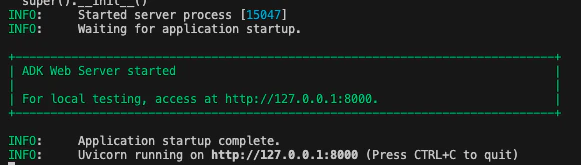
http://127.0.0.1:8000を開くとADK Web UIが起動します。
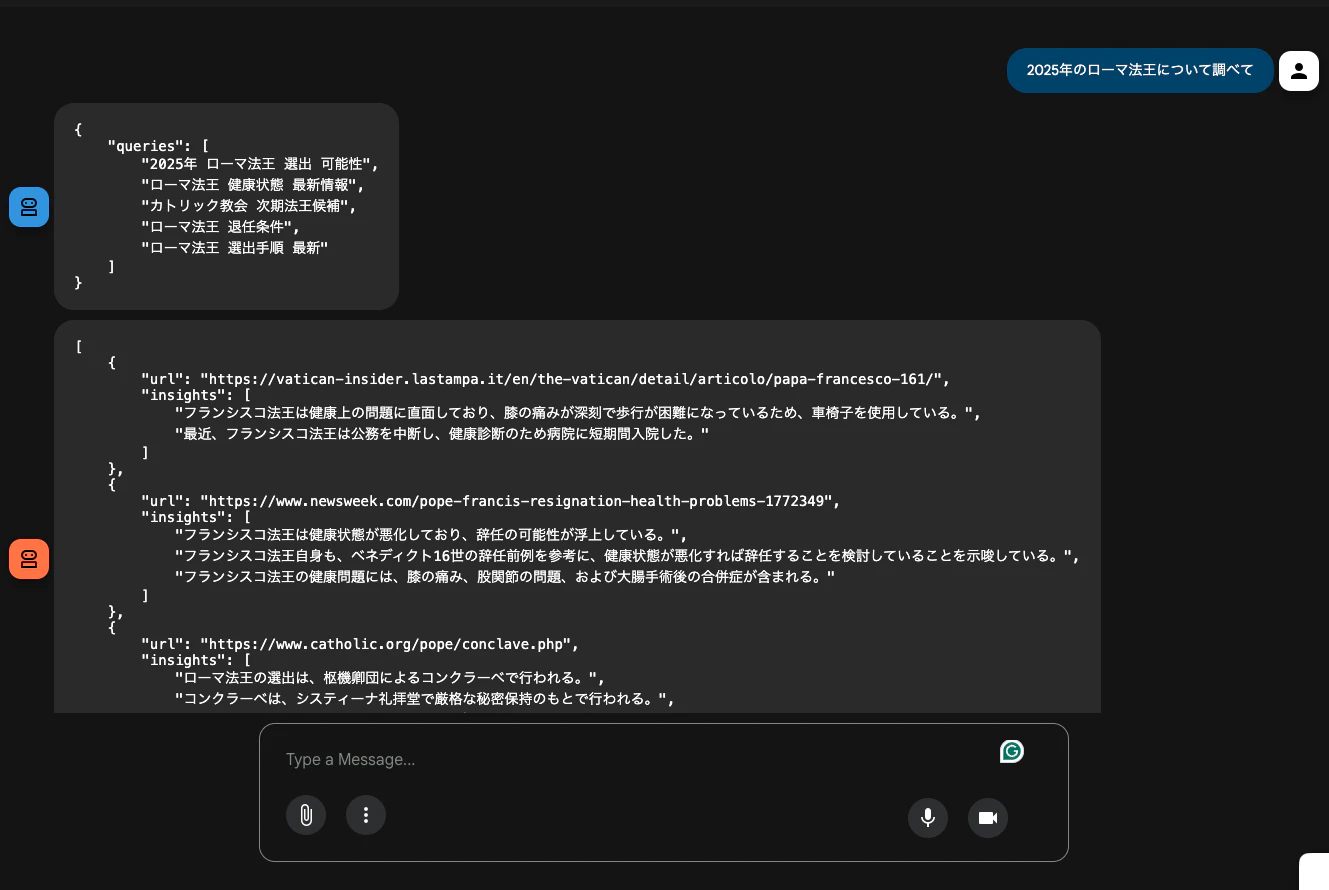
業務内容を避けるため、今回はあくまでシンプルな例を使って動作を確認してみます。
「2025年のローマ法王について調べて」と入力すると、「クエリを分解して → search_engine でリアルタイム検索して要点を整理 → レポートでまとめる」という処理を自動で実行してくれました!👏

おわりに
Google ADKとBright Data MCPを用いて競合動向・市場調査を自動化するAIエージェントを構築したところ、
- 外部環境の「今」を捉えられる
- 情報収集の抜け漏れが減る
- レポート作成まで自動化できる
という大きなメリットを実感しました。
市場・競合リサーチを効率化したい方、Google ADKやBright Data MCPを活用したプロジェクトに興味がある方の参考になれば嬉しいです。
Appendix
Bright Data MCP Serverで利用可能なツール

| 機能 | 説明 |
|---|---|
| search_engine | Google、Bing、YandexからSERP(検索結果ページ)をスクレイピング。Googleの結果はJSON形式、Bing/YandexはMarkdown形式で返却。cursorパラメータでページネーション対応。 |
| scrape_as_markdown | 単一ページを高度な抽出機能でスクレイピングし、Markdown形式で返却。Bright DataのUnlocker機能を使用し、Bot保護やCAPTCHAを自動処理。 |
| search_engine_batch | 最大10件の検索クエリを並列実行。Googleの結果はJSON、Bing/YandexはMarkdown形式で返却。 |
| scrape_batch | 最大10件のWebページを一括スクレイピングし、URL/コンテンツのペアを配列でMarkdown形式返却。 |
| scrape_as_html | 単一ページを高度な抽出機能でスクレイピングし、HTML応答本体を返却。Bot検出やCAPTCHA保護されたサイトに対応。 |
| extract | WebページをMarkdownとしてスクレイピングし、AIサンプリングで構造化JSONに変換。カスタム抽出プロンプトをオプションで指定可能。 |
| session_stats | 現在のMCPセッション中に各ツールが呼び出された回数をレポート。 |
| web_data_amazon_product | Amazon商品の構造化データを高速取得。/dp/を含む有効な商品URLが必要。通常のスクレイピングより高速かつ安定。 |
| web_data_amazon_product_reviews | Amazon商品レビューの構造化データを高速取得。/dp/を含む有効な商品URLが必要。通常のスクレイピングより高速かつ安定。 |
| web_data_amazon_product_search | Amazon検索結果の構造化データを取得。検索キーワードとAmazonドメインURLが必要。検索結果の最初のページのみ対応。 |
| web_data_walmart_product | Walmart商品の構造化データを高速取得。/ip/を含む商品URLが必要。通常のスクレイピングより高速かつ安定。 |
| web_data_walmart_seller | Walmart出品者の構造化データを高速取得。有効なWalmart出品者URLが必要。通常のスクレイピングより高速かつ安定。 |
| web_data_ebay_product | eBay商品の構造化データを高速取得。有効なeBay商品URLが必要。通常のスクレイピングより高速かつ安定。 |
| web_data_homedepot_products | Home Depot商品の構造化データを高速取得。有効なhomedepot.com商品URLが必要。通常のスクレイピングより高速かつ安定。 |
| web_data_zara_products | Zara商品の構造化データを高速取得。有効なZara商品URLが必要。通常のスクレイピングより高速かつ安定。 |
| web_data_etsy_products | Etsy商品の構造化データを高速取得。有効なEtsy商品URLが必要。通常のスクレイピングより高速かつ安定。 |
| web_data_bestbuy_products | Best Buy商品の構造化データを高速取得。有効なBest Buy商品URLが必要。通常のスクレイピングより高速かつ安定。 |
| web_data_linkedin_person_profile | LinkedIn個人プロフィールの構造化データを高速取得。有効なLinkedInプロフィールURLが必要。通常のスクレイピングより高速かつ安定。 |
| web_data_linkedin_company_profile | LinkedIn企業プロフィールの構造化データを高速取得。有効なLinkedIn企業URLが必要。通常のスクレイピングより高速かつ安定。 |
| web_data_linkedin_job_listings | LinkedIn求人情報の構造化データを高速取得。有効なLinkedIn求人URLまたは検索URLが必要。通常のスクレイピングより高速かつ安定。 |
| web_data_linkedin_posts | LinkedInの投稿の構造化データを高速取得。有効なLinkedIn投稿URLが必要。通常のスクレイピングより高速かつ安定。 |
| web_data_linkedin_people_search | LinkedInの人物検索結果の構造化データを高速取得。LinkedIn人物検索URLが必要。通常のスクレイピングより高速かつ安定。 |
| web_data_crunchbase_company | Crunchbase企業情報の構造化データを高速取得。有効なCrunchbase企業URLが必要。通常のスクレイピングより高速かつ安定。 |
| web_data_zoominfo_company_profile | ZoomInfo企業プロフィールの構造化データを高速取得。有効なZoomInfo企業URLが必要。通常のスクレイピングより高速かつ安定。 |
| web_data_instagram_profiles | Instagramプロフィールの構造化データを高速取得。有効なInstagramプロフィールURLが必要。通常のスクレイピングより高速かつ安定。 |
| web_data_instagram_posts | Instagram投稿の構造化データを高速取得。有効なInstagram投稿URLが必要。通常のスクレイピングより高速かつ安定。 |
| web_data_instagram_reels | Instagramリールの構造化データを高速取得。有効なInstagramリールURLが必要。通常のスクレイピングより高速かつ安定。 |
| web_data_instagram_comments | Instagramコメントの構造化データを高速取得。有効なInstagram URLが必要。通常のスクレイピングより高速かつ安定。 |
| web_data_facebook_posts | Facebook投稿の構造化データを高速取得。有効なFacebook投稿URLが必要。通常のスクレイピングより高速かつ安定。 |
| web_data_facebook_marketplace_listings | Facebookマーケットプレイス出品情報の構造化データを高速取得。有効なマーケットプレイス出品URLが必要。通常のスクレイピングより高速かつ安定。 |
| web_data_facebook_company_reviews | Facebook企業レビューの構造化データを高速取得。有効なFacebook企業URLとレビュー件数が必要。通常のスクレイピングより高速かつ安定。 |
| web_data_facebook_events | Facebookイベント情報の構造化データを高速取得。有効なFacebookイベントURLが必要。通常のスクレイピングより高速かつ安定。 |
| web_data_tiktok_profiles | TikTokプロフィールの構造化データを高速取得。有効なTikTokプロフィールURLが必要。通常のスクレイピングより高速かつ安定。 |
| web_data_tiktok_posts | TikTok投稿の構造化データを高速取得。有効なTikTok投稿URLが必要。通常のスクレイピングより高速かつ安定。 |
| web_data_tiktok_shop | TikTok Shop商品の構造化データを高速取得。有効なTikTok Shop商品URLが必要。通常のスクレイピングより高速かつ安定。 |
| web_data_tiktok_comments | TikTokコメントの構造化データを高速取得。有効なTikTok動画URLが必要。通常のスクレイピングより高速かつ安定。 |
| web_data_google_maps_reviews | GoogleマップレビューN構造化データを高速取得。有効なGoogleマップURLが必要で、days_limit(デフォルト3日)をオプション指定可能。通常のスクレイピングより高速かつ安定。 |
| web_data_google_shopping | Google Shopping商品の構造化データを高速取得。有効なGoogle Shopping商品URLが必要。通常のスクレイピングより高速かつ安定。 |
| web_data_google_play_store | Google Play Storeアプリの構造化データを高速取得。有効なPlay StoreアプリURLが必要。通常のスクレイピングより高速かつ安定。 |
| web_data_apple_app_store | Apple App Storeアプリの構造化データを高速取得。有効なApp StoreアプリURLが必要。通常のスクレイピングより高速かつ安定。 |
| web_data_reuter_news | Reutersニュース記事の構造化データを高速取得。有効なReutersニュース記事URLが必要。通常のスクレイピングより高速かつ安定。 |
| web_data_github_repository_file | GitHubリポジトリファイルの構造化データを高速取得。有効なGitHubファイルURLが必要。通常のスクレイピングより高速かつ安定。 |
| web_data_yahoo_finance_business | Yahoo Finance企業プロフィールの構造化データを高速取得。有効なYahoo Finance企業URLが必要。通常のスクレイピングより高速かつ安定。 |
| web_data_x_posts | X(旧Twitter)投稿の構造化データを高速取得。有効なX投稿URLが必要。通常のスクレイピングより高速かつ安定。 |
| web_data_zillow_properties_listing | Zillow不動産物件情報の構造化データを高速取得。有効なZillow物件URLが必要。通常のスクレイピングより高速かつ安定。 |
| web_data_booking_hotel_listings | Booking.comホテル情報の構造化データを高速取得。有効なBooking.com物件URLが必要。通常のスクレイピングより高速かつ安定。 |
| web_data_youtube_profiles | YouTubeチャンネルプロフィールの構造化データを高速取得。有効なYouTubeチャンネルURLが必要。通常のスクレイピングより高速かつ安定。 |
| web_data_youtube_comments | YouTubeコメントの構造化データを高速取得。有効なYouTube動画URLが必要で、num_of_comments(デフォルト10件)をオプション指定可能。通常のスクレイピングより高速かつ安定。 |
| web_data_reddit_posts | Reddit投稿の構造化データを高速取得。有効なReddit投稿URLが必要。通常のスクレイピングより高速かつ安定。 |
| web_data_youtube_videos | YouTube動画メタデータの構造化データを高速取得。有効なYouTube動画URLが必要。通常のスクレイピングより高速かつ安定。 |
| scraping_browser_navigate | スクレイピングブラウザセッションを開くまたは再利用し、指定URLにナビゲート。ネットワークリクエストの追跡をリセット。 |
| scraping_browser_go_back | アクティブなスクレイピングブラウザセッションを前のページに戻し、新しいURLとタイトルを報告。 |
| scraping_browser_go_forward | アクティブなスクレイピングブラウザセッションを次のページに進め、新しいURLとタイトルを報告。 |
| scraping_browser_snapshot | 現在のページのARIAスナップショットをキャプチャし、インタラクティブ要素とそのref(参照ID)をリスト化。後続のref操作で使用。 |
| scraping_browser_click_ref | 最新のARIAスナップショットから取得したrefを使用して要素をクリック。refと人間が読める要素の説明が必要。 |
| scraping_browser_type_ref | ARIAスナップショットで特定されたrefの要素にテキストを入力。入力後にEnterキーを押して送信するオプションあり。 |
| scraping_browser_screenshot | 現在のページのスクリーンショットをキャプチャ。full_pageオプションでページ全体の画像取得に対応。 |
| scraping_browser_network_requests | ページ読み込み以降に記録されたネットワークリクエストをHTTPメソッド、URL、レスポンスステータスとともにリスト化。デバッグ用。 |
| scraping_browser_wait_for_ref | ARIA refで特定された要素が表示されるまで待機。タイムアウト(ミリ秒)をオプション指定可能。 |
| scraping_browser_get_text | 現在のページのbody要素のテキストコンテンツを返却。 |
| scraping_browser_get_html | 現在のページのHTMLコンテンツを返却。headやscriptタグが必要な場合を除き、full_pageオプションは使用を避ける。 |
| scraping_browser_scroll | スクレイピングブラウザセッションで現在のページの最下部までスクロール。 |
| scraping_browser_scroll_to_ref | ARIAスナップショットで参照された要素が表示されるまでページをスクロール。 |