
この記事はComputer Society Advent Calendar 2025の13日目の記事です。
0. はじめに
←前編
中間試験という例外処理を終えsretした骨なしチキンです。
前回は、FAT16ファイルシステムの基盤となる、
- ディスク読み書き
- ファイルを作成する
create_file - ルートディレクトリ一覧を取得する
lsコマンド - 最初のFATの中身だけ表示する謎
cat
を実装しました。後編では、ディレクトリに対応するように拡張します!
1. 自作OSの現状
先輩が、
commonは、カーネルとユーザーの両方にリンクされるため、特権に依存しない処理を書くのが好ましい
とおっしゃっていたので、まずはkernel, user, commonの3ディレクトリに切り分けました。
honenashiOS
├── common
│   ├── common.c
│   └── common.h
├── kernel
│   ├── drivers
│   │   ├── virtio.c
│   │   └── virtio.h
│   ├── filesystem
│   │   ├── fat16.c
│   │   └── fat16.h
│   ├── kernel.c
│   └── kernel.h
├── user
│   ├── shell.c
│   ├── user.c
│   └── user.h
├── run.sh(実行するシェルスクリプト)
├── kernel.ld(カーネルのリンカスクリプト)
└── user.ld(ユーザーのリンカスクリプト)
そして、common.c内のvprintf関数を
- カーネルのputchar、ユーザーのputcharのどちらを使うのか、は引数
putcで指定 - フォーマット指定子の処理のみ
int vprintf(putc_fn_t putc, const char *fmt, va_list vargs) {
  int count = 0;
  while (*fmt) {
    if (*fmt == '%') {
      fmt++;
      switch (*fmt) {
      case '\0':
        putc('%');
        count++;
        return count;
      case '%':
        putc('%');
        count++;
        break;
        ...
のように実装しました。

このような経緯で、後編のファイルシステム実装(カーネル側)ではkprintfを使用しています。
2. FAT16におけるディレクトリの扱い
2-1. ディレクトリ=ファイル
一般に、ディレクトリとは、書類(ファイル)を入れる箱のことですが、この箱もファイルだ、ということです。
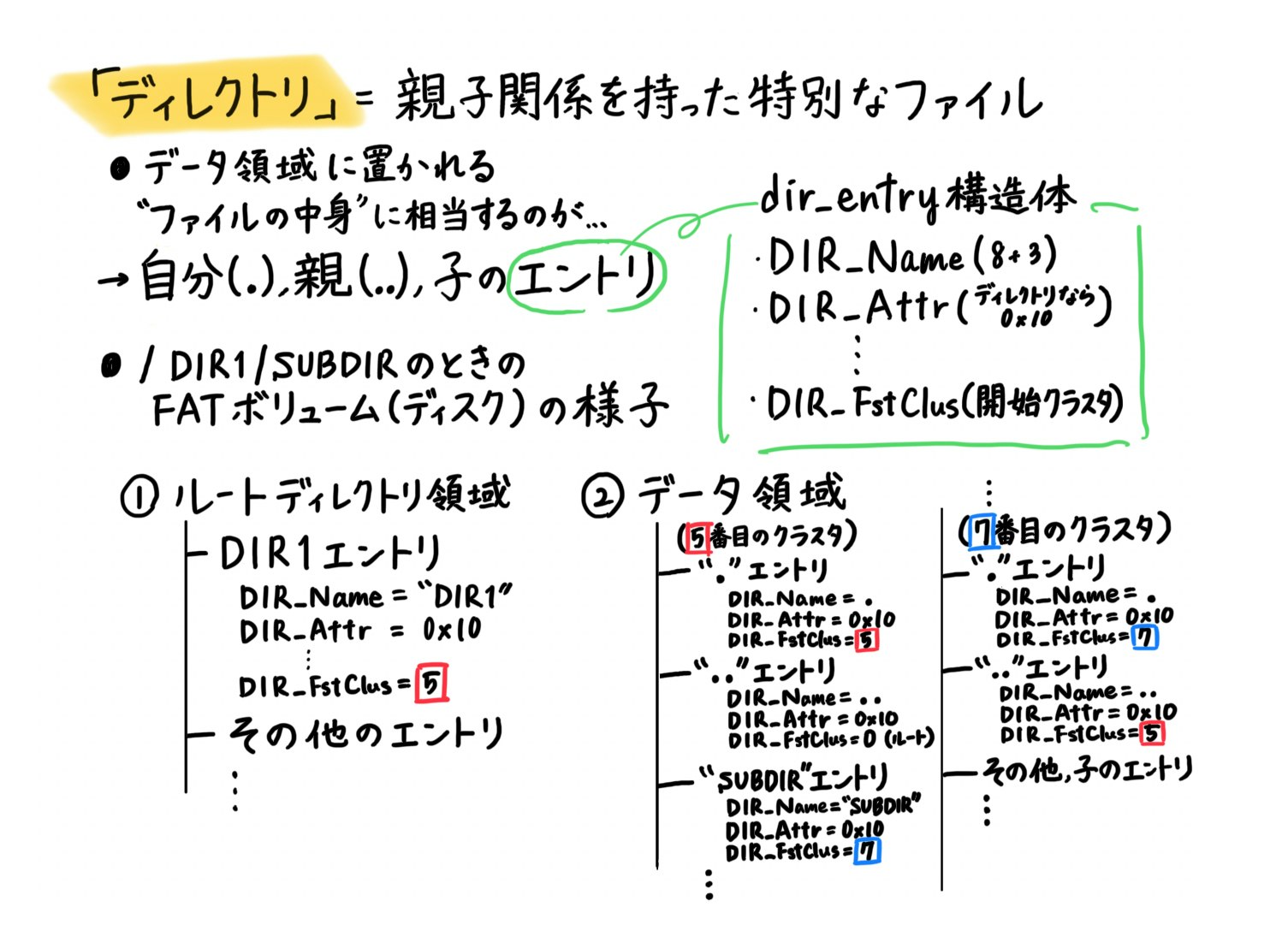
上記から分かるように、ファイルとディレクトリの違いは、次の2点だけです。
| ファイル | ディレクトリ | |
|---|---|---|
エントリの属性DIR_Attr
|
0x20※ |
0x10 |
| データ領域に置かれる実体 | 中身 |
.と..の開始クラスタ番号 |
※隠しファイル、パーミッションなど例外多数
2-2. ルートディレクトリの扱い
前編の復習ですが、FAT16ファイルシステムでは、ディスク上にFATボリュームが展開され、それは、ブートセクタ・FAT領域・ルートディレクトリ領域・データ領域の4つに分かれているのでした。
その際に、
FAT32では、ルートディレクトリ領域のサイズは可変長で、そこもデータ領域として扱われます
とよく分からず書いたのですが、伏線回収です!
 FAT16の場合
ルートディレクトリだけは特別で、FATボリューム内で、固定長のルートディレクトリ領域を持ちます。この領域のサイズは、Boot Parameter BlockによってBPB_RootEntCntだと決められています。
前編のcreate_file関数内で、「ルートディレクトリ領域のエントリ構造体にファイルの情報を書き込む処理」がありましたが、書き込み先の領域が特別なだけで、ディレクトリの実体がエントリの集合であること、サブディレクトリのエントリは親が持っていることを十分に満たしています。
FAT32の場合
ルートも他のサブディレクトリと同じ扱いで、実体はデータ領域のクラスタに置かれます。これはすなわち、
- ルートディレクトリのサイズは可変長
- ルート自身も開始クラスタ番号(
BPB_RootClus)を持つ
ということを意味します。
3. ディレクトリを作る(mkdirコマンド)
ディレクトリ=ファイルであることを意識して、前編のcreate_file関数と同様の手順で、make_dir関数を実装していきます(一旦、ディレクトリ作成場所はルート直下に限定します)。
- ディレクトリ領域の空きエントリ、データ領域の空きクラスタを探す
- ディレクトリエントリの設定(
DIR_ATTRが0x10に注意) - データ領域に【
.と..の名前(※)、属性、開始クラスタ番号】を書き込み
※ここでの「名前」とは、ディレクトリ名に拘らず、.と..です。
int make_dir(const char *name) {
  read_fat_from_disk();
  read_root_dir_from_disk();

  // 空きエントリを探す
  int entry_index = -1;
  for (int i = 0; i < BPB_RootEntCnt; i++) {
    if (root_dir[i].name[0] == 0x00 || (uint8_t)root_dir[i].name[0] == 0xE5) {
      entry_index = i;
      break;
    }
  }
  if (entry_index < 0) {
    kprintf("[FAT16] ERROR: Root directory full.\n");
    return -1;
  }

  // 空きクラスタを探す
  uint16_t new_cluster = 0;
  for (uint16_t i = 2; i < FAT_ENTRY_NUM; i++) {
    if (fat[i] == 0x0000) {
      new_cluster = i;
      break;
    }
  }
  if (new_cluster == 0) {
    kprintf("[FAT16] ERROR: No free cluster.\n");
    return -1;
  }
  fat[new_cluster] = 0xFFFF; // EOC

  // ディレクトリエントリの設定
  struct dir_entry *de = &root_dir[entry_index];
  memset(de, 0, sizeof(struct dir_entry));
  memset(de->name, ' ', 8);
  memset(de->ext, ' ', 3);
  int n = 0;
  while (n < 8 && name[n] && name[n] != '.') {
    de->name[n] = name[n];
    n++;
  }
  de->attr = 0x10; // ATTR_DIRECTORY
  de->start_cluster = new_cluster;
  de->size = 0;

  // 新ディレクトリクラスタに "." と ".." を書く
  struct dir_entry buf[BPB_BytsPerSec / sizeof(struct dir_entry)];
  memset(buf, 0, sizeof(buf));

  // "."
  memset(buf[0].name, ' ', 8);
  memset(buf[0].ext, ' ', 3);
  buf[0].name[0] = '.';
  buf[0].attr = 0x10;
  buf[0].start_cluster = new_cluster;

  // ".."(今回は絶対にルートなので 0)
  memset(buf[1].name, ' ', 8);
  memset(buf[1].ext, ' ', 3);
  buf[1].name[0] = '.';
  buf[1].name[1] = '.';
  buf[1].attr = 0x10;
  buf[1].start_cluster = 0;

  // 書き戻し
  write_cluster(new_cluster, buf);
  write_fat_to_disk();
  write_root_dir_to_disk();

  kprintf("[FAT16] Directory created: %s (cluster %d)\n", name, new_cluster);
  return 0;
}
以上より、ディレクトリを新規作成する際に行われるディスク読み書きの様子 を理解できました!
挙動確認として、カーネルのmain関数内に
create_file("test.txt", "hello", 5);
make_dir("testdir");
を追加すると、
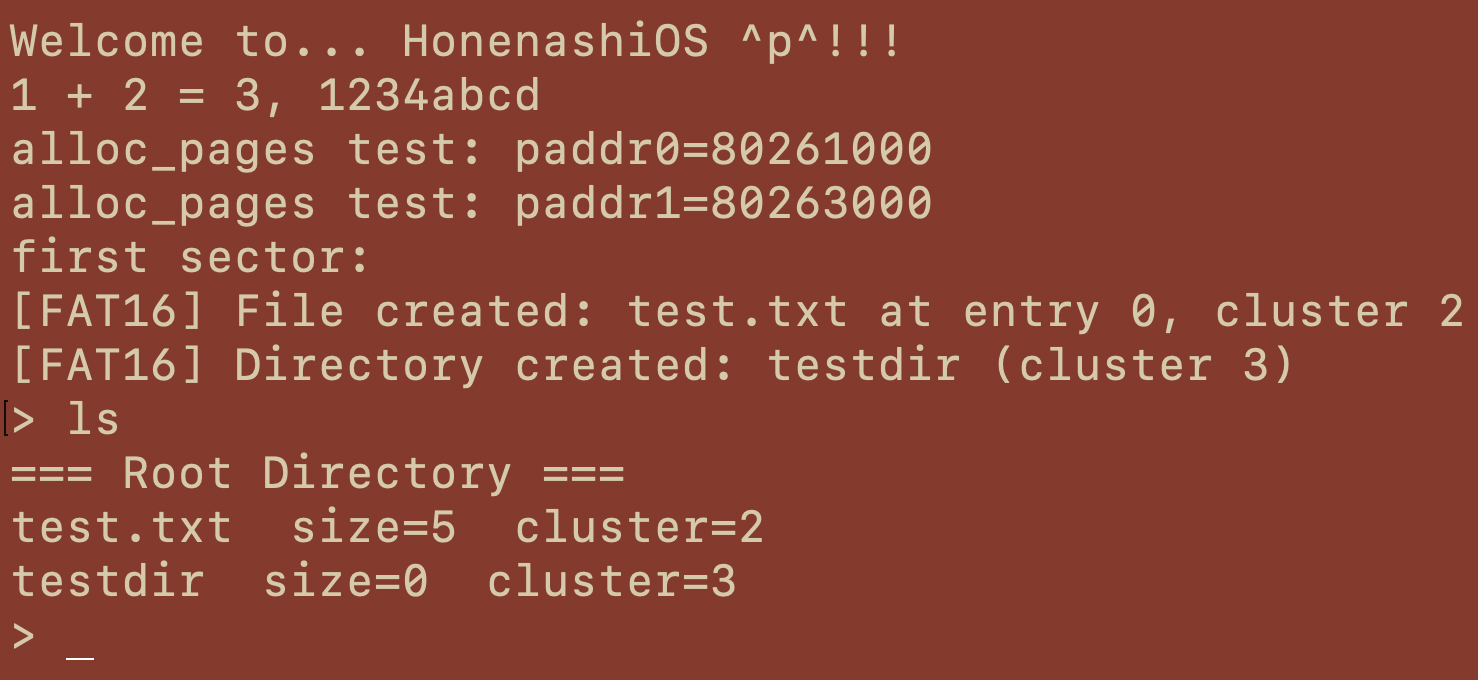
ルート直下にディレクトリが作られたことを確認できました。しかし、親がルートに限られているのが残念です。そこで...↓
4. 「カレントディレクトリ」という概念を導入(cdコマンド)
cdやpwdを実現させるためには、新たに変数を導入する必要があります。
extern uint16_t current_dir_cluster;
uint16_t current_dir_cluster = 0; //最初はルートにいるので
ヘッダファイルで実体を定義しない!
ヘッダで int global_var = 42;のような実体を定義し、これを複数のファイルで#includeした場合、すべてのファイルでglobal_varの実体が生成され、リンク時にduplicate_symbolとエラーが出ます。
これを防ぐために、ヘッダファイル内では、
extern int global_var;
と宣言し、実体の定義は各ソースファイル内で行うようにしましょう。
cdコマンドは、ディレクトリを移動させる、すなわちこのcurrent_dir_clusterを更新するものです。
ここで、2-2で述べたFAT16の設計思想を思い出しましょう。FAT16では、
- ルートディレクトリ・・・特別な固定長領域で、クラスタを持たない
- サブディレクトリ・・・通常のファイルと同様、データ領域のクラスタに実体を持つ
のでした。これを踏まえて、current_dir_clusterの値が
- 0(ルート)・・・ルートディレクトリ領域から
- !0(サブディレクトリ)・・・データ領域のクラスタから
探索し、そこにエントリ(=構造体)のstart_clusterの値を代入します。
int current_directory(const char *name) {
  if (strcmp(name, "/") == 0) {
    current_dir_cluster = 0;
    return 0;
  }

  struct dir_entry buf[BPB_BytsPerSec / sizeof(struct dir_entry)];
  if (current_dir_cluster == 0) {
    // 0なのでルート
    for (int i = 0; i < BPB_RootEntCnt; i++) {
      struct dir_entry *de = &root_dir[i];
      if (de->name[0] == 0x00)
        break;
      if (!(de->attr & 0x10))
        continue;
      // cd <名前>
      if (name_match(de, name)) {
        current_dir_cluster = de->start_cluster;
        return 0;
      }
    }
  } else {
    read_cluster(current_dir_cluster, buf);
    for (int i = 0; i < BPB_BytsPerSec / sizeof(struct dir_entry); i++) {
      struct dir_entry *de = &buf[i];
      if (de->name[0] == 0x00)
        break;
      if (!(de->attr & 0x10))
        continue;
      // cd ..
      if (name[0] == '.' && name[1] == '.' && name[2] == '\0') {
        if (de->name[0] == '.' && de->name[1] == '.') {
          current_dir_cluster = de->start_cluster;
          return 0;
        }
        continue;
      }
      // cd <名前>
      if (name_match(de, name)) {
        current_dir_cluster = de->start_cluster;
        return 0;
      }
    }
  }
  kprintf("[cd] directory not found: %s\n", name);
  return -1;
}

int name_match(const struct dir_entry *de, const char *name) {
  char fat_name[9];
  memset(fat_name, 0, sizeof(fat_name));
  // name[8] をコピー(末尾スペース除去)
  for (int i = 0; i < 8; i++) {
    if (de->name[i] == ' ')
      break;
    fat_name[i] = de->name[i];
  }
  return strcmp(fat_name, name) == 0;
}
この変数の導入に伴い、先ほどのmake_dir関数を、ルート直下限定ではなく、親を指定できるように変更します。
- 空き領域探索プロセスを同様に変更
- 親ディレクトリのクラスタ開始番号
parent_clusterも引数にとる - データ領域に書き込む
..のクラスタ番号を、0ではなくparent_clusterにする
の3点を修正しましょう。
int make_dir(uint16_t parent_cluster, const char *name) {
  read_fat_from_disk();
  read_root_dir_from_disk();

  struct dir_entry buf[BPB_BytsPerSec / sizeof(struct dir_entry)];
  struct dir_entry *parent_entries = NULL;
  int parent_entry_count = 0;

  /* ===== 親ディレクトリの実体を決定 ===== */
  if (parent_cluster == 0) {
    // ルートディレクトリ
    parent_entries = root_dir;
    parent_entry_count = BPB_RootEntCnt;
  } else {
    // サブディレクトリ
    read_cluster(parent_cluster, buf);
    parent_entries = buf;
    parent_entry_count = BPB_BytsPerSec / sizeof(struct dir_entry);
  }

  /* ===== 空きエントリ探索 ===== */
  int entry_index = -1;
  for (int i = 0; i < parent_entry_count; i++) {
    if (parent_entries[i].name[0] == 0x00 ||
        (uint8_t)parent_entries[i].name[0] == 0xE5) {
      entry_index = i;
      break;
    }
  }

  if (entry_index < 0) {
    kprintf("[FAT16] ERROR: Directory full.\n");
    return -1;
  }

  /* ===== 空きクラスタ探索 ===== */
  uint16_t new_cluster = 0;
  for (uint16_t i = 2; i < FAT_ENTRY_NUM; i++) {
    if (fat[i] == 0x0000) {
      new_cluster = i;
      break;
    }
  }

  if (new_cluster == 0) {
    kprintf("[FAT16] ERROR: No free cluster.\n");
    return -1;
  }

  fat[new_cluster] = 0xFFFF; // EOC

  /* ===== 親ディレクトリにエントリ追加 ===== */
  struct dir_entry *de = &parent_entries[entry_index];
  memset(de, 0, sizeof(struct dir_entry));
  memset(de->name, ' ', 8);
  memset(de->ext, ' ', 3);

  int n = 0;
  while (n < 8 && name[n] && name[n] != '.') {
    de->name[n] = name[n];
    n++;
  }

  de->attr = 0x10; // ATTR_DIRECTORY
  de->start_cluster = new_cluster;
  de->size = 0;

  /* ===== 新ディレクトリの中身を作る ===== */
  struct dir_entry newbuf[BPB_BytsPerSec / sizeof(struct dir_entry)];
  memset(newbuf, 0, sizeof(newbuf));

  // "."
  memset(newbuf[0].name, ' ', 8);
  memset(newbuf[0].ext, ' ', 3);
  newbuf[0].name[0] = '.';
  newbuf[0].attr = 0x10;
  newbuf[0].start_cluster = new_cluster;

  // ".."
  memset(newbuf[1].name, ' ', 8);
  memset(newbuf[1].ext, ' ', 3);
  newbuf[1].name[0] = '.';
  newbuf[1].name[1] = '.';
  newbuf[1].attr = 0x10;
  newbuf[1].start_cluster = parent_cluster;

  /* ===== 書き戻し ===== */
  write_cluster(new_cluster, newbuf);
  write_fat_to_disk();

  if (parent_cluster == 0) {
    write_root_dir_to_disk();
  } else {
    write_cluster(parent_cluster, parent_entries);
  }

  kprintf("[FAT16] Directory created: %s (cluster %d)\n", name, new_cluster);
  return 0;
}
5. pwdコマンドで挙動確認したい!
人間がpwdコマンドでこのcurrent_dir_clusterを解釈するには、新たに論理パスを導入する必要があります。
#define MAX_PATH_LEN 256
extern char current_path[MAX_PATH_LEN];
char current_path[MAX_PATH_LEN] = "/";
先ほどのcurrent_directory内で、このcurrent_pathも更新させます。この更新処理は、update_current_path_on_cd関数として、別で定義しましょう。
void update_current_path_on_cd(const char *name) {
  //「cd /」の場合
  if (strcmp(name, "/") == 0) {
    strcpy(current_path, "/");
    return;
  }
  if (strcmp(name, "..") == 0) {
    if (strcmp(current_path, "/") == 0) return;
    // 末尾の /foo を削除
    char *p = strrchr(current_path, '/');
    if (p == current_path) {
      // "/foo" → "/"
      current_path[1] = '\0';
    } else if (p) {
      *p = '\0';
    }
    return;
  }
  //「cd <サブディレクトリ>」の場合
  if (strcmp(current_path, "/") != 0)
    strcat(current_path, "/");
  strcat(current_path, name);
}
current_directory関数内で、ディレクトリ移動に成功したとき(return 0;)に
update_current_path_on_cd(name);
を追加することも忘れずに。
最後に、pwdコマンドを作ってみます。
void main(void) {
  while (1) {
  prompt:
    printf("> ");
    char cmdline[128];
    for (int i = 0;; i++) {
      char ch = getchar();
      ...
    else if (strcmp(cmdline, "ls") == 0)
      sys_list_root_dir(); // 前編
    else if (strcmp(cmdline, "cat") == 0)
      sys_concatenate(); // 前編
    else if (strcmp(cmdline, "pwd") == 0)
      sys_print_working_directory(); // 追加
    ...
void sys_print_working_directory() { syscall(SYS_PWD, 0, 0, 0); }
void handle_syscall(struct trap_frame *f) {
  switch (f->a3) {
  case SYS_PUTCHAR:
    putchar(f->a0);
    break;
  ...
  case SYS_PWD: // 追加
    print_working_directory();
    yield();
    break;
  ...
void print_working_directory(void) { kprintf("%s\n", current_path); }
以上が、シェルのpwdの入力から、current_pathを出力するためのシステムコールを呼び出す一連の流れです。
挙動確認として、カーネルのmain関数内に
create_file("test.txt", "hello", 5);
make_dir(0, "testdir");
make_dir(3, "unreachable");
current_directory("testdir"); //cdコマンドがないので、カーネルで直接移動してます汗
を追加すると、
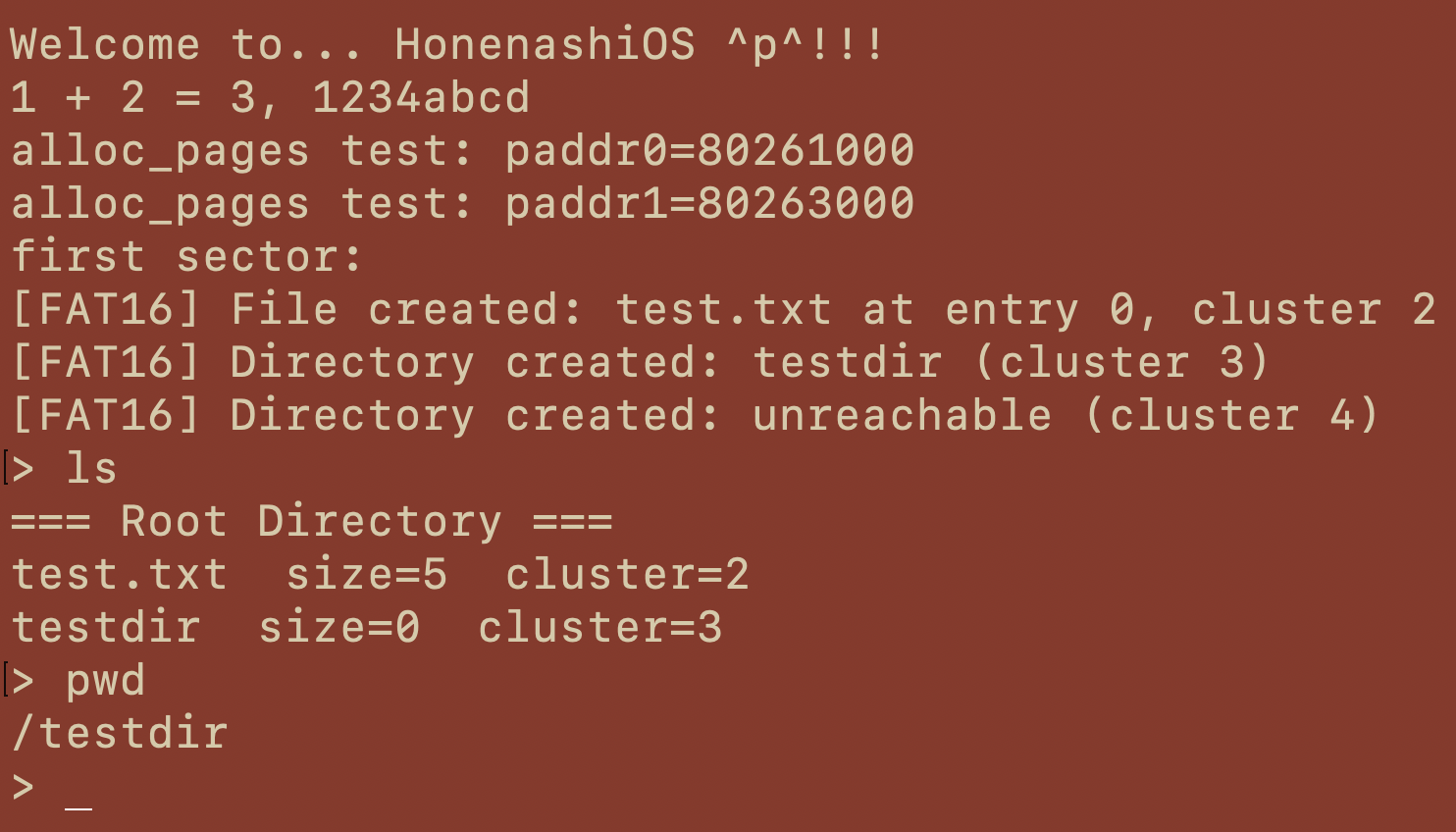
現在地が表示されました!
6. おわりに
他にも、FAT16の仕様がサポートする機能には、
- 長いファイル名
LFN - さまざまなエントリの属性
DIR_Attr - 複数の階層を辿れる
cd,ls - ファイル削除(FATのクラスタ解放)
- タイムスタンプ
- 空きクラスタ探索の最適化
などがありますが、FAT16の設計思想はこれだけ、とも言えます。ファイルシステムやディレクトリが「クラスタチェーンでファイルを管理する」仕組みに過ぎないことを理解し、FAT16の単純さ、軽量さを実感しました。
今後も骨なしOSを色々拡張させていくのが楽しみです!最後までお読みくださり、ありがとうございました

7. 参考文献