
初めまして、ウリノと申します。所属している山形大学のサークルの先輩からアドベントカレンダーやってみない?っていうお誘いがあり初めての記事投稿をさせてもらうことになりました。
しかしながらいったい何を題材に書いたものか…そんなに語れることがない気がする…と思いながらもとりあえず今年の文化祭で展示したVRゲームの話をしようかなと
この動画のような感じでVRで地面を掘り進めるゲームを作成しました。
なんでこれを作ろうと思ったのか?
今年の7月に「ドンキーコングバナンザ」が発売されて、衝撃を受けたからですね。豪快に地面を破壊し掘り進めているのを見てなんじゃこりゃ⁉ってなりました。どうやってるのか全く分からなかったからです。
通常のゲームでは3Dのモデルは表面だけが描画されていて中身はスカスカになってます。ゲームで建物にカメラを埋めたりすると変な画面になるやつですね。なのでドンキーコングバナンザみたいに地面を破壊したら普通はスカスカの中身が見えるだけで、断面なんて見れるはずがないんです。
これが衝撃的でどうやってるのか気になってしまいました、Unityでもできたりしないかな?再現してみようとなったわけですね
とっかかりを探す
とはいえ当初は本当にどこから手を付ければいいのかもわかりません、とりあえず適当に検索…
あ り ま し た
なになに、ボクセル?ボクセルって何ぞや?(無知)
どうやら2dをドットをピクセルとするときに3Dではボクセルというものになるみたいですね、マイクラとかがボクセルを使ったゲームの中で一番わかりやすいものになりそうです。
なるほど、だからドンキーコングで地面を破壊した時にそのまま同じ地面が現れるわけではなく別の色の岩とかが出てくることができるわけですね、ヨシ!疑問解消!
ってなるわけがありません、ドンキーコングとマイクラは全然違うでしょう!!めちゃくちゃ滑らかな地面してるじゃないですか!
早くも手詰まりです。とりあえず「Unity ボクセル」で検索…
ありました(2回目)
正直まだ知識不足で処理時間のくだりの部分などは理解しきれませんでしたが大事なのはNaiveSurfaceNetsという手法をとれば滑らかにボクセルをモデルとして表示できる!
1,地面はボクセルで構成されている
2,ボクセルは通常カクカクしているが、描画方法を工夫すれば滑らかにできる
なんとなく方向性が見えたのでここからはUnityでの実装に行きます
MagicaVoxelでモデルの用意、Unityでの準備
まずモデルを用意しなくてはなりません
ボクセルのモデルはMagicaVoxelを使わせてもらいました
ここで作ったボクセルは.vox拡張子というものになり、そのままではUnityで読み込めません
なのでVoxReaderを使わせてもらいます
コードを書く前に…チャンクについて
私も後でその存在の必要性に気づき、苦戦させられたチャンクの話をします。
この手のゲームではあらかじめマップをチャンクで分けておく必要があります
なぜチャンクで分ける必要があるのか?
マインクラフトで例えましょう、マインクラフトもボクセルのゲームである以上、1ブロック破壊するごとに再描画を行っています。では「どこまで」を再生成させるのか?まさか1ブロック壊れたり配置したりしただけで
世界をッ!!再構築するッッッッッ!!!!!!!
とはなりません、処理が重たくなります
おそらく破壊されたブロックが属するチャンク部分を再生成させています(詳しいマイクラの処理はわかりません)
チャンクで区画分けされているから、再生成させる部分を減らすことができて、軽くなるわけです。
ボクセルのモデルを読み込み、チャンクを管理するスクリプト
using System;
using System.Linq;
using System.Collections.Generic;
using System.IO;
using VoxReader;
using VoxReader.Interfaces;
using UnityEngine;
using Vector3 = UnityEngine.Vector3;
using R3;
//materialIDと記載されているがまだ使用できないです
public readonly struct VoxelData
{
    public readonly float density;
    public readonly int materialID;

    public VoxelData(float density, int materialID)
    {
        this.density = density;
        this.materialID = materialID;
    }
}

public class ChunkManager : MonoBehaviour
{
    [Header("Chunk / Grid")]
    [SerializeField]
    private int chunkResolution = 16;
    public float voxelSize = 1.0f;

    [Header("MagicaVoxel")]
    [SerializeField]
    private string magicaVoxelFileName = "my_model.vox";

    // チャンク管理
    private readonly Dictionary<Vector3Int,ChunkRenderer> _chunkDic = new Dictionary<Vector3Int, ChunkRenderer>();

    // グローバルVoxelデータ、ここに現在のステージ状態が記録される
    private VoxelData[,,] _globalVoxelData;
    // 初期Voxelデータ、ここに元のステージ状態が記録される
    private VoxelData[,,] _initialVoxelData;
    // グローバルVoxelデータのサイズ
    private int _globalSizeX, _globalSizeY, _globalSizeZ;

    private Vector3Int _voxelWorldOrigin;

    // 実行時に使用するマテリアル関連のデータ
    private Material[] _activeMaterials; // 実際にモデルで使われるマテリアルの配列
    private Dictionary<int, int> _paletteIndexToSubMeshIndexMap; // .voxパレットID -> サブメッシュID の対応表

    // イベント、一応作成
    public Observable<Unit> OnVoxelRecreated => _onVoxelRecreated;
    private readonly Subject<Unit> _onVoxelRecreated = new();
    public Observable<Unit> OnVoxelReset => _onVoxelReset;
    private readonly Subject<Unit> _onVoxelReset = new();

    private void Start()
    {
        _voxelWorldOrigin = Vector3Int.FloorToInt(transform.position / voxelSize);
        transform.position = (Vector3)_voxelWorldOrigin * voxelSize;
        LoadVoxelModel();
        CreateChunks();
    }

    private void LoadVoxelModel()
    {
        string filePath = Path.Combine(Application.streamingAssetsPath, magicaVoxelFileName);
        if (!File.Exists(filePath))
        {
            Debug.LogError($"MagicaVoxelファイルが見つかりません: {filePath}");
            return;
        }

        IVoxFile voxFileContent = VoxReader.VoxReader.Read(filePath);

        if (voxFileContent == null || voxFileContent.Models.Length == 0)
        {
            Debug.LogError("MagicaVoxelファイルの読み込みに失敗したか、モデルが含まれていません。");
            return;
        }

        IModel model = voxFileContent.Models[0];


        //Voxelデータに情報を格納
        _globalSizeX = (int)model.LocalSize.X;
        _globalSizeY = (int)model.LocalSize.Z;
        _globalSizeZ = (int)model.LocalSize.Y;
        _globalVoxelData = new VoxelData[_globalSizeX, _globalSizeZ, _globalSizeY];
        _initialVoxelData = new VoxelData[_globalSizeX, _globalSizeZ, _globalSizeY];

        foreach (Voxel voxel in model.Voxels)
        {
            //MagicaVoxelとUnityの座標系のずれを修正
            int x = (int)voxel.LocalPosition.X;
            int y = (int)voxel.LocalPosition.Z;
            int z = (int)voxel.LocalPosition.Y;

            if (x < 0 || x >= _globalSizeX || y < 0 || y >= _globalSizeY || z < 0 || z >= _globalSizeZ) continue;

            _globalVoxelData[x, y, z] = new VoxelData(1,0);

        }
        Array.Copy(_globalVoxelData, _initialVoxelData, _globalVoxelData.Length);

        Debug.Log($"MagicaVoxelモデルを読み込みました。サイズ: ({_globalSizeX}, {_globalSizeY}, {_globalSizeZ})");
    }

    public void ResetStage()
    {
        Array.Copy(_initialVoxelData, _globalVoxelData, _initialVoxelData.Length);
        var allChunkCoords = new HashSet<Tuple<int, int, int>>();
        foreach (var chunkCoord in _chunkDic.Keys)
        {
            allChunkCoords.Add(new Tuple<int, int, int>(chunkCoord.x, chunkCoord.y, chunkCoord.z));
        }
        RebuildChunks(allChunkCoords);
        _onVoxelReset.OnNext(Unit.Default);
    }
    /// <summary>
    /// チャンクを生成する、基本的に初回の生成時にのみ呼ばれる
    /// </summary>
    private void CreateChunks()
    {
        if (_globalVoxelData == null) return;

        int chunksX = Mathf.CeilToInt((float)_globalSizeX / chunkResolution);
        int chunksY = Mathf.CeilToInt((float)_globalSizeY / chunkResolution);
        int chunksZ = Mathf.CeilToInt((float)_globalSizeZ / chunkResolution);

        for (int x = 0; x < chunksX; x++)
        {
            for (int y = 0; y < chunksY; y++)
            {
                for (int z = 0; z < chunksZ; z++)
                {
                    Vector3Int chunkCoord = new Vector3Int(x, y, z);
                    Vector3Int chunkStartPos = new Vector3Int(x * chunkResolution, y * chunkResolution, z * chunkResolution);

                    GameObject chunkObject = new GameObject($"Chunk ({x}, {y}, {z})");
                    chunkObject.transform.parent = this.transform;
                    chunkObject.transform.localPosition = (Vector3)chunkStartPos * voxelSize;

                    ChunkRenderer chunkRenderer = chunkObject.AddComponent<ChunkRenderer>();

                    chunkRenderer.GenerateSurfaceNetsMesh(_globalVoxelData, chunkStartPos, chunkResolution, voxelSize);
                    _chunkDic.Add(chunkCoord, chunkRenderer);
                }
            }
        }
    }
    /// <summary>
    /// 指定されたチャンクを再構築する、範囲を限定することで処理を軽くする
    /// </summary>
    public void RebuildChunks(HashSet<Tuple<int,int,int>> affectedChunks)
    {
        foreach (var chunkTuple in affectedChunks)
        {
            Vector3Int chunkCoord = new Vector3Int(chunkTuple.Item1, chunkTuple.Item2, chunkTuple.Item3);
            if (_chunkDic.TryGetValue(chunkCoord, out ChunkRenderer chunkRenderer))
            {
                Vector3Int chunkStartPos = new Vector3Int(chunkCoord.x * chunkResolution, chunkCoord.y * chunkResolution, chunkCoord.z * chunkResolution);
                chunkRenderer.GenerateSurfaceNetsMesh(_globalVoxelData, chunkStartPos, chunkResolution, voxelSize);
            }
        }
        _onVoxelRecreated.OnNext(Unit.Default);
    }
}
渡されたチャンクの情報を基に、描画するスクリプト
using System.Collections.Generic;
using System.Linq;
using Unity.Collections;
using UnityEngine;

[RequireComponent(typeof(MeshFilter), typeof(MeshRenderer))]
public class ChunkRenderer : MonoBehaviour
{
    private readonly List<Vector3> _vertices = new List<Vector3>();
    private readonly Dictionary<int, List<int>> _submeshTriangles = new Dictionary<int, List<int>>();
    private float _voxelSize;
    private Material[] _materials;

    public void GenerateSurfaceNetsMesh(VoxelData[,,] globalVoxelData, Vector3Int chunkStartPos, int resolution, float voxelsize)
    {
        _voxelSize = voxelsize;
        float isoLevel = 0.5f;

        _vertices.Clear();
        _submeshTriangles.Clear();

        // 必要なバッファサイズを見積もる。
        int size = resolution + 1;
        int maxVertices = size * size * size;
        int maxIndices = maxVertices * 24;

        var vertexBuf = new NativeArray<Vector3>(maxVertices, Allocator.Temp);
        var idxBuf = new NativeArray<int>(maxVertices, Allocator.Temp);

        // idxBufを-1で初期化(頂点未生成を表す)
        for (int i = 0; i < idxBuf.Length; i++) idxBuf[i] = -1;

        var triangleBuf = new NativeArray<int>(maxIndices, Allocator.Temp);

        int vertexCount = 0;
        int triangleCount = 0;

        int gSizeX = globalVoxelData.GetLength(0);
        int gSizeY = globalVoxelData.GetLength(1);
        int gSizeZ = globalVoxelData.GetLength(2);

        // =================================================================
        // 1. 内部の頂点を生成 (Surface Nets)
        // =================================================================
        for (int z = 0; z < size; z++)
        {
            for (int y = 0; y < size; y++)
            {
                for (int x = 0; x < size; x++)
                {
                    int kind;
                    if (ComputeVertex(x, y, z, chunkStartPos, globalVoxelData, gSizeX, gSizeY, gSizeZ, isoLevel, out Vector3 vertex, out kind))
                    {
                        vertexBuf[vertexCount] = vertex;

                        // idxBufには現在のセル座標(x,y,z)に対応するvertex indexを保存
                        int cellIndex = x + y * size + z * size * size;
                        idxBuf[cellIndex] = vertexCount;
                        vertexCount++;
                    }
                }
            }
        }

        // データをメッシュ用にコピー (面を生成する前に、既に生成された内部頂点をリストに追加しておく)
        for (int i = 0; i < vertexCount; i++)
        {
            _vertices.Add(vertexBuf[i]);
        }

        // =================================================================
        // 2. 面の構築(生成済みの頂点を繋ぐ)
        // =================================================================
        // 面の追加は 視点側(x,y,z >= 1) から見て行う (後方参照するため)
        // 以前のロジックでは境界で continue していたが、これを取りやめ、
        // 境界外の頂点が必要な場合は GetOrGenerateVertex でその場生成して穴を塞ぐ。

        for (int z = 0; z < size; z++)
        {
            for (int y = 0; y < size; y++)
            {
                for (int x = 0; x < size; x++)
                {
                    // このセルの原点(0番目の近傍点)の状態を再取得
                    // (ComputeVertex でも取得しているが、ローカル変数として再計算するコストは低い)
                    int kind = GetCellKind(x, y, z, chunkStartPos, globalVoxelData, gSizeX, gSizeY, gSizeZ, isoLevel);
                    bool outside = (kind & 1) == 0;

                    // 必要となる頂点のインデックスを取得する。
                    // もし現在のチャンク範囲内(idxBuf内)にあればそれを使い、なければその場で生成する。

                    int GetV(int lx, int ly, int lz)
                    {
                         return GetOrGenerateVertex(lx, ly, lz, size, idxBuf, chunkStartPos, globalVoxelData, gSizeX, gSizeY, gSizeZ, isoLevel);
                    }

                    int v0 = GetV(x - 1, y - 1, z - 1);
                    int v1 = GetV(x - 0, y - 1, z - 1);
                    int v2 = GetV(x - 0, y - 0, z - 1);
                    int v3 = GetV(x - 1, y - 0, z - 1);
                    int v4 = GetV(x - 1, y - 1, z - 0);
                    int v5 = GetV(x - 0, y - 1, z - 0);
                    // int v6 = GetV(x,     y,     z);     // current
                    int v7 = GetV(x - 1, y - 0, z - 0);

                    // 面が作れるかどうかは、該当する4つの頂点すべてが有効(生成可能)である必要がある。
                    // GetOrGenerateVertex は生成失敗時 -1 を返す(例えば外部が完全に無効な場合など)。

                    // X
                    if (x < size - 1)
                    {
                        bool s1 = ((kind >> 1) & 1) != 0;
                        if (((kind & 1) != 0) != s1) // Edge Cross
                        {
                            int c0 = GetV(x, y - 1, z - 1);
                            int c1 = GetV(x, y - 1, z);
                            int c2 = GetV(x, y,     z);
                            int c3 = GetV(x, y,     z - 1);

                            if (c0 != -1 && c1 != -1 && c2 != -1 && c3 != -1)
                            {
                                if (!((kind & 1) != 0)) // Solid -> Empty (based on x)
                                    triangleCount = AddQuad(triangleBuf, triangleCount, c0, c1, c2, c3);
                                else
                                    triangleCount = AddQuad(triangleBuf, triangleCount, c0, c3, c2, c1);
                            }
                        }
                    }

                    // Y
                    if (y < size - 1)
                    {
                        bool s1 = ((kind >> 4) & 1) != 0;
                        if (((kind & 1) != 0) != s1)
                        {
                            int c0 = GetV(x - 1, y, z - 1);
                            int c1 = GetV(x,     y, z - 1);
                            int c2 = GetV(x,     y, z);
                            int c3 = GetV(x - 1, y, z);

                            if (c0 != -1 && c1 != -1 && c2 != -1 && c3 != -1)
                            {
                                if (!((kind & 1) != 0))
                                    triangleCount = AddQuad(triangleBuf, triangleCount, c0, c1, c2, c3);
                                else
                                    triangleCount = AddQuad(triangleBuf, triangleCount, c0, c3, c2, c1);
                            }
                        }
                    }

                    // Z
                    if (z < size - 1)
                    {
                        bool s1 = ((kind >> 3) & 1) != 0;
                        if (((kind & 1) != 0) != s1)
                        {
                            int c0 = GetV(x - 1, y - 1, z);
                            int c1 = GetV(x - 1, y,     z);
                            int c2 = GetV(x,     y,     z);
                            int c3 = GetV(x,     y - 1, z);

                            if (c0 != -1 && c1 != -1 && c2 != -1 && c3 != -1)
                            {
                                if (!((kind & 1) != 0))
                                    triangleCount = AddQuad(triangleBuf, triangleCount, c0, c1, c2, c3);
                                else
                                    triangleCount = AddQuad(triangleBuf, triangleCount, c0, c3, c2, c1);
                            }
                        }
                    }
                }
            }
        }

        idxBuf.Dispose();
        vertexBuf.Dispose();

        // Copy indices to list
        var tris = new List<int>();
        for (int i = 0; i < triangleCount; i++)
        {
            tris.Add(triangleBuf[i]);
        }
        _submeshTriangles[0] = tris;

        triangleBuf.Dispose();

        BuildMesh();
    }

    // 内部頂点計算ロジック(分離)
    // 成功したら true を返し、vertex と kind を出力
    bool ComputeVertex(int x, int y, int z, Vector3Int chunkStartPos, VoxelData[,,] globalVoxelData, int gSizeX, int gSizeY, int gSizeZ, float isoLevel, out Vector3 vertex, out int kind)
    {
        kind = GetCellKind(x, y, z, chunkStartPos, globalVoxelData, gSizeX, gSizeY, gSizeZ, isoLevel);

        // 8つの点がすべて内側またはすべて外側の場合はスキップ
        if (kind == 0 || kind == 255)
        {
            vertex = Vector3.zero;
            return false;
        }

        // 頂点位置計算
        vertex = Vector3.zero;
        int crossCount = 0;

        for (var i = 0; i < 12; i++)
        {
            var p0 = edgeTable[i][0];
            var p1 = edgeTable[i][1];

            bool b0 = ((kind >> p0) & 1) != 0;
            bool b1 = ((kind >> p1) & 1) != 0;

            if (b0 == b1) continue;

            Vector3 p0Pos = ToVec(x, y, z, p0);
            Vector3 p1Pos = ToVec(x, y, z, p1);

            float val0 = GetDensity(chunkStartPos, x, y, z, p0, globalVoxelData, gSizeX, gSizeY, gSizeZ);
            float val1 = GetDensity(chunkStartPos, x, y, z, p1, globalVoxelData, gSizeX, gSizeY, gSizeZ);

            float t = (isoLevel - val0) / (val1 - val0);
            vertex += Vector3.Lerp(p0Pos, p1Pos, t);

            crossCount++;
        }

        if (crossCount > 0)
        {
            vertex /= crossCount;
            return true;
        }

        vertex = Vector3.zero;
        return false;
    }

    // セルの density kind (8 bit mask) を取得する
    int GetCellKind(int x, int y, int z, Vector3Int chunkStartPos, VoxelData[,,] globalVoxelData, int gSizeX, int gSizeY, int gSizeZ, float isoLevel)
    {
        int kind = 0;
        for (int i = 0; i < 8; i++)
        {
            int rx = x + neighborTable[i][0];
            int ry = y + neighborTable[i][1];
            int rz = z + neighborTable[i][2];

            int gx = chunkStartPos.x + rx;
            int gy = chunkStartPos.y + ry;
            int gz = chunkStartPos.z + rz;

            float density = 0f;
            if (gx >= 0 && gx < gSizeX && gy >= 0 && gy < gSizeY && gz >= 0 && gz < gSizeZ)
            {
                density = globalVoxelData[gx, gy, gz].density;
            }

            if (density > isoLevel)
            {
                kind |= (1 << i);
            }
        }
        return kind;
    }

    // 内部なら idxBuf から、外部なら動的生成して _vertices に追加してインデックスを返す
    int GetOrGenerateVertex(
        int x, int y, int z,
        int size,
        NativeArray<int> idxBuf,
        Vector3Int chunkStartPos,
        VoxelData[,,] globalVoxelData,
        int gSizeX, int gSizeY, int gSizeZ,
        float isoLevel)
    {
        // Check if inside current chunk bounds
        if (x >= 0 && x < size && y >= 0 && y < size && z >= 0 && z < size)
        {
            int idx = idxBuf[x + y * size + z * size * size];
            // 内部でも、頂点が生成されていないセル(Full or Empty)の場合は -1 が返る
            return idx;
        }

        Vector3 v;
        int k;
        if (ComputeVertex(x, y, z, chunkStartPos, globalVoxelData, gSizeX, gSizeY, gSizeZ, isoLevel, out v, out k))
        {
            int newIndex = _vertices.Count;
            _vertices.Add(v);
            return newIndex;
        }

        return -1;
    }

    static int AddQuad(NativeArray<int> tris, int count, int v0, int v1, int v2, int v3)
    {
        // Triangle 1
        tris[count++] = v0;
        tris[count++] = v1;
        tris[count++] = v2;
        // Triangle 2
        tris[count++] = v0;
        tris[count++] = v2;
        tris[count++] = v3;
        return count;
    }

    float GetDensity(Vector3Int chunkStart, int lx, int ly, int lz, int neighborIdx, VoxelData[,,] data, int gxMax, int gyMax, int gzMax)
    {
        int nx = lx + neighborTable[neighborIdx][0];
        int ny = ly + neighborTable[neighborIdx][1];
        int nz = lz + neighborTable[neighborIdx][2];

        int gx = chunkStart.x + nx;
        int gy = chunkStart.y + ny;
        int gz = chunkStart.z + nz;

        if (gx >= 0 && gx < gxMax && gy >= 0 && gy < gyMax && gz >= 0 && gz < gzMax)
        {
            return data[gx, gy, gz].density;
        }
        return 0f; // 範囲外はEmpty
    }

    private void BuildMesh()
    {
        TryGetComponent<MeshFilter>(out var meshFilter);
        TryGetComponent<MeshRenderer>(out var meshRenderer);

        if (_vertices.Count == 0)
        {
            meshFilter.mesh = null;
            return;
        }

        Mesh mesh = new Mesh();
        if (_vertices.Count > 65535)
            mesh.indexFormat = UnityEngine.Rendering.IndexFormat.UInt32;

        mesh.vertices = _vertices.ToArray();

        var sortedSubmeshes = _submeshTriangles
            .OrderBy(pair => pair.Key)
            .ToArray();

        mesh.subMeshCount = sortedSubmeshes.Length;
        var activeMaterials = new Material[sortedSubmeshes.Length];

        for (int i = 0; i < sortedSubmeshes.Length; i++)
        {
            var pair = sortedSubmeshes[i];
            List<int> triangles = pair.Value;

            mesh.SetTriangles(triangles.ToArray(), i);
        }
        activeMaterials[0] = new Material(Shader.Find("Universal Render Pipeline/Lit"));

        mesh.RecalculateNormals();
        mesh.RecalculateBounds();
        meshFilter.mesh = mesh;
        meshRenderer.materials = activeMaterials;
    }

    // 整数座標から実数座標を取得(補間前)
    static Vector3 ToVec(int i, int j, int k, int neighbor)
    {
        float x = i + neighborTable[neighbor][0];
        float y = j + neighborTable[neighbor][1];
        float z = k + neighborTable[neighbor][2];
        return new Vector3(x, y, z);
    }

    static readonly int[][] neighborTable = new int[][]
    {
        new int[] { 0, 0, 0 },
        new int[] { 1, 0, 0 },
        new int[] { 1, 0, 1 },
        new int[] { 0, 0, 1 },
        new int[] { 0, 1, 0 },
        new int[] { 1, 1, 0 },
        new int[] { 1, 1, 1 },
        new int[] { 0, 1, 1 },
    };

    static readonly int[][] edgeTable = new int[][]
    {
        new int[] { 0, 1 },
        new int[] { 1, 2 },
        new int[] { 2, 3 },
        new int[] { 3, 0 },
        new int[] { 4, 5 },
        new int[] { 5, 6 },
        new int[] { 6, 7 },
        new int[] { 7, 4 },
        new int[] { 0, 4 },
        new int[] { 1, 5 },
        new int[] { 2, 6 },
        new int[] { 3, 7 },
    };
}
チャンク分けをするにあたって、Voxファイルの読み込み、全体のチャンクを管理するスクリプトとチャンクごとに描画するスクリプトの二つに分割しました。
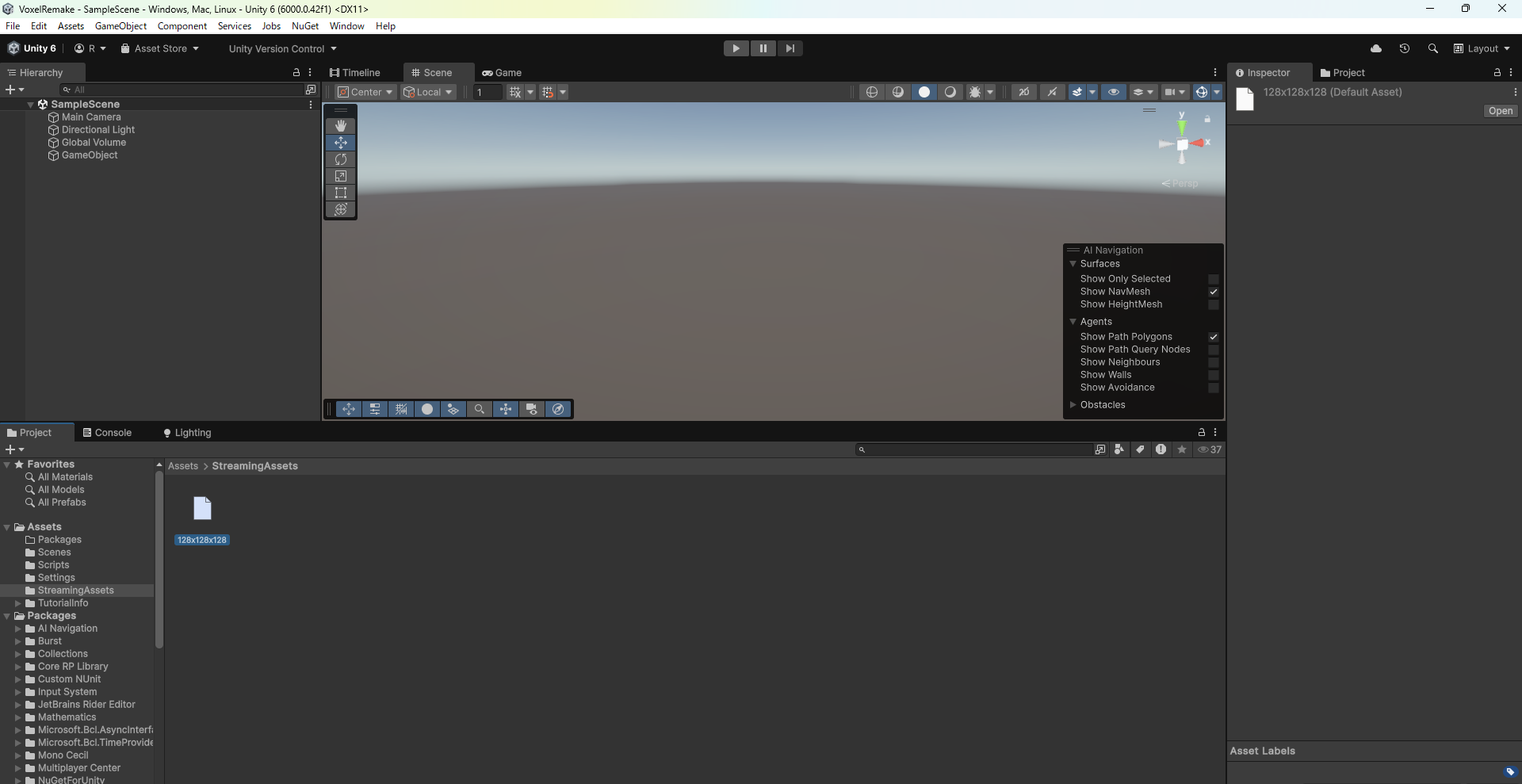
StreamingAssets直下にMagicaVoxelで作ったデータを格納

開きたいボクセルのモデルの名前をChunkManagerスクリプトのインスペクターで記入
これで下準備はばっちりです。
実行

MagicaVoxel上の様子
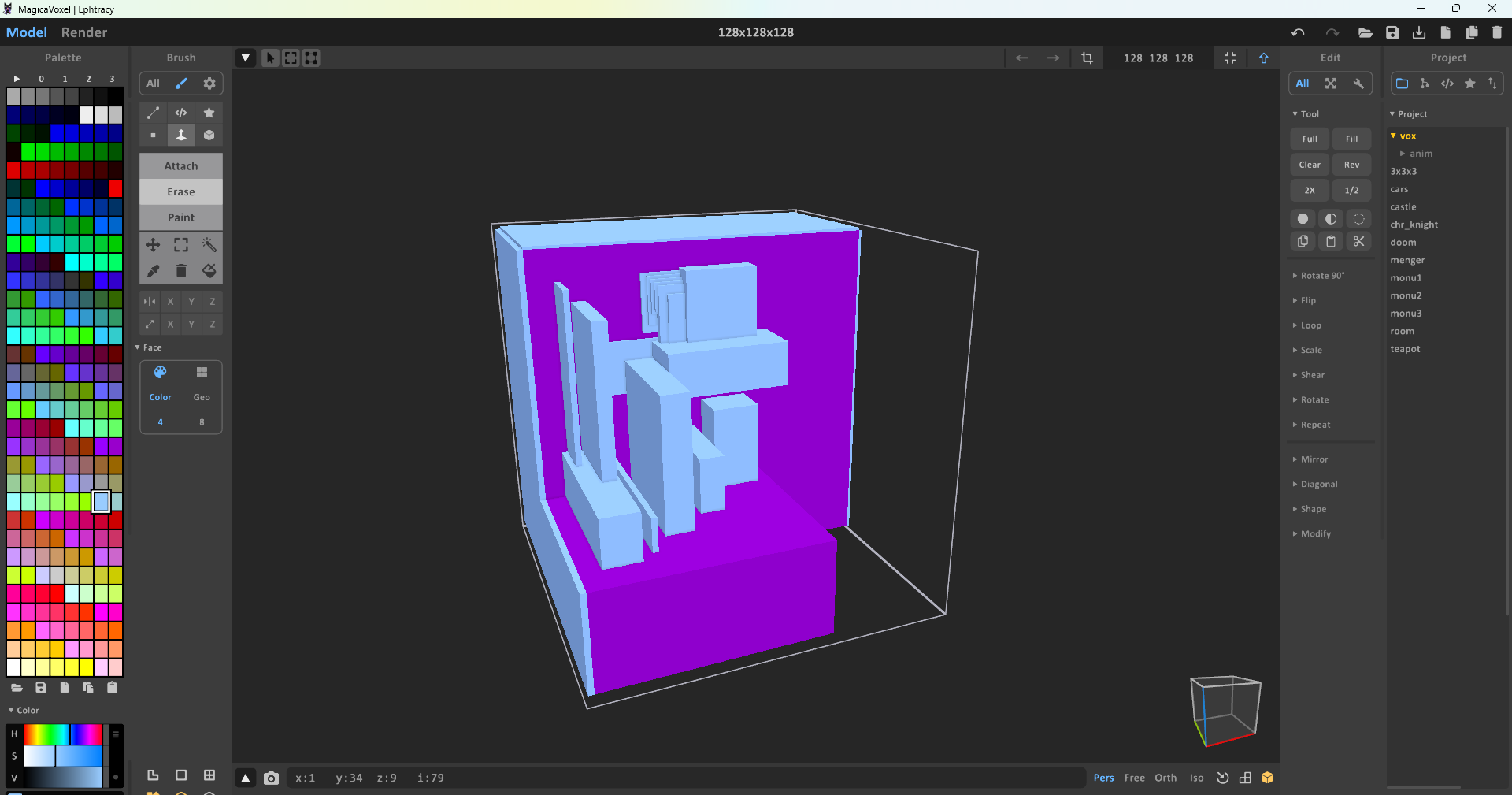
分かりにくいかもしれませんが、上の青色の階段部分がだいぶ滑らかになっています
Naive Surface Netsの関係上、一番端のマスがうまく計算できず、端までブロックを配置して埋めてしまうと描画されなくなる欠陥を抱えています。直したかったけどうまいこと直せなかった…
とりあえず今回はここまで、今後もメッシュ破壊編、テクスチャ編、当たり判定編と続けていきたいです