
はじめに
毎日ひとつ、AIアプリをつくる。
日替わりでテーマに沿って小さなアプリを開発します。Claudeで。
この記事は  AI Code Challenge Advent Calender 2025 の5 日目の記事です!
 4 日目の記事:気分だけの日記アプリを作ってみた!
6 日目の記事:3Dブロック崩しゲームアプリを作ってみた! 
AI アプリ
概要

海外のイベントや旅行先でコミュニケーションとりたいけど、言語の壁がある...
だったら翻訳アプリを作っちゃえばいいじゃない! 
できればリアルタイムで翻訳してほしいですよね。
AI 実装
Claude Desktopでプロンプトを与えて実装してもらいます。
 プロンプト:
リアルタイム文字起こし翻訳アプリを作って

リアルタイム文字起こし翻訳アプリを作成しました!
プロンプト:
htmlで実行します。
音声認識はできました。翻訳結果が出ません。
Access to fetch at 'https://api.anthropic.com/v1/messages' from origin 'null' has been blocked by CORS policy: Response to preflight request doesn't pass access control check: No 'Access-Control-Allow-Origin' header is present on the requested resource.
CORSエラーが発生していますね。ブラウザから直接Anthropic APIを呼び出すことができないため、バックエンドサーバーを経由する必要があります。
簡単な解決方法として、無料の翻訳APIを使用するバージョンを作成します
完成しました!
完成したアプリ
できました!
 リアルタイム翻訳
 のhtmlコードをローカルに「index.html」として保存します。
保存したhtmlファイルをダブルクリックしてブラウザで確認できます
index.html
<!DOCTYPE html>
<html lang="ja">
<head>
<meta charset="UTF-8">
<meta name="viewport" content="width=device-width, initial-scale=1.0">
<title>リアルタイム翻訳アプリ</title>
<script crossorigin src="https://unpkg.com/react@18/umd/react.production.min.js"></script>
<script crossorigin src="https://unpkg.com/react-dom@18/umd/react-dom.production.min.js"></script>
<script src="https://unpkg.com/@babel/standalone/babel.min.js"></script>
<script src="https://cdn.tailwindcss.com"></script>
<link rel="preconnect" href="https://fonts.googleapis.com">
<link rel="preconnect" href="https://fonts.gstatic.com" crossorigin>
<link href="https://fonts.googleapis.com/css2?family=Noto+Sans+JP:wght@300;400;700;900&display=swap" rel="stylesheet">
<style>
* {
font-family: 'Noto Sans JP', sans-serif;
}
@keyframes fade-in {
from {
opacity: 0;
transform: translateY(-20px);
}
to {
opacity: 1;
transform: translateY(0);
}
}
.animate-fade-in {
animation: fade-in 0.6s ease-out;
}
::-webkit-scrollbar {
width: 8px;
}
::-webkit-scrollbar-track {
background: rgba(15, 23, 42, 0.5);
border-radius: 10px;
}
::-webkit-scrollbar-thumb {
background: linear-gradient(180deg, #a855f7, #06b6d4);
border-radius: 10px;
}
::-webkit-scrollbar-thumb:hover {
background: linear-gradient(180deg, #9333ea, #0891b2);
}
</style>
</head>
<body>
<div id="root"></div>
<script type="text/babel">
const { useState, useEffect, useRef } = React;
// Lucide icons as inline SVG components
const Mic = ({ className }) => (
<svg className={className} viewBox="0 0 24 24" fill="none" stroke="currentColor" strokeWidth="2" strokeLinecap="round" strokeLinejoin="round">
<path d="M12 2a3 3 0 0 0-3 3v7a3 3 0 0 0 6 0V5a3 3 0 0 0-3-3Z"></path>
<path d="M19 10v2a7 7 0 0 1-14 0v-2"></path>
<line x1="12" x2="12" y1="19" y2="22"></line>
</svg>
);
const MicOff = ({ className }) => (
<svg className={className} viewBox="0 0 24 24" fill="none" stroke="currentColor" strokeWidth="2" strokeLinecap="round" strokeLinejoin="round">
<line x1="2" x2="22" y1="2" y2="22"></line>
<path d="M18.89 13.23A7.12 7.12 0 0 0 19 12v-2"></path>
<path d="M5 10v2a7 7 0 0 0 12 5"></path>
<path d="M15 9.34V5a3 3 0 0 0-5.68-1.33"></path>
<path d="M9 9v3a3 3 0 0 0 5.12 2.12"></path>
<line x1="12" x2="12" y1="19" y2="22"></line>
</svg>
);
const Languages = ({ className }) => (
<svg className={className} viewBox="0 0 24 24" fill="none" stroke="currentColor" strokeWidth="2" strokeLinecap="round" strokeLinejoin="round">
<path d="m5 8 6 6"></path>
<path d="m4 14 6-6 2-3"></path>
<path d="M2 5h12"></path>
<path d="M7 2h1"></path>
<path d="m22 22-5-10-5 10"></path>
<path d="M14 18h6"></path>
</svg>
);
const Volume2 = ({ className }) => (
<svg className={className} viewBox="0 0 24 24" fill="none" stroke="currentColor" strokeWidth="2" strokeLinecap="round" strokeLinejoin="round">
<polygon points="11 5 6 9 2 9 2 15 6 15 11 19 11 5"></polygon>
<path d="M15.54 8.46a5 5 0 0 1 0 7.07"></path>
<path d="M19.07 4.93a10 10 0 0 1 0 14.14"></path>
</svg>
);
const VolumeX = ({ className }) => (
<svg className={className} viewBox="0 0 24 24" fill="none" stroke="currentColor" strokeWidth="2" strokeLinecap="round" strokeLinejoin="round">
<polygon points="11 5 6 9 2 9 2 15 6 15 11 19 11 5"></polygon>
<line x1="22" x2="16" y1="9" y2="15"></line>
<line x1="16" x2="22" y1="9" y2="15"></line>
</svg>
);
const Trash2 = ({ className }) => (
<svg className={className} viewBox="0 0 24 24" fill="none" stroke="currentColor" strokeWidth="2" strokeLinecap="round" strokeLinejoin="round">
<path d="M3 6h18"></path>
<path d="M19 6v14c0 1-1 2-2 2H7c-1 0-2-1-2-2V6"></path>
<path d="M8 6V4c0-1 1-2 2-2h4c1 0 2 1 2 2v2"></path>
<line x1="10" x2="10" y1="11" y2="17"></line>
<line x1="14" x2="14" y1="11" y2="17"></line>
</svg>
);
const Copy = ({ className }) => (
<svg className={className} viewBox="0 0 24 24" fill="none" stroke="currentColor" strokeWidth="2" strokeLinecap="round" strokeLinejoin="round">
<rect width="14" height="14" x="8" y="8" rx="2" ry="2"></rect>
<path d="M4 16c-1.1 0-2-.9-2-2V4c0-1.1.9-2 2-2h10c1.1 0 2 .9 2 2"></path>
</svg>
);
const Check = ({ className }) => (
<svg className={className} viewBox="0 0 24 24" fill="none" stroke="currentColor" strokeWidth="2" strokeLinecap="round" strokeLinejoin="round">
<polyline points="20 6 9 17 4 12"></polyline>
</svg>
);
const RealtimeTranslator = () => {
const [isListening, setIsListening] = useState(false);
const [transcript, setTranscript] = useState('');
const [translation, setTranslation] = useState('');
const [sourceLang, setSourceLang] = useState('ja');
const [targetLang, setTargetLang] = useState('en');
const [autoSpeak, setAutoSpeak] = useState(false);
const [history, setHistory] = useState([]);
const [copied, setCopied] = useState(false);
const [interimTranscript, setInterimTranscript] = useState('');
const [error, setError] = useState('');
const [isSupported, setIsSupported] = useState(true);
const [isTranslating, setIsTranslating] = useState(false);
const recognitionRef = useRef(null);
const translationTimeoutRef = useRef(null);
const isInitializedRef = useRef(false);
// 言語コードマッピング(音声認識用とLibreTranslate API用)
const languages = [
{ code: 'ja', speechCode: 'ja-JP', name: '日本語', flag: '🇯🇵', ttsCode: 'ja-JP' },
{ code: 'en', speechCode: 'en-US', name: 'English', flag: '🇺🇸', ttsCode: 'en-US' },
{ code: 'zh', speechCode: 'zh-CN', name: '中文', flag: '🇨🇳', ttsCode: 'zh-CN' },
{ code: 'ko', speechCode: 'ko-KR', name: '한국어', flag: '🇰🇷', ttsCode: 'ko-KR' },
{ code: 'es', speechCode: 'es-ES', name: 'Español', flag: '🇪🇸', ttsCode: 'es-ES' },
{ code: 'fr', speechCode: 'fr-FR', name: 'Français', flag: '🇫🇷', ttsCode: 'fr-FR' },
{ code: 'de', speechCode: 'de-DE', name: 'Deutsch', flag: '🇩🇪', ttsCode: 'de-DE' },
{ code: 'it', speechCode: 'it-IT', name: 'Italiano', flag: '🇮🇹', ttsCode: 'it-IT' },
{ code: 'pt', speechCode: 'pt-BR', name: 'Português', flag: '🇧🇷', ttsCode: 'pt-BR' },
{ code: 'ru', speechCode: 'ru-RU', name: 'Русский', flag: '🇷🇺', ttsCode: 'ru-RU' },
];
const getCurrentLang = (code) => languages.find(l => l.code === code);
useEffect(() => {
if (!('webkitSpeechRecognition' in window) && !('SpeechRecognition' in window)) {
setIsSupported(false);
setError('お使いのブラウザは音声認識に対応していません。Chrome、Edge、Safariをお試しください。');
return;
}
const SpeechRecognition = window.SpeechRecognition || window.webkitSpeechRecognition;
if (!isInitializedRef.current) {
recognitionRef.current = new SpeechRecognition();
recognitionRef.current.continuous = true;
recognitionRef.current.interimResults = true;
isInitializedRef.current = true;
}
if (recognitionRef.current) {
const speechCode = getCurrentLang(sourceLang)?.speechCode || 'ja-JP';
recognitionRef.current.lang = speechCode;
recognitionRef.current.onstart = () => {
console.log('音声認識開始');
setError('');
};
recognitionRef.current.onresult = (event) => {
let interim = '';
let final = '';
for (let i = event.resultIndex; i < event.results.length; i++) {
const transcriptPart = event.results[i][0].transcript;
if (event.results[i].isFinal) {
final += transcriptPart;
} else {
interim += transcriptPart;
}
}
if (interim) {
setInterimTranscript(interim);
}
if (final) {
setTranscript(prev => prev + final + ' ');
setInterimTranscript('');
clearTimeout(translationTimeoutRef.current);
translationTimeoutRef.current = setTimeout(() => {
translateText(final);
}, 800);
}
};
recognitionRef.current.onerror = (event) => {
console.error('音声認識エラー:', event.error);
if (event.error === 'no-speech') {
return;
}
if (event.error === 'not-allowed') {
setError('マイクへのアクセスが拒否されました。ブラウザの設定でマイクの使用を許可してください。');
setIsListening(false);
return;
}
if (event.error === 'network') {
setError('ネットワークエラーが発生しました。');
setIsListening(false);
return;
}
setError(`エラー: ${event.error}`);
setIsListening(false);
};
recognitionRef.current.onend = () => {
console.log('音声認識終了イベント');
if (isListening) {
try {
console.log('音声認識を再開始');
recognitionRef.current.start();
} catch (e) {
console.error('再開始エラー:', e);
setIsListening(false);
}
}
};
}
return () => {
if (recognitionRef.current && isListening) {
try {
recognitionRef.current.stop();
} catch (e) {
console.error('停止エラー:', e);
}
}
};
}, [sourceLang, isListening]);
const translateText = async (text) => {
if (!text.trim()) return;
setIsTranslating(true);
console.log('翻訳開始:', text);
try {
// MyMemory Translation API(無料、APIキー不要)を使用
const url = `https://api.mymemory.translated.net/get?q=${encodeURIComponent(text)}&langpair=${sourceLang}|${targetLang}`;
const response = await fetch(url);
const data = await response.json();
console.log('API レスポンス:', data);
if (data.responseStatus === 200 && data.responseData) {
const translatedText = data.responseData.translatedText;
setTranslation(prev => prev + translatedText + ' ');
if (autoSpeak) {
speakText(translatedText);
}
setHistory(prev => [{
original: text,
translated: translatedText,
timestamp: new Date().toLocaleTimeString(),
sourceLang,
targetLang
}, ...prev].slice(0, 50));
} else {
console.error('翻訳エラー:', data);
setError('翻訳に失敗しました。しばらくしてからもう一度お試しください。');
}
} catch (error) {
console.error('翻訳エラー:', error);
setError('翻訳APIへの接続に失敗しました。インターネット接続を確認してください。');
} finally {
setIsTranslating(false);
}
};
const speakText = (text) => {
if ('speechSynthesis' in window) {
const utterance = new SpeechSynthesisUtterance(text);
const ttsCode = getCurrentLang(targetLang)?.ttsCode || 'en-US';
utterance.lang = ttsCode;
utterance.rate = 0.9;
window.speechSynthesis.cancel(); // 既存の音声を停止
window.speechSynthesis.speak(utterance);
}
};
const toggleListening = async () => {
if (!isSupported) {
setError('お使いのブラウザは音声認識に対応していません。');
return;
}
if (isListening) {
console.log('音声認識を停止');
try {
recognitionRef.current?.stop();
setIsListening(false);
setError('');
} catch (e) {
console.error('停止エラー:', e);
setError('停止中にエラーが発生しました。');
}
} else {
console.log('音声認識を開始');
setTranscript('');
setTranslation('');
setInterimTranscript('');
setError('');
try {
await navigator.mediaDevices.getUserMedia({ audio: true });
setIsListening(true);
setTimeout(() => {
try {
recognitionRef.current?.start();
console.log('音声認識開始成功');
} catch (e) {
console.error('開始エラー:', e);
setError('音声認識の開始に失敗しました: ' + e.message);
setIsListening(false);
}
}, 100);
} catch (e) {
console.error('マイク権限エラー:', e);
setError('マイクへのアクセスが拒否されました。ブラウザの設定を確認してください。');
setIsListening(false);
}
}
};
const swapLanguages = () => {
const temp = sourceLang;
setSourceLang(targetLang);
setTargetLang(temp);
};
const clearAll = () => {
setTranscript('');
setTranslation('');
setInterimTranscript('');
setHistory([]);
setError('');
};
const copyToClipboard = (text) => {
navigator.clipboard.writeText(text);
setCopied(true);
setTimeout(() => setCopied(false), 2000);
};
return (
<div className="min-h-screen bg-gradient-to-br from-slate-900 via-purple-900 to-slate-900 p-4 md:p-8">
<div className="max-w-7xl mx-auto">
<div className="text-center mb-8 animate-fade-in">
<h1 className="text-5xl md:text-6xl font-black text-transparent bg-clip-text bg-gradient-to-r from-cyan-400 via-purple-400 to-pink-400 mb-3 tracking-tight">
リアルタイム翻訳
</h1>
<p className="text-slate-300 text-lg font-light">
話すだけで、瞬時に翻訳
</p>
<p className="text-slate-500 text-sm mt-2">
Powered by MyMemory Translation API
</p>
</div>
<div className="bg-slate-800/50 backdrop-blur-xl rounded-3xl p-6 md:p-8 shadow-2xl border border-slate-700/50 mb-6">
{error && (
<div className="bg-red-900/50 border-2 border-red-500 rounded-xl p-4 mb-6 animate-fade-in">
<p className="text-red-200 text-center font-semibold">{error}</p>
</div>
)}
{!isSupported && (
<div className="bg-yellow-900/50 border-2 border-yellow-500 rounded-xl p-4 mb-6">
<p className="text-yellow-200 text-center font-semibold">
このブラウザは音声認識に対応していません。Chrome、Edge、またはSafariをご使用ください。
</p>
</div>
)}
<div className="grid grid-cols-1 md:grid-cols-3 gap-4 mb-6">
<div className="space-y-2">
<label className="text-sm font-semibold text-slate-300 uppercase tracking-wider">
元の言語
</label>
<select
value={sourceLang}
onChange={(e) => setSourceLang(e.target.value)}
className="w-full bg-slate-900/80 text-white border-2 border-purple-500/30 rounded-xl px-4 py-3 text-lg focus:outline-none focus:border-purple-400 transition-all"
disabled={isListening}
>
{languages.map(lang => (
<option key={lang.code} value={lang.code}>
{lang.flag} {lang.name}
</option>
))}
</select>
</div>
<div className="flex items-end justify-center">
<button
onClick={swapLanguages}
className="bg-gradient-to-r from-purple-600 to-pink-600 hover:from-purple-500 hover:to-pink-500 text-white p-4 rounded-full transition-all transform hover:scale-110 active:scale-95 shadow-lg"
disabled={isListening}
>
<Languages className="w-6 h-6" />
</button>
</div>
<div className="space-y-2">
<label className="text-sm font-semibold text-slate-300 uppercase tracking-wider">
翻訳先の言語
</label>
<select
value={targetLang}
onChange={(e) => setTargetLang(e.target.value)}
className="w-full bg-slate-900/80 text-white border-2 border-cyan-500/30 rounded-xl px-4 py-3 text-lg focus:outline-none focus:border-cyan-400 transition-all"
disabled={isListening}
>
{languages.map(lang => (
<option key={lang.code} value={lang.code}>
{lang.flag} {lang.name}
</option>
))}
</select>
</div>
</div>
<div className="flex flex-wrap gap-4 justify-center items-center">
<button
onClick={toggleListening}
disabled={!isSupported}
className={`flex items-center gap-3 px-8 py-4 rounded-2xl font-bold text-lg transition-all transform hover:scale-105 active:scale-95 shadow-xl ${
!isSupported
? 'bg-gray-600 cursor-not-allowed opacity-50'
: isListening
? 'bg-gradient-to-r from-red-600 to-orange-600 hover:from-red-500 hover:to-orange-500 text-white animate-pulse'
: 'bg-gradient-to-r from-green-600 to-emerald-600 hover:from-green-500 hover:to-emerald-500 text-white'
}`}
>
{isListening ? (
<>
<MicOff className="w-6 h-6" />
停止
</>
) : (
<>
<Mic className="w-6 h-6" />
開始
</>
)}
</button>
<button
onClick={() => setAutoSpeak(!autoSpeak)}
className={`flex items-center gap-3 px-6 py-4 rounded-2xl font-semibold transition-all transform hover:scale-105 active:scale-95 ${
autoSpeak
? 'bg-gradient-to-r from-blue-600 to-cyan-600 text-white shadow-lg'
: 'bg-slate-700 text-slate-300 hover:bg-slate-600'
}`}
>
{autoSpeak ? <Volume2 className="w-5 h-5" /> : <VolumeX className="w-5 h-5" />}
自動読み上げ
</button>
<button
onClick={clearAll}
className="flex items-center gap-3 px-6 py-4 rounded-2xl font-semibold bg-slate-700 hover:bg-red-600/80 text-slate-300 hover:text-white transition-all transform hover:scale-105 active:scale-95"
>
<Trash2 className="w-5 h-5" />
クリア
</button>
</div>
</div>
<div className="grid grid-cols-1 lg:grid-cols-2 gap-6 mb-6">
<div className="bg-gradient-to-br from-purple-900/40 to-slate-800/40 backdrop-blur-xl rounded-3xl p-6 border-2 border-purple-500/30 shadow-xl">
<div className="flex items-center justify-between mb-4">
<h3 className="text-xl font-bold text-purple-300 flex items-center gap-2">
<span className="text-2xl">{getCurrentLang(sourceLang)?.flag}</span>
音声認識
</h3>
{transcript && (
<button
onClick={() => copyToClipboard(transcript)}
className="text-purple-300 hover:text-purple-200 transition-colors"
>
{copied ? <Check className="w-5 h-5" /> : <Copy className="w-5 h-5" />}
</button>
)}
</div>
<div className="bg-slate-900/60 rounded-2xl p-6 min-h-[200px] max-h-[400px] overflow-y-auto">
<p className="text-white text-lg leading-relaxed whitespace-pre-wrap">
{transcript}
{interimTranscript && (
<span className="text-purple-400 opacity-70">{interimTranscript}</span>
)}
</p>
{isListening && !transcript && !interimTranscript && (
<div className="text-center mt-8">
<div className="inline-block">
<div className="flex gap-2 mb-4 justify-center">
<div className="w-3 h-3 bg-purple-500 rounded-full animate-bounce" style={{ animationDelay: '0ms' }}></div>
<div className="w-3 h-3 bg-purple-500 rounded-full animate-bounce" style={{ animationDelay: '150ms' }}></div>
<div className="w-3 h-3 bg-purple-500 rounded-full animate-bounce" style={{ animationDelay: '300ms' }}></div>
</div>
<p className="text-slate-400 italic">
🎤 リスニング中... 話しかけてください
</p>
</div>
</div>
)}
{!isListening && !transcript && (
<p className="text-slate-500 italic text-center mt-8">
「開始」ボタンを押して音声入力を開始してください
</p>
)}
</div>
</div>
<div className="bg-gradient-to-br from-cyan-900/40 to-slate-800/40 backdrop-blur-xl rounded-3xl p-6 border-2 border-cyan-500/30 shadow-xl">
<div className="flex items-center justify-between mb-4">
<h3 className="text-xl font-bold text-cyan-300 flex items-center gap-2">
<span className="text-2xl">{getCurrentLang(targetLang)?.flag}</span>
翻訳結果
</h3>
{translation && (
<button
onClick={() => copyToClipboard(translation)}
className="text-cyan-300 hover:text-cyan-200 transition-colors"
>
{copied ? <Check className="w-5 h-5" /> : <Copy className="w-5 h-5" />}
</button>
)}
</div>
<div className="bg-slate-900/60 rounded-2xl p-6 min-h-[200px] max-h-[400px] overflow-y-auto">
<p className="text-white text-lg leading-relaxed whitespace-pre-wrap">
{translation}
</p>
{isTranslating && (
<div className="text-center mt-8">
<div className="inline-block">
<div className="flex gap-2 mb-4 justify-center">
<div className="w-3 h-3 bg-cyan-500 rounded-full animate-bounce" style={{ animationDelay: '0ms' }}></div>
<div className="w-3 h-3 bg-cyan-500 rounded-full animate-bounce" style={{ animationDelay: '150ms' }}></div>
<div className="w-3 h-3 bg-cyan-500 rounded-full animate-bounce" style={{ animationDelay: '300ms' }}></div>
</div>
<p className="text-slate-400 italic">翻訳中...</p>
</div>
</div>
)}
</div>
</div>
</div>
{history.length > 0 && (
<div className="bg-slate-800/30 backdrop-blur-xl rounded-3xl p-6 border border-slate-700/50 shadow-xl">
<h3 className="text-2xl font-bold text-slate-200 mb-4">履歴</h3>
<div className="space-y-3 max-h-[400px] overflow-y-auto">
{history.map((item, index) => (
<div
key={index}
className="bg-slate-900/50 rounded-xl p-4 hover:bg-slate-900/70 transition-all"
>
<div className="flex items-start gap-3 mb-2">
<span className="text-xs font-mono text-slate-500">{item.timestamp}</span>
</div>
<div className="grid grid-cols-1 md:grid-cols-2 gap-4">
<div>
<p className="text-xs text-purple-400 mb-1">
{getCurrentLang(item.sourceLang)?.flag}{' '}
{getCurrentLang(item.sourceLang)?.name}
</p>
<p className="text-white">{item.original}</p>
</div>
<div>
<p className="text-xs text-cyan-400 mb-1">
{getCurrentLang(item.targetLang)?.flag}{' '}
{getCurrentLang(item.targetLang)?.name}
</p>
<p className="text-white">{item.translated}</p>
</div>
</div>
</div>
))}
</div>
</div>
)}
</div>
</div>
);
};
ReactDOM.render(<RealtimeTranslator />, document.getElementById('root'));
</script>
</body>
</html>
使い方:
- 「元の言語」と「翻訳先の言語」を選択
- 「開始」ボタンを押して話す
- リアルタイムで文字起こしと翻訳が表示されます
こんなイメージです。
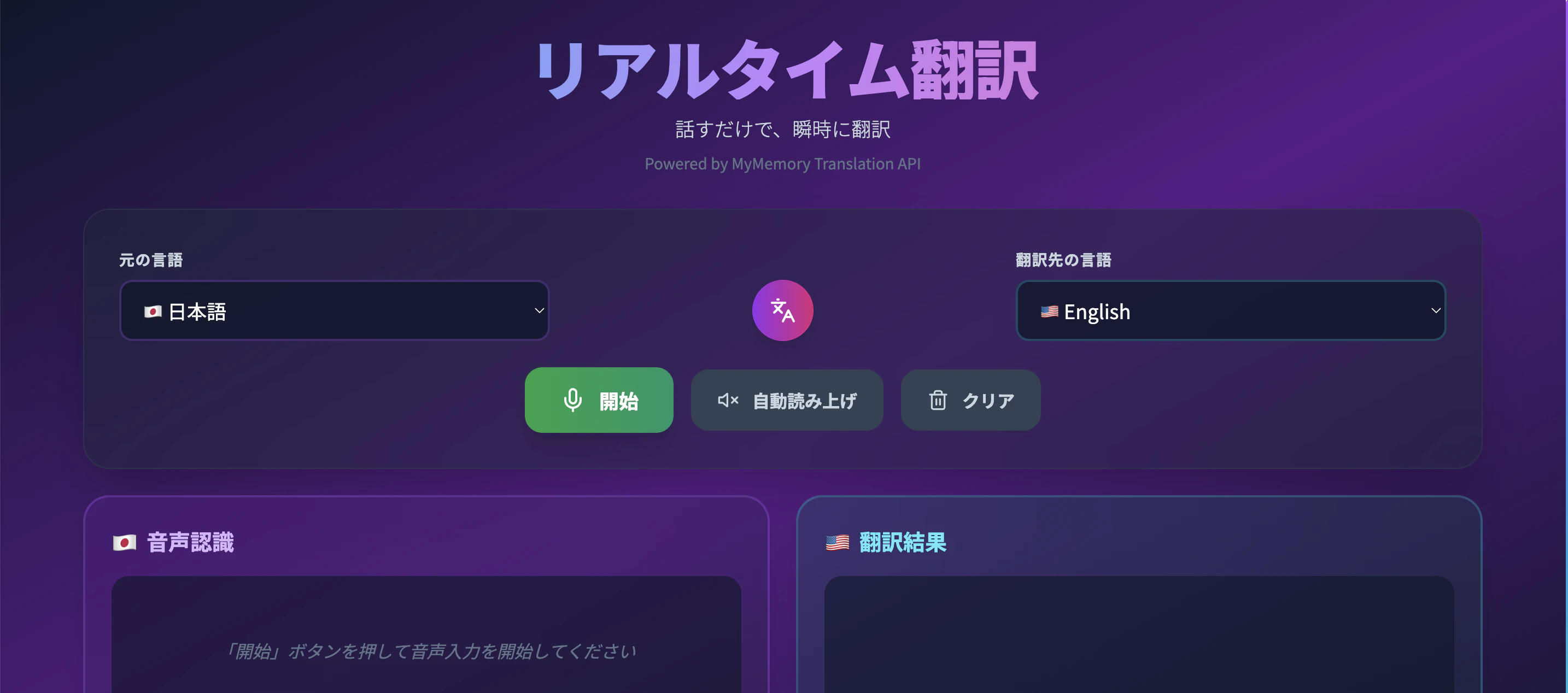
「開始」で音声を入力します。
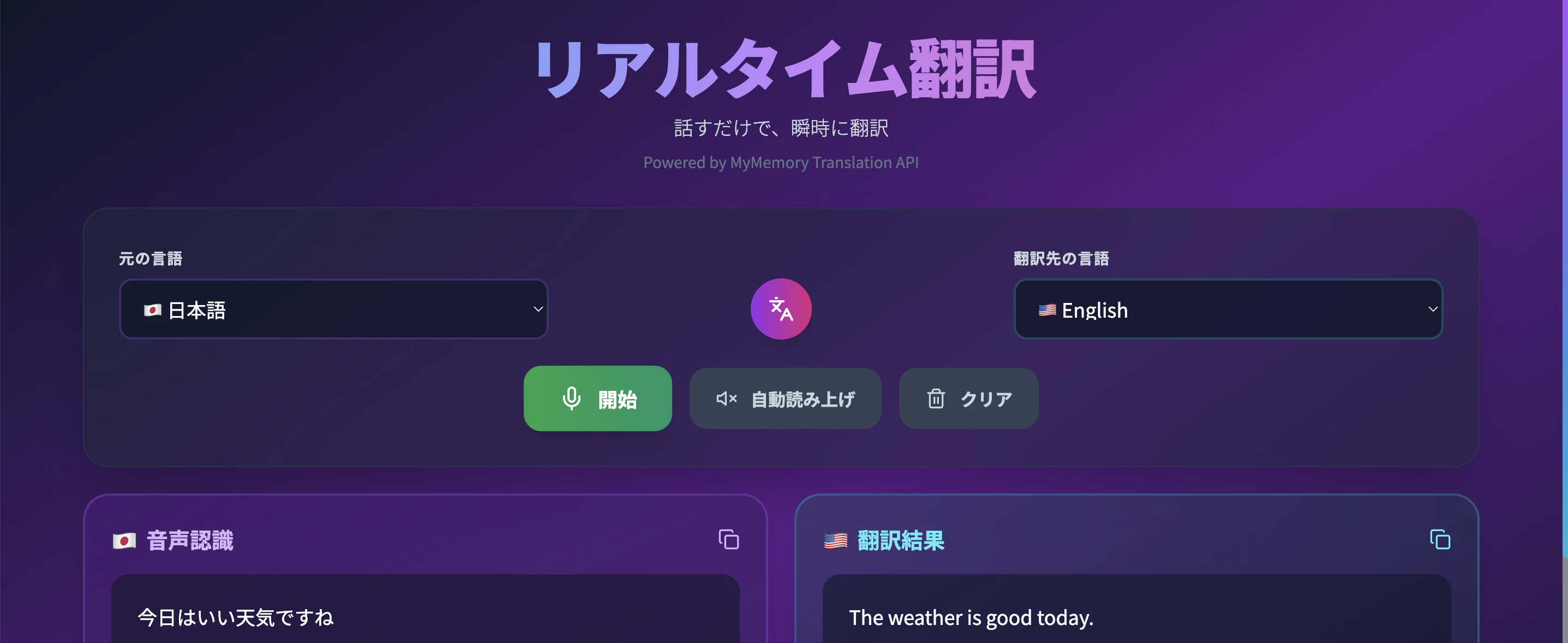
いい感じに動いています。
ちなみに「自動読み上げ」をONにしたまま、リアルタイム翻訳をすると翻訳結果を読み上げてくれます!
プログラム解説
ポイントとなるプログラムを解説します。
- 音声認識用コード(speechCode)、翻訳API用コード(code)、音声読み上げ用コード(ttsCode)を定義。
const languages = [
  { code: 'ja', speechCode: 'ja-JP', name: '日本語', flag: '🇯🇵', ttsCode: 'ja-JP' },
  { code: 'en', speechCode: 'en-US', name: 'English', flag: '🇺🇸', ttsCode: 'en-US' },
  // …他の言語も同様に定義
];
- ブラウザの SpeechRecognition API を使って音声認識を開始。
useEffect(() => {
  const SpeechRecognition = window.SpeechRecognition || window.webkitSpeechRecognition;
  recognitionRef.current = new SpeechRecognition();
  recognitionRef.current.continuous = true;
  recognitionRef.current.interimResults = true;
}, [sourceLang, isListening]);
- MyMemory API にリクエストを送り、翻訳結果を取得。
const translateText = async (text) => {
  const url = `https://api.mymemory.translated.net/get?q=${encodeURIComponent(text)}&langpair=${sourceLang}|${targetLang}`;
  const response = await fetch(url);
  const data = await response.json();
  if (data.responseStatus === 200) {
    const translatedText = data.responseData.translatedText;
    setTranslation(prev => prev + translatedText + ' ');
    if (autoSpeak) speakText(translatedText);
  }
};
- ブラウザの speechSynthesis API で翻訳結果を音声出力。
const speakText = (text) => {
  const utterance = new SpeechSynthesisUtterance(text);
  utterance.lang = getCurrentLang(targetLang)?.ttsCode || 'en-US';
  utterance.rate = 0.9;
  window.speechSynthesis.cancel();
  window.speechSynthesis.speak(utterance);
};
おわりに
- 翻訳のAPI(MyMemory Translation API)を使うのでインターネット接続が必要です。
- こんなにも簡単にリアルタイム翻訳アプリができてしまうのは驚きです。
AI で楽しいアプリ開発を!!
この記事は AI Code Challenge Advent Calender 2025 の5 日目の記事です!