
1. Role
Primary: Used for measuring lap times.
Split: Used for measuring intermediate sectors.
In F1 terms, Split 1 corresponds to Sector 1 measurement, and Split 2 corresponds to Sector 2 measurement.
2. Marker IDs
There are four IDs available from 0 to 3. You can decide which marker IDs to assign to each timer.
Minimum: 1 ID, Maximum: 4 IDs.
For multiple IDs, enter them separated by commas (e.g., 0,1,2,3). If there is only one, no comma is required.
3. Detection Mode
You can choose from three modes: Normal, Corrected, and Hybrid.
Normal: Works like TVPAS, using the raw camera image as the source for detection.
Corrected: Compensates for the barrel distortion typically found in wide-angle FPV camera images before performing detection.
Hybrid: Performs detection in both Normal and Corrected modes and combines the results. (This can detect more markers but is more processing-intensive. That said, an Intel 9th Gen Core i7-9700K can still achieve around 60 FPS in Hybrid mode.)
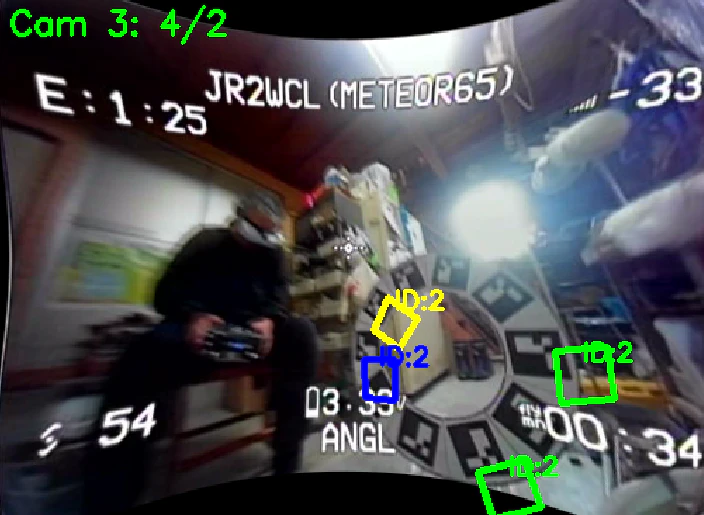
↑ Detection is performed by transforming the original image as shown above.
- Green frames: Markers detected in both Normal and Corrected.
- Yellow frames: Markers detected only in Corrected.
- Blue frames: Markers detected only in Normal.
Depending on your PC's performance, Hybrid mode might become heavy.
By enabling "Show Detection FPS" in the Overlay, you can check the actual detection speed. If the performance is insufficient, it is recommended to switch to Normal mode.
4. Marker Detection Tips and Flicker Length
Markers are detected in video up to 60 FPS (60 frames per second). When the number of markers detected exceeds the "Marker Threshold," FPVTrackside enters a state where it prepares to record a lap pass once those markers disappear.
Once the markers are no longer detected, the system identifies it as a lap completion.
However, it is common for a marker to disappear for one frame and reappear in the next. In such cases, the marker didn't actually leave the view; it just failed to be read momentarily.
If this happens, it can cause the lap time to be recorded prematurely before reaching the gate.
Looking at the commit history of TinyViewPlus, you can see that the author, t-asano, put a lot of effort into solving this. The solution was logic that waits for 3 consecutive frames (theoretically 0.1 seconds since TinyViewPlus ran at 30 FPS) after the marker disappears. If the marker is detected again during this period, it is not counted as a lap, and it waits for another 3 frames. This prevents recording a lap time too early if the marker briefly fails to be read.
In the detection system added to FPVTrackside, this "3-frame wait" is handled in time units: Flicker Length MS. The default is 150ms. After markers stop being detected, the system waits for 0.15 seconds before reporting the pass time.
You might worry that this delays the recorded time by 0.15 seconds. However, the system automatically subtracts the Flicker Length MS from the time reported to the main program, so the recorded time remains accurate.
In extreme cases, if you set Flicker Length to 5000ms, it will wait for 5 seconds, making premature lap records almost impossible. However, the downside is that the lap won't be confirmed on the screen until 5 seconds after passing the gate, which might be frustrating for spectators.
(For example, in a 3-minute limit race, sending a record of 2:58 at the 3:03 mark is fine. However, sending a record of 3:01 after 3:06 has elapsed would result in the record being rejected due to the time limit.)
5. Marker Threshold
The default is 2. This value determines the minimum number of markers required for the system to consider them "detected."
With the default of 2, if 2 or more markers are detected, the system enters the mode to wait for them to disappear. If only 1 is detected, it won't trigger this mode. (Setting this to 1 is discouraged because OSD characters can sometimes be misidentified as markers. 2 is recommended. Higher numbers prevent early detection but increase the risk of missing a pass entirely.)
6. Min Marker Percent
One reason for premature lap records is that markers are sometimes detected when they are still very small (far away).
When adjusting settings during testing, you can enable "Show Marker Size" in the Overlay to see the actual size. If markers are being detected from too far away, you should increase this value. Be careful, as setting it too high might cause the system to fail to detect the gate pass.
7. Multi-thread Detection
For modern PCs, it is recommended to enable this to process detection using 4 threads in parallel.