
作ったもの
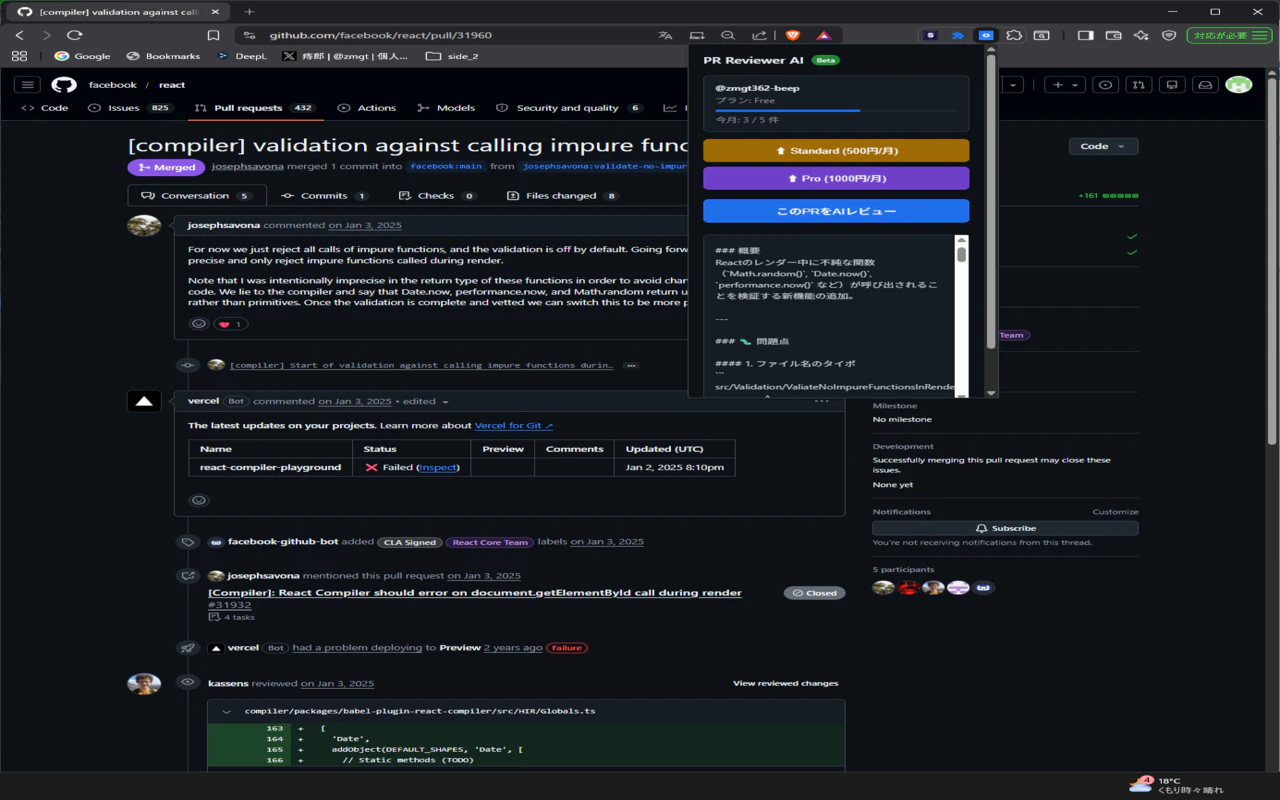
GitHubのPull Requestページでワンクリックするだけで、Claude AIがシニアエンジニアレベルのコードレビューを日本語で生成するChrome拡張機能を作りました。
PR Reviewer AI
インストール
👉 PR Reviewer AI - Chrome Web Store
無料プランは月5件まで。クレジットカード不要です。
機能:
- GitHubのPRページでワンクリック→AIレビュー生成
- 問題点・改善提案・良い点を日本語で出力
- 月間使用量管理(Free: 5件/月)
- フリーミアム(Free→Standard 500円/月→Pro 1000円/月)
なぜ作ったか
コードレビューって時間かかりますよね。
特に個人開発やスタートアップだとレビュアーが自分しかいないケースも多い。「誰かにレビューしてほしいけど頼める人がいない」という状況を何度も経験しました。
AIにレビューさせたら解決するのでは?と思って作りました。
技術スタック
| 項目 | 技術 |
|---|---|
| フロントエンド | Chrome拡張(Manifest V3) |
| バックエンド | Cloudflare Workers |
| AI | Claude API(claude-sonnet-4-6) |
| 決済 | Stripe(サブスク) |
| 認証 | GitHub OAuth |
| DB | Cloudflare KV |
| 開発ツール | Cursor |
コストはほぼゼロで運用できます。Cloudflare Workersは無料枠が大きく、Claude APIは従量課金なので初期費用がかかりません。
実装のポイント
1. GitHub OAuth認証
Chrome拡張でOAuthをやるにはchrome.identity.launchWebAuthFlowを使うのが正解です。
async function startLogin() {
  const clientId = 'YOUR_CLIENT_ID';
  const redirectUri = chrome.identity.getRedirectURL();
  const authUrl = `https://github.com/login/oauth/authorize?client_id=${clientId}&scope=repo&redirect_uri=${encodeURIComponent(redirectUri)}`;

  chrome.identity.launchWebAuthFlow(
    { url: authUrl, interactive: true },
    async (callbackUrl) => {
      const code = new URL(callbackUrl).searchParams.get('code');
      const res = await fetch('https://your-worker.workers.dev/auth/callback', {
        method: 'POST',
        headers: { 'Content-Type': 'application/json' },
        body: JSON.stringify({ code, redirectUri }),
      });
      const data = await res.json();
    }
  );
}
chrome.tabs.createでOAuthページを開く方法だと認証後のコールバックが取れないのでハマりました。chrome.identity.launchWebAuthFlow一択です。
2. GitHub APIでPR差分取得
const diffRes = await fetch(
  `https://api.github.com/repos/${owner}/${repo}/pulls/${pullNumber}/files`,
  {
    headers: {
      Authorization: `token ${accessToken}`,
      'User-Agent': 'PR-Reviewer-AI',
      'Accept': 'application/vnd.github.v3+json',
    },
  }
);
const files = await diffRes.json();
const diffText = files.map(f =>
  `### ${f.filename}\n\`\`\`\n${f.patch || '(no diff)'}\n\`\`\``
).join('\n\n').slice(0, 20000);
差分が大きいPRはトークン制限に引っかかるので.slice(0, 20000)で切っています。
3. Claude APIでレビュー生成
const claudeRes = await fetch('https://api.anthropic.com/v1/messages', {
  method: 'POST',
  headers: {
    'Content-Type': 'application/json',
    'x-api-key': env.ANTHROPIC_API_KEY,
    'anthropic-version': '2023-06-01',
  },
  body: JSON.stringify({
    model: 'claude-sonnet-4-6',
    max_tokens: 1500,
    messages: [{
      role: 'user',
      content: `あなたはシニアエンジニアです。以下のPR差分をレビューしてください。
問題点、改善提案、良い点を日本語で簡潔にまとめてください。

${diffText}`,
    }],
  }),
});
4. Stripe サブスク管理
const params = new URLSearchParams({
  'payment_method_types[]': 'card',
  'line_items[0][price]': priceId,
  'line_items[0][quantity]': '1',
  'mode': 'subscription',
  'success_url': 'https://your-worker.workers.dev/success',
  'cancel_url': 'https://your-worker.workers.dev/cancel',
  'metadata[githubId]': userId,
  'metadata[plan]': plan,
});

const stripeRes = await fetch('https://api.stripe.com/v1/checkout/sessions', {
  method: 'POST',
  headers: {
    'Authorization': `Bearer ${env.STRIPE_SECRET_KEY}`,
    'Content-Type': 'application/x-www-form-urlencoded',
  },
  body: params.toString(),
});
ハマったポイント
① GitHub OAuth AppのClient IDの文字化け
O(大文字オー)と0(ゼロ)を見間違えて30分溶かしました。Client IDはコピペで確認することを強くおすすめします。
② chrome.windows.createではOAuthが動かない
最初はchrome.windows.createでOAuthページを開こうとしましたが、ポップアップが一瞬表示されて消えるだけでした。chrome.identity.launchWebAuthFlowが正解です。
③ Cloudflare WorkerのANTHROPIC_API_KEY
新しいAPIキーを作成した後、Cloudflare Workerの環境変数に反映されていなかったため401エラーが続きました。キーを更新したら必ずWorkerをDeployし直してください。
まとめ
| 項目 | 内容 |
|---|---|
| 開発期間 | 深夜作業2〜3日 |
| 開発費用 | ほぼ0円 |
| 運用費用 | Claude API従量課金のみ |
| 収益モデル | フリーミアム(Stripe) |
Chrome拡張×Cloudflare Workers×Stripeの組み合わせは個人開発に最適です。サーバー管理不要・スケール自動・決済も簡単に実装できます。
同じスタックで作ったSaveSmartの記事も参考にしてみてください。
- SaveSmart開発記事:https://qiita.com/zmgt362/items/00620b5bbdb93d240b7d
- PR Reviewer AI LP:https://pr-reviewer-api.zmgt362.workers.dev
もっと詳しく学びたい方へ
Chrome拡張×AI×Stripeでサブスク収益を得るまでの全手順を電子書籍にまとめました。
第1章は無料で読めます。