

はじめに
地図を使ったWebアプリを作る際、ユーザーに住所を入力してもらう場面はよくあります。
ただ、都道府県から番地までをすべて手入力してもらうのは大変で、入力ミスも起きやすいですよね。
そこで本記事では、郵便番号を入力すると住所を自動入力してくれるフォーム を作ります。
使用するのは ZENRIN Maps API の郵便番号検索 API です。
郵便番号から住所(都道府県・市区町村・大字)が取得できるため、
- 入力フォームの負担を減らしたい
- 住所の精度を上げたい
- 地図と連動したフォームを作りたい
といった要件にとても便利です。
本記事は、HTML と JavaScript の基本が分かれば読める内容になっています。
実際に動かせるサンプルコードも用意していますので、一緒に動きを確認しながら学んでいきましょう。
この記事でできること
- 郵便番号(7桁)の入力チェック
- 郵便番号から住所(都道府県・市区町村・大字)を自動入力
- 複数ヒットした場合の候補リスト表示
- 選択した住所の緯度経度の取得
- 地図上へのマーカー表示とポップアップ表示
APIキー取得手順
ZENRIN Maps API を利用するには、事前に APIキーの取得が必要です。
現在、ZENRIN Maps API は2か月間の無料トライアルが用意されており、期間中は主要な機能を実際にお試しいただけます。
開発や評価の初期段階でも安心してご利用いただけます。
APIキーの取得方法については、以下の記事で詳しく解説されています。
初めての方は、まずこちらをご覧いただき、APIキーの発行と設定を行ってください。
ZENRIN Maps APIの始め方
公式リファレンス
- 地図描画 メインクラス(Map)
- ポリゴンのクラス(Polygon)
- 拡大縮小ボタンのクラス(ZoomButton)
- コンパスのクラス(Compass)
- スケールバーのクラス(ScaleBar)
- マーカーのクラス(Marker)
- 郵便番号検索(postcode)
ファイル構成
project/
├─ zma_postcode_autoform.html
├─ css/
│   └─ zma_postcode_autoform.css
└─ js/
    └─ zma_postcode_autoform.js
サンプルコード
<!DOCTYPE html>
<html lang="ja">
<head>
  <meta charset="UTF-8">
  <meta name="viewport" content="width=device-width, initial-scale=1.0">
  <title>郵便番号から住所を自動入力 - ZENRIN Maps API</title>
  <link rel="stylesheet" href="css/zma_postcode_autoform.css">
  <!-- ZENRIN Maps API ローダーを読み込む -->
  <script src="https://test-js.zmaps-api.com/zma_loader.js?key=YOUR_API_KEY&auth=referer"></script>
</head>
<body>
  <div class="container">
    <header class="header">
      <h1>📮 郵便番号から住所を自動入力</h1>
      <p class="header-description">ZENRIN Maps APIの郵便番号検索を使用した住所入力フォーム</p>
    </header>

    <div class="content-wrapper">
      <!-- 左側: 入力フォーム -->
      <main class="main-content">
        <div class="form-section">
          <h2 class="section-title">お届け先住所</h2>

          <form id="addressForm" class="address-form">
            <!-- 郵便番号入力 -->
            <div class="form-group">
              <label for="postcode" class="form-label">
                郵便番号 <span class="required">*</span>
              </label>
              <div class="postcode-input-wrapper">
                <input
                  type="text"
                  id="postcode"
                  name="postcode"
                  class="form-input postcode-input"
                  placeholder="100-0001 または 1000001"
                  maxlength="8"
                  autocomplete="postal-code"
                >
                <button type="button" id="searchButton" class="btn btn-search" disabled>
                  <span class="btn-icon">🔍</span>
                  検索
                </button>
              </div>
              <small class="form-help">7桁の郵便番号を入力してください(ハイフンありなしどちらでも可)</small>
              <div id="postcodeError" class="error-message"></div>
            </div>

            <!-- 検索結果表示エリア -->
            <div id="searchResults" class="search-results" style="display: none;">
              <div class="results-header">
                <span class="results-title">検索結果</span>
                <button type="button" id="closeResults" class="btn-close">×</button>
              </div>
              <div id="resultsList" class="results-list"></div>
            </div>

            <!-- 都道府県 -->
            <div class="form-group">
              <label for="prefecture" class="form-label">
                都道府県 <span class="required">*</span>
              </label>
              <input
                type="text"
                id="prefecture"
                name="prefecture"
                class="form-input"
                placeholder="例: 東京都"
                readonly
              >
            </div>

            <!-- 市区町村 -->
            <div class="form-group">
              <label for="city" class="form-label">
                市区町村 <span class="required">*</span>
              </label>
              <input
                type="text"
                id="city"
                name="city"
                class="form-input"
                placeholder="例: 千代田区"
                readonly
              >
            </div>

            <!-- 町名・番地 -->
            <div class="form-group">
              <label for="town" class="form-label">
                町名・番地 <span class="required">*</span>
              </label>
              <input
                type="text"
                id="town"
                name="town"
                class="form-input"
                placeholder="例: 千代田"
              >
              <small class="form-help">郵便番号検索では取得できない部分を手動で入力してください</small>
            </div>

            <!-- 建物名・部屋番号 -->
            <div class="form-group">
              <label for="building" class="form-label">
                建物名・部屋番号
              </label>
              <input
                type="text"
                id="building"
                name="building"
                class="form-input"
                placeholder="例: ○○マンション 101号室"
              >
            </div>

            <!-- ローディング表示 -->
            <div id="loading" class="loading" style="display: none;">
              <div class="spinner"></div>
              <span>検索中...</span>
            </div>

            <!-- 送信ボタン -->
            <div class="form-actions">
              <button type="submit" class="btn btn-submit" disabled>
                送信
              </button>
              <button type="button" id="resetButton" class="btn btn-reset">
                リセット
              </button>
            </div>
          </form>
        </div>

        <!-- デモ説明 -->
        <div class="demo-section">
          <h3 class="demo-title">💡 使い方</h3>
          <ol class="demo-steps">
            <li>郵便番号を入力(7桁、ハイフンありなしどちらでも可)</li>
            <li>自動的に検索が実行され、結果が表示されます</li>
            <li>複数の結果がある場合は、一覧から選択してください</li>
            <li>都道府県・市区町村が自動入力されます</li>
            <li>町名・番地以降は手動で入力してください</li>
          </ol>

          <h3 class="demo-title">📝 サンプル郵便番号</h3>
          <div class="sample-postcodes">
            <button type="button" class="sample-btn" data-postcode="100-0001">100-0001(東京都千代田区)</button>
            <button type="button" class="sample-btn" data-postcode="530-0001">530-0001(大阪府大阪市)</button>
            <button type="button" class="sample-btn" data-postcode="460-0008">460-0008(愛知県名古屋市)</button>
            <button type="button" class="sample-btn" data-postcode="064-0914">064-0914(北海道札幌市)</button>
          </div>
        </div>
      </main>

      <!-- 右側: 地図表示エリア -->
      <div class="map-section">
        <h2 class="section-title">📍 地図表示</h2>
        <div id="ZMap" class="map-container"></div>
      </div>
    </div>
  </div>

  <script src="js/zma_postcode_autoform.js"></script>
</body>
</html>
CSS(クリックで展開)
/* ============================================
   リセット & ベーススタイル
   ============================================ */
* {
  margin: 0;
  padding: 0;
  box-sizing: border-box;
}

body {
  font-family: 'Segoe UI', 'Hiragino Kaku Gothic ProN', 'Hiragino Sans', Meiryo, sans-serif;
  background: #e3f2fd;
  min-height: 100vh;
  padding: 20px;
  color: #333;
}

/* ============================================
   コンテナ
   ============================================ */
.container {
  max-width: 100%;
  margin: 0 auto;
  background: white;
  border-radius: 12px;
  box-shadow: 0 10px 40px rgba(0, 0, 0, 0.2);
  overflow: hidden;
  height: calc(100vh - 40px);
  display: flex;
  flex-direction: column;
}

/* ============================================
   コンテンツラッパー(左右分割)
   ============================================ */
.content-wrapper {
  display: flex;
  flex: 1;
  overflow: hidden;
}

/* ============================================
   ヘッダー
   ============================================ */
.header {
  background: linear-gradient(135deg, #667eea 0%, #764ba2 100%);
  color: white;
  padding: 30px 40px;
  text-align: center;
}

.header h1 {
  font-size: 28px;
  font-weight: 600;
  margin-bottom: 8px;
}

.header-description {
  font-size: 14px;
  opacity: 0.9;
}

/* ============================================
   メインコンテンツ(左側)
   ============================================ */
.main-content {
  width: 500px;
  min-width: 400px;
  padding: 40px;
  overflow-y: auto;
  background: white;
  border-right: 1px solid #e1e5e9;
}

.form-section {
  margin-bottom: 40px;
}

.section-title {
  font-size: 20px;
  font-weight: 600;
  color: #333;
  margin-bottom: 24px;
  padding-bottom: 12px;
  border-bottom: 2px solid #e1e5e9;
}

/* ============================================
   フォーム
   ============================================ */
.address-form {
  display: flex;
  flex-direction: column;
  gap: 20px;
}

.form-group {
  display: flex;
  flex-direction: column;
  gap: 8px;
}

.form-label {
  font-size: 14px;
  font-weight: 600;
  color: #555;
}

.required {
  color: #dc3545;
  margin-left: 4px;
}

.form-input {
  padding: 12px 16px;
  border: 2px solid #e1e5e9;
  border-radius: 8px;
  font-size: 16px;
  transition: all 0.3s;
  background: white;
}

.form-input:focus {
  outline: none;
  border-color: #667eea;
  box-shadow: 0 0 0 3px rgba(102, 126, 234, 0.1);
}

.form-input:read-only {
  background-color: #f8f9fa;
  cursor: not-allowed;
}

.form-input::placeholder {
  color: #adb5bd;
}

.form-help {
  font-size: 12px;
  color: #6c757d;
  margin-top: -4px;
}

/* ============================================
   郵便番号入力エリア
   ============================================ */
.postcode-input-wrapper {
  display: flex;
  gap: 12px;
  align-items: flex-start;
}

.postcode-input {
  flex: 1;
}

/* ============================================
   ボタン
   ============================================ */
.btn {
  padding: 12px 24px;
  border: none;
  border-radius: 8px;
  font-size: 14px;
  font-weight: 600;
  cursor: pointer;
  transition: all 0.3s;
  display: inline-flex;
  align-items: center;
  gap: 8px;
  white-space: nowrap;
}

.btn:disabled {
  opacity: 0.5;
  cursor: not-allowed;
}

.btn-search {
  background: linear-gradient(135deg, #667eea 0%, #764ba2 100%);
  color: white;
}

.btn-search:hover:not(:disabled) {
  transform: translateY(-2px);
  box-shadow: 0 4px 12px rgba(102, 126, 234, 0.4);
}

.btn-submit {
  background: #28a745;
  color: white;
  flex: 1;
}

.btn-submit:hover:not(:disabled) {
  background: #218838;
  transform: translateY(-2px);
  box-shadow: 0 4px 12px rgba(40, 167, 69, 0.4);
}

.btn-reset {
  background: #6c757d;
  color: white;
  flex: 1;
}

.btn-reset:hover {
  background: #5a6268;
  transform: translateY(-2px);
}

.btn-icon {
  font-size: 16px;
}

.form-actions {
  display: flex;
  gap: 12px;
  margin-top: 8px;
}

/* ============================================
   検索結果
   ============================================ */
.search-results {
  background: #f8f9fa;
  border: 2px solid #e1e5e9;
  border-radius: 8px;
  padding: 16px;
  margin-top: 8px;
  animation: slideDown 0.3s ease-out;
}

@keyframes slideDown {
  from {
    opacity: 0;
    transform: translateY(-10px);
  }
  to {
    opacity: 1;
    transform: translateY(0);
  }
}

.results-header {
  display: flex;
  justify-content: space-between;
  align-items: center;
  margin-bottom: 12px;
}

.results-title {
  font-size: 14px;
  font-weight: 600;
  color: #333;
}

.btn-close {
  background: none;
  border: none;
  font-size: 24px;
  color: #6c757d;
  cursor: pointer;
  padding: 0;
  width: 24px;
  height: 24px;
  display: flex;
  align-items: center;
  justify-content: center;
  border-radius: 4px;
  transition: all 0.2s;
}

.btn-close:hover {
  background: #e9ecef;
  color: #dc3545;
}

.results-list {
  display: flex;
  flex-direction: column;
  gap: 8px;
}

.result-item {
  background: white;
  border: 2px solid #e1e5e9;
  border-radius: 6px;
  padding: 12px 16px;
  cursor: pointer;
  transition: all 0.2s;
}

.result-item:hover {
  border-color: #667eea;
  background: #f0f4ff;
  transform: translateX(4px);
}

.result-item.selected {
  border-color: #667eea;
  background: #e7f0ff;
}

.result-postcode {
  font-size: 16px;
  font-weight: 600;
  color: #667eea;
  margin-bottom: 4px;
}

.result-address {
  font-size: 14px;
  color: #333;
  margin-bottom: 4px;
}

.result-details {
  font-size: 12px;
  color: #6c757d;
}

/* ============================================
   ローディング
   ============================================ */
.loading {
  display: flex;
  align-items: center;
  justify-content: center;
  gap: 12px;
  padding: 20px;
  color: #667eea;
  font-weight: 600;
}

.spinner {
  width: 20px;
  height: 20px;
  border: 3px solid #f3f3f3;
  border-top: 3px solid #667eea;
  border-radius: 50%;
  animation: spin 1s linear infinite;
}

@keyframes spin {
  0% { transform: rotate(0deg); }
  100% { transform: rotate(360deg); }
}

/* ============================================
   エラーメッセージ
   ============================================ */
.error-message {
  color: #dc3545;
  font-size: 12px;
  margin-top: 4px;
  display: none;
}

.error-message.show {
  display: block;
}

/* ============================================
   デモセクション
   ============================================ */
.demo-section {
  background: #f8f9fa;
  border-radius: 8px;
  padding: 24px;
  margin-top: 40px;
}

.demo-title {
  font-size: 18px;
  font-weight: 600;
  color: #333;
  margin-bottom: 16px;
}

.demo-steps {
  margin-left: 20px;
  margin-bottom: 24px;
  line-height: 1.8;
  color: #555;
}

.demo-steps li {
  margin-bottom: 8px;
}

.sample-postcodes {
  display: flex;
  flex-wrap: wrap;
  gap: 8px;
}

.sample-btn {
  padding: 8px 16px;
  background: white;
  border: 2px solid #667eea;
  border-radius: 6px;
  color: #667eea;
  font-size: 13px;
  font-weight: 600;
  cursor: pointer;
  transition: all 0.2s;
}

.sample-btn:hover {
  background: #667eea;
  color: white;
  transform: translateY(-2px);
  box-shadow: 0 4px 8px rgba(102, 126, 234, 0.3);
}

/* ============================================
   地図表示エリア(右側)
   ============================================ */
.map-section {
  flex: 1;
  display: flex;
  flex-direction: column;
  padding: 40px;
  background: #f8f9fa;
  overflow: hidden;
}

.map-section .section-title {
  margin-bottom: 20px;
  flex-shrink: 0;
}

.map-container {
  flex: 1;
  width: 100%;
  min-height: 0;
  border-radius: 8px;
  overflow: hidden;
  box-shadow: 0 4px 12px rgba(0, 0, 0, 0.1);
  background: #e9ecef;
}

/* ============================================
   レスポンシブ
   ============================================ */
@media (max-width: 1024px) {
  .container {
    height: auto;
    min-height: calc(100vh - 40px);
  }

  .content-wrapper {
    flex-direction: column;
  }

  .main-content {
    width: 100%;
    min-width: auto;
    border-right: none;
    border-bottom: 1px solid #e1e5e9;
    max-height: 50vh;
  }

  .map-section {
    flex: 1;
    min-height: 50vh;
  }
}

@media (max-width: 768px) {
  body {
    padding: 10px;
  }

  .container {
    height: auto;
    min-height: calc(100vh - 20px);
  }

  .header {
    padding: 20px;
  }

  .header h1 {
    font-size: 22px;
  }

  .main-content {
    padding: 24px;
    max-height: none;
  }

  .postcode-input-wrapper {
    flex-direction: column;
  }

  .btn-search {
    width: 100%;
    justify-content: center;
  }

  .form-actions {
    flex-direction: column;
  }

  .sample-postcodes {
    flex-direction: column;
  }

  .sample-btn {
    width: 100%;
  }

  .map-section {
    padding: 24px;
    min-height: 400px;
  }

  .map-container {
    min-height: 400px;
  }
}
// ============================================
// グローバル変数
// ============================================
const API_KEY = 'YOUR_API_KEY';
const POSTCODE_SEARCH_URL = 'https://test-web.zmaps-api.com/search/postcode';

// DOM要素
const postcodeInput = document.getElementById('postcode');
const searchButton = document.getElementById('searchButton');
const prefectureInput = document.getElementById('prefecture');
const cityInput = document.getElementById('city');
const townInput = document.getElementById('town');
const buildingInput = document.getElementById('building');
const searchResults = document.getElementById('searchResults');
const resultsList = document.getElementById('resultsList');
const loading = document.getElementById('loading');
const postcodeError = document.getElementById('postcodeError');
const addressForm = document.getElementById('addressForm');
const resetButton = document.getElementById('resetButton');
const closeResults = document.getElementById('closeResults');

// 地図関連の変数
let map = null;
let currentMarker = null;
let currentPopup = null; // 現在表示中のPopup
let currentSelectedItem = null; // 選択された住所情報(緯度経度を含む)

// ============================================
// 初期化
// ============================================
document.addEventListener('DOMContentLoaded', function() {
  // イベントリスナーの設定
  setupEventListeners();

  // サンプル郵便番号ボタンの設定
  setupSampleButtons();

  // 地図の初期化
  initializeMap();
});

// ============================================
// 地図の初期化
// ============================================
function initializeMap() {
  // ZENRIN Maps APIのローダーが読み込まれるまで待機
  if (typeof ZMALoader === 'undefined') {
    console.error('ZMALoader is not defined');
    return;
  }

  ZMALoader.setOnLoad(function (mapOptions, error) {
    if (error) {
      console.error('地図の初期化エラー:', error);
      return;
    }

    // 初期表示位置(東京駅周辺)
    const initialLat = 35.681236;
    const initialLng = 139.767125;

    // 地図の中心を設定
    mapOptions.center = new ZDC.LatLng(initialLat, initialLng);
    mapOptions.zoom = 15;

    // 地図を生成
    map = new ZDC.Map(
      document.getElementById('ZMap'),
      mapOptions,
      function () {
        console.log('地図の初期化が完了しました');

        // 地図コントロールを追加
        map.addControl(new ZDC.ZoomButton('bottom-right', new ZDC.Point(-20, -35)));
        map.addControl(new ZDC.Compass('top-right'));
        map.addControl(new ZDC.ScaleBar('bottom-left'));
      },
      function () {
        console.error('地図の初期化に失敗しました');
      }
    );
  });
}

// ============================================
// イベントリスナーの設定
// ============================================
function setupEventListeners() {
  // 郵便番号入力時のイベント
  postcodeInput.addEventListener('input', handlePostcodeInput);
  postcodeInput.addEventListener('keypress', function(e) {
    if (e.key === 'Enter') {
      e.preventDefault();
      if (!searchButton.disabled) {
        searchPostcode();
      }
    }
  });

  // 検索ボタン
  searchButton.addEventListener('click', searchPostcode);

  // リセットボタン
  resetButton.addEventListener('click', resetForm);

  // 結果を閉じるボタン
  closeResults.addEventListener('click', function() {
    searchResults.style.display = 'none';
  });

  // フォーム送信
  addressForm.addEventListener('submit', handleFormSubmit);
}

// ============================================
// サンプル郵便番号ボタンの設定
// ============================================
function setupSampleButtons() {
  const sampleButtons = document.querySelectorAll('.sample-btn');
  sampleButtons.forEach(button => {
    button.addEventListener('click', function() {
      const postcode = this.getAttribute('data-postcode');
      postcodeInput.value = postcode;
      handlePostcodeInput();
      // 自動検索を実行
      setTimeout(() => {
        if (!searchButton.disabled) {
          searchPostcode();
        }
      }, 100);
    });
  });
}

// ============================================
// 郵便番号入力の処理
// ============================================
function handlePostcodeInput() {
  const value = postcodeInput.value.trim();

  // 検索ボタンの有効/無効を切り替え(空でない場合に有効)
  searchButton.disabled = !value;

  // エラーメッセージを非表示
  hidePostcodeError();

  // フォームの送信ボタンの有効/無効
  updateSubmitButton();
}

// ============================================
// 郵便番号検索
// ============================================
async function searchPostcode() {
  const postcode = postcodeInput.value.trim();

  if (!postcode) {
    showPostcodeError('郵便番号を入力してください');
    return;
  }

  // ハイフンを除去(APIはハイフンありなしどちらでも対応)
  const digitsOnly = postcode.replace(/-/g, '');

  // UIのリセット
  hidePostcodeError();
  hideSearchResults();
  showLoading();
  clearAddressFields();

  try {
    // APIリクエストのパラメータ
    const params = new URLSearchParams({
      post_code: digitsOnly,
      sort: 'address_code',
      limit: '0,10',
      datum: 'JGD'
    });

    const url = `${POSTCODE_SEARCH_URL}?${params.toString()}`;

    // API呼び出し
    const response = await fetch(url, {
      method: 'GET',
      headers: {
        'x-api-key': API_KEY,
        'Authorization': 'referer'
      }
    });

    hideLoading();

    if (!response.ok) {
      throw new Error(`HTTP Error: ${response.status}`);
    }

    const data = await response.json();

    // レスポンスの処理
    if (data.status === 'OK' && data.result && data.result.item) {
      const items = data.result.item;

      if (items.length === 0) {
        showPostcodeError('該当する住所が見つかりませんでした');
        return;
      }

      // 結果が1件の場合は自動入力
      if (items.length === 1) {
        // 選択された住所情報を保存(緯度経度を含む)
        currentSelectedItem = items[0];
        fillAddressFields(items[0]);
        hideSearchResults();
      } else {
        // 複数件の場合は選択リストを表示
        displaySearchResults(items);
      }
    } else if (data.status === 'ERROR') {
      showPostcodeError('検索中にエラーが発生しました: ' + (data.message || '不明なエラー'));
    } else {
      showPostcodeError('検索結果の形式が正しくありません');
    }
  } catch (error) {
    hideLoading();
    console.error('検索エラー:', error);
    showPostcodeError('検索中にエラーが発生しました。ネットワーク接続を確認してください。');
  }
}

// ============================================
// 検索結果の表示
// ============================================
function displaySearchResults(items) {
  resultsList.innerHTML = '';

  items.forEach((item, index) => {
    const resultItem = createResultItem(item, index);
    resultsList.appendChild(resultItem);
  });

  searchResults.style.display = 'block';
}

// ============================================
// 検索結果アイテムの作成
// ============================================
function createResultItem(item, index) {
  const div = document.createElement('div');
  div.className = 'result-item';
  div.dataset.index = index;

  const postcode = item.post_code || '郵便番号不明';
  const address = item.address || '住所情報なし';
  const addressRead = item.address_read || '';

  div.innerHTML = `
    <div class="result-postcode">${postcode}</div>
    <div class="result-address">${address}</div>
    ${addressRead ? `<div class="result-details">読み: ${addressRead}</div>` : ''}
  `;

  // クリックイベント
  div.addEventListener('click', function() {
    selectAddress(item, div);
  });

  return div;
}

// ============================================
// 住所の選択
// ============================================
function selectAddress(item, element) {
  // 他の選択を解除
  document.querySelectorAll('.result-item').forEach(el => {
    el.classList.remove('selected');
  });

  // 選択状態を設定
  element.classList.add('selected');

  // 選択された住所情報を保存(緯度経度を含む)
  currentSelectedItem = item;

  // 住所フィールドに自動入力
  fillAddressFields(item);

  // 検索結果を非表示
  setTimeout(() => {
    hideSearchResults();
  }, 300);
}

// ============================================
// 住所フィールドへの自動入力
// ============================================
function fillAddressFields(item) {
  // 都道府県
  const prefecture = item.address2 || '';
  prefectureInput.value = prefecture;

  // 市区町村
  const city = item.address3 || '';
  cityInput.value = city;

  // 町名・番地(大字と字丁目を結合)
  const oaza = item.address4 || '';  // 大字
  const azc = item.address5 || '';   // 字丁目

  let town = '';
  if (oaza && azc) {
    // 大字と字丁目の両方がある場合は結合
    town = oaza + azc;
  } else if (oaza) {
    // 大字のみ
    town = oaza;
  } else if (azc) {
    // 字丁目のみ
    town = azc;
  } else {
    // address4とaddress5がない場合は、addressから都道府県と市区町村を除いた部分を取得
    const fullAddress = item.address || '';
    const addressWithoutPrefecture = fullAddress.replace(prefecture, '').replace(city, '').trim();
    if (addressWithoutPrefecture) {
      town = addressWithoutPrefecture;
    }
  }

  if (town) {
    townInput.value = town;
  }

  // フォームの送信ボタンを有効化
  updateSubmitButton();
}

// ============================================
// 住所フィールドのクリア
// ============================================
function clearAddressFields() {
  prefectureInput.value = '';
  cityInput.value = '';
  townInput.value = '';
  buildingInput.value = '';
  updateSubmitButton();
}

// ============================================
// フォーム送信の処理
// ============================================
function handleFormSubmit(e) {
  e.preventDefault();

  // バリデーション
  if (!prefectureInput.value || !cityInput.value || !townInput.value) {
    alert('都道府県、市区町村、町名・番地は必須項目です');
    return;
  }

  // 緯度経度が取得できているか確認
  if (!currentSelectedItem || !currentSelectedItem.position) {
    alert('住所の位置情報が取得できていません。郵便番号を再検索してください。');
    return;
  }

  // 地図上にマーカーを表示
  displayMarkerOnMap(currentSelectedItem);

  // フォームデータの取得
  const formData = {
    postcode: postcodeInput.value,
    prefecture: prefectureInput.value,
    city: cityInput.value,
    town: townInput.value,
    building: buildingInput.value,
    latitude: currentSelectedItem.position[1],
    longitude: currentSelectedItem.position[0]
  };

  console.log('送信データ:', formData);
}

// ============================================
// 地図上にマーカーを表示
// ============================================
function displayMarkerOnMap(item) {
  if (!map) {
    console.error('地図が初期化されていません');
    return;
  }

  // 既存のマーカーを削除
  if (currentMarker) {
    map.removeWidget(currentMarker);
    currentMarker = null;
  }

  // 緯度経度を取得
  const position = item.position;
  if (!position || position.length !== 2) {
    console.error('緯度経度が取得できません');
    return;
  }

  const lat = position[1];
  const lng = position[0];

  // マーカーを作成
  const latLng = new ZDC.LatLng(lat, lng);
  currentMarker = new ZDC.Marker(
    latLng,
    {
      styleId: ZDC.MARKER_COLOR_ID_RED_L, // 赤いマーカー
      title: item.address || '住所'
    }
  );

  // マーカーを地図に追加
  map.addWidget(currentMarker);

  // 地図の中心をマーカーの位置に移動
  map.setCenter(latLng);
  map.setZoom(17);

  // マーカークリック時に情報ウィンドウを表示
  currentMarker.addEventListener('click', function() {
    showInfoWindow(item, latLng);
  });

  // 地図の中心移動後に少し遅延を入れて情報ウィンドウを表示
  setTimeout(() => {
    showInfoWindow(item, latLng);
  }, 300);
}

// ============================================
// 情報ウィンドウを表示
// ============================================
function showInfoWindow(item, latLng) {
  // 既存のPopupがあれば削除
  if (currentPopup) {
    map.removeWidget(currentPopup);
    currentPopup = null;
  }

  const postcode = item.post_code || '郵便番号不明';
  const fullAddress = `${prefectureInput.value}${cityInput.value}${townInput.value}${buildingInput.value ? buildingInput.value : ''}`;

  // HTMLコンテンツを作成
  const htmlContent = `
    <div style="padding: 15px; min-width: 250px; max-width: 350px;">
      <h3 style="margin: 0 0 15px 0; font-size: 18px; color: #333; border-bottom: 2px solid #667eea; padding-bottom: 8px;">
        📮 ${postcode}
      </h3>
      <div style="font-size: 14px; line-height: 1.6; color: #555;">
        <p style="margin: 8px 0;">
          <strong>🏠 住所:</strong><br>${fullAddress}
        </p>
        <p style="margin: 8px 0;">
          <strong>📍 座標:</strong><br>
          緯度: ${latLng.lat.toFixed(6)}<br>
          経度: ${latLng.lng.toFixed(6)}
        </p>
      </div>
    </div>
  `;

  // Popupを作成
  currentPopup = new ZDC.Popup(
    latLng,
    {
      htmlSource: htmlContent,
      closeButton: true,
      offset: new ZDC.Point(0, -40)
    }
  );

  // Popupをマップに追加して表示
  map.addWidget(currentPopup);
  currentPopup.show();
}

// ============================================
// フォームのリセット
// ============================================
function resetForm() {
  postcodeInput.value = '';
  clearAddressFields();
  hideSearchResults();
  hidePostcodeError();
  searchButton.disabled = true;
  updateSubmitButton();
  currentSelectedItem = null;

  // マーカーを削除
  if (currentMarker && map) {
    map.removeWidget(currentMarker);
    currentMarker = null;
  }

  // Popupを削除
  if (currentPopup && map) {
    map.removeWidget(currentPopup);
    currentPopup = null;
  }
}

// ============================================
// 送信ボタンの有効/無効を更新
// ============================================
function updateSubmitButton() {
  const submitButton = document.querySelector('.btn-submit');
  const hasRequiredFields = prefectureInput.value && cityInput.value && townInput.value;
  submitButton.disabled = !hasRequiredFields;
}

// ============================================
// UI表示制御
// ============================================
function showLoading() {
  loading.style.display = 'flex';
}

function hideLoading() {
  loading.style.display = 'none';
}

function hideSearchResults() {
  searchResults.style.display = 'none';
}

function showPostcodeError(message) {
  postcodeError.textContent = message;
  postcodeError.classList.add('show');
}

function hidePostcodeError() {
  postcodeError.classList.remove('show');
  postcodeError.textContent = '';
}
コードを実行した結果は、以下になります。

郵便番号検索した結果が表示されます。
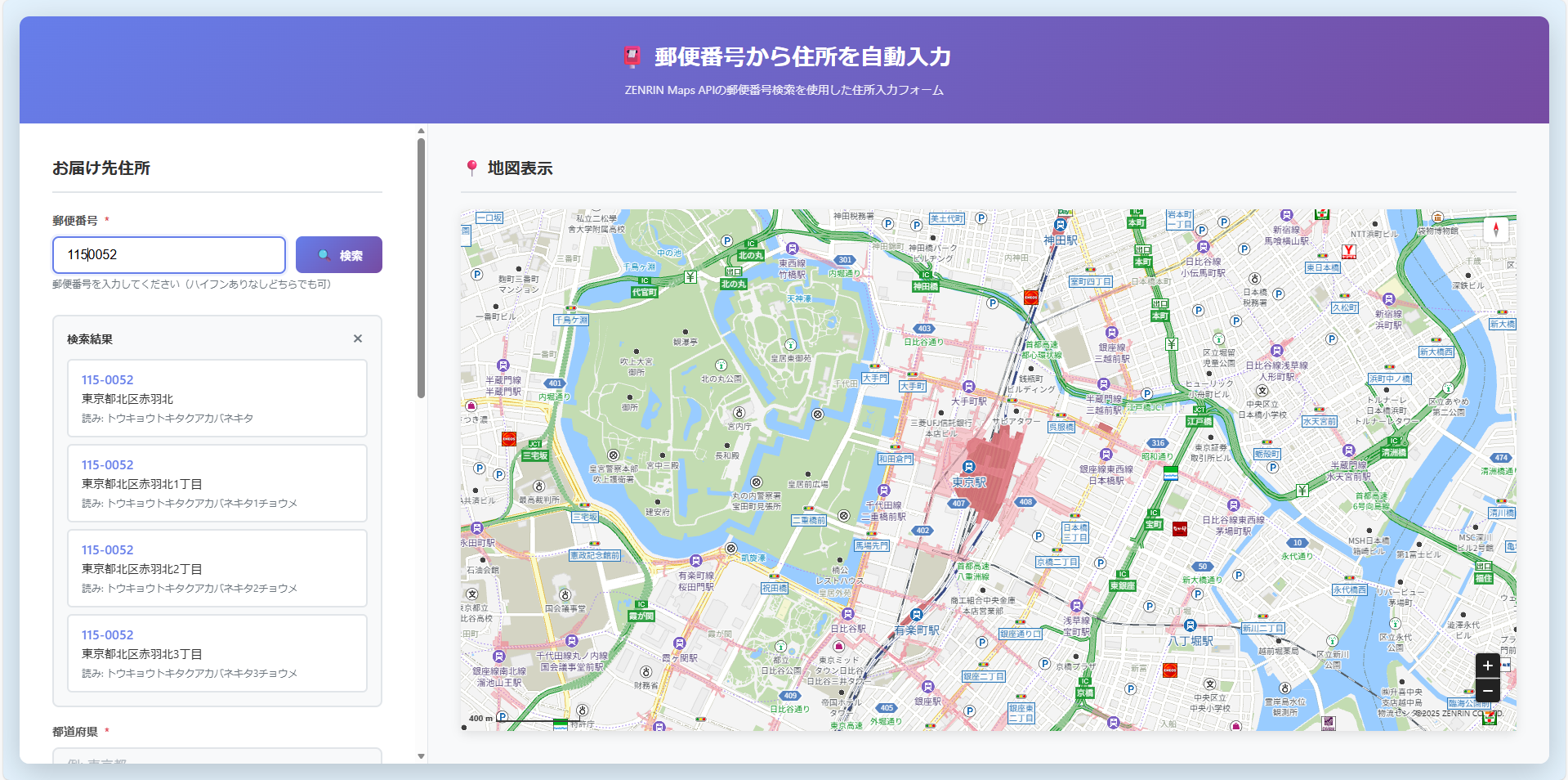
候補を選択すると住所を自動補完します。
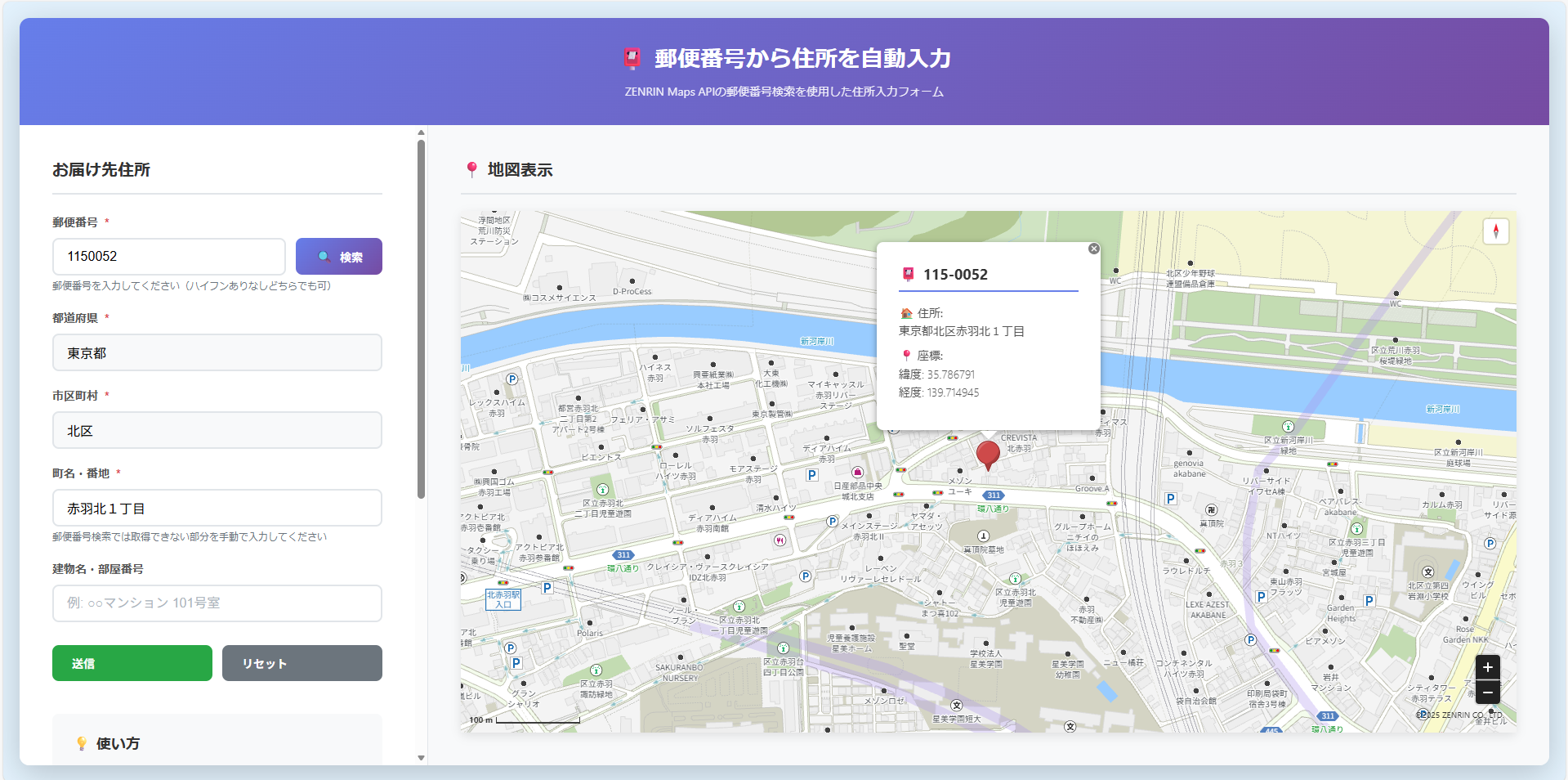
ステップ解説
Step 1:郵便番号検索 API の呼び出し
const response = await fetch(url, {
  method: 'GET',
  headers: {
    'x-api-key': 'YOUR_API_KEY',
    'Authorization': 'referer'
  }
});
🔍 解説
- GET パラメータの組み立て
- APIキーの付与
- レスポンス JSON の取得
-
status: OK/status: ERRORの判定
⚠️ 注意ポイント
-
Authorization: refererを必ず付与する必要があります - レート制限に触れると
status: ERRORが返るため、エラー処理を必ず実装してください - ユーザーに見せるエラー文はなるべく優しい文言にすると良いです
Step 2:検索結果リストの作成
items.forEach((item, index) => {
  const resultItem = createResultItem(item, index);
  resultsList.appendChild(resultItem);
});
🔍 解説
- 複数ヒットした場合の候補リスト生成
- 郵便番号・住所・読みの表示
- リストクリックで住所確定
⚠️ 注意ポイント
- 郵便番号は 複数の住所に対応しているケースが多く、検索結果は常に配列として返却されます。
- 読み情報(address_read)は存在しない場合があるため、nullチェックが必須です
Step 3:フォームへの住所入力
prefectureInput.value = item.address2;
cityInput.value = item.address3;
townInput.value = oaza + azc;
🔍 解説
- address2 → 都道府県
- address3 → 市区町村
- address4 + address5 → 大字・字丁目の結合
⚠️ 注意ポイント
- address そのものを split しようとすると誤爆するため、必ず分割済みフィールドを使用してください
Step 4:地図へマーカー表示
currentMarker = new ZDC.Marker(latLng, {
  styleId: ZDC.MARKER_COLOR_ID_RED_L
});
map.addWidget(currentMarker);
map.setCenter(latLng);
🔍 解説
- 緯度経度から LatLng オブジェクト生成
- Marker クラスによるピンの生成
- マップ中心位置の移動
⚠️ 注意ポイント
- 既存マーカーを removeWidget しないとピンが増え続けます
- ズームレベルを調整しないと広域表示のままでピンが見えません
Step :ポップアップ表示
const popup = new ZDC.Popup(latLng, { htmlSource: htmlContent });
map.addWidget(popup);
popup.show();
🔍 解説
- 郵便番号・住所・緯度経度の表示
- Popup ウィジェットの生成と表示
- 既存 Popup の削除
⚠️ 注意ポイント
- Popup は再生成するたびに map に残るため、削除処理が必要です
→map.getWidgets()で Popup を検出して削除するのが定石です
おわりに
今回は、郵便番号検索 API を利用して 住所フォームの自動入力と地図表示 を実装しました。
API のレスポンスから住所を取り出し、フォームに反映し、最終的にマーカー表示まで行う流れが理解できたと思います。
郵便番号検索の仕組みを理解しておくと、
- 会員登録フォームの住所自動入力
- 不動産や店舗検索サイトでの所在地補完
- 社内向けの業務システムで住所ミスを減らす
- 位置情報を扱うアプリの初期値入力
など、幅広い場面で活かすことができます。
もし「検索結果をマップ上で一覧表示したい」「選択した住所の周辺施設も表示したい」などの要件があれば、ZENRIN Maps API はそのまま拡張できますので是非活用してみてください。