LINEで使える家計簿ボットをAWSサーバーレスで作ろう
AWS SAM × Lambda × DynamoDB × LINE Messaging API
はじめに
この記事では、LINEでメッセージを送るだけで家計を記録できる「家計簿ボット」をAWSのサーバーレス構成で構築する方法を紹介します。
また今まではコンソールをポチポチしていましたが、、今回は初めてCLIとCloudFormationを使って作業を行いました。
ソースコード周りは基本的にすべてClaudeCodeで書いており、私は少し微修正したのみです。
この記事で作るもの
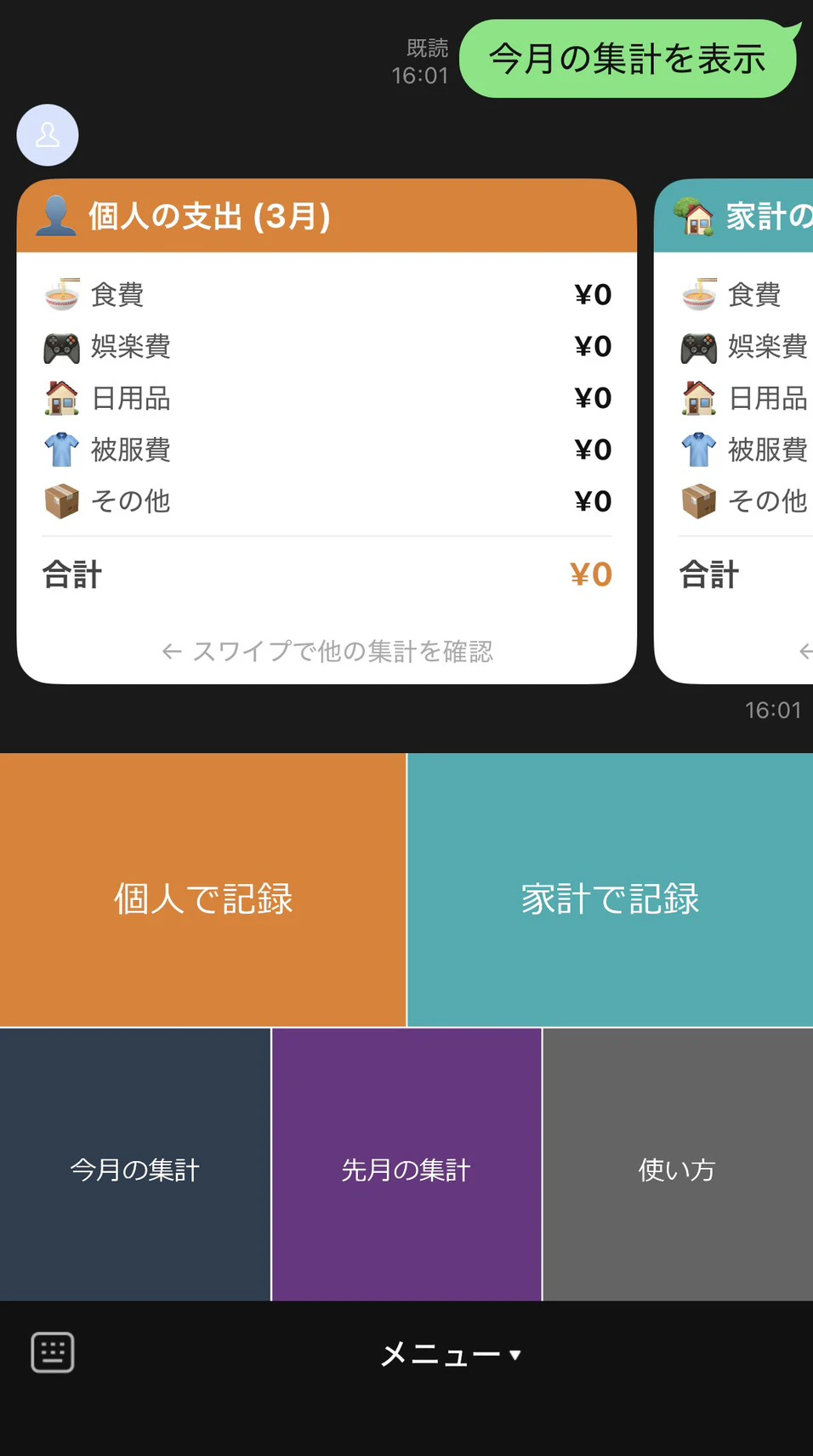
LINEアプリからメッセージを送ると、支出を記録・集計できるボットです。
処理の流れはシンプルに以下の通りです。
- ユーザーがLINEでメッセージを送信
- API GatewayがリクエストをLambdaに転送
- Lambdaが支出を解析してDynamoDBに保存
- LINEに返信メッセージを送る
実装されている機能
- 個人の支出と家計の支出を分けて記録
- 「食費」、「娯楽費」、「日用品」、「その他」などの項目に分けて記録
- 送信した記録の取り消し機能
- リッチメニューの実装でGUI的な操作が可能
- 過去月の総支出の確認なども可能
使用する技術
- AWS Lambda(Python 3.13):メイン処理
- Amazon API Gateway:LINEからのWebhook受信
- Amazon DynamoDB:支出データとセッションの保存
- AWS SAM:インフラのコード化とデプロイ
- LINE Messaging API:ボットとのやり取り
事前準備
必要なアカウント・ツール
- LINE Developersアカウント(無料)
- AWS CLI(インストール済み・設定済み)
- AWS SAM CLI
- Python 3.13
AWS CLIのインストール(Windows)
以下のURLからインストーラーをダウンロードして実行してください。
https://awscli.amazonaws.com/AWSCLIV2.msi
インストール後、コマンドプロンプトで確認します。
aws --version
SAM CLIのインストール(Windows)
winget install Amazon.SAM-CLI
AWS CLIの初期設定
aws configure

AWS Access Key ID: AWSコンソールで発行したキー
AWS Secret Access Key: 同上
Default region name: リージョンの指定
Default output format: json
プロジェクトの構成
kakeibo-line-bot/
├── template.yaml        # SAMテンプレート(インフラ定義)
├── requirements.txt     # Pythonライブラリ一覧
├── Makefile
├── swtup_rich_menu.py
├── README.md
└── src/
    ├── handler.py          # Lambda関数のエントリーポイント
    ├── config.py           # 設定値
    ├── dynamodb_client.py  # DynamoDB操作
    ├── expense_parser.py   # 支出メッセージの解析
    ├── flex_message.py     # LINEのFlexメッセージ生成
    └── line_client.py      # LINE API呼び出し
インフラ構成(template.yaml)
AWS SAMのテンプレートファイルでインフラ全体を定義します。Lambda・API Gateway・DynamoDB(2テーブル)をコードで管理できるのがSAMの強みです。
全体構成図
LINEプラットフォーム
    ↓ POST /webhook
API Gateway
    ↓
Lambda(handler.py)
    ↓
DynamoDB
  ├── kakeibo-expenses  (支出データ)
  └── kakeibo-sessions  (セッション情報・TTL1分で自動削除)
template.yaml
ソースコードはこちら
AWSTemplateFormatVersion: "2010-09-09"
Transform: AWS::Serverless-2016-10-31
Description: LINE Kakeibo Bot - Serverless household expense tracker

Parameters:
  LineChannelSecret:
    Type: String
    NoEcho: true
  LineChannelAccessToken:
    Type: String
    NoEcho: true

Globals:
  Function:
    Runtime: python3.13
    Timeout: 10
    MemorySize: 256
    Environment:
      Variables:
        DYNAMODB_TABLE_NAME: !Ref ExpensesTable
        LINE_CHANNEL_SECRET: !Ref LineChannelSecret
        LINE_CHANNEL_ACCESS_TOKEN: !Ref LineChannelAccessToken

Resources:
  # ─────────────────────────────────────────────
  # Lambda 関数
  # ─────────────────────────────────────────────
  KakeiboFunction:
    Type: AWS::Serverless::Function
    Properties:
      FunctionName: kakeibo-line-bot
      CodeUri: src/
      Handler: handler.lambda_handler
      Description: LINE Bot webhook handler for household expense tracking
      Policies:
        - DynamoDBCrudPolicy:
            TableName: !Ref ExpensesTable
        - DynamoDBCrudPolicy:
            TableName: !Ref SessionsTable
      Events:
        Webhook:
          Type: Api
          Properties:
            Path: /webhook
            Method: post
            RestApiId: !Ref KakeiboApi

  # ─────────────────────────────────────────────
  # API Gateway
  # ─────────────────────────────────────────────
  KakeiboApi:
    Type: AWS::Serverless::Api
    Properties:
      Name: kakeibo-api
      StageName: Prod
      Description: LINE Webhook receiver for Kakeibo Bot
      Auth:
        DefaultAuthorizer: NONE

  # ─────────────────────────────────────────────
  # DynamoDB: 支出テーブル
  # ─────────────────────────────────────────────
  ExpensesTable:
    Type: AWS::DynamoDB::Table
    Properties:
      TableName: kakeibo-expenses
      BillingMode: PAY_PER_REQUEST
      AttributeDefinitions:
        - AttributeName: user_id
          AttributeType: S
        - AttributeName: expense_id
          AttributeType: S
      KeySchema:
        - AttributeName: user_id
          KeyType: HASH
        - AttributeName: expense_id
          KeyType: RANGE
      PointInTimeRecoverySpecification:
        PointInTimeRecoveryEnabled: false

  # ─────────────────────────────────────────────
  # DynamoDB: セッションテーブル(入力モード保持)
  # TTLで自動削除されるため保持コストはほぼゼロ
  # ─────────────────────────────────────────────
  SessionsTable:
    Type: AWS::DynamoDB::Table
    Properties:
      TableName: kakeibo-sessions
      BillingMode: PAY_PER_REQUEST
      AttributeDefinitions:
        - AttributeName: user_id
          AttributeType: S
      KeySchema:
        - AttributeName: user_id
          KeyType: HASH
      TimeToLiveSpecification:
        AttributeName: ttl
        Enabled: true  # TTLで10分後に自動削除

Outputs:
  WebhookUrl:
    Description: "LINE Developers ConsoleのWebhook URLに設定してください"
    Value: !Sub "https://${KakeiboApi}.execute-api.${AWS::Region}.amazonaws.com/Prod/webhook"

  FunctionArn:
    Description: Lambda Function ARN
    Value: !GetAtt KakeiboFunction.Arn

  ExpensesTableName:
    Description: DynamoDB Expenses Table Name
    Value: !Ref ExpensesTable

  SessionsTableName:
    Description: DynamoDB Sessions Table Name
    Value: !Ref SessionsTable
ポイント解説
DynamoDBテーブルが2つある理由
支出データ(kakeibo-expenses)とセッション情報(kakeibo-sessions)を分けています。セッションテーブルはTTL(Time To Live)機能で一定時間後に自動削除されるため、保持コストはほぼゼロです。
認証情報の扱い
LINEのChannel SecretやAccess TokenはParametersとして渡し、ソースコードにハードコードしない設計にしています。デプロイ時に --guided オプションで対話的に入力できます。
API Gatewayの認証設定
DefaultAuthorizer: NONE を指定することで、LINEサーバーからの認証なしPOSTリクエストを受け付けます。セキュリティはLambda側でLINEの署名検証(X-Line-Signatureヘッダー)によって担保します。
ソースコード
handler.py(Lambdaエントリーポイント)
LINEからのWebhookを受け取り、各モジュールに処理を振り分けます。
ソースコードはこちら
import json
import logging
import re
from datetime import datetime, timezone, timedelta

import dynamodb_client
import line_client
from config import CATEGORIES, WALLETS
from expense_parser import ParseError, parse_expense
from flex_message import (
    build_confirm_flex,
    build_summary_flex,
    build_wallet_select_flex,
)

logger = logging.getLogger(__name__)
logger.setLevel(logging.INFO)

JST = timezone(timedelta(hours=9))

# 過去月指定コマンドのパターン(マッチした場合 "YYYY-MM" を返す)
_PAST_MONTH_PATTERNS = [
    (re.compile(r"^(\d{4})-(\d{2})$"),       lambda m, now: f"{m.group(1)}-{m.group(2)}"),
    (re.compile(r"^(\d{4})年(\d{1,2})月$"),   lambda m, now: f"{m.group(1)}-{int(m.group(2)):02d}"),
    (re.compile(r"^(\d{1,2})月$"),            lambda m, now: f"{now.year}-{int(m.group(1)):02d}"),
    (re.compile(r"^先月$"),                    lambda m, now: (now.replace(day=1) - timedelta(days=1)).strftime("%Y-%m")),
]

HELP_TEXT = (
    "【家計簿Botの使い方】\n\n"
    "【支出の入力方法】\n"
    "① リッチメニューの「個人で記録」または「家計で記録」をタップ\n"
    "② 「カテゴリ番号,金額,備考」の形式で入力\n\n"
    "カテゴリ:\n"
    "  1: 食費\n"
    "  2: 娯楽費\n"
    "  3: 日用品\n"
    "  4: 被服費\n"
    "  5: その他\n\n"
    "入力例:\n"
    "  1,800,ランチ\n"
    "  2,1500,映画\n"
    "  3,300\n\n"
    "【集計の確認】\n"
    "  「集計」「今月」 → 今月の集計\n"
    "  「先月」        → 先月の集計\n"
    "  「3月」         → 今年3月の集計\n"
    "  「2025-12」     → 2025年12月の集計\n\n"
    "【取り消し】\n"
    "  記録直後の確認カードの「取り消す」ボタンで直前の記録を削除できます。"
)


def lambda_handler(event: dict, context) -> dict:
    headers = {k.lower(): v for k, v in (event.get("headers") or {}).items()}
    signature = headers.get("x-line-signature", "")
    body_raw = (event.get("body") or "").encode("utf-8")

    if not line_client.verify_signature(body_raw, signature):
        logger.warning("Invalid signature")
        return {"statusCode": 403, "body": "Forbidden"}

    body = json.loads(body_raw)
    for line_event in body.get("events", []):
        try:
            _handle_event(line_event)
        except Exception:
            logger.exception("Error handling event: %s", line_event)

    return {"statusCode": 200, "body": "OK"}


def _handle_event(event: dict) -> None:
    event_type = event.get("type")
    reply_token = event.get("replyToken")
    user_id = event.get("source", {}).get("userId")
    now = datetime.now(JST)

    if not user_id:
        return

    if event_type == "follow":
        dynamodb_client.clear_session(user_id)
        line_client.reply(reply_token, [
            {"type": "text", "text": f"家計簿Botへようこそ!\n\n{HELP_TEXT}"}
        ])
        return

    # postback: リッチメニューボタンやカード内ボタン
    if event_type == "postback":
        data = event.get("postback", {}).get("data", "")
        _handle_postback(reply_token, user_id, data, now)
        return

    if event_type != "message":
        return
    if event.get("message", {}).get("type") != "text":
        return

    text = event["message"]["text"].strip()
    year_month = now.strftime("%Y-%m")

    # キャンセルコマンド(入力モード中の取り消し)
    if text in ("キャンセル", "cancel", "やめる", "戻る"):
        session = dynamodb_client.get_session(user_id)
        if session:
            dynamodb_client.clear_session(user_id)
            line_client.reply(reply_token, [
                {"type": "text", "text": "入力をキャンセルしました。"}
            ])
        else:
            line_client.reply(reply_token, [
                {"type": "text", "text": "キャンセルできる操作はありません。"}
            ])
        return

    # 集計コマンド(今月)
    if text in ("集計", "今月", "残高", "サマリー"):
        _send_summary(reply_token, user_id, year_month)
        return

    # 過去月指定コマンド
    past_ym = _parse_month_command(text, now)
    if past_ym is not None:
        try:
            target_dt = datetime.strptime(past_ym, "%Y-%m")
        except ValueError:
            line_client.reply(reply_token, [
                {"type": "text", "text": "月の指定が正しくありません。\n例: 先月 / 3月 / 2025-12 / 2025年12月"}
            ])
            return

        current_month_start = now.replace(day=1, hour=0, minute=0, second=0, microsecond=0)
        if target_dt > current_month_start:
            line_client.reply(reply_token, [
                {"type": "text", "text": "未来の月は指定できません。"}
            ])
            return

        _send_summary(reply_token, user_id, past_ym)
        return

    # ─── 支出入力(セッションで財布区分を確認) ───
    wallet = dynamodb_client.get_session(user_id)
    if wallet is None:
        # モード未選択 → 財布選択カードを表示
        expense = parse_expense(text)
        if expense is not None:
            # 支出形式の入力だがモード未選択の場合、選択を促す
            line_client.reply(reply_token, [
                {"type": "text", "text": "個人・家計のどちらの支出か選んでから入力してください。"},
                build_wallet_select_flex(),
            ])
        else:
            line_client.reply(reply_token, [
                {"type": "text", "text": HELP_TEXT}
            ])
        return

    # モード選択済み → 支出を記録
    try:
        expense = parse_expense(text)
        if expense is None:
            wallet_meta = WALLETS[wallet]
            line_client.reply(reply_token, [
                {
                    "type": "text",
                    "text": (
                        f"{wallet_meta['emoji']} {wallet_meta['name']}モードで入力中です。\n"
                        "「カテゴリ番号,金額,備考」の形式で入力してください。\n"
                        "例: 1,800,ランチ\n\n"
                        "「キャンセル」でモードを解除できます。"
                    )
                }
            ])
            return

        expense_id = dynamodb_client.save_expense(user_id, expense, wallet)
        # 記録完了 → セッションをクリア(1回入力ごとにモード解除)
        dynamodb_client.clear_session(user_id)

        totals = dynamodb_client.get_monthly_summary(user_id, year_month)

        line_client.reply(reply_token, [
            build_confirm_flex(expense_id, wallet, expense.category, expense.amount, expense.memo),
            build_summary_flex(year_month, totals),
        ])

    except ParseError as e:
        line_client.reply(reply_token, [
            {"type": "text", "text": str(e)}
        ])


def _handle_postback(reply_token: str, user_id: str, data: str, now: datetime) -> None:
    year_month = now.strftime("%Y-%m")

    # 財布区分の選択
    if data.startswith("action=select_wallet&wallet="):
        wallet = data.split("wallet=")[1]
        if wallet not in WALLETS:
            return
        dynamodb_client.set_session(user_id, wallet)
        wallet_meta = WALLETS[wallet]
        line_client.reply(reply_token, [
            {
                "type": "text",
                "text": (
                    f"{wallet_meta['emoji']} {wallet_meta['name']}モードで入力します。\n\n"
                    "「カテゴリ番号,金額,備考」の形式で入力してください。\n"
                    "例: 1,800,ランチ\n\n"
                    "「キャンセル」でモードを解除できます。"
                )
            }
        ])
        return

    # 取り消し
    if data.startswith("action=undo&expense_id="):
        expense_id = data.split("expense_id=")[1]
        item = dynamodb_client.get_expense(user_id, expense_id)
        if item is None:
            line_client.reply(reply_token, [
                {"type": "text", "text": "この記録はすでに削除されています。"}
            ])
            return

        deleted = dynamodb_client.delete_expense(user_id, expense_id)
        if deleted:
            cat_meta    = CATEGORIES[int(item["category"])]
            wallet_meta = WALLETS.get(item.get("wallet", "household"), WALLETS["household"])
            line_client.reply(reply_token, [
                {
                    "type": "text",
                    "text": (
                        f"取り消しました。\n"
                        f"{wallet_meta['emoji']} {wallet_meta['name']} / "
                        f"{cat_meta['emoji']} {cat_meta['name']} "
                        f"¥{int(item['amount']):,}"
                    )
                }
            ])
        else:
            line_client.reply(reply_token, [
                {"type": "text", "text": "取り消しに失敗しました。すでに削除されている可能性があります。"}
            ])
        return

    # 今月の集計
    if data == "action=summary&month=current":
        _send_summary(reply_token, user_id, year_month)
        return

    # 先月の集計
    if data == "action=summary&month=last":
        last_month = (now.replace(day=1) - timedelta(days=1)).strftime("%Y-%m")
        _send_summary(reply_token, user_id, last_month)
        return

    # 記録入力ボタン(リッチメニュー)
    if data.startswith("action=record&wallet="):
        wallet = data.split("wallet=")[1]
        if wallet not in WALLETS:
            return
        dynamodb_client.set_session(user_id, wallet)
        wallet_meta = WALLETS[wallet]
        line_client.reply(reply_token, [
            {
                "type": "text",
                "text": (
                    f"{wallet_meta['emoji']} {wallet_meta['name']}モードで入力します。\n\n"
                    "「カテゴリ番号,金額,備考」の形式で入力してください。\n"
                    "例: 1,800,ランチ\n\n"
                    "「キャンセル」でモードを解除できます。"
                )
            }
        ])
        return

    # ヘルプ
    if data == "action=help":
        line_client.reply(reply_token, [
            {"type": "text", "text": HELP_TEXT}
        ])
        return

    logger.warning("Unknown postback data: %s", data)


def _parse_month_command(text: str, now: datetime):
    for pattern, resolver in _PAST_MONTH_PATTERNS:
        m = pattern.match(text)
        if m:
            return resolver(m, now)
    return None


def _send_summary(reply_token: str, user_id: str, year_month: str) -> None:
    totals = dynamodb_client.get_monthly_summary(user_id, year_month)
    line_client.reply(reply_token, [
        build_summary_flex(year_month, totals)
    ])
config.py(設定値)
環境変数から設定値を読み込みます。
ソースコードはこちら
import os

CATEGORIES = {
    1: {"name": "食費",   "emoji": "🍜"},
    2: {"name": "娯楽費", "emoji": "🎮"},
    3: {"name": "日用品", "emoji": "🏠"},
    4: {"name": "被服費", "emoji": "👕"},
    5: {"name": "その他", "emoji": "📦"},
}

# 財布区分
WALLETS = {
    "personal":  {"name": "個人",  "emoji": "👤", "color": "#E67E22"},
    "household": {"name": "家計",  "emoji": "🏡", "color": "#27ACB2"},
}

TABLE_NAME         = os.environ.get("DYNAMODB_TABLE_NAME", "kakeibo-expenses")
SESSION_TABLE_NAME = os.environ.get("SESSION_TABLE_NAME", "kakeibo-sessions")
LINE_CHANNEL_SECRET       = os.environ.get("LINE_CHANNEL_SECRET", "")
LINE_CHANNEL_ACCESS_TOKEN = os.environ.get("LINE_CHANNEL_ACCESS_TOKEN", "")

# セッションの有効期間(秒): 10分
SESSION_TTL_SECONDS = 60
dynamodb_client.py(DynamoDB操作)
支出データの読み書きとセッション管理を行います。
ソースコードはこちら
import time
import uuid
from datetime import datetime, timezone, timedelta
from typing import Dict, Optional

import boto3
from boto3.dynamodb.conditions import Key

from config import SESSION_TABLE_NAME, SESSION_TTL_SECONDS, TABLE_NAME

JST = timezone(timedelta(hours=9))

_dynamodb = boto3.resource("dynamodb")


def _get_table():
    return _dynamodb.Table(TABLE_NAME)


def _get_session_table():
    return _dynamodb.Table(SESSION_TABLE_NAME)


# ─────────────────────────────────────────────────────────
# 支出 CRUD
# ─────────────────────────────────────────────────────────

def save_expense(user_id: str, expense, wallet: str) -> str:
    """
    支出をDynamoDBに保存する。
    wallet: "personal" | "household"
    戻り値: expense_id(取り消し用)
    """
    now = datetime.now(JST)
    expense_id = f"{now.strftime('%Y-%m-%dT%H:%M:%S')}#{uuid.uuid4().hex[:8]}"

    _get_table().put_item(Item={
        "user_id":    user_id,
        "expense_id": expense_id,
        "category":   expense.category,
        "amount":     expense.amount,
        "memo":       expense.memo,
        "wallet":     wallet,
        "year_month": now.strftime("%Y-%m"),
        "created_at": now.isoformat(),
    })
    return expense_id


def delete_expense(user_id: str, expense_id: str) -> bool:
    """
    指定の支出を削除する。
    戻り値: 削除できた場合True(存在しなかった場合False)
    """
    response = _get_table().delete_item(
        Key={"user_id": user_id, "expense_id": expense_id},
        ReturnValues="ALL_OLD",
    )
    return "Attributes" in response


def get_expense(user_id: str, expense_id: str) -> Optional[dict]:
    """指定の支出1件を取得する(取り消し確認用)。"""
    response = _get_table().get_item(
        Key={"user_id": user_id, "expense_id": expense_id}
    )
    return response.get("Item")


def get_monthly_summary(user_id: str, year_month: str) -> Dict[str, Dict[int, int]]:
    """
    指定月のカテゴリ別・財布別合計を返す。

    Args:
        user_id: LINE User ID
        year_month: "2026-03" 形式

    Returns:
        {
            "personal":  {1: 8000, 2: 1500, 3: 0, 4: 0, 5: 0},
            "household": {1: 7200, 2: 2000, 3: 8900, 4: 0, 5: 2100},
        }
    """
    totals = {
        "personal":  {i: 0 for i in range(1, 6)},
        "household": {i: 0 for i in range(1, 6)},
    }

    last_key = None
    while True:
        kwargs = {
            "KeyConditionExpression": (
                Key("user_id").eq(user_id) &
                Key("expense_id").begins_with(year_month)
            )
        }
        if last_key:
            kwargs["ExclusiveStartKey"] = last_key

        response = _get_table().query(**kwargs)
        for item in response["Items"]:
            cat    = int(item["category"])
            amount = int(item["amount"])
            # walletフィールドがない古いデータは household 扱い
            wallet = item.get("wallet", "household")
            if wallet in totals:
                totals[wallet][cat] += amount

        last_key = response.get("LastEvaluatedKey")
        if not last_key:
            break

    return totals


# ─────────────────────────────────────────────────────────
# セッション管理(入力モード保持)
# ─────────────────────────────────────────────────────────

def set_session(user_id: str, wallet: str) -> None:
    """
    ユーザーの入力モード(財布区分)をセッションに保存する。
    TTLでSESSION_TTL_SECONDS後に自動削除。
    """
    ttl = int(time.time()) + SESSION_TTL_SECONDS
    _get_session_table().put_item(Item={
        "user_id": user_id,
        "wallet":  wallet,
        "ttl":     ttl,
    })


def get_session(user_id: str) -> Optional[str]:
    """
    ユーザーの現在の入力モードを取得する。
    セッションがない(または期限切れ)場合はNoneを返す。
    """
    response = _get_session_table().get_item(
        Key={"user_id": user_id}
    )
    item = response.get("Item")
    if not item:
        return None
    # TTLはDynamoDBが自動削除するが、取得直後にチェックも行う
    if int(item.get("ttl", 0)) < int(time.time()):
        return None
    return item["wallet"]


def clear_session(user_id: str) -> None:
    """セッションを削除する(入力完了・キャンセル時)。"""
    _get_session_table().delete_item(Key={"user_id": user_id})
expense_parser.py(支出メッセージの解析)
「昼食 800円」のようなテキストから金額・カテゴリを抽出します。
ソースコードはこちら
import re
from dataclasses import dataclass
from typing import Optional


@dataclass
class Expense:
    category: int
    amount: int
    memo: str


class ParseError(Exception):
    pass


def parse_expense(text: str) -> Optional[Expense]:
    """
    「カテゴリ番号,金額,備考」形式をパースする。

    Examples:
        "1,800,ランチ"  -> Expense(category=1, amount=800, memo="ランチ")
        "1,800"         -> Expense(category=1, amount=800, memo="")
        "abc"           -> None(マッチしない)

    Raises:
        ParseError: 金額が不正な場合
    """
    pattern = r"^([1-5]),(\d+)(?:,(.*))?$"
    match = re.match(pattern, text.strip())
    if not match:
        return None

    category = int(match.group(1))
    amount = int(match.group(2))
    memo = (match.group(3) or "").strip()

    if amount <= 0:
        raise ParseError("金額は1円以上を入力してください")
    if amount > 10_000_000:
        raise ParseError("金額が大きすぎます(1000万円以下で入力してください)")

    return Expense(category=category, amount=amount, memo=memo)
flex_message.py(LINEメッセージ生成)
集計結果などをLINEのFlexメッセージ形式で生成します。
ソースコードはこちら
from datetime import datetime, timezone, timedelta
from typing import Dict
from config import CATEGORIES, WALLETS
_JST = timezone(timedelta(hours=9))
def build_summary_flex(year_month: str, totals: Dict[str, Dict[int, int]]) -> dict:
"""
個人・家計を分けた集計をFlex Message(carousel)で返す。
Args:
year_month: "2026-03" 形式
totals: {
"personal": {1: 8000, ...},
"household": {1: 7200, ...},
}
Returns:
LINE Messaging API の message オブジェクト
"""
year = int(year_month.split("-")[0])
month = int(year_month.split("-")[1])
current_year = datetime.now(_JST).year
month_label = f"{month}月" if year == current_year else f"{year}年{month}月"
total_personal = sum(totals["personal"].values())
total_household = sum(totals["household"].values())
total_all = total_personal + total_household
bubbles = [
_build_wallet_bubble(month_label, "personal", totals["personal"]),
_build_wallet_bubble(month_label, "household", totals["household"]),
_build_total_bubble(month_label, total_personal, total_household, total_all),
]
return {
"type": "flex",
"altText": f"{month_label}の支出: 個人¥{total_personal:,} / 家計¥{total_household:,}",
"contents": {
"type": "carousel",
"contents": bubbles,
},
}
def _build_wallet_bubble(month_label: str, wallet: str, cat_totals: Dict[int, int]) -> dict:
"""個人 or 家計の1枚カードを生成する。"""
meta = WALLETS[wallet]
total = sum(cat_totals.values())
color = meta["color"]
title = f"{meta['emoji']} {meta['name']}の支出 ({month_label})"
rows = []
for cat_id, cat_meta in CATEGORIES.items():
rows.append({
"type": "box",
"layout": "horizontal",
"contents": [
{
"type": "text",
"text": f"{cat_meta['emoji']} {cat_meta['name']}",
"flex": 3,
"size": "sm",
"color": "#555555",
},
{
"type": "text",
"text": f"¥{cat_totals.get(cat_id, 0):,}",
"flex": 2,
"size": "sm",
"align": "end",
"weight": "bold",
"color": "#111111",
},
],
})
return {
"type": "bubble",
"styles": {"header": {"backgroundColor": color}},
"header": {
"type": "box",
"layout": "vertical",
"paddingAll": "md",
"contents": [
{
"type": "text",
"text": title,
"color": "#ffffff",
"size": "md",
"weight": "bold",
"wrap": True,
}
],
},
"body": {
"type": "box",
"layout": "vertical",
"spacing": "md",
"paddingAll": "lg",
"contents": rows + [
{"type": "separator", "margin": "md"},
{
"type": "box",
"layout": "horizontal",
"margin": "md",
"contents": [
{
"type": "text",
"text": "合計",
"flex": 3,
"weight": "bold",
"size": "md",
},
{
"type": "text",
"text": f"¥{total:,}",
"flex": 2,
"align": "end",
"weight": "bold",
"size": "md",
"color": color,
},
],
},
],
},
"footer": {
"type": "box",
"layout": "vertical",
"spacing": "xs",
"paddingAll": "md",
"contents": [
{
"type": "text",
"text": "← スワイプで他の集計を確認",
"size": "xs",
"color": "#aaaaaa",
"align": "center",
}
],
},
}
def _build_total_bubble(month_label: str, personal: int, household: int, total: int) -> dict:
"""個人+家計の合計カードを生成する。"""
return {
"type": "bubble",
"styles": {"header": {"backgroundColor": "#6C3483"}},
"header": {
"type": "box",
"layout": "vertical",
"paddingAll": "md",
"contents": [
{
"type": "text",
"text": f"📊 合計支出 ({month_label})",
"color": "#ffffff",
"size": "md",
"weight": "bold",
}
],
},
"body": {
"type": "box",
"layout": "vertical",
"spacing": "md",
"paddingAll": "lg",
"contents": [
{
"type": "box",
"layout": "horizontal",
"contents": [
{"type": "text", "text": "👤 個人", "flex": 3, "size": "sm", "color": "#555555"},
{"type": "text", "text": f"¥{personal:,}", "flex": 2, "size": "sm",
"align": "end", "weight": "bold", "color": WALLETS["personal"]["color"]},
],
},
{
"type": "box",
"layout": "horizontal",
"contents": [
{"type": "text", "text": "🏡 家計", "flex": 3, "size": "sm", "color": "#555555"},
{"type": "text", "text": f"¥{household:,}", "flex": 2, "size": "sm",
"align": "end", "weight": "bold", "color": WALLETS["household"]["color"]},
],
},
{"type": "separator", "margin": "md"},
{
"type": "box",
"layout": "horizontal",
"margin": "md",
"contents": [
{"type": "text", "text": "合計", "flex": 3, "weight": "bold", "size": "md"},
{"type": "text", "text": f"¥{total:,}", "flex": 2, "align": "end",
"weight": "bold", "size": "md", "color": "#6C3483"},
],
},
],
},
"footer": {
"type": "box",
"layout": "vertical",
"paddingAll": "md",
"contents": [
{
"type": "text",
"text": "← スワイプで内訳を確認",
"size": "xs",
"color": "#aaaaaa",
"align": "center",
}
],
},
}
def build_confirm_flex(expense_id: str, wallet: str, cat_id: int, amount: int, memo: str) -> dict:
"""
支出記録直後に表示する確認カード(取り消しボタン付き)。
"""
wallet_meta = WALLETS[wallet]
cat_meta = CATEGORIES[cat_id]
memo_text = f"備考: {memo}" if memo else "(備考なし)"
return {
"type": "flex",
"altText": f"記録完了: {wallet_meta['name']} {cat_meta['name']} ¥{amount:,}",
"contents": {
"type": "bubble",
"styles": {"header": {"backgroundColor": wallet_meta["color"]}},
"header": {
"type": "box",
"layout": "vertical",
"paddingAll": "md",
"contents": [
{
"type": "text",
"text": f"{wallet_meta['emoji']} {wallet_meta['name']}の支出を記録しました",
"color": "#ffffff",
"size": "sm",
"weight": "bold",
"wrap": True,
}
],
},
"body": {
"type": "box",
"layout": "vertical",
"spacing": "sm",
"paddingAll": "lg",
"contents": [
{
"type": "box",
"layout": "horizontal",
"contents": [
{"type": "text", "text": "カテゴリ", "flex": 2, "size": "sm", "color": "#888888"},
{"type": "text", "text": f"{cat_meta['emoji']} {cat_meta['name']}",
"flex": 3, "size": "sm", "weight": "bold"},
],
},
{
"type": "box",
"layout": "horizontal",
"contents": [
{"type": "text", "text": "金額", "flex": 2, "size": "sm", "color": "#888888"},
{"type": "text", "text": f"¥{amount:,}", "flex": 3, "size": "sm",
"weight": "bold", "color": wallet_meta["color"]},
],
},
{
"type": "box",
"layout": "horizontal",
"contents": [
{"type": "text", "text": "備考", "flex": 2, "size": "sm", "color": "#888888"},
{"type": "text", "text": memo_text, "flex": 3, "size": "sm", "wrap": True},
],
},
],
},
"footer": {
"type": "box",
"layout": "vertical",
"paddingAll": "md",
"contents": [
{
"type": "button",
"action": {
"type": "postback",
"label": "⬅ この記録を取り消す",
"data": f"action=undo&expense_id={expense_id}",
"displayText": "記録を取り消します",
},
"style": "secondary",
"height": "sm",
}
],
},
},
}
def build_wallet_select_flex() -> dict:
"""財布選択(個人 or 家計)のFlex Messageを返す。"""
return {
"type": "flex",
"altText": "どちらの支出ですか?",
"contents": {
"type": "bubble",
"body": {
"type": "box",
"layout": "vertical",
"spacing": "md",
"paddingAll": "lg",
"contents": [
{
"type": "text",
"text": "どちらの支出ですか?",
"weight": "bold",
"size": "md",
"align": "center",
},
{
"type": "box",
"layout": "horizontal",
"spacing": "md",
"margin": "md",
"contents": [
{
"type": "button",
"action": {
"type": "postback",
"label": "👤 個人",
"data": "action=select_wallet&wallet=personal",
"displayText": "個人の支出を入力します",
},
"style": "primary",
"color": WALLETS["personal"]["color"],
"flex": 1,
},
{
"type": "button",
"action": {
"type": "postback",
"label": "🏡 家計",
"data": "action=select_wallet&wallet=household",
"displayText": "家計の支出を入力します",
},
"style": "primary",
"color": WALLETS["household"]["color"],
"flex": 1,
},
],
},
],
},
},
}
line_client.py(LINE API呼び出し)
LINE Messaging APIへのリクエストを担当します。
ソースコードはこちら
import base64
import hashlib
import hmac
import json
import urllib.error
import urllib.request
from typing import List

from config import LINE_CHANNEL_ACCESS_TOKEN, LINE_CHANNEL_SECRET

LINE_API_BASE = "https://api.line.me/v2/bot"
LINE_REPLY_URL = f"{LINE_API_BASE}/message/reply"


def _api_request(path: str, payload: dict, method: str = "POST") -> dict:
    """LINE Messaging APIへのリクエスト共通処理。"""
    data = json.dumps(payload).encode("utf-8")
    req = urllib.request.Request(
        f"{LINE_API_BASE}{path}",
        data=data,
        headers={
            "Content-Type": "application/json",
            "Authorization": f"Bearer {LINE_CHANNEL_ACCESS_TOKEN}",
        },
        method=method,
    )
    try:
        with urllib.request.urlopen(req) as res:
            return json.loads(res.read())
    except urllib.error.HTTPError as e:
        body = e.read().decode("utf-8")
        raise RuntimeError(f"LINE API error {e.code}: {body}") from e


def verify_signature(body: bytes, signature: str) -> bool:
    """LINE Webhookの署名を検証する。"""
    hash_ = hmac.new(
        LINE_CHANNEL_SECRET.encode("utf-8"),
        body,
        hashlib.sha256,
    ).digest()
    expected = base64.b64encode(hash_).decode("utf-8")
    return hmac.compare_digest(expected, signature)


def reply(reply_token: str, messages: List[dict]) -> None:
    """LINE Messaging APIにreply送信する。"""
    _api_request("/message/reply", {
        "replyToken": reply_token,
        "messages": messages,
    })


def create_rich_menu(rich_menu: dict) -> str:
    """リッチメニューを作成してrichMenuIdを返す。"""
    result = _api_request("/richmenu", rich_menu)
    return result["richMenuId"]


def upload_rich_menu_image(rich_menu_id: str, image_path: str) -> None:
    """リッチメニューに画像をアップロードする。"""
    with open(image_path, "rb") as f:
        image_data = f.read()

    req = urllib.request.Request(
        f"https://api-data.line.me/v2/bot/richmenu/{rich_menu_id}/content",
        data=image_data,
        headers={
            "Content-Type": "image/png",
            "Authorization": f"Bearer {LINE_CHANNEL_ACCESS_TOKEN}",
        },
        method="POST",
    )
    try:
        with urllib.request.urlopen(req) as res:
            return json.loads(res.read())
    except urllib.error.HTTPError as e:
        body = e.read().decode("utf-8")
        raise RuntimeError(f"LINE API error {e.code}: {body}") from e


def set_default_rich_menu(rich_menu_id: str) -> None:
    """リッチメニューをデフォルト(全ユーザー)に設定する。"""
    req = urllib.request.Request(
        f"{LINE_API_BASE}/user/all/richmenu/{rich_menu_id}",
        data=b"",
        headers={"Authorization": f"Bearer {LINE_CHANNEL_ACCESS_TOKEN}"},
        method="POST",
    )
    try:
        with urllib.request.urlopen(req) as res:
            return json.loads(res.read())
    except urllib.error.HTTPError as e:
        body = e.read().decode("utf-8")
        raise RuntimeError(f"LINE API error {e.code}: {body}") from e


def delete_all_rich_menus() -> None:
    """既存のリッチメニューを全削除する(再セットアップ用)。"""
    req = urllib.request.Request(
        f"{LINE_API_BASE}/richmenu/list",
        headers={"Authorization": f"Bearer {LINE_CHANNEL_ACCESS_TOKEN}"},
        method="GET",
    )
    try:
        with urllib.request.urlopen(req) as res:
            menus = json.loads(res.read()).get("richmenus", [])
    except urllib.error.HTTPError as e:
        body = e.read().decode("utf-8")
        raise RuntimeError(f"LINE API error {e.code}: {body}") from e

    for menu in menus:
        req = urllib.request.Request(
            f"{LINE_API_BASE}/richmenu/{menu['richMenuId']}",
            headers={"Authorization": f"Bearer {LINE_CHANNEL_ACCESS_TOKEN}"},
            method="DELETE",
        )
        with urllib.request.urlopen(req):
            pass
setup_rich_menu.py
リッチメニューのセットアップスクリプト。デプロイ後に一度だけ実行する。
ソースコードはこちら
"""
使い方:
    set LINE_CHANNEL_ACCESS_TOKEN="your-token"
    python setup_rich_menu.py

必要ライブラリ:
    pip install Pillow
"""

import os
import sys

sys.path.insert(0, os.path.join(os.path.dirname(__file__), "src"))

from line_client import (
    create_rich_menu,
    delete_all_rich_menus,
    set_default_rich_menu,
    upload_rich_menu_image,
)

# ─────────────────────────────────────────────────────────
# ボタン配置(2500 x 1686 px、2段組み)
#
# 上段(高さ843px、2列):
#  ┌──────────────────┬──────────────────┐
#  │   個人で記録     │   家計で記録     │
#  └──────────────────┴──────────────────┘
#
# 下段(高さ843px、3列):
#  ┌────────────┬────────────┬────────────┐
#  │  今月の集計 │  先月の集計 │  ❓ 使い方 │
#  └────────────┴────────────┴────────────┘
# ─────────────────────────────────────────────────────────

MENU_WIDTH  = 2500
MENU_HEIGHT = 1686   # 全高(2段)

ROW_H = MENU_HEIGHT // 2   # 843px(上段・下段それぞれの高さ)

# 上段: 2等分
TOP_W = MENU_WIDTH // 2    # 1250px

# 下段: 3等分
BOT_W = MENU_WIDTH // 3    # 833px(端数は最後のボタンで吸収)
BOT_W_LAST = MENU_WIDTH - BOT_W * 2  # 834px

RICH_MENU_BODY = {
    "size": {"width": MENU_WIDTH, "height": MENU_HEIGHT},
    "selected": True,
    "name": "家計簿メニュー",
    "chatBarText": "メニュー",
    "areas": [
        # ─── 上段 ───
        # 左: 👤個人で記録
        {
            "bounds": {"x": 0, "y": 0, "width": TOP_W, "height": ROW_H},
            "action": {
                "type": "postback",
                "label": "個人で記録",
                "data": "action=record&wallet=personal",
                "displayText": "個人の支出を入力します",
            },
        },
        # 右: 🏡家計で記録
        {
            "bounds": {"x": TOP_W, "y": 0, "width": TOP_W, "height": ROW_H},
            "action": {
                "type": "postback",
                "label": "家計で記録",
                "data": "action=record&wallet=household",
                "displayText": "家計の支出を入力します",
            },
        },

        # ─── 下段 ───
        # 左: 📊今月の集計
        {
            "bounds": {"x": 0, "y": ROW_H, "width": BOT_W, "height": ROW_H},
            "action": {
                "type": "postback",
                "label": "今月の集計",
                "data": "action=summary&month=current",
                "displayText": "今月の集計を表示",
            },
        },
        # 中: 📅先月の集計
        {
            "bounds": {"x": BOT_W, "y": ROW_H, "width": BOT_W, "height": ROW_H},
            "action": {
                "type": "postback",
                "label": "先月の集計",
                "data": "action=summary&month=last",
                "displayText": "先月の集計を表示",
            },
        },
        # 右: ❓使い方
        {
            "bounds": {"x": BOT_W * 2, "y": ROW_H, "width": BOT_W_LAST, "height": ROW_H},
            "action": {
                "type": "postback",
                "label": "使い方",
                "data": "action=help",
                "displayText": "使い方を表示",
            },
        },
    ],
}

IMAGE_PATH = "rich_menu.png"


def generate_image() -> None:
    """リッチメニュー用の画像をPillowで生成する。"""
    try:
        from PIL import Image, ImageDraw, ImageFont
    except ImportError:
        print("Pillow が必要です: pip install Pillow")
        sys.exit(1)

    W, H = MENU_WIDTH, MENU_HEIGHT
    img = Image.new("RGB", (W, H), color=(255, 255, 255))
    draw = ImageDraw.Draw(img)

    # ─── 背景色 ───
    # 上段左: 個人で記録(オレンジ)
    draw.rectangle([0,     0,      TOP_W - 1,     ROW_H - 1], fill=(230, 126, 34))
    # 上段右: 家計で記録(青緑)
    draw.rectangle([TOP_W, 0,      W - 1,         ROW_H - 1], fill=(39, 172, 178))
    # 下段左: 今月の集計(濃紺)
    draw.rectangle([0,         ROW_H, BOT_W - 1,         H - 1], fill=(44, 62, 80))
    # 下段中: 先月の集計(紫)
    draw.rectangle([BOT_W,     ROW_H, BOT_W * 2 - 1,     H - 1], fill=(108, 52, 131))
    # 下段右: 使い方(グレー)
    draw.rectangle([BOT_W * 2, ROW_H, W - 1,             H - 1], fill=(100, 100, 100))

    # ─── 境界線 ───
    # 横区切り(上段・下段)
    draw.line([(0, ROW_H), (W, ROW_H)], fill=(255, 255, 255), width=6)
    # 上段の縦区切り
    draw.line([(TOP_W, 0), (TOP_W, ROW_H)], fill=(255, 255, 255), width=6)
    # 下段の縦区切り
    draw.line([(BOT_W,     ROW_H), (BOT_W,     H)], fill=(255, 255, 255), width=6)
    draw.line([(BOT_W * 2, ROW_H), (BOT_W * 2, H)], fill=(255, 255, 255), width=6)

    # ─── フォント ───
    font_candidates = [
        "C:/Windows/Fonts/meiryo.ttc",
        "C:/Windows/Fonts/YuGothM.ttc",
        "/System/Library/Fonts/ヒラギノ角ゴシック W3.ttc",
        "/usr/share/fonts/opentype/noto/NotoSansCJK-Regular.ttc",
    ]
    font_lg = font_md = font_sm = None
    for path in font_candidates:
        if os.path.exists(path):
            try:
                font_lg = ImageFont.truetype(path, 110)
                font_md = ImageFont.truetype(path, 80)
                font_sm = ImageFont.truetype(path, 70)
                break
            except Exception:
                continue
    if font_lg is None:
        font_lg = font_md = font_sm = ImageFont.load_default()

    def draw_centered(text, x_center, y_center, font, color=(255, 255, 255)):
        bbox = draw.textbbox((0, 0), text, font=font)
        tw = bbox[2] - bbox[0]
        th = bbox[3] - bbox[1]
        draw.text((x_center - tw // 2, y_center - th // 2), text, font=font, fill=color)

    # ─── 上段テキスト(縦中央 = ROW_H // 2 = 421px)───
    cy_top = ROW_H // 2

    # 上段左: 個人で記録
    draw_centered("個人で記録", TOP_W // 2, cy_top, font_lg)

    # 上段右: 家計で記録
    draw_centered("家計で記録", TOP_W + TOP_W // 2, cy_top, font_lg)

    # ─── 下段テキスト(縦中央 = ROW_H + ROW_H // 2 = 1264px)───
    cy_bot = ROW_H + ROW_H // 2

    # 下段左: 今月の集計
    draw_centered("今月の集計", BOT_W // 2, cy_bot, font_md)

    # 下段中: 先月の集計
    draw_centered("先月の集計", BOT_W + BOT_W // 2, cy_bot, font_md)

    # 下段右: 使い方
    draw_centered("使い方", BOT_W * 2 + BOT_W_LAST // 2, cy_bot, font_md)

    img.save(IMAGE_PATH, "PNG")
    print(f"画像生成完了: {IMAGE_PATH}")


def main():
    token = os.environ.get("LINE_CHANNEL_ACCESS_TOKEN", "")
    if not token:
        print("環境変数 LINE_CHANNEL_ACCESS_TOKEN を設定してください")
        print("例: $env:LINE_CHANNEL_ACCESS_TOKEN='your-token'; python setup_rich_menu.py")
        sys.exit(1)

    print("既存リッチメニューを削除中...")
    delete_all_rich_menus()

    print("画像を生成中...")
    generate_image()

    print("リッチメニューを作成中...")
    rich_menu_id = create_rich_menu(RICH_MENU_BODY)
    print(f"  richMenuId: {rich_menu_id}")

    print("画像をアップロード中...")
    upload_rich_menu_image(rich_menu_id, IMAGE_PATH)

    print("デフォルトメニューとして設定中...")
    set_default_rich_menu(rich_menu_id)

    print(f"\n完了!richMenuId: {rich_menu_id}")

    if os.path.exists(IMAGE_PATH):
        os.remove(IMAGE_PATH)


if __name__ == "__main__":
    main()
デプロイ手順
1. ビルド
Windowsの日本語環境では文字コードエラーが起きる場合があるため、環境変数を設定してから実行してください。
set PYTHONUTF8=1
sam build
2. デプロイ(初回)
sam deploy --guided
対話式で以下の項目を入力します。
Stack Name: kakeibo-stack
AWS Region: ap-northeast-1
Parameter LineChannelSecret: Channel Secretを入力
Parameter LineChannelAccessToken: Access Tokenを入力
Confirm changes before deploy: y
Allow SAM CLI IAM role creation: y
KakeiboFunction has no authentication. Is this okay?: y
Save arguments to configuration file: y
LINEのチャンネルシークレットとアクセストークンの入力を求められます。
3. WebhookURLをLINEに登録
デプロイ完了後に出力されるURLをコピーします。
Outputs:
  WebhookUrl: *********
このURLを LINE Developers Console → Messaging API → Webhook URL に貼り付けて保存します。
実際の画面