0
0

Delete article

Deleted articles cannot be recovered.

Draft of this article would be also deleted.

Are you sure you want to delete this article?

Claude Codeのちらつきを消す「NO_FLICKER」モードを常時ONにする方法。

0
Posted at

はじめに

Claude Code v2.1.89以降で使える CLAUDE_CODE_NO_FLICKER モードを常時ONにする方法を紹介します。

設定方法

settings.jsonで設定する

~/.claude/settings.json に記述すると、全プロジェクト共通で有効になります。

{
  "env": {
    "CLAUDE_CODE_NO_FLICKER": "1"
  }
}

特定のプロジェクトだけで有効にしたい場合は、プロジェクトルートの .claude/settings.json に同じ内容を記述します。

NO_FLICKERモードで何が変わる?

  • ちらつきが消える
  • メモリ使用量が一定
  • スクロール位置が安定
  • マウス操作が使える

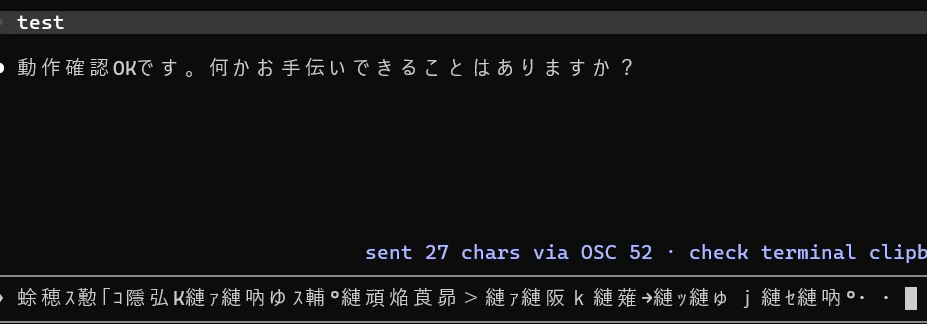
だがしかし、日本語テキストをコピーすると文字化けする

日本語テキストの文字化け
↑「動作確認OKです。何かお手伝いできることはありますか?」をコピーして貼り付けた結果

0
0
0

Register as a new user and use Qiita more conveniently

  1. You get articles that match your needs
  2. You can efficiently read back useful information
  3. You can use dark theme
What you can do with signing up
0
0

Delete article

Deleted articles cannot be recovered.

Draft of this article would be also deleted.

Are you sure you want to delete this article?