0
0

Delete article

Deleted articles cannot be recovered.

Draft of this article would be also deleted.

Are you sure you want to delete this article?

Flutterのボタンを配置してみる

0
Posted at

Flutterを少しずつ理解していくために、デフォルトプロジェクトにボタンを配置してみようと思います。

サンプルコード

children: [
    const Text('You have pushed the button this many times:'),
    Text(
      '$_counter',
      style: Theme.of(context).textTheme.headlineMedium,
    ), 
+    ElevatedButton(
+      onPressed: _incrementCounter,
+      child: Text("押してね"),
+    )
],
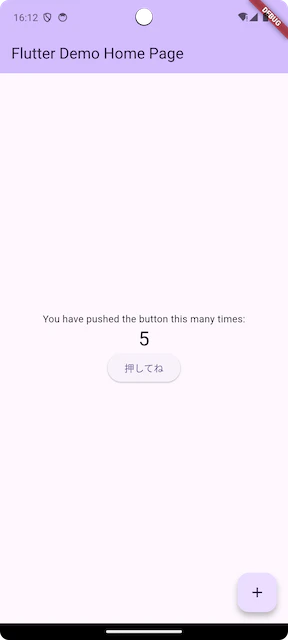
Screenshot_20260308_161215.png

ボタンを追加することができました。
今回は複雑な設定や配置場所の細かい調整はしていないため、シンプルに実装できました。

onPressedの押下処理はfloatingActionButtonと同じにしてみました。
今回はElevatedButtonを追加してみました。
Flutterに用意されている他のボタンについても試してみたいと思います。

0
0
0

Register as a new user and use Qiita more conveniently

  1. You get articles that match your needs
  2. You can efficiently read back useful information
  3. You can use dark theme
What you can do with signing up
0
0

Delete article

Deleted articles cannot be recovered.

Draft of this article would be also deleted.

Are you sure you want to delete this article?