
はじめに
本記事では、GitHubとDiscordのWebhook連携を応用し、間にGASを挟むことによってDiscordでの通知の質を改善したという話になります。
この事例ではDiscordを用いましたが、Slackでも応用が利くようになっています。
単純なGitHubとDiscordのWebhook連携については以下の記事がおすすめです。
この記事が届いてほしい層
- GitHubのメール通知を見逃しがちな方
- チーム開発におけるレビュー依頼等にかけるコミュニケーションコストを削減したい方
背景
GitHubとDiscordのWebhookのシステムでは、以下の問題がありました。
- 通知が必要なアクションの幅が大きい
- レビューしてほしいメンバーへのメンションはできない
通知が必要なアクションの幅が大きい
GitHubでは、通知を発生させるActionについてPull Requestに絞るといったことはできましたが、このPull Request関連の通知のうち、実際にレビュー通知というユースケースだけを見るとopened, ready_for_reviewというアクションだけが必要でその他は必要ありませんでした。
レビューしてほしいメンバーへのメンションはできない
これはそのまんまですね。
自分の場合レビューを頼む際のメンションとお願い文を書く手間を省くためのWebhookなのでこれはマストでした。
親しき中にもなんとやらということで毎回文章用意していますが、そこから直すべきなのかもしれません。
本題
早速GASのコードを共有します。
GASの始め方やデプロイ方法、GitHub Webhookとの連携方法についてはこの記事では触れませんが自身で調べていただければと思います。
const DISCORD_WEBHOOK_URL = `任意のDiscordWebHookURL`;

/**
 * イベント毎の設定
 */
const EVENT_SETTINGS = {
  pull_request: {
    enable_event: ["opened", "ready_for_review"],
    judge_event_exception_function: isPullRequestExceptionPattern,
    build_message_function: buildPRMessage,
    messages: ["レビューお願いします!!"],
  },

  pull_request_review: {
    enable_event: ["submitted"],
    judge_event_exception_function: isPullRequestReviewExceptionPattern,
    build_message_function: buildPRRMessage,
    messages: {
      comment: "修正お願いします!!",
      approved: "お疲れ様ですっ:tada::tada::tada:",
    },
  },
};

/**
 * GitHubID → DiscordID のマップ
 */
const USER_MAP = {
  "GitHubID_1": "Discord内部ID_1",
  "GitHubID_2": "Discord内部ID_2",
  "GitHubID_3": "Discord内部ID_3",
};

/**
 * POSTメイン処理
 */
function doPost(e) {
  try {
    const eventType = e.parameter["event"];
    const data = JSON.parse(e.postData.contents);

    if (!isNeedSendAction(eventType, data)) {
      return ContentService.createTextOutput("Skipped: " + data.action);
    }

    const messageOptions = EVENT_SETTINGS[eventType].build_message_function(data);
    const response = UrlFetchApp.fetch(DISCORD_WEBHOOK_URL, messageOptions);

    return ContentService.createTextOutput("Success: " + response.getResponseCode());
  } catch (err) {
    return ContentService.createTextOutput("Error: " + err.message);
  }
}

/**
 * 通知判定
 */
function isNeedSendAction(eventType, data) {
  return (
    EVENT_SETTINGS.hasOwnProperty(eventType) &&
    EVENT_SETTINGS[eventType].enable_event.includes(data.action) &&
    EVENT_SETTINGS[eventType].judge_event_exception_function(data)
  );
}

/**
 * 除外判定
 */
function isPullRequestExceptionPattern(data) {
  return !isPullRequestDraft(data);
}

function isPullRequestReviewExceptionPattern(data) {
  return !isEmptyReview(data);
}

function isPullRequestDraft(data) {
  return data.pull_request.draft;
}

function isEmptyReview(data) {
  return !data.review.body;
}

/**
 * 共通:Discord投稿オプションの生成
 */
function buildDiscordPayload(content, embed) {
  return {
    method: "post",
    contentType: "application/json",
    muteHttpExceptions: true,
    payload: JSON.stringify({ content, embeds: [embed] }),
  };
}

/**
 * Pull Request メッセージ
 */
function buildPRMessage(data) {
  const content = addUserMention(data.pull_request.requested_reviewers) +
  "\n" +
  EVENT_SETTINGS.pull_request.messages[0];

  const embed = {
    author: {
      name: data.pull_request.user.login,
      url: data.pull_request.user.html_url,
      icon_url: data.pull_request.user.avatar_url,
    },
    title: `Pull Request ${data.action}: #${data.pull_request.number} ${data.pull_request.title}`,
    url: data.pull_request.html_url,
    description: filterDescription(data.pull_request.body),
    color: 0xC5FA20,
  };

  return buildDiscordPayload(content, embed);
}

/**
 * Pull Request Review メッセージ
 */
function buildPRRMessage(data) {
  const content = addUserMention(data.pull_request.requested_reviewers) +
  "\n" +
  getReviewMessage(EVENT_SETTINGS.pull_request_review.messages, data.review.state);

  const embed = {
    author: {
      name: data.review.user.login,
      url: data.review.user.html_url,
      icon_url: data.review.user.avatar_url,
    },
    title: `Review ${data.action}`,
    url: data.review.html_url,
    description: `### コメント\n${filterDescription(data.review.body)}`,
    image: { url: extractFirstImageUrl(data.review.body) },
    color: 0xC5FA20,
  };

  return buildDiscordPayload(content, embed);
}

/**
 * メンション生成
 */
function addUserMention(reviewers) {
  return reviewers
    .map((r) => (USER_MAP[r.login] ? `<@${USER_MAP[r.login]}>` : ""))
    .join("");
}

/**
 * review.state に応じたメッセージ
 */
function getReviewMessage(messages, state) {
  return messages[state] ?? "";
}

/**
 * Description から不要部分の除外
 */
function filterDescription(msg) {
  if (!msg) return "";

  return msg
    .replace(/<!--([\s\S]*?)-->/g, "") // コメント除去
    .replace(/!\[.*?\]\((.*?)\)/g, ""); // 画像除去
}

/**
 * Description から画像URL抽出
 */
function extractFirstImageUrl(msg) {
  if (!msg) return null;

  const markdown = msg.match(/!\[.*?\]\((.*?)\)/);
  if (markdown) return markdown[1];

  const html = msg.match(/<img [^>]*src="(.*?)"[^>]*\/?>/);
  if (html) return html[1];

  return null;
}
コード解説
このコードは、DiscordのユーザーにGitHub Webhookから何らかのアクションが出た場合に通知をするシステムになっており、Pull_Request, Pull_Rerquest_Review以外のアクションにも対応できるようになっています。
始めに、個人にカスタマイズしていただく部分として大きなもの2点を紹介します。
EVENT_SETTINGS
const EVENT_SETTINGS = {
  pull_request: {
    enable_event: ["opened", "ready_for_review"],
    judge_event_exception_function: isPullRequestExceptionPattern,
    build_message_function: buildPRMessage,
    messages: ["レビューお願いします!!"],
  },

  pull_request_review: {
    enable_event: ["submitted"],
    judge_event_exception_function: isPullRequestReviewExceptionPattern,
    build_message_function: buildPRRMessage,
    messages: {
      comment: "修正お願いします!!",
      approved: "お疲れ様ですっ:tada::tada::tada:",
    },
  },
};
このEVENT_SETTINGにて、通知を流すイベントごとにオブジェクトを作っていただきます。
(pull_requestやpull_request_reviewがそれに該当します。このイベント名は以下のページを参考にしてください。)
次にそれぞれのイベントのオブジェクト内に
- enable_actions
- judge_event_exception_function
- build_message_function
- messages
の属性を用意してもらいます。
enable_actions
enable_actionsでは、それぞれのイベントのうち、通知を流すアクションを配列にして記述します。
こちらも先ほどのリンクを参考にしてください。
judge_action_exception_function
judge_action_exception_functionでは、1つ前で設定を行ったactionのうち、通知を流さないパターンを判定するための関数を設定します。
例えば、pull_requestのopenedアクションは、PRが公開された際に発火しますが、DraftのPRが公開された際にも発火します。Draft段階でレビューを求める通知は必要ないため、こちらは除外するようにしています。
build_message_function
build_message_functionでは、Discordへ通知を行うためのペイロードを作成する関数を設定します。
ペイロード作成が仕事と書きましたが、共通部分はbuildDiscordPayloadでまとめているので、メインはembedとcontentの作成になります。
embedの作成については、こちらで試しながらやるのがおすすめです。
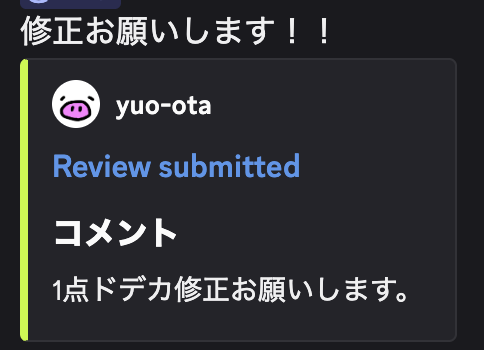
embedとは、画像下側のブロックのような部分を指し、
contentとは、『修正お願いします!!』と書かれているメッセージ部分を指します。
messages
messagesでは、基本的にはcontentに入れる内容を設定することになります。
pull_requestイベントの場合は、レビューのお願いだけになるので配列にしましたが、
pull_request_reviewイベントのようにレビュー自体がapprovedなのかcommentなのかで内容を変えたい場合にはMAP型で設定をしても問題ないです。
ここの出力は、build_message_functionで設定をした関数内で切り替えてください。
USER_MAP
const USER_MAP = {
  "GitHubID_1": "Discord内部ID_1",
  "GitHubID_2": "Discord内部ID_2",
  "GitHubID_3": "Discord内部ID_3",
};
こちらのMAPでは、GitHubのIDとDiscordのIDの対応付けをします。
この際に、Discord内部ID取得方法は以下のリンクが参考になります。
⚠️GitHubの設定上の注意
イベントごとにWebhookを定義しないと本システムは動きません。
例えばPull Requestの通知の場合には、Payload URLを
https://script.google.com/macros/s/xxxxxx/exec?event=pull_request
とこのようにevent=pull_requestのようにパラメーターを設定してください。
(GASがheader情報を読ませてくれないための措置になります。)
おわりに
今回はDiscordと連携をしましたがSlackでもNotionでもできるのでぜひカスタマイズして使ってください!