
はじめに
git操作を覚えたい
導入したてですがとりあえずこれさえあれば当面困らんやろ、、、と思ってメモしています
基本的な扱い方
「編集」→「add」→「commit」の繰り返し
場合によっては
「branch作成」→「編集」→「add」→「commit」→「merge」
いい感じになったら
「add」→「commit」→「push」
(ぐらいの認識しかない)
コマンド
コマンドプロンプト上で操作する
管理開始
最初の設定
初期化
管理対象ディレクトリにcd 管理対象ディレクトリで移動
初期化すると.gitフォルダが作成される
git init
untracked fileの設定
.gitignoreという名前のファイルを作成、追跡しなくて良いディレクトリやファイルを指定する
.gitignoreをaddしてcommitしておく
/フォルダ名/
/ファイル名
...
基本操作
状態の確認
今いるブランチとかがわかる
git status
add(コミット準備)
コミット予約、ステージングに追加と呼ぶらしい
git add 対象ファイル
すべてを予約するには
git add .
commit
git commit -m "コメント"
履歴を見る
コミット履歴とかコミットIDとかがわかる
git log --graph --all
--graphオプションはなくてもOKだが、個人的にはこっちのほうが見た目が好き
--allオプションをつけなければ今いるコミットまでのログを出力する
qでログの表示を終了できる
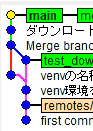
GUIでログを表示
gitk --all
ブランチの操作
ブランチの作成
ブランチを階層的に定義する。
今いるブランチから分岐し、featureの中に機能名という名前のブランチを作成する
git checkout -b feature/機能名
ブランチの移動
ブランチ名を指定すればそのブランチの最新のコミットに移動できる
git checkout ブランチ名
コミットIDを指定すればコミット当時の状態に移動できる
git checkout コミットID
ブランチの削除
git branch -d ブランチ名
ブランチのマージ
今いるブランチに別のブランチをマージする
git merge ブランチ名
どんなブランチがあるか
git branch -a
Push
GitHubでリポジトリを作成
Newを選択
リポジトリ名を入力
リポジトリの作成

リポジトリを作成すると、コマンド例がつらつら出てくる
コマンドプロンプトでコードを実行
まずはメアドとユーザー名を指定する。ユーザー名はGitHubに登録したものと同じにする。
git config --global user.email "メアド"
git config --global user.name "ユーザー名"
確認方法はこれ
git config --global --list
"…or push an existing repository from the command line"という部分に実行すべきコマンドが記載されている
これを実行するようにGitHubから指示される
git remote add origin 指定されたURL
git branch -M main
git push -u リモート名 ブランチ名
作業の定型化
addしてcommitしてpushする
git add 対象ファイル
git commit -m "コメント"
git push -u リモート名 ブランチ名