
やりたいこと
OCIオブジェクト・ストレージにおいて、事前認証済リクエスト(Pre-Authenticated Request)を利用して、
APIキーなどの認証情報を使用せずに、CLIからオブジェクトのアップロードおよびダウンロードを行います。
具体的には以下を実施します。
- OCIコンソールから事前認証済リクエストを作成する
- 発行された事前認証済URLを使用し、
curlコマンドでオブジェクトをアップロード/ダウンロードする
事前認証済リクエストの作成
バケットに対してオブジェクトをアップロード/ダウンロードする前準備として、
事前認証済リクエストを作成します。
事前認証済リクエストを使用することで、APIキーなどの資格証明(クレデンシャル)を保持していないユーザーでも、
指定したバケットまたはオブジェクトにアクセスすることが可能になります。
本手順では、作成した事前認証済リクエストを使用し、CLIからオブジェクトをアップロードおよびダウンロードを行います。
OCIコンソール画面から「ストレージ」→「バケット」を選択します。
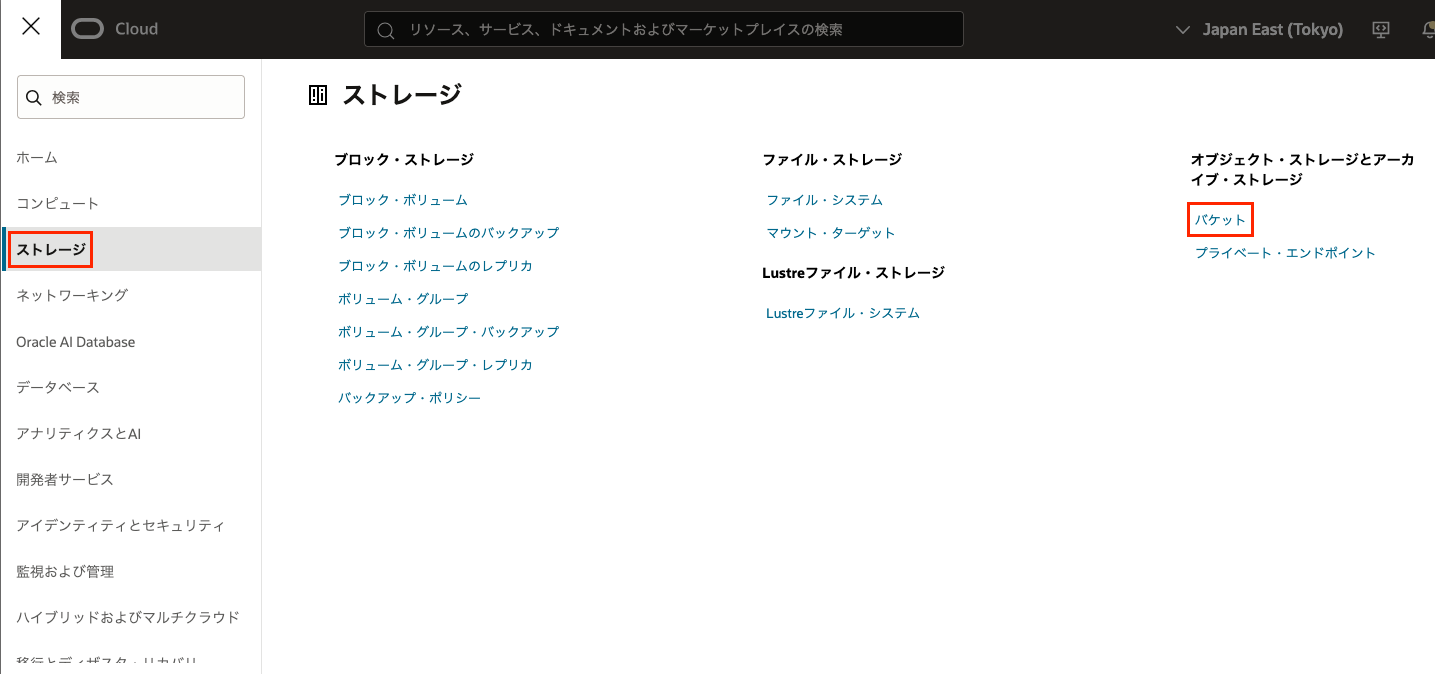
任意のバケット(ここではbucket01)を選択します。

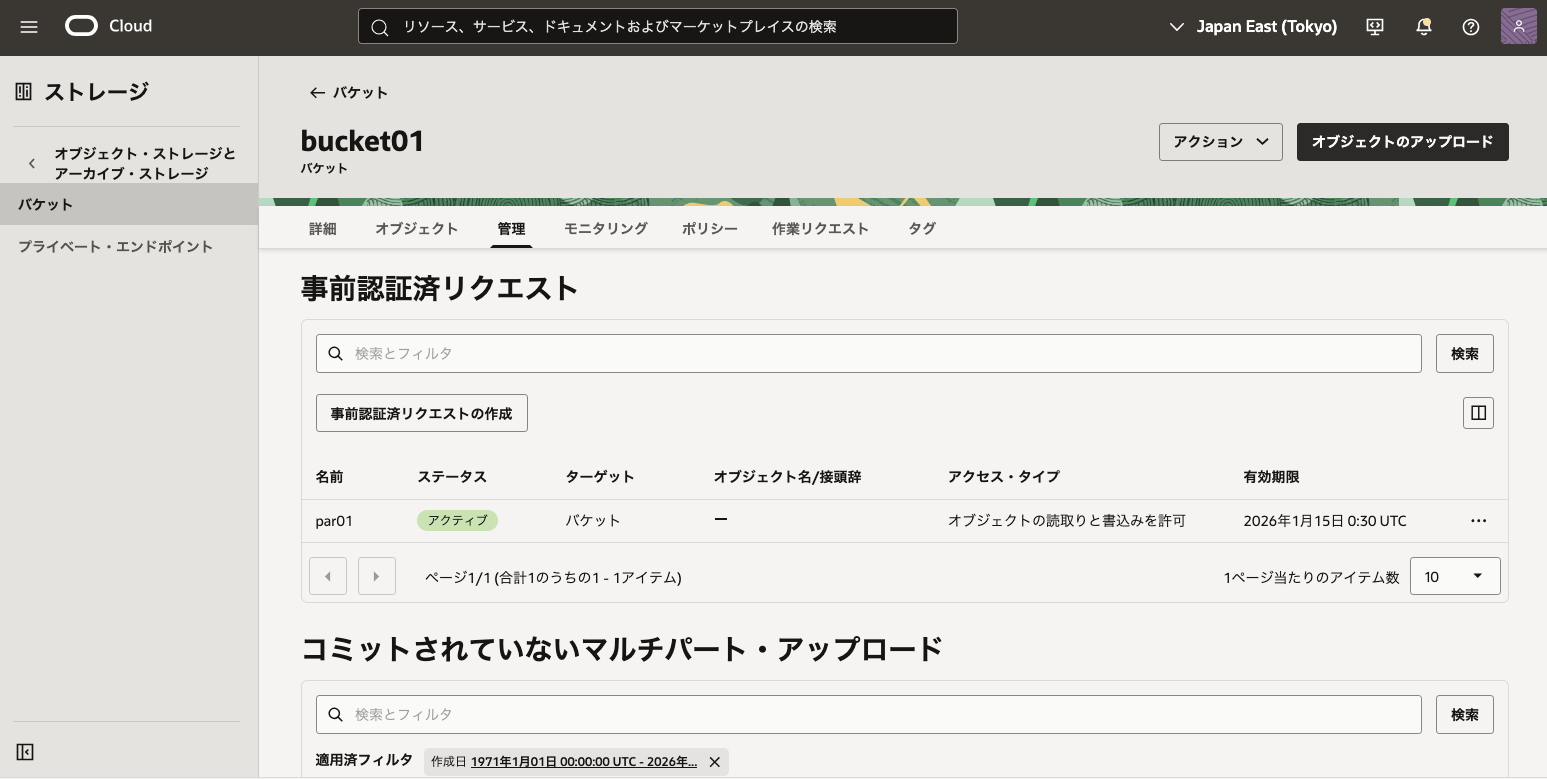
「管理」→「事前認証済リクエストの作成」を選択します。

以下を入力、「事前認証済リクエストの作成」を選択します。
-
名前:任意(ここでは
par01) -
事前認証済リクエスト・ターゲット:任意(ここでは
バケット) -
アクセス・タイプ:オブジェクト
- アップロード時:書き込み権限が必要
- ダウンロード時:読み取り権限が必要
-
オブジェクト・リストの有効化:任意
- 有効化すると、バケット内オブジェクトの一覧取得が可能
-
有効期限:任意
- デフォルトでは1週間
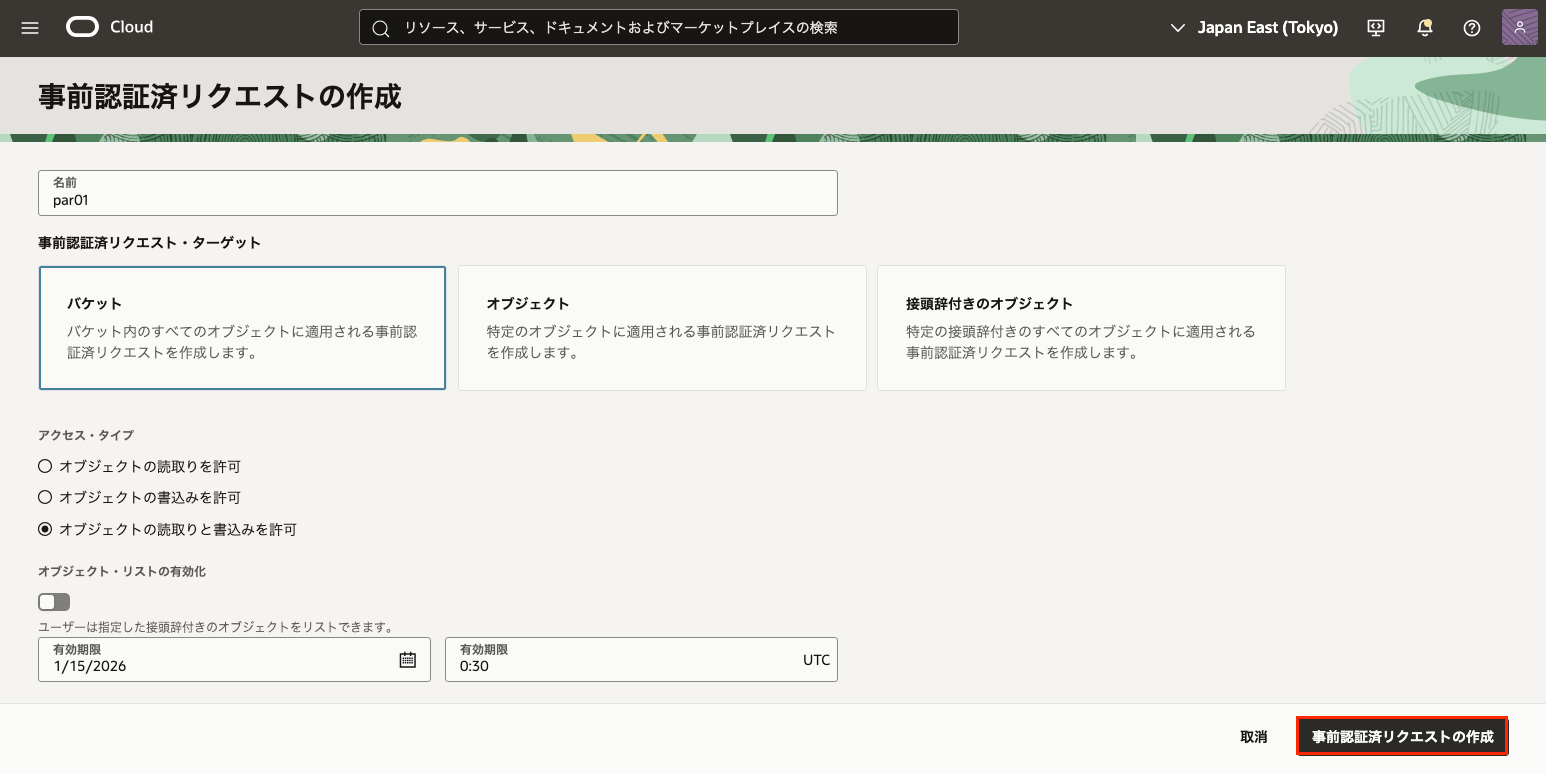
- デフォルトでは1週間
URLが払い出されるため、「コピー」を選択してURLを控えておきます。

「閉じる」を選択すると、事前認証済URLは再表示されません。
必ずこの時点で URL を保存してください。
事前認証済リクエストが作成されます。
オブジェクトのアップロード
ここではカレントディレクトリ直下に存在するtest.txtを事前認証済リクエストを使用してアップロードする方法を行います。
以下のコマンドを実行します。
curl -v -X PUT --upload-file ./test.txt "事前認証済URL/test.txt"
実行結果に200 OKが返却されれば、アップロードは成功です。
*   Trying 134.70.80.3:443...
* Connected to objectstorage.ap-tokyo-1.oraclecloud.com (134.70.80.3) port 443 (#0)
* ALPN, offering h2
* ALPN, offering http/1.1
*  CAfile: /etc/pki/tls/certs/ca-bundle.crt
* TLSv1.0 (OUT), TLS header, Certificate Status (22):
* TLSv1.3 (OUT), TLS handshake, Client hello (1):
* TLSv1.2 (IN), TLS header, Certificate Status (22):
* TLSv1.3 (IN), TLS handshake, Server hello (2):
* TLSv1.2 (IN), TLS header, Certificate Status (22):
* TLSv1.2 (IN), TLS handshake, Certificate (11):
* TLSv1.2 (IN), TLS header, Certificate Status (22):
* TLSv1.2 (IN), TLS handshake, Server key exchange (12):
* TLSv1.2 (IN), TLS header, Certificate Status (22):
* TLSv1.2 (IN), TLS handshake, Server finished (14):
* TLSv1.2 (OUT), TLS header, Certificate Status (22):
* TLSv1.2 (OUT), TLS handshake, Client key exchange (16):
* TLSv1.2 (OUT), TLS header, Finished (20):
* TLSv1.2 (OUT), TLS change cipher, Change cipher spec (1):
* TLSv1.2 (OUT), TLS header, Certificate Status (22):
* TLSv1.2 (OUT), TLS handshake, Finished (20):
* TLSv1.2 (IN), TLS header, Finished (20):
* TLSv1.2 (IN), TLS header, Certificate Status (22):
* TLSv1.2 (IN), TLS handshake, Finished (20):
* SSL connection using TLSv1.2 / ECDHE-RSA-AES256-GCM-SHA384
* ALPN, server did not agree to a protocol
* Server certificate:
*  subject: C=US; ST=California; L=Redwood City; O=Oracle Corporation; CN=objectstorage.ap-tokyo-1.oraclecloud.com
*  start date: Jul 18 00:00:00 2025 GMT
*  expire date: Jul 17 23:59:59 2026 GMT
*  subjectAltName: host "objectstorage.ap-tokyo-1.oraclecloud.com" matched cert's "objectstorage.ap-tokyo-1.oraclecloud.com"
*  issuer: C=US; O=DigiCert Inc; CN=DigiCert Global G2 TLS RSA SHA256 2020 CA1
*  SSL certificate verify ok.
* TLSv1.2 (OUT), TLS header, Unknown (23):
> PUT /p/u8SOMGxN-uV16sO7CbgvKOlnu0JpYG-4C5z6t0awUtV6jOxKexkA4LLA7ZmvDQVu/n/xxxxx/b/bucket01/o/test.txt HTTP/1.1
> Host: objectstorage.ap-tokyo-1.oraclecloud.com
> User-Agent: curl/7.76.1
> Accept: */*
> Content-Length: 0
>
* TLSv1.2 (IN), TLS header, Unknown (23):
* Mark bundle as not supporting multiuse
< HTTP/1.1 200 OK
< etag: 810f3aca-b80c-475e-9cc6-74f19e06a647
< last-modified: Thu, 08 Jan 2026 00:43:08 GMT
< opc-content-md5: 1B2M2Y8AsgTpgAmY7PhCfg==
< version-id: b7090857-9514-4d3c-ad60-66bedae743ee
< committed-chunk-count: 0
< Content-Length: 0
< date: Thu, 08 Jan 2026 00:43:08 GMT
< opc-request-id: nrt-1:51Y22h71wBO340ZJsHtSTAe_NxP1PlFglYPB83rwCqkeWLVvyhJlnNKB-NJKHGJC
< x-api-id: native
< x-content-type-options: nosniff
< strict-transport-security: max-age=31536000; includeSubDomains
< access-control-allow-origin: *
< access-control-allow-methods: POST,PUT,GET,HEAD,DELETE,OPTIONS
< access-control-allow-credentials: true
< access-control-expose-headers: access-control-allow-credentials,access-control-allow-methods,access-control-allow-origin,committed-chunk-count,content-length,date,etag,last-modified,opc-client-info,opc-content-md5,opc-request-id,strict-transport-security,version-id,x-api-id,x-content-type-options
<
* Connection #0 to host objectstorage.ap-tokyo-1.oraclecloud.com left intact
OCI コンソールで確認すると、バケットにオブジェクトがアップロードされていることが確認できます。

オブジェクトのダウンロード
アップロード完了後、ローカルのtest.txtを削除して、
バケット上のtest.txtをカレントディレクトリへダウンロードします。
以下のコマンドを実行します。
curl -v -O "事前認証済URL/test.txt"
実行結果に200 OKが返却されれば、ダウンロードは成功です。
  % Total    % Received % Xferd  Average Speed   Time    Time     Time  Current
                                 Dload  Upload   Total   Spent    Left  Speed
  0     0    0     0    0     0      0      0 --:--:-- --:--:-- --:--:--     0*   Trying 134.70.80.3:443...
* Connected to objectstorage.ap-tokyo-1.oraclecloud.com (134.70.80.3) port 443 (#0)
* ALPN, offering h2
* ALPN, offering http/1.1
*  CAfile: /etc/pki/tls/certs/ca-bundle.crt
* TLSv1.0 (OUT), TLS header, Certificate Status (22):
} [5 bytes data]
* TLSv1.3 (OUT), TLS handshake, Client hello (1):
} [512 bytes data]
* TLSv1.2 (IN), TLS header, Certificate Status (22):
{ [5 bytes data]
* TLSv1.3 (IN), TLS handshake, Server hello (2):
{ [93 bytes data]
* TLSv1.2 (IN), TLS header, Certificate Status (22):
{ [5 bytes data]
* TLSv1.2 (IN), TLS handshake, Certificate (11):
{ [3058 bytes data]
* TLSv1.2 (IN), TLS header, Certificate Status (22):
{ [5 bytes data]
* TLSv1.2 (IN), TLS handshake, Server key exchange (12):
{ [333 bytes data]
* TLSv1.2 (IN), TLS header, Certificate Status (22):
{ [5 bytes data]
* TLSv1.2 (IN), TLS handshake, Server finished (14):
{ [4 bytes data]
* TLSv1.2 (OUT), TLS header, Certificate Status (22):
} [5 bytes data]
* TLSv1.2 (OUT), TLS handshake, Client key exchange (16):
} [70 bytes data]
* TLSv1.2 (OUT), TLS header, Finished (20):
} [5 bytes data]
* TLSv1.2 (OUT), TLS change cipher, Change cipher spec (1):
} [1 bytes data]
* TLSv1.2 (OUT), TLS header, Certificate Status (22):
} [5 bytes data]
* TLSv1.2 (OUT), TLS handshake, Finished (20):
} [16 bytes data]
* TLSv1.2 (IN), TLS header, Finished (20):
{ [5 bytes data]
* TLSv1.2 (IN), TLS header, Certificate Status (22):
{ [5 bytes data]
* TLSv1.2 (IN), TLS handshake, Finished (20):
{ [16 bytes data]
* SSL connection using TLSv1.2 / ECDHE-RSA-AES256-GCM-SHA384
* ALPN, server did not agree to a protocol
* Server certificate:
*  subject: C=US; ST=California; L=Redwood City; O=Oracle Corporation; CN=objectstorage.ap-tokyo-1.oraclecloud.com
*  start date: Jul 18 00:00:00 2025 GMT
*  expire date: Jul 17 23:59:59 2026 GMT
*  subjectAltName: host "objectstorage.ap-tokyo-1.oraclecloud.com" matched cert's "objectstorage.ap-tokyo-1.oraclecloud.com"
*  issuer: C=US; O=DigiCert Inc; CN=DigiCert Global G2 TLS RSA SHA256 2020 CA1
*  SSL certificate verify ok.
* TLSv1.2 (OUT), TLS header, Unknown (23):
} [5 bytes data]
> GET /p/u8SOMGxN-uV16sO7CbgvKOlnu0JpYG-4C5z6t0awUtV6jOxKexkA4LLA7ZmvDQVu/n/cloudii/b/bucket01/o/test.txt HTTP/1.1
> Host: objectstorage.ap-tokyo-1.oraclecloud.com
> User-Agent: curl/7.76.1
> Accept: */*
>
* TLSv1.2 (IN), TLS header, Unknown (23):
{ [5 bytes data]
* Mark bundle as not supporting multiuse
< HTTP/1.1 200 OK
< accept-ranges: bytes
< Content-Length: 0
< content-md5: 1B2M2Y8AsgTpgAmY7PhCfg==
< last-modified: Thu, 08 Jan 2026 00:43:08 GMT
< etag: 810f3aca-b80c-475e-9cc6-74f19e06a647
< version-id: b7090857-9514-4d3c-ad60-66bedae743ee
< storage-tier: Standard
< Content-Type: application/octet-stream
< date: Thu, 08 Jan 2026 01:04:30 GMT
< opc-request-id: nrt-1:bnHPn-1C4fATfwUoENvvxKLSBTyhjKOuAo9CpNneULwt2vwlRqmXXUmmiSnV2H5E
< x-api-id: native
< x-content-type-options: nosniff
< strict-transport-security: max-age=31536000; includeSubDomains
< access-control-allow-origin: *
< access-control-allow-methods: POST,PUT,GET,HEAD,DELETE,OPTIONS
< access-control-allow-credentials: true
< access-control-expose-headers: accept-ranges,access-control-allow-credentials,access-control-allow-methods,access-control-allow-origin,content-length,content-md5,content-type,date,etag,last-modified,opc-client-info,opc-request-id,storage-tier,strict-transport-security,version-id,x-api-id,x-content-type-options
<
  0     0    0     0    0     0      0      0 --:--:-- --:--:-- --:--:--     0
* Connection #0 to host objectstorage.ap-tokyo-1.oraclecloud.com left intact
lsコマンド等で確認すると、
オブジェクトがローカルにダウンロードされていることが分かります。
以上で、
事前認証済URLを使用したオブジェクトのアップロード/ダウンロード手順は完了です。
注意事項
最後に、事前認証済リクエスト利用時の主な注意点をまとめます。
- 事前認証済リクエストは作成数に制約はなく、無制限に作成可能
- 有効期限の設定は必須だが、将来の任意の日付を指定可能
- 事前認証済リクエストの編集は不可
- 事前認証済リクエストを使用してバケットやオブジェクトの削除は不可
参考ドキュメント