
はじめに
本記事では、AWS と OCI 間でサイト間 VPN(IPSec + BGP)を構成する手順を、
実際のコンソール操作と設定値を交えながら解説します。
構成の流れとしては、
- AWS側で必要なリソースを一時的に作成
- OCI側でDRG / CPE / IPSec接続を構成
- 再度AWS側に戻り、設定を確定
- 接続確認
という手順で実際に設定します。
「なぜ一時的なカスタマー・ゲートウェイを作るのか?」
「どの値を OCI 側に転記すればよいのか?」
といったハマりやすいポイントも補足しながら進めていきますので、
AWS × OCI 接続が初めての方でも、そのままなぞれる構成になっています。
1.AWS側の設定
まずはAWS側で、以下のネットワーク・リソースを作成します。
- カスタマー・ゲートウェイ(Customer Gateway):OCI側ルータを表す“論理的な定義”
- トランジット・ゲートウェイ(Transit Gateway):AWS側ネットワークの中継ハブ
一時的カスタマー・ゲートウェイの作成
最初にカスタマー・ゲートウェイを作成します。
このゲートウェイはOCI 側の設定完了後に削除する一時的なものです。
AWSマネジメントコンソールから
「ネットワーキングとコンテンツ配信」→「VPC」を選択します。

「カスタマーゲートウェイを作成」を選択します。

以下の項目を入力し、「カスタマーゲートウェイを作成」を選択します。
- 名前タグ:任意(例:
cgw-tmp) - BGP ASN:
31898
※OCIのBGP ASN - IPアドレス:任意(例:
1.1.1.1)
※後ほど削除するため、仮の値で問題ありません

カスタマー・ゲートウェイが作成されます。

Transit Gatewayの作成
続いてTransit Gatewayを作成します。
「Transit Gatewayの作成」を選択します。

以下を入力し、「Transit Gatewayを作成」を選択します。
- 名前タグ:任意(例:
transit-gateway) - Amazon 側の自律システム番号 (ASN):
64512
※AWSのBGP ASN
キャプチャでは65000と表示されていますが、正しくは64512です
その他の項目はデフォルトのままで問題ありません。

Transit Gatewayが作成されます。

Transit Gateway アタッチメントの作成
Transit GatewayをVPCに接続するため、アタッチメントを作成します。
「Transit Gateway アタッチメント」→
「Transit Gateway アタッチメントを作成」を選択します。

以下の項目を入力、「Transit Gateway アタッチメントを作成」を選択します。
- 名前タグ:任意(例:
transit-gateway-attachment) - Transit Gateway ID:作成したものを選択
- アタッチメントタイプ:VPN
- VPC ID:任意のVPC

状態がPending→Availableになれば利用可能です。

VPN接続の作成
Transit Gatewayの準備が整ったら、VPN接続を作成します。
「VPN接続を作成する」を選択します。
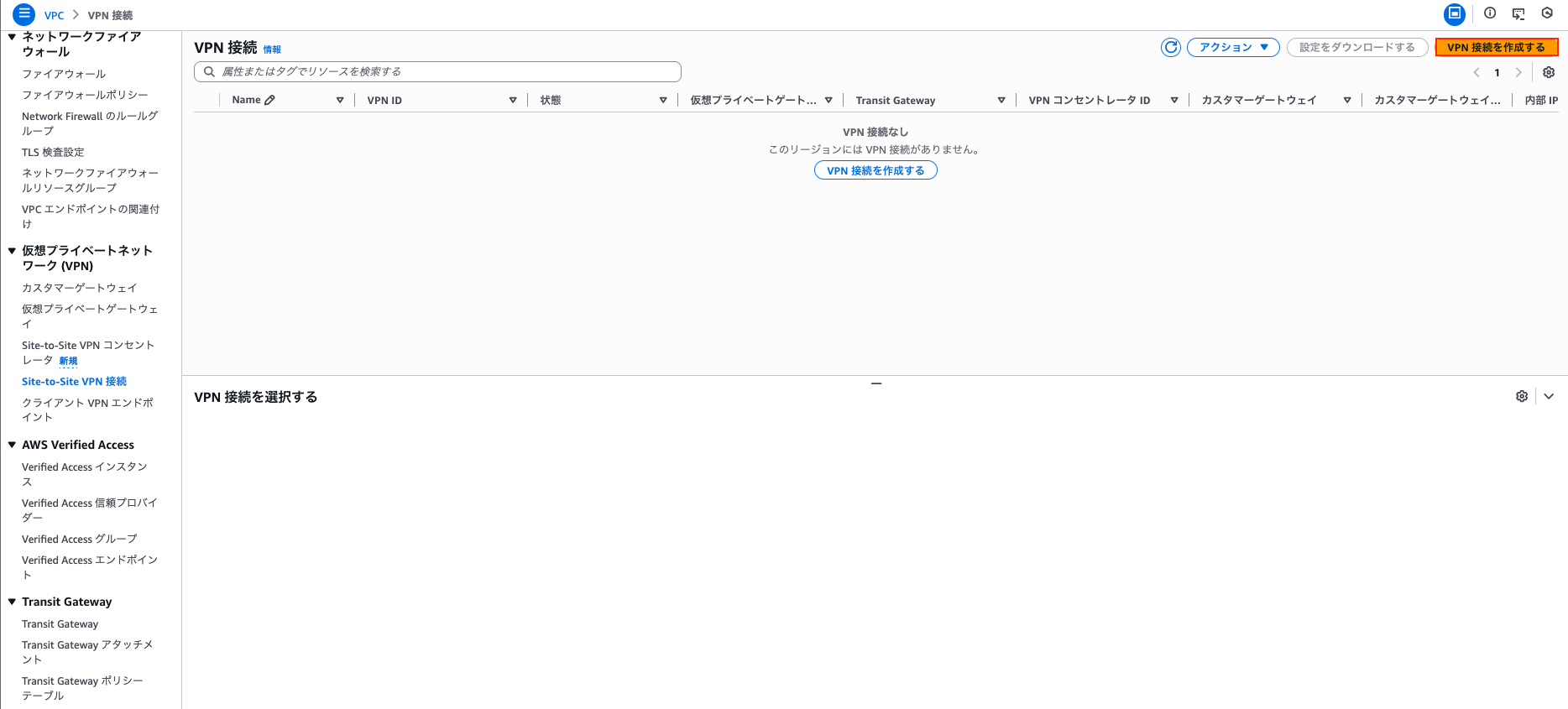
以下の項目を入力、「VPN接続を作成する」を選択します。
- 名前タグ:任意(例:
vpn-to-oci) - ターゲットゲートウェイのタイプ:Transit Gateway
- Transit Gateway:作成済みのもの
- カスタマーゲートウェイ:作成済みのもの
その他の項目はデフォルトのままで問題ありません。

作成後、「設定をダウンロードする」を選択します。

設定は以下を選択します。
- ベンダー:Generic
- プラットフォーム:Generic
- ソフトウェア:Vendor Agnostic
- IKE バージョン:ikev2
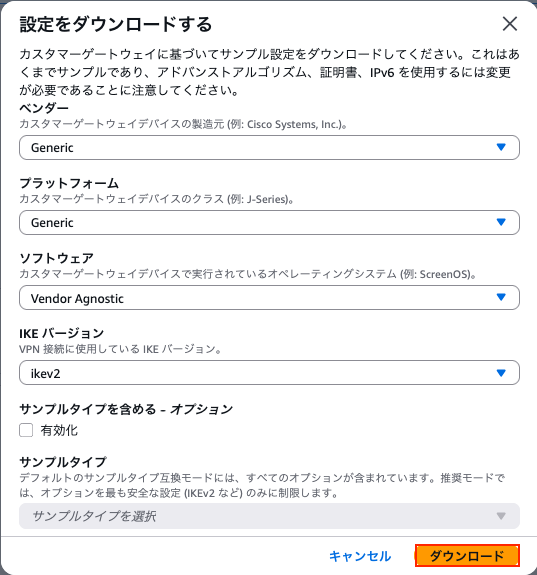
ダウンロードしたファイルの定義内容は以下です。
Amazon Web Services
Virtual Private Cloud

VPN Connection Configuration
================================================================================
AWS utilizes unique identifiers to manipulate the configuration of
a VPN Connection. Each VPN Connection is assigned a VPN Connection Identifier
and is associated with two other identifiers, namely the
Customer Gateway Identifier and the Virtual Private Gateway Identifier.

Your VPN Connection ID		         : vpn-0627ab0eef34dbc46
Your Virtual Private Gateway ID          :
Your Customer Gateway ID    		 : cgw-02770192178a94250

A VPN Connection consists of a pair of IPSec tunnel security associations (SAs).
It is important that both tunnel security associations be configured.


IPSec Tunnel #1
================================================================================
#1: Internet Key Exchange Configuration

Configure the IKE SA as follows:
Please note, these sample configurations are for the minimum requirement of AES128, SHA1, and DH Group 2.
Category "VPN" connections in the GovCloud region have a minimum requirement of AES128, SHA2, and DH Group 14.
You will need to modify these sample configuration files to take advantage of AES256, SHA256, or other DH groups like 2, 14-18, 22, 23, and 24.
NOTE: If you customized tunnel options when creating or modifying your VPN connection, you may need to modify these sample configurations to match the custom settings for your tunnels.

Higher parameters are only available for VPNs of category "VPN," and not for "VPN-Classic".
The address of the external interface for your customer gateway must be a static address.
Your customer gateway may reside behind a device performing network address translation (NAT).
To ensure that NAT traversal (NAT-T) can function, you must adjust your firewall !rules to unblock UDP port 4500.
If not behind NAT, and you are not using an Accelerated VPN, we recommend disabling NAT-T. If you are using an Accelerated VPN, make sure that NAT-T is enabled.
  - IKE version              : IKEv2
  - Authentication Method    : Pre-Shared Key
  - Pre-Shared Key           : bnAteiWUybc6iTZhyYsrwS5NreHlGj
  - Authentication Algorithm : sha1
  - Encryption Algorithm     : aes-128-cbc
  - Lifetime                 : 28800 seconds
  - Phase 1 Negotiation Mode : main
  - Diffie-Hellman           : Group 2

#2: IPSec Configuration

Configure the IPSec SA as follows:
Category "VPN" connections in the GovCloud region have a minimum requirement of AES128, SHA2, and DH Group 14.
Please note, you may use these additionally supported IPSec parameters for encryption like AES256 and other DH groups like 2, 5, 14-18, 22, 23, and 24.
NOTE: If you customized tunnel options when creating or modifying your VPN connection, you may need to modify these sample configurations to match the custom settings for your tunnels.

Higher parameters are only available for VPNs of category "VPN," and not for "VPN-Classic".
  - Protocol                 : esp
  - Authentication Algorithm : hmac-sha1-96
  - Encryption Algorithm     : aes-128-cbc
  - Lifetime                 : 3600 seconds
  - Mode                     : tunnel
  - Perfect Forward Secrecy  : Diffie-Hellman Group 2

IPSec Dead Peer Detection (DPD) will be enabled on the AWS Endpoint. We
recommend configuring DPD on your endpoint as follows:
  - DPD Interval             : 10
  - DPD Retries              : 3

IPSec ESP (Encapsulating Security Payload) inserts additional
headers to transmit packets. These headers require additional space,
which reduces the amount of space available to transmit application data.
To limit the impact of this behavior, we recommend the following
configuration on your Customer Gateway:
  - TCP MSS Adjustment       : 1379 bytes
  - Clear Don't Fragment Bit : enabled
  - Fragmentation            : Before encryption

#3: Tunnel Interface Configuration

Your Customer Gateway must be configured with a tunnel interface that is
associated with the IPSec tunnel. All traffic transmitted to the tunnel
interface is encrypted and transmitted to the Virtual Private Gateway.


The Customer Gateway and Virtual Private Gateway each have two addresses that relate
to this IPSec tunnel. Each contains an outside address, upon which encrypted
traffic is exchanged. Each also contain an inside address associated with
the tunnel interface.

The Customer Gateway outside IP address was provided when the Customer Gateway
was created. Changing the IP address requires the creation of a new
Customer Gateway.

The Customer Gateway inside IP address should be configured on your tunnel
interface.

Outside IP Addresses:
  - Customer Gateway 		        : 1.1.1.1
  - Virtual Private Gateway	        : 13.112.69.198

Inside IP Addresses
  - Customer Gateway         		: 169.254.72.34/30
  - Virtual Private Gateway             : 169.254.72.33/30

Configure your tunnel to fragment at the optimal size:
  - Tunnel interface MTU     : 1436 bytes

#4: Border Gateway Protocol (BGP) Configuration:

The Border Gateway Protocol (BGPv4) is used within the tunnel, between the inside
IP addresses, to exchange routes from the VPC to your home network. Each
BGP router has an Autonomous System Number (ASN). Your ASN was provided
to AWS when the Customer Gateway was created.

BGP Configuration Options:
  - Customer Gateway ASN	          : 31898
  - Virtual Private  Gateway ASN          : 64512
  - Neighbor IP Address     		  : 169.254.195.33
  - Neighbor Hold Time       : 30

Configure BGP to announce routes to the Virtual Private Gateway. The gateway
will announce prefixes to your customer gateway based upon the prefix you
assigned to the VPC at creation time.


IPSec Tunnel #2
================================================================================
#1: Internet Key Exchange Configuration

Configure the IKE SA as follows:
Please note, these sample configurations are for the minimum requirement of AES128, SHA1, and DH Group 2.
Category "VPN" connections in the GovCloud region have a minimum requirement of AES128, SHA2, and DH Group 14.
You will need to modify these sample configuration files to take advantage of AES256, SHA256, or other DH groups like 2, 14-18, 22, 23, and 24.
NOTE: If you customized tunnel options when creating or modifying your VPN connection, you may need to modify these sample configurations to match the custom settings for your tunnels.

Higher parameters are only available for VPNs of category "VPN," and not for "VPN-Classic".
The address of the external interface for your customer gateway must be a static address.
Your customer gateway may reside behind a device performing network address translation (NAT).
To ensure that NAT traversal (NAT-T) can function, you must adjust your firewall !rules to unblock UDP port 4500.
If not behind NAT, and you are not using an Accelerated VPN, we recommend disabling NAT-T. If you are using an Accelerated VPN, make sure that NAT-T is enabled.
  - IKE version              : IKEv2
  - Authentication Method    : Pre-Shared Key
  - Pre-Shared Key           : NQvZal5vOHGxQoNxMB2RqMAwLXapj5
  - Authentication Algorithm : sha1
  - Encryption Algorithm     : aes-128-cbc
  - Lifetime                 : 28800 seconds
  - Phase 1 Negotiation Mode : main
  - Diffie-Hellman           : Group 2

#2: IPSec Configuration

Configure the IPSec SA as follows:
Category "VPN" connections in the GovCloud region have a minimum requirement of AES128, SHA2, and DH Group 14.
Please note, you may use these additionally supported IPSec parameters for encryption like AES256 and other DH groups like 2, 5, 14-18, 22, 23, and 24.
NOTE: If you customized tunnel options when creating or modifying your VPN connection, you may need to modify these sample configurations to match the custom settings for your tunnels.

Higher parameters are only available for VPNs of category "VPN," and not for "VPN-Classic".
  - Protocol                 : esp
  - Authentication Algorithm : hmac-sha1-96
  - Encryption Algorithm     : aes-128-cbc
  - Lifetime                 : 3600 seconds
  - Mode                     : tunnel
  - Perfect Forward Secrecy  : Diffie-Hellman Group 2

IPSec Dead Peer Detection (DPD) will be enabled on the AWS Endpoint. We
recommend configuring DPD on your endpoint as follows:
  - DPD Interval             : 10
  - DPD Retries              : 3

IPSec ESP (Encapsulating Security Payload) inserts additional
headers to transmit packets. These headers require additional space,
which reduces the amount of space available to transmit application data.
To limit the impact of this behavior, we recommend the following
configuration on your Customer Gateway:
  - TCP MSS Adjustment       : 1379 bytes
  - Clear Don't Fragment Bit : enabled
  - Fragmentation            : Before encryption

#3: Tunnel Interface Configuration

Your Customer Gateway must be configured with a tunnel interface that is
associated with the IPSec tunnel. All traffic transmitted to the tunnel
interface is encrypted and transmitted to the Virtual Private Gateway.


The Customer Gateway and Virtual Private Gateway each have two addresses that relate
to this IPSec tunnel. Each contains an outside address, upon which encrypted
traffic is exchanged. Each also contain an inside address associated with
the tunnel interface.

The Customer Gateway outside IP address was provided when the Customer Gateway
was created. Changing the IP address requires the creation of a new
Customer Gateway.

The Customer Gateway inside IP address should be configured on your tunnel
interface.

Outside IP Addresses:
  - Customer Gateway 		        : 1.1.1.1
  - Virtual Private Gateway	        : 52.68.42.161

Inside IP Addresses
  - Customer Gateway         		: 169.254.18.70/30
  - Virtual Private Gateway             : 169.254.18.69/30

Configure your tunnel to fragment at the optimal size:
  - Tunnel interface MTU     : 1436 bytes

#4: Border Gateway Protocol (BGP) Configuration:

The Border Gateway Protocol (BGPv4) is used within the tunnel, between the inside
IP addresses, to exchange routes from the VPC to your home network. Each
BGP router has an Autonomous System Number (ASN). Your ASN was provided
to AWS when the Customer Gateway was created.

BGP Configuration Options:
  - Customer Gateway ASN	          : 31898
  - Virtual Private  Gateway ASN          : 64512
  - Neighbor IP Address     		  : 169.254.18.69
  - Neighbor Hold Time       : 30

Configure BGP to announce routes to the Virtual Private Gateway. The gateway
will announce prefixes to your customer gateway based upon the prefix you
assigned to the VPC at creation time.


Additional Notes and Questions
================================================================================

  - Amazon Virtual Private Cloud Getting Started Guide:
      http://docs.amazonwebservices.com/AmazonVPC/latest/GettingStartedGuide
  - Amazon Virtual Private Cloud Network Administrator Guide:
      http://docs.amazonwebservices.com/AmazonVPC/latest/NetworkAdminGuide
この中でIPSec Tunnel 1の以下設定をOCI側のリソース作成時に使用します。
# 共有シークレット
Pre-Shared Key : bnAteiWUybc6iTZhyYsrwS5NreHlGj
# CPE IPアドレス
Virtual Private Gateway : 13.112.69.198
# トンネル内IP
Customer Gateway : 169.254.72.34/30
Virtual Private Gateway : 169.254.72.33/30
OCIの仕様により、以下のリンクローカルIP範囲は使用できません。
該当する場合は 「VPN トンネルオプションの変更」 からCIDRを変更してください。
- 169.254.10.0~169.254.19.255
- 169.254.100.0~169.254.109.255
- 169.254.192.0~169.254.201.255
ここまででAWS 側の一次設定は完了です。
2. OCI側の設定
AWS側の一次設定が完了したため、続いてOCI側の設定に移ります。
動的ルーティング・ゲートウェイ(DRG)の作成
まず、動的ルーティング・ゲートウェイ(DRG)を作成します。
OCIコンソールから
「ネットワーキング」→「動的ルーティング・ゲートウェイ」を選択します。

「動的ルーティング・ゲートウェイの作成」を選択し、
DRG名(ここでは「drg」)とコンパートメントを指定します。


DRGの作成が完了したら、次にVCNとのアタッチメントを作成します。
「仮想クラウド・ネットワーク・アタッチメントの作成」を選択します。

アタッチメント名(ここでは「vcn-attachment」)と接続対象のVCNを選択し、
「VCN アタッチメントの作成」を実行します。
その他の項目はデフォルトのままで問題ありません。

ライフサイクルの状態が
「アタッチ中」→「アタッチ済」
に変われば、アタッチメントは利用可能です。

顧客構内機器(CPE)の作成
続いて、顧客構内機器(CPE)の作成を行います。
「ネットワーキング」→「顧客構内機器」を選択します。

「CPEの作成」を選択します。

以下の項目を入力し、「CPEの作成」を実行します。
- 名前:任意(例:
cpe) - IPアドレス:AWS側のVirtual Private Gatewayに表示されているIPアドレス
- ベンダー:Other
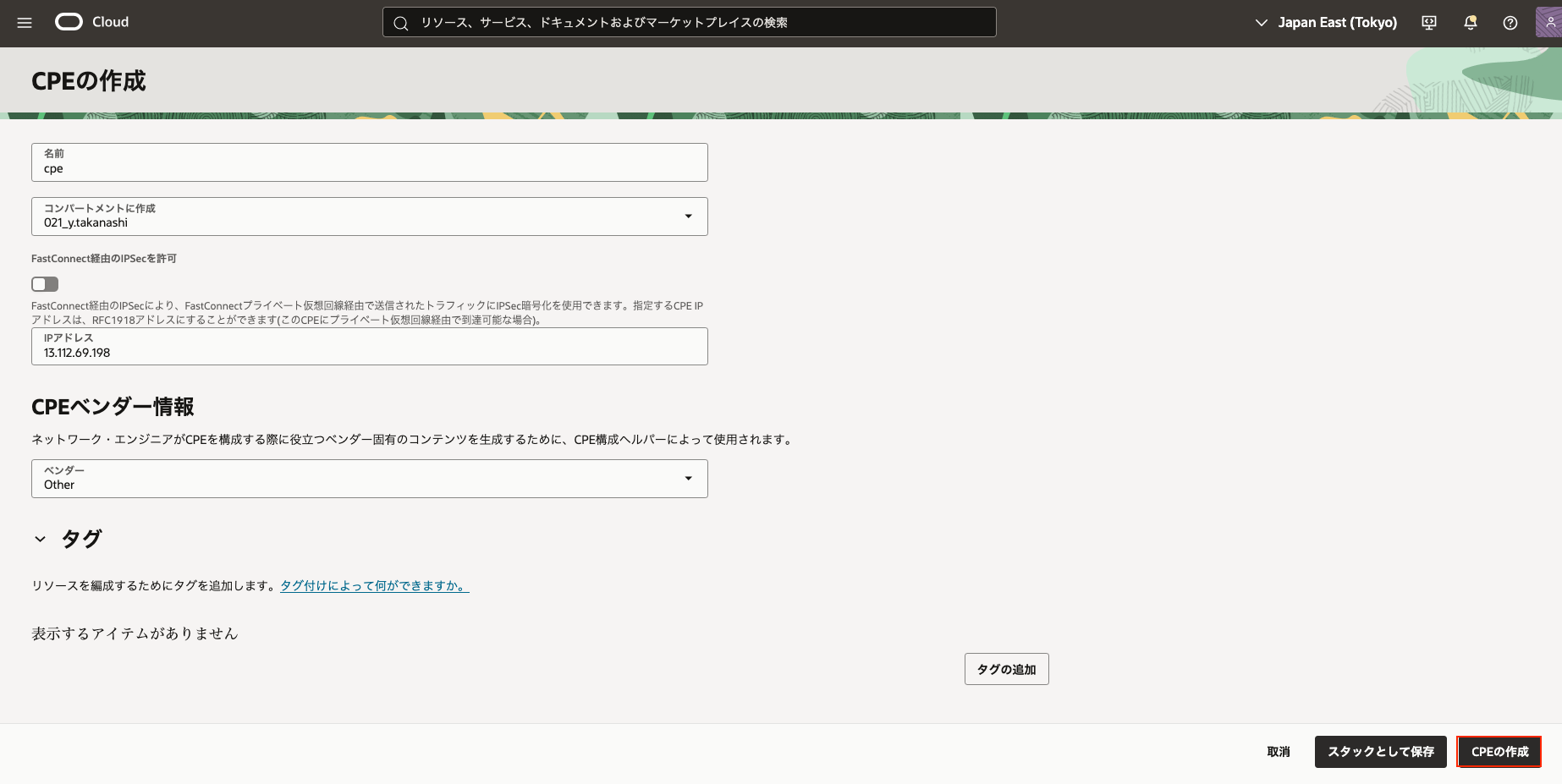
CPE が作成されることを確認します。

サイト間VPNの作成
次に、サイト間VPN(IPSec 接続)を作成します。
「ネットワーキング」→「サイト間VPN」を選択します。

「IPSec接続の作成」を選択します。

以下の項目を入力し、「IPSec接続の作成」を実行します。
- 名前:任意(例:
vpn-to-aws) - 顧客構内機器:作成したCPEを選択
- 動的ルーティング・ゲートウェイ:作成したDRGを選択
- トンネル1の名前:任意(例:
tun1tun2) - 共有シークレット:AWS 側のPre-Shared Keyに記載されている値
- IKEバージョン:IKEv2
- ルーティング・タイプ:BGP動的ルーティング
- BGP ASN:64512
- IPv4トンネル内インターフェース - CPE:Virtual Private Gatewayに記載されているCIDR
- IPv4トンネル内インターフェース - Oracle:Customer Gatewayに記載されているCIDR
OCI の仕様上、IPSec 接続1つにつきトンネル単位での冗長化は不可のため、
本手順ではトンネル 1 のみを使用します。


ライフサイクルの状態が
「プロビジョニング中」→「使用可能」
に変われば作成完了です。

「トンネル」から、今回利用するトンネル(ここでは「tun1」)の
Oracle VPN IP アドレスを控えておきます。

以上でOCI側の設定は完了です。
3.AWS側の設定(再度)
カスタマー・ゲートウェイの再作成
OCI側の設定完了後、AWS側でカスタマー・ゲートウェイを再作成します。
「カスタマーゲートウェイを作成」から以下の項目を入力してゲートウェイを作成します。
- 名前タグ:任意(例:
cgw) - BGP ASN:31898
※OCIのBGP ASN - IPアドレス:Oracle VPN IPアドレスに記載されている値

カスタマー・ゲートウェイが作成されます。

カスタマー・ゲートウェイの置き換え
既存のVPN接続に対して、作成したカスタマー・ゲートウェイを紐付け直します。
VPN接続の詳細画面から
「アクション」→「VPN接続を変更」を選択します。

ターゲット・カスタマー・ゲートウェイを新しく作成したものに変更し、
「変更を保存」を選択します。

状態が「変更中」→「利用可能」となれば完了です。

4.接続確認
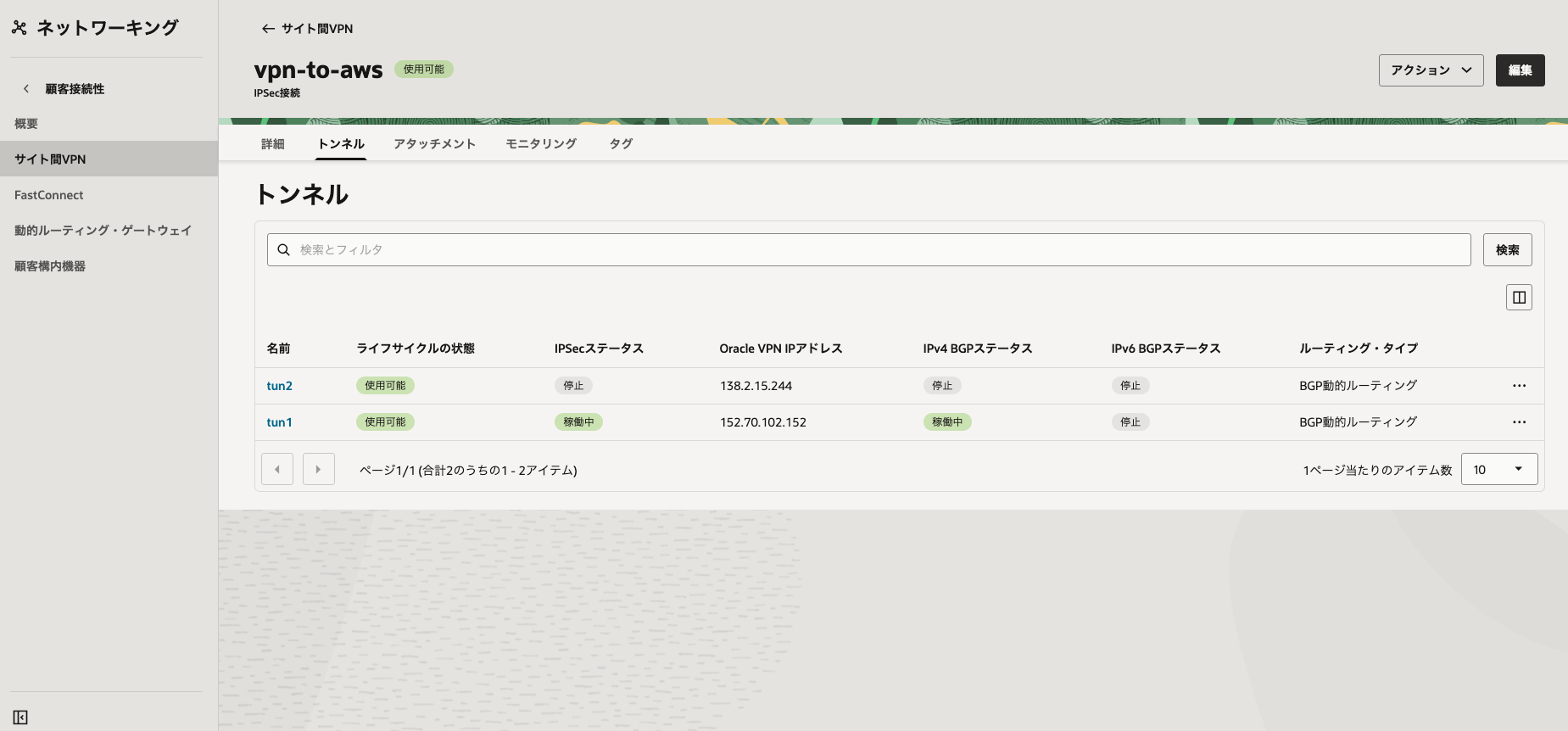
カスタマー・ゲートウェイの置き換え完了後、トンネル1のステータスを確認します。
設定に問題がない場合、トンネル1の状態は「Up」になります。
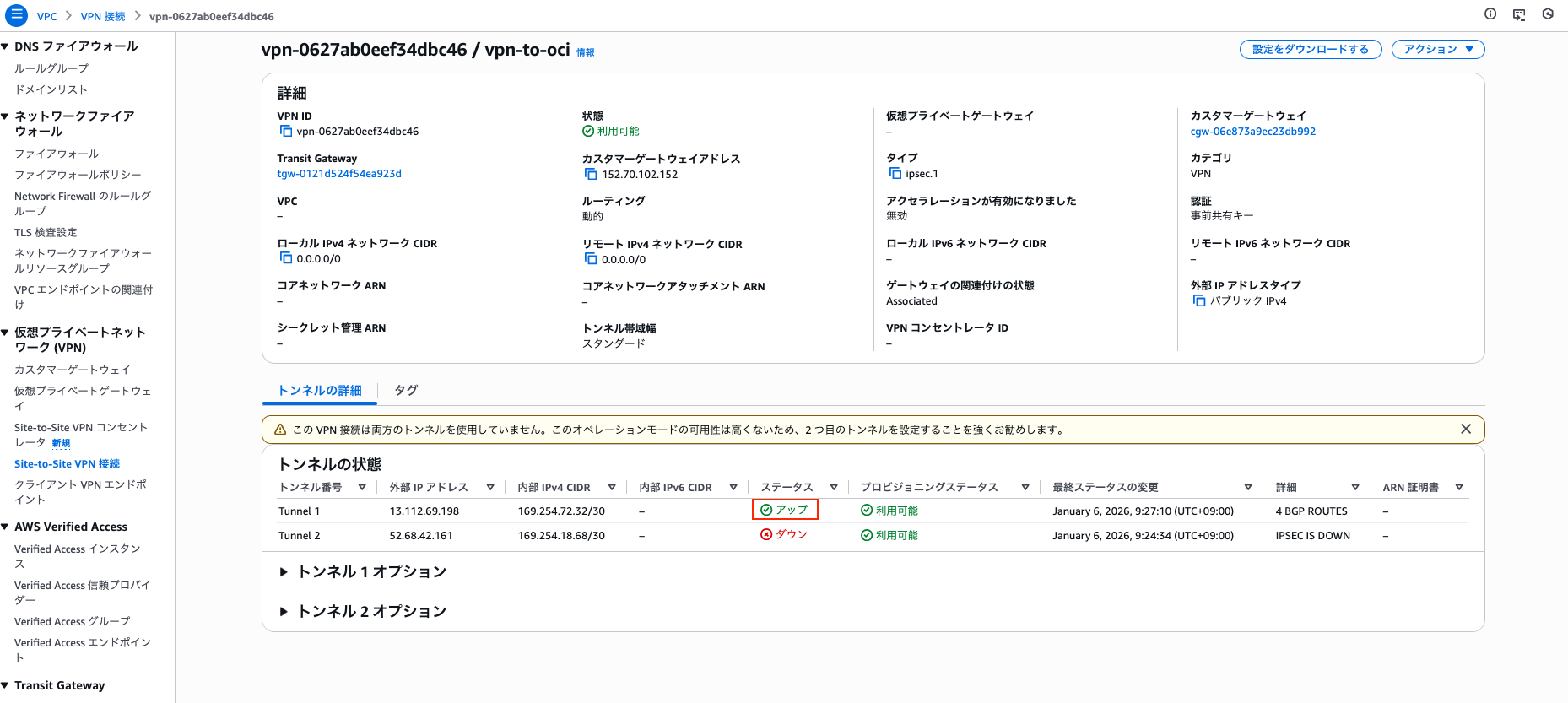
OCI側もIPSec StatusとIPv4 BGP statusがともに「稼働中」となり、
AWSとの接続が確立されていることが確認できます。
以上で、AWSとOCI間のVPN接続設定はすべて完了です。
なお、ping等による疎通確認については本記事では割愛します。
また、AWS側で一時的に作成したカスタマー・ゲートウェイは、
接続確立後は不要となるため、適宜削除してください。
参考ドキュメント
https://docs.oracle.com/ja-jp/iaas/Content/Network/Tasks/vpn_to_aws.htm
https://cloudii.jp/news/blog/aws/awsocivpn/