
はじめに
WebAssembly(WASM)は「ブラウザやサーバーで、ネイティブに近い速度でコードを実行できる、言語非依存のバイナリフォーマット」。Rust・C++・Goなど様々な言語からコンパイルでき、JavaScriptより高速に動くことが特徴。
この記事では:
- WASMの基礎知識
- RustでWASMをビルドする方法
- マンデルブロ集合(計算量の多いフラクタル図形)を描画する
- 同じロジックをJavaScriptでも実装し、速度比較する
「WASMって結局どれくらい速いの?」を実際に手を動かして確認する。実測してみると、単純に「WASMの方が常に速い」わけではないことも分かった。
WASMの基礎知識
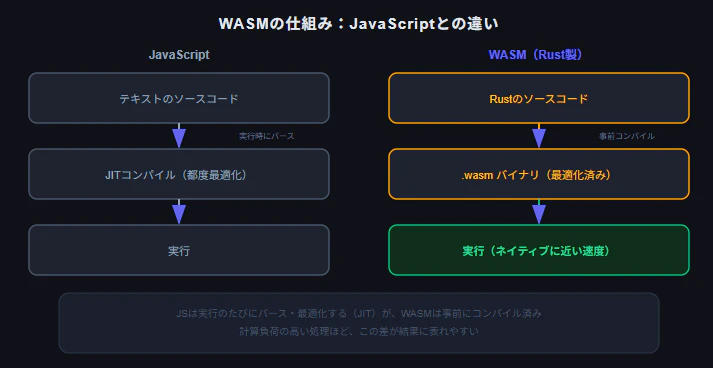
Rustのコード
    ↓ コンパイル(wasm-pack等)
.wasmファイル(バイナリ)
    ↓ ブラウザが読み込み・実行
JSから関数として呼び出せる
JavaScriptはテキストを都度パース・実行するインタプリタ言語(JITコンパイルはされるが)。WASMは事前にコンパイル済みのバイナリを直接実行するため、特に計算量の多い処理で速度差が出やすい。
マンデルブロ集合は「各ピクセルごとに複素数の反復計算を行う」という計算負荷の高い処理なので、WASMとJSの違いを体感するのに向いている。
1. Rust側のセットアップ
cargo install wasm-pack
cargo new --lib mandelbrot-wasm
cd mandelbrot-wasm
Cargo.toml を編集する:
[package]
name = "mandelbrot-wasm"
version = "0.1.0"
edition = "2021"

[lib]
crate-type = ["cdylib"]

[dependencies]
wasm-bindgen = "0.2"
crate-type = ["cdylib"] はWASM用の共有ライブラリとしてビルドするための設定。wasm-bindgen はRustとJavaScriptの間で関数・データをやり取りするためのライブラリ。
2. マンデルブロ集合のロジックを実装する
src/lib.rs:
use wasm_bindgen::prelude::*;

#[wasm_bindgen]
pub fn calculate_mandelbrot(width: u32, height: u32, max_iter: u32) -> Vec<u32> {
    let mut result = vec![0u32; (width * height) as usize];

    for py in 0..height {
        for px in 0..width {
            // ピクセル座標を複素平面上の座標に変換
            let x0 = (px as f64 / width as f64) * 3.5 - 2.5;
            let y0 = (py as f64 / height as f64) * 2.0 - 1.0;

            let mut x = 0.0;
            let mut y = 0.0;
            let mut iteration = 0;

            // z = z^2 + c の反復計算
            while x * x + y * y <= 4.0 && iteration < max_iter {
                let x_new = x * x - y * y + x0;
                y = 2.0 * x * y + y0;
                x = x_new;
                iteration += 1;
            }

            result[(py * width + px) as usize] = iteration;
        }
    }

    result
}
#[wasm_bindgen] をつけた関数は、JavaScript側から直接呼び出せるようになる。Vec<u32> の戻り値も自動的にJS側で扱える形に変換される。
マンデルブロ集合のアルゴリズム自体はシンプルで、各ピクセルに対応する複素数 c について z = z² + c を繰り返し、発散するまでの反復回数を記録するだけ。この「各ピクセルごとに最大反復回数までループする」という処理が、全体では非常に計算量が多くなる。
3. WASMにビルドする
wasm-pack build --target web --release
pkg/ ディレクトリに以下が生成される:
pkg/
├── mandelbrot_wasm.js       # JSから呼び出すためのラッパー
├── mandelbrot_wasm_bg.wasm  # 本体のWASMバイナリ
└── mandelbrot_wasm.d.ts     # TypeScript用の型定義
--target web にすることで、ブラウザで直接 import して使える形式のJSラッパーが生成される。
--release を忘れると、wasm-pack build はデフォルトでデバッグビルド(最適化なし)になる。この状態だとWASMの計算速度が本来の性能を発揮できず、JavaScriptのJITコンパイラによる最適化に負けることがある。実際、デバッグビルドで極端に解像度を上げて比較したところ、WASMが34秒・JSが31秒とJSの方がわずかに速いという結果になった。--release をつけてビルドし直すことで、この逆転現象は解消される。速度比較をする際は必ず --release でビルドすること。
4. HTMLから呼び出して描画する
index.html を作る:
<!DOCTYPE html>
<html lang="ja">
<head>
  <meta charset="UTF-8">
  <title>Mandelbrot: WASM vs JS</title>
</head>
<body>
  <h1>マンデルブロ集合:WASM vs JavaScript</h1>

  <div>
    <label>解像度: <input type="number" id="size" value="600"></label>
    <label>最大反復回数: <input type="number" id="maxIter" value="200"></label>
    <button id="runWasm">WASMで計算</button>
    <button id="runJs">JavaScriptで計算</button>
  </div>

  <p id="result"></p>
  <canvas id="canvas" width="600" height="600"></canvas>

  <script type="module">
    import init, { calculate_mandelbrot } from "./pkg/mandelbrot_wasm.js";

    let wasmReady = false;

    async function setup() {
      await init();
      wasmReady = true;
    }
    setup();

    function draw(iterData, width, height, maxIter) {
      const canvas = document.getElementById("canvas");
      canvas.width = width;
      canvas.height = height;
      const ctx = canvas.getContext("2d");
      const imageData = ctx.createImageData(width, height);

      for (let i = 0; i < iterData.length; i++) {
        const iter = iterData[i];
        const color = iter === maxIter ? 0 : Math.floor((iter / maxIter) * 255);
        imageData.data[i * 4] = color;
        imageData.data[i * 4 + 1] = color;
        imageData.data[i * 4 + 2] = 255 - color;
        imageData.data[i * 4 + 3] = 255;
      }

      ctx.putImageData(imageData, 0, 0);
    }

    // JavaScript版の同じロジック
    function calculateMandelbrotJs(width, height, maxIter) {
      const result = new Uint32Array(width * height);

      for (let py = 0; py < height; py++) {
        for (let px = 0; px < width; px++) {
          const x0 = (px / width) * 3.5 - 2.5;
          const y0 = (py / height) * 2.0 - 1.0;

          let x = 0.0;
          let y = 0.0;
          let iteration = 0;

          while (x * x + y * y <= 4.0 && iteration < maxIter) {
            const xNew = x * x - y * y + x0;
            y = 2.0 * x * y + y0;
            x = xNew;
            iteration++;
          }

          result[py * width + px] = iteration;
        }
      }

      return result;
    }

    document.getElementById("runWasm").addEventListener("click", () => {
      if (!wasmReady) {
        alert("WASMの読み込み中です");
        return;
      }
      const width = Number(document.getElementById("size").value);
      const height = width;
      const maxIter = Number(document.getElementById("maxIter").value);

      const start = performance.now();
      const result = calculate_mandelbrot(width, height, maxIter);
      const elapsed = performance.now() - start;

      draw(result, width, height, maxIter);
      document.getElementById("result").textContent = `WASM: ${elapsed.toFixed(2)}ms`;
    });

    document.getElementById("runJs").addEventListener("click", () => {
      const width = Number(document.getElementById("size").value);
      const height = width;
      const maxIter = Number(document.getElementById("maxIter").value);

      const start = performance.now();
      const result = calculateMandelbrotJs(width, height, maxIter);
      const elapsed = performance.now() - start;

      draw(result, width, height, maxIter);
      document.getElementById("result").textContent = `JavaScript: ${elapsed.toFixed(2)}ms`;
    });
  </script>
</body>
</html>
WASM版・JS版で全く同じアルゴリズムを実装し、どちらもボタンで実行して performance.now() で計測時間を表示する構成にした。
5. ローカルで動かす
WASMをブラウザから読み込むには、file:// ではなくHTTPサーバー経由で配信する必要がある(CORSの制約)。
npx serve .
表示されたURL(http://localhost:3000 など)にアクセスする。
6. 速度比較の結果
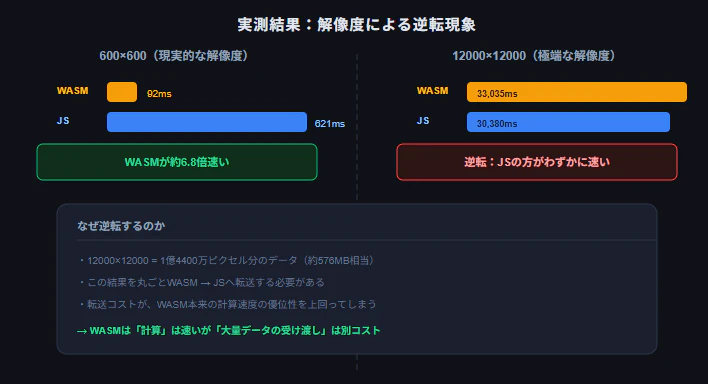
実際に手元の環境(Windows / Brave)で計測した結果がこちら。
現実的な解像度(600×600、最大反復回数200)
| 実行時間 | |
|---|---|
| WASM | 約92ms |
| JavaScript | 約621ms |
WASMがJSの約6.8倍速いという、期待通りの結果になった。
極端に解像度を上げた場合(12000×12000)
| 実行時間 | |
|---|---|
| WASM | 約33,035ms |
| JavaScript | 約30,380ms |
驚くことに、JavaScriptの方がわずかに速いという逆転現象が起きた。
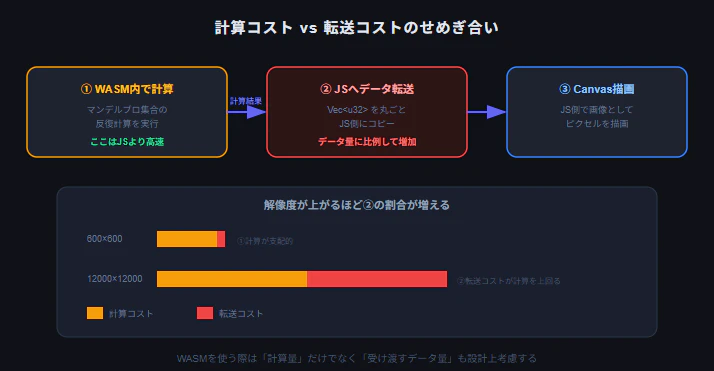
なぜ逆転するのか
12000×12000は1億4400万ピクセル分の計算結果(Vec<u32>)を丸ごとJS側に転送する計算になる。データ量にして約576MB相当。この規模になると、WASM→JS間のデータ転送コストが、計算時間そのものを上回ってしまう。
つまり:
- 計算部分自体はWASMの方が圧倒的に速い(600×600の結果がそれを裏付けている)
- しかし大量データをJSとやり取りする往復コストは、解像度に比例して増え続ける
- ある規模を超えると、この転送コストが計算の速さを打ち消してしまう
実務でWASMを使う際は、「計算は速いが、JS側との大きなデータの受け渡しはコストがかかる」ことを踏まえ、可能であれば結果を丸ごと返すのではなく、必要な範囲だけ受け渡す・WASM側で完結できる処理を増やす、といった設計上の工夫が効いてくる。
まとめ
| 要素 | 役割 |
|---|---|
wasm-bindgen |
RustとJSの間で関数・データをやり取りする |
wasm-pack build --target web --release |
ブラウザで直接importできる形式に、最適化ありでビルド |
performance.now() |
JS側で処理時間を計測する標準API |
今回はマンデルブロ集合という「計算量が多く、見た目にも変化が分かりやすい」題材でWASMとJSの速度差を体感した。現実的な解像度ではWASMが数倍速い一方、極端にデータ量を増やすとWASM⇔JS間の転送コストが支配的になり、JSに逆転されることもあると実測で確認できた。WASMは万能の高速化手段ではなく、「計算量は多いがJSとのデータの受け渡しは小さく抑えられる」場面で真価を発揮する、という使い分けの感覚が、実務での適用判断に役立つはず。