
この記事について
基礎編・バックエンド実装編に続く、hono-express-nextjs-todoシリーズの最終回です。Next.jsでSPAのフロントエンドを作り、これまで作ったHono/ExpressのAPIと結合します。
今回は実装そのものよりも、「AIエージェント時代のNext.js」がどう変わっていたかという発見が多い回になりました。create-next-appが生成するファイルに見慣れないものが増えていたり、公式ドキュメントがAIエージェント自身に読み方を指示していたり、といった話を中心にまとめます。
1. プロジェクト構成
hono-express-nextjs-todo/にfrontend/を追加します。
# docker-compose.yml に追加
  frontend-app:
    build: .
    volumes:
      - ./frontend:/app
      - frontend_node_modules:/app/node_modules
    working_dir: /app
    ports:
      - "3000:3000"
    tty: true

volumes:
  # ...
  frontend_node_modules:
APIの向き先は環境変数で切り替えられるようにしました。
API_BASE_URL=http://hono-app:3000
(この値の意味は後述します。最初はhttp://localhost:3001にしていましたが、結果的に書き換えることになりました。)
2. create-next-appが変わっていた
npx create-next-app@latest .
を実行すると、見慣れないプロンプトが表示されました。
? Would you like to use the recommended Next.js defaults? › - Use arrow-keys. Return to submit.
❯   Yes, use recommended defaults - TypeScript, ESLint, No React Compiler, Tailwind CSS, No src/ directory, App Router, AGENTS.md
    No, reuse previous settings
    No, customize settings
「推奨デフォルト」の中にAGENTS.mdが正式に含まれていることに気づきました。実際に生成されたプロジェクトには、見慣れないファイルが2つ増えていました。
AGENTS.md
CLAUDE.md
CLAUDE.mdの中身を見ると、驚くほど短い1行でした。
@AGENTS.md
Claude Codeには@ファイル名で他ファイルの内容を読み込む記法があり、CLAUDE.mdは実体を持たずAGENTS.mdへの参照だけを担っている構成でした。実体であるAGENTS.mdの中身はこうなっていました。
<!-- BEGIN:nextjs-agent-rules -->

# This is NOT the Next.js you know

This version has breaking changes — APIs, conventions, and file structure may all differ from your training data. Read the relevant guide in `node_modules/next/dist/docs/` (resolved from this file's directory; in monorepos the `next` package may not be visible from the repo root) before writing any code. Heed deprecation notices.

This block is written and re-added by `next dev` — verify at `node_modules/next/dist/server/lib/generate-agent-files.js`. Removing it from a diff only re-creates the uncommitted change; committing it with your work keeps the tree clean.

<!-- END:nextjs-agent-rules -->
意訳すると「これはお前が学習データで知っているNext.jsとは違う。コードを書く前にnode_modules/next/dist/docs/のガイドを読め」という、フレームワーク自身がAIエージェント宛てに直接書いた警告文です。しかもnext devが起動のたびにこのブロックを自動で書き戻す仕組みまで用意されており、コミットからうっかり消しても実害はない(次のnext devで復活する)ようになっています。
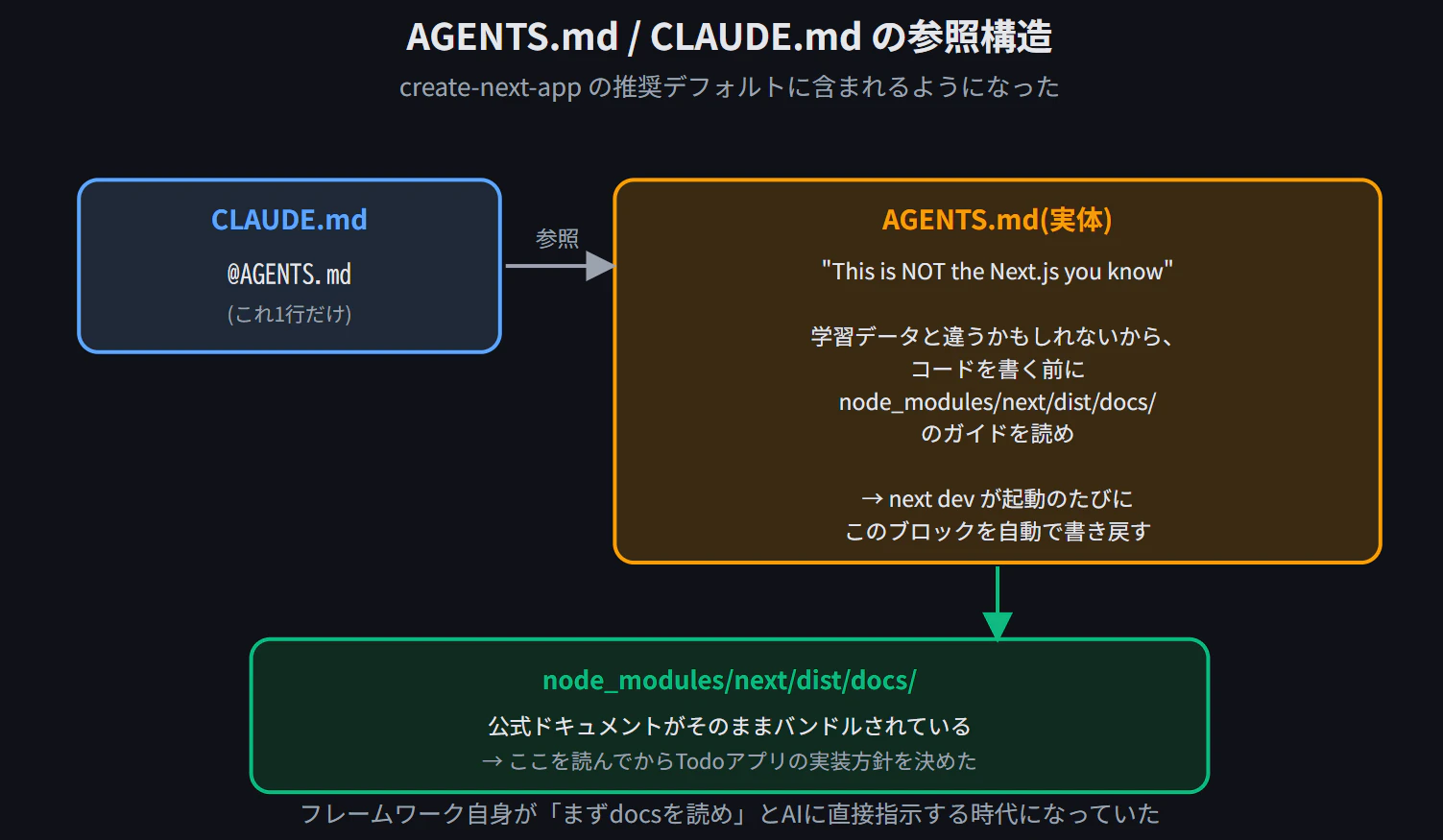
これは今の開発でかなり本質的な話だと感じました。LLMの学習データはある時点で止まっていて、フレームワーク側もそれを織り込んで「まず現物のドキュメントを読め」と釘を刺してくる、という状況です。
3. 実際にdocsを読みに行く
忠告どおり、node_modules/next/dist/docs/を覗きました。
ls node_modules/next/dist/docs/
# 01-app  02-pages  03-architecture  04-community  index.md
公式ドキュメントがそのままパッケージにバンドルされていました。データフェッチ関連のファイルを探すと、目的のものが見つかりました。
find node_modules/next/dist/docs/01-app/ -iname "*fetch*" -o -iname "*data*"
node_modules/next/dist/docs/01-app/01-getting-started/06-fetching-data.md
node_modules/next/dist/docs/01-app/01-getting-started/07-mutating-data.md
node_modules/next/dist/docs/01-app/02-guides/single-page-applications.md
3つとも読んだ結果、特にsingle-page-applications.mdに、探していたものそのものが載っていました。Todoリストの実装例です。useActionStateとuseOptimisticを組み合わせ、Server Actionでサーバーへの反映と楽観的UIを両立させるパターンが、ほぼそのまま流用できる形で書かれていました。
ドキュメントの例はdb.saveTodos(next)のようにNext.js自身のサーバー内でDB操作する前提でしたが、Server Actionは「サーバー側で動く非同期関数」というだけなので、中身を外部APIへのfetchに差し替えれば同じパターンがそのまま使えます。
4. 実装方針の転換:Client fetchからServer Actionsへ
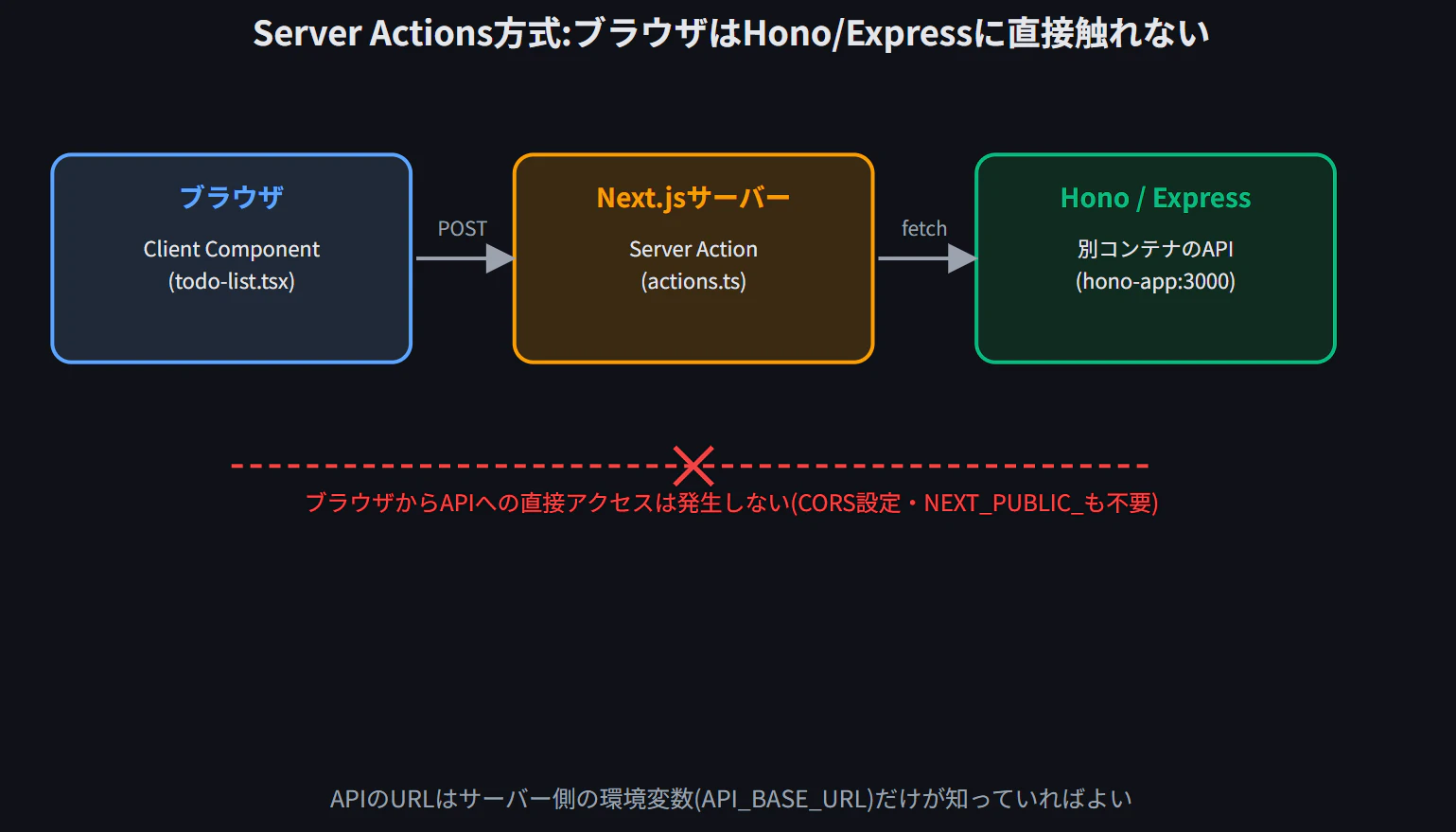
当初は素朴に「Client ComponentからfetchでHono/ExpressのAPIを叩く」設計を想定していましたが、ドキュメントを読んだ結果、Server Actions方式に転換しました。これには2つの副産物がありました。
- CORS設定が不要:Server ActionはNext.jsのサーバー(Node.jsプロセス)で実行されるため、ブラウザは一切Hono/Expressに直接アクセスしません。Client Componentで直接fetchする設計だったら、Hono/Express側にCORSミドルウェアの追加が必要でした。
-
NEXT_PUBLIC_プレフィックスが不要:APIのURLはサーバー側でしか使わないので、ブラウザのJSバンドルに含める必要がありません。当初NEXT_PUBLIC_API_BASE_URLとしていた環境変数を、API_BASE_URLに変更しました。
5. 実装
app/todos-reducer.ts(楽観的更新のロジック)
export type Todo = {
  id: number;
  title: string;
  done: boolean;
  createdAt: string;
};

export type TodoAction =
  | { type: "add"; title: string }
  | { type: "toggle"; id: number }
  | { type: "delete"; id: number };

export function todosReducer(todos: Todo[], action: TodoAction): Todo[] {
  switch (action.type) {
    case "add":
      return [
        ...todos,
        { id: -Date.now(), title: action.title, done: false, createdAt: new Date().toISOString() },
      ];
    case "toggle":
      return todos.map((t) => (t.id === action.id ? { ...t, done: !t.done } : t));
    case "delete":
      return todos.filter((t) => t.id !== action.id);
    default:
      return todos;
  }
}
app/actions.ts(Server Action、ここでHono APIを叩く)
"use server";

import type { Todo, TodoAction } from "./todos-reducer";

const API_BASE_URL = process.env.API_BASE_URL ?? "http://localhost:3001";

export async function saveTodos(todos: Todo[], action: TodoAction): Promise<Todo[]> {
  switch (action.type) {
    case "add": {
      await fetch(`${API_BASE_URL}/todos`, {
        method: "POST",
        headers: { "Content-Type": "application/json" },
        body: JSON.stringify({ title: action.title }),
      });
      break;
    }
    case "toggle": {
      const current = todos.find((t) => t.id === action.id);
      await fetch(`${API_BASE_URL}/todos/${action.id}`, {
        method: "PATCH",
        headers: { "Content-Type": "application/json" },
        body: JSON.stringify({ done: !current?.done }),
      });
      break;
    }
    case "delete": {
      await fetch(`${API_BASE_URL}/todos/${action.id}`, { method: "DELETE" });
      break;
    }
  }

  const res = await fetch(`${API_BASE_URL}/todos`);
  return res.json();
}
app/todo-list.tsx(Client Component)
"use client";

import { useActionState, useOptimistic, startTransition } from "react";
import { saveTodos } from "./actions";
import { todosReducer, type Todo, type TodoAction } from "./todos-reducer";

export function TodoList({ initialTodos }: { initialTodos: Todo[] }) {
  const [todos, dispatch, isPending] = useActionState(saveTodos, initialTodos);
  const [optimisticTodos, addOptimistic] = useOptimistic(todos, todosReducer);

  function runAction(action: TodoAction) {
    startTransition(() => {
      addOptimistic(action);
      dispatch(action);
    });
  }

  return (
    <div className="space-y-4">
      <form
        action={(formData) =>
          runAction({ type: "add", title: String(formData.get("title")) })
        }
        className="flex gap-2"
      >
        <input
          name="title"
          placeholder="やることを入力"
          className="flex-1 rounded-md border border-gray-300 px-3 py-2 text-sm focus:border-blue-500 focus:outline-none"
        />
        <button
          type="submit"
          className="rounded-md bg-blue-600 px-4 py-2 text-sm font-medium text-white hover:bg-blue-700"
        >
          追加
        </button>
      </form>

      {optimisticTodos.length === 0 && (
        <p className="px-4 py-6 text-center text-sm text-gray-400">
          まだTodoがありません
        </p>
      )}

      <ul className="divide-y divide-gray-200 rounded-md border border-gray-200 bg-white">
        {optimisticTodos.map((todo) => (
          <li key={todo.id} className="flex items-center gap-3 px-4 py-3">
            <input
              type="checkbox"
              checked={todo.done}
              onChange={() => runAction({ type: "toggle", id: todo.id })}
              className="h-4 w-4 rounded border-gray-300 text-blue-600 focus:ring-blue-500"
            />
            <span
              className={`flex-1 text-sm ${
                todo.done ? "text-gray-400 line-through" : "text-gray-800"
              }`}
            >
              {todo.title}
            </span>
            <button
              onClick={() => runAction({ type: "delete", id: todo.id })}
              className="text-xs text-red-500 hover:text-red-700"
            >
              削除
            </button>
          </li>
        ))}
      </ul>

      {isPending && <p className="text-xs text-gray-400">同期中…</p>}
    </div>
  );
}
app/page.tsx(Server Component、初期データ取得)
import { TodoList } from "./todo-list";

const API_BASE_URL = process.env.API_BASE_URL ?? "http://localhost:3001";

export default async function Page() {
  const res = await fetch(`${API_BASE_URL}/todos`, { cache: "no-store" });
  const initialTodos = await res.json();

  return (
    <main className="mx-auto mt-16 max-w-md px-4">
      <h1 className="mb-6 text-2xl font-bold text-gray-800">Todo</h1>
      <TodoList initialTodos={initialTodos} />
    </main>
  );
}
6. トラブルシュート集
実装以上にハマりどころが多かったので、まとめて記録します。
①Turbopackがnext/package.jsonを見つけられない
Turbopack build encountered 1 error:
./app
Error: Could not find the Next.js package (next/package.json)
Resolved from: /app/app
Filesystem root used for resolution: /app
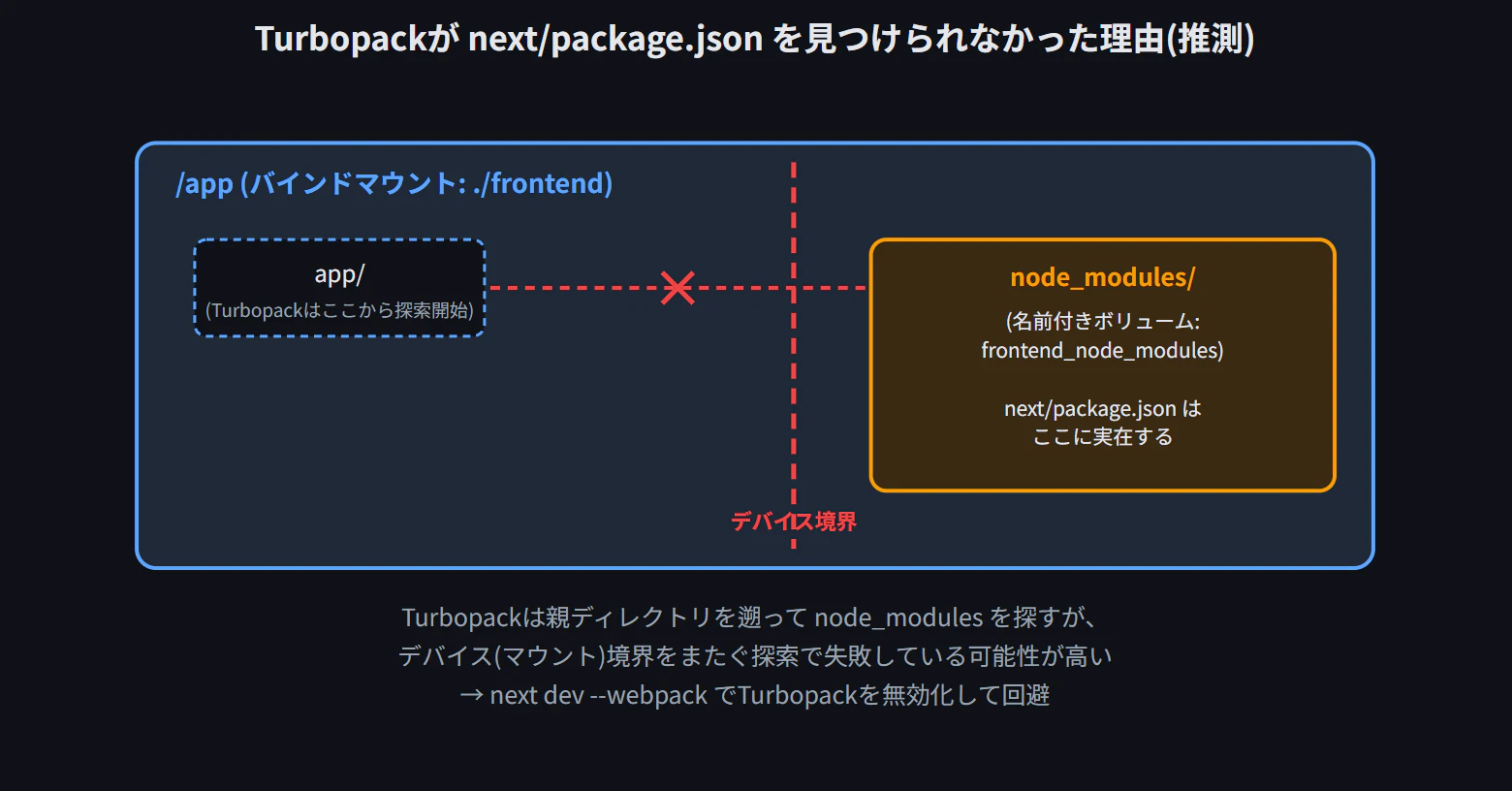
node_modules自体はls node_modules/next/package.jsonで存在を確認できるのに、Turbopackからは見えない状態でした。turbopack.rootをnext.config.tsで明示しても解決せず、最終的にnext dev --webpackでTurbopackを無効化することで回避しました。
原因は完全には特定できていませんが、docker-compose.ymlでnode_modulesを親ディレクトリ(/app)とは別の名前付きボリュームにマウントしている構成が怪しいと考えています。バインドマウントされた/appと、名前付きボリュームの/app/node_modulesは別デバイス(別ファイルシステム)になるため、Rust製で高速なファイルシステム走査を行うTurbopackが、親ディレクトリを遡ってnode_modulesを探す際にデバイス境界で探索を打ち切っている可能性があります。バックエンド編で同じボリューム構成を使っていましたが、Hono/ExpressはTurbopackを使わないため問題が顕在化しなかった、という推測です。
②コンテナ間通信でlocalhostを使ってしまう
Caused by: Error
connect ECONNREFUSED 127.0.0.1:3001
.env.localにAPI_BASE_URL=http://localhost:3001と書いていましたが、これはNext.jsコンテナ自身のlocalhostを指すため、当然Honoは存在せず接続を拒否されます。Docker Compose上の別コンテナへは、サービス名+コンテナ内部のポートでアクセスする必要がありました。
API_BASE_URL=http://hono-app:3000
ホストWindows側に公開するためのポート(3001)と、コンテナ内部で実際にリッスンしているポート(3000)を混同しないことが重要でした。
③古いnext devプロセスの残留
⨯ Another next dev server is already running.
- PID:          822
Ctrl+Cで止めたつもりのnext dev(Turbopack版)がバックグラウンドに残っており、古い環境変数の値を握ったまま動き続けていました。killでプロセスを終了させてから再起動することで解決しました。バックエンド実装編で遭遇したtsxのプロセス残留問題と、構図がよく似ています。
④コピペミスによる事故が複数回発生
デバッグの過程で、こちらが提示したコードスニペットの一部行が欠落した状態のまま反映されてしまい、以下のようなエラーが連鎖しました。
⨯ ReferenceError: API_BASE_URL is not defined
Runtime ReferenceError: TodoList is not defined
いずれも、断片的な差分ではなくファイル全体を提示し直すことで解消しました。AIとのやり取りでコードを継ぎ足していく時は、差分ではなくファイル全体を都度示すほうが事故が少ない、という実務的な教訓です。
⑤useOptimisticのつもりがuseActionStateになっていた
const [optimisticTodos, addOptimistic] = useActionState(todos, todosReducer);
これはuseOptimisticが正しく、実行時にaction.bind is not a functionというエラーになりました。似た名前のフックを2つ同時に使うコードでは、こうした取り違えが起きやすいと実感しました。
⑥checked={todo.id}による表示バグ
一番見つけにくかったのがこれです。
<input
  type="checkbox"
  checked={todo.id}  // 本来は todo.done
  onChange={() => runAction({ type: "toggle", id: todo.id })}
/>
サーバーへの送信ログを見ると、トグル処理自体は正常に動いていました(done: false → true → falseと交互に切り替わっている)。にもかかわらず、画面上は「チェックを外したのにまたチェックが入る」ように見えていました。原因はcheckedの判定にtodo.id(常に0以外の数値、つまり常にtruthy)を渡してしまっていたことで、サーバー処理は正常、UIの見た目だけ壊れているという、ログだけでは気づきにくいパターンでした。あわせてtextDecoration: "done"という無効なCSS値も見つかりました(正しくは"none")。
まとめ
これでhono-express-nextjs-todoシリーズは完結です。3本を通しての振り返りです。
-
①TypeScript基礎編:PHPの緩い型付けとの対比で、
noUncheckedIndexedAccessやexactOptionalPropertyTypesといったstrict系オプションの価値を実感した -
②バックエンド実装編:同じ仕様のAPIをHono/Expressで実装し比較。コード量の差はわずかで、「軽量だから速い」も実測では確認できなかった。一方で
lastInsertRowidのタイポのような、型チェックをすり抜けるバグにも複数遭遇した -
③フロントエンド結合編(本記事):Next.jsとAIエージェント関連の変化が大きく、
AGENTS.mdがデフォルトで生成され、フレームワーク自身がAIに「まずdocsを読め」と警告する時代になっていた。実際にその忠告に従うことで、Server Actions +useOptimisticという実装方針にたどり着けた
3本を通して一貫していたのは、エラーメッセージや公式情報を鵜呑みにせず、実際に手を動かして確認することの重要性でした。AIとの協働開発が進んでも、この基本姿勢は変わらないと感じています。