
画面に貼り込むテクスチャを用意する場合に
どの程度の大きさで表示されるのか知っておきたいという局面が出たので
blenderアドオンを作成したのでメモ程度に
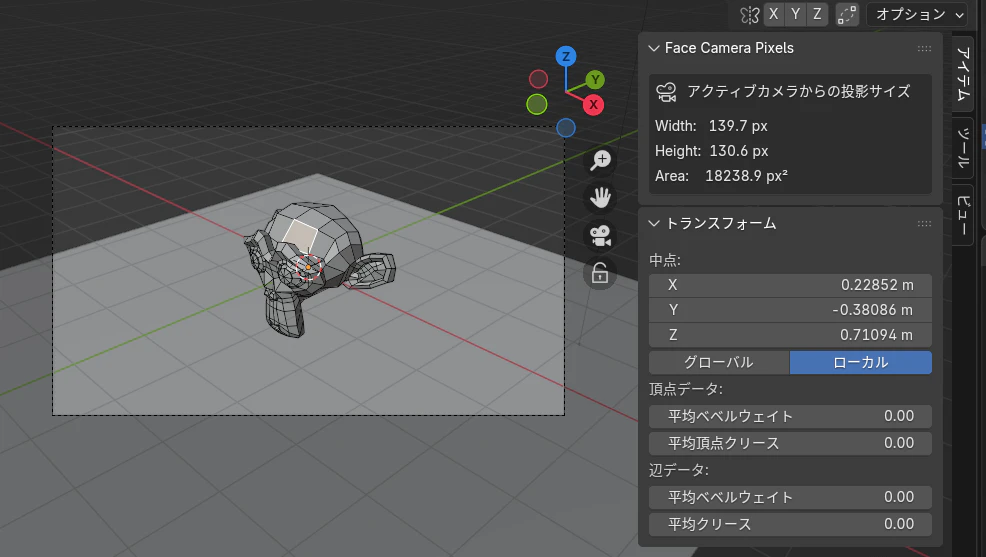
選択面の縦横をカメラ座標に投影したものをのバウンディングボックスを取得するだけのものです
calc_face2camera_pixels.py
bl_info = {
    "name": "Selected Face Camera Pixels",
    "author": "Yukimi",
    "version": (1, 1),
    "blender": (4, 0, 0),
    "location": "View3D > N Panel > Face Camera Pixels",
    "description": "アクティブカメラから見た選択面のピクセルサイズを表示",
    "category": "3D View",
}

import bpy
import bmesh
from bpy_extras.object_utils import world_to_camera_view

def calculate_face_pixels(context):
    """選択面のカメラ投影ピクセルサイズを計算"""
    obj = context.active_object
    if obj.mode != 'EDIT': return 0.0, 0.0

    bm = bmesh.from_edit_mesh(obj.data)
    selected_faces = [f for f in bm.faces if f.select]

    if not selected_faces: return 0.0, 0.0

    # 全頂点のワールド座標
    world_verts = [obj.matrix_world @ v.co for face in selected_faces for v in face.verts]

    if len(world_verts) < 2: return 0.0, 0.0

    # カメラ投影
    projected = []
    for v in world_verts:
        coord = world_to_camera_view(context.scene, context.scene.camera, v)
        if 0 <= coord.x <= 1 and 0 <= coord.y <= 1:  # 視野内のみ
            projected.append(coord)

    if len(projected) < 2: return 0.0, 0.0

    xs = [p.x for p in projected]
    ys = [p.y for p in projected]
    #bbox
    width_norm = max(xs) - min(xs)
    height_norm = max(ys) - min(ys)
    # レンダリング画像基準のサイズ
    render = context.scene.render
    width_px = width_norm * render.resolution_x
    height_px = height_norm * render.resolution_y

    return width_px, height_px


class Y_FACE_CAMERA_PIXELS_PT_panel(bpy.types.Panel):
    bl_label = "Face Camera Pixels"
    bl_idname = "FACE_CAMERA_PIXELS_PT_panel"
    bl_space_type = 'VIEW_3D'
    bl_region_type = 'UI'
    bl_category = "Item"

    def draw(self, context):
        layout = self.layout
        scene = context.scene
        obj = context.active_object

        box = layout.box()
        box.label(text="アクティブカメラからの投影サイズ", icon='CAMERA_DATA')

        if not obj or obj.type == 'MESH':
            width, height = calculate_face_pixels(context)
            if not scene.camera:
                box.label(text="シーンにアクティブカメラがありません")
            else:
                if width > 0 or height > 0:
                    col = box.column(align=True)
                    col.label(text=f"Width:   {width:.1f} px")
                    col.label(text=f"Height:  {height:.1f} px")
                    col.label(text=f"Area:    {width * height:.1f} px²")
                else:
                    box.label(text="選択面がありません", icon='INFO')
                    box.label(text="Edit Modeで面を選択してください")
        else:
            self.report({'WARNING'}, "メッシュオブジェクトを選択してください")


# 登録・解除
def register():
    bpy.utils.register_class(Y_FACE_CAMERA_PIXELS_PT_panel)


def unregister():
    bpy.utils.unregister_class(Y_FACE_CAMERA_PIXELS_PT_panel)


if __name__ == "__main__":
    register()
XのGrokで生成してみたものを微調整しました
自分でも作れましたが 一瞬でエラー処理も含めて動くものが出るのは改めてすごいものですね