
はじめに
find の -mtime と -mmin、curl の -X と -H、docker run の -p と --name。
使い慣れたコマンドでも、少し複雑になると --help を見に行きたくなります。
そこで、思いついた順に単語を並べるとコマンド行を組み立ててくれる jany を作りました。
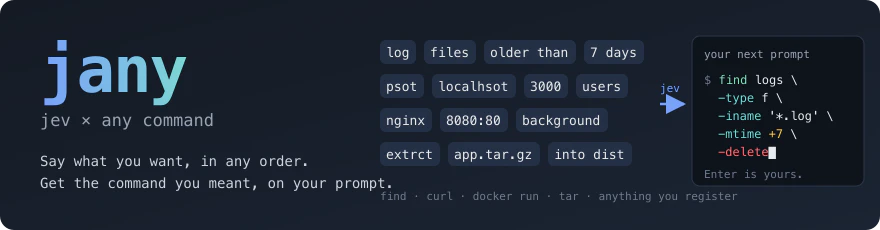
$ jany find log files older than 7 days in logs
$ find logs -type f -iname '*.log' -mtime +7█
2 行目は出力ではなく、入力済みの次のプロンプトです。jany はコマンドを実行しません。読んで、必要なら直して、Enter は自分で押します。
jany は experimental です。コマンド定義やシェル連携は 1.0 までに変わる可能性があります。
始め方・やめ方
| 始める |
cargo install jany && jany --skills --locale ja のあと、Claude Code か Codex で /jany-setup
|
| 使う | jany find log files older than 7 days |
| コマンドを足す | /jany-register tar |
| やめる | /jany-teardown |
/jany-setup は、どのシェルで使うかを聞いて rc に設定を書きます。zsh なら、jany を付けずに find empty folders と打てる jany --on にするかも聞きます。
/jany-teardown は、jany が置いたもの(rc の行、設定、スキル、バイナリ)を片付けます。
使ってみる
$ jany curl psot localhsot 3000 users first_name amanda     # typo も分かれたポートも OK
$ curl -sS -X POST http://localhost:3000/users -H 'Content-Type: application/json' -H 'Accept: application/json' --data '{"first_name":"amanda"}'

$ jany docker run nginx 8080:80 background named web
$ docker run -d --name web -p 8080:80 nginx

$ jany find empty folders depth 2 count
$ find . -maxdepth 2 -type d -empty | wc -l
find、curl、docker run の定義は最初から入っています。jany --list で、入っている定義とそれぞれの入力例が見られます。
$ jany --list
curl  e.g. jany curl post localhost json profile.first_name=job
docker run  e.g. jany docker run nginx 8080:80 background named web
find  e.g. jany find log files older than 7 days in /var/log delete
思ったとおりに変換されないときは --hint を付けると、そのコマンドに言える語(役割)と例が出ます。
$ jany ffmpeg --hint
  what you can say to `jany ffmpeg`:
    input     The input media file or URL to read (clip.mov, ~/Videos/talk.mkv, https://example.com/a.m3u8)
    output    The output file to write (out.mp4, audio.mp3, thumb.jpg)
    start     Where to start in the input (a time like 0:10, 90, 30s; usually after: from, start, at, skip)
    …
  examples (from cases.toml):
    jany ffmpeg clip.mp4 gif 10fps 480p first 5s
      → ffmpeg -t 5 -i clip.mp4 -r 10 -vf 'scale=-2:480' clip.gif
    …
仕組み

-
*.log、/var/log、8080:80、+7d、KEY=valueのように形で分かる語は、規則で決めます。全部の語が規則で決まれば、外には何も送りません - 規則で決まらない語(
log、older、7など)だけ、役割を jev(TypeSafe System One、OpenRouter 経由)に 1 回のリクエストで聞きます。jev は決まった選択肢から役割を選ぶだけで、コマンドは生成しません - 危ないコマンド(
find … -deleteなど)は、消える対象を先に見せてから入力行に置きます
語ごとにどう決まったかは --explain で見られます。
$ jany find log files older than 7 days in logs --explain
word   role        conf  by    note
log    extension   0.59  jev   extension 0.62, name_word 0.23
files  type        1.00  rule  → f
older  qualifier   1.00  rule
than   qualifier   1.00  rule
7      time_amount 0.93  jev   ≥ 7 days; at least p=0.93; time_amount 1.00, action 0.00
days   unit        1.00  rule
in     noise       1.00  rule
logs   path        0.99  jev   path 1.00, action 0.00
jev: typesafe/jev-1.13-20260917 · 8 questions · 381 ms · 2655 in / 861 out tokens · $0.000112
confidence 0.59: check the command before you run it
by の列が rule の語は規則で決まり、jev の語は jev が決めています。log は拡張子とファイル名の一部のどちらとも取れるので、確信度は 0.59 にとどまっています。こういうときは最後の行のように注意が出ます。*.log と書けば迷わず規則で決まります。
jev には、聞く語の文脈として入力の語を全部送ります。ヘッダや環境変数のように秘密が入りうる役割は、定義でマスクを指定しておけば、伏せた形で送られます。
コマンドを足す・育てる
jurl と jind を作ってみると、ほとんどの処理が同じでした。語を分けて、規則で決めて、残りを jev に聞いて、直して、組み立てるところまでは共通です。違うのは、最後にどんな argv を作るかだけでした。
そこで jany では、コマンドごとに違う部分を 3 つのファイルに出しました。コマンドを足すのに Rust は書きません。
~/.config/jany/cmd/<name>/
  schema.toml    役割・語の表・規則
  assemble.sh    役割の付いた語(JSON)→ argv(JSON)
  cases.toml     入力 → 期待する argv のテスト(jany --test <name> で回す)
このファイルは、Claude Code / Codex の /jany-register <name> に書かせます。
$ jany tar extrct app.tar.gz into dist strip 1       # /jany-register で足した定義
$ tar -xf app.tar.gz --strip-components 1 -C dist
使っていて誤認識に気づいたら、定義を直せば次からはそう読まれます。例えば自作の docker compose の定義では、ps a の a がただの埋め草(noise)と読まれていました。
$ jany docker compose ps a --explain
word  role   conf  by    note
ps    verb   1.00  rule
a     noise  1.00  rule
jev: not called (fast path)
エージェントに「a は --all」と伝えて定義を直させると、次からはこう読まれます。
$ jany docker compose ps a --explain
word  role   conf  by    note
ps    verb   1.00  rule
a     flag   1.00  rule  → all
jev: not called (fast path)
向かないもの
語の役割がだいたい決まっているコマンド(find、curl、docker run、tar、git の一部)は得意です。
任意の SQL、jq の式、ffmpeg のフィルタグラフのように自由度が高すぎるものは向きません。そういう部分は -- の後ろに書けば、そのまま渡せます。
jany find log files -- -perm 644
おわりに
最初は curl の引数を覚えるのが面倒で、jurl post localhost 3000 users first_name job と打てる jurl を作りました。次に find のために jind を作りました。docker も tar も git も欲しくなったところで、コマンドごとにバイナリを書くこと自体が面倒になり、定義ファイルでコマンドを増やせる jany になりました。
曖昧な部分だけを jev に判定させて、実行するかどうかは人間が決める。そのバランスを目指しています。