1
0

Delete article

Deleted articles cannot be recovered.

Draft of this article would be also deleted.

Are you sure you want to delete this article?

More than 5 years have passed since last update.

Salesforce(Lightning)で設定を変えても反映されない場合の対処法

Last updated at Posted at 2020-06-12

はじめに

Salesforce認定アドミニストレータの勉強中、項目ヘルプテキストを追加したのに、ぜんぜん反映されなくて困った。
そこで、簡単な手順で即時反映される方法を見つけたのでメモしておきます。

設定変更を反映する手順

右上のユーザーアイコンをクリック

右上のアイコンをクリックしてメニューを表示

image.png

表示設定を切り替えて、元に戻す

  1. カンファタブルの人はコンパクトに、コンパクトの人はカンファタブルに切り替える。
  2. 切り替える前の状態に戻す。(コンパクトからカンファタブルに、カンファタブルからコンパクトに戻す)
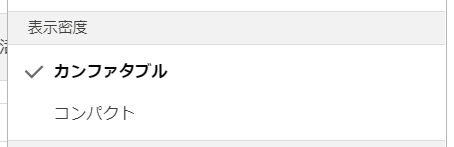
image.png

これだけ!
※実際には、1の時点で反映されていますが、普通は戻すので2も記載しています。

さいごに

Salesforceのこういうクセ、結構引っかかる。。

1
0
0

Register as a new user and use Qiita more conveniently

  1. You get articles that match your needs
  2. You can efficiently read back useful information
  3. You can use dark theme
What you can do with signing up
1
0

Delete article

Deleted articles cannot be recovered.

Draft of this article would be also deleted.

Are you sure you want to delete this article?