
やりたいこと
- 警告詐欺のような不正サイトにどのように飛ばされるのか知りたい。
- プロキシで可視化する。
- 可視化する過程で証明書廻りについて学びたい
環境
学習用なので環境構築が簡単なDockerを使用
プロキシ
- Windows 11
- Docker Desktop
- ubuntu/squid(https://hub.docker.com/r/ubuntu/squid)
- Docker Desktop
クライアント
- Windows 11のEdge
手順
プロキシ側
-
ubuntu/squidをダウンロードして実行
(省略) -
security_file_certgenのインストール
復号にはSquidのSSL Bumpの機能を利用する。ubuntu/squidはコンパイルオプション--with-opensslがないのでaptでインストール。ついでにいろいろインストール
apt update
apt install squid-openssl
apt install vim
apt install systemctl -
SSL Bumpの設定
以下のページを参考に
https://tech-mmmm.blogspot.com/2021/09/squidssl-bumphttps-ssl.html -
動作確認
Docker側からcurlで確認する。証明書が信頼されていないため、curlの--insecureオプションが必要
curl --insecure -x http://localhost:3128 https://google.com
クライアント側
- 証明書のダウンロード
プロキシ側の2.の手順で作成した証明書を、クライアント側のWindowsに登録する必要がある。
Docker環境からのファイルの取出しはDocker cpコマンドを使用する。
docker cp <docker id>:/etc/squid/bump.crt . - 証明書の登録
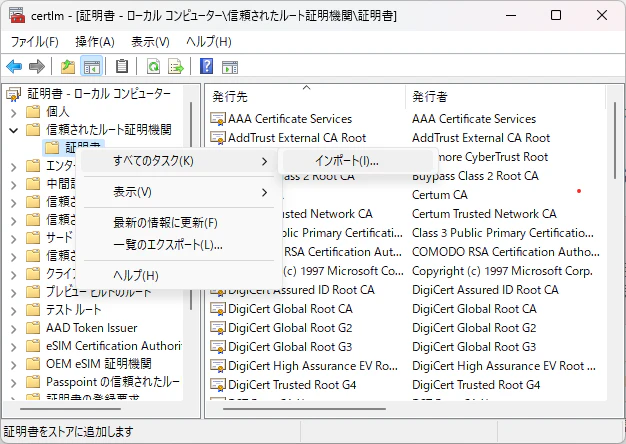
検索ウインドウから、「コンピュータの証明書の管理」を起動
「信頼されたルート証明機関」を右クリックし、「すべてのタスク」→「インポート」を選択し、先ほど取り出したbump.crtをインストールする。

- プロキシ設定
検索ウインドウから、「プロキシの設定を変更する」を起動→「プロキシサーバーを使う」でプロキシIPアドレスを「http://localhost」、ポートを「3128」に変更

参考文献
技術メモメモ SquidのSSL Bumpを使ってHTTPS (SSL) 通信を可視化する
https://tech-mmmm.blogspot.com/2021/09/squidssl-bumphttps-ssl.html
TECH4ALL クライアントに証明書インストール不要なSSL対応透過型プロキシを構築する
https://tech.opst.co.jp/2023/02/17/%E3%82%AF%E3%83%A9%E3%82%A4%E3%82%A2%E3%83%B3%E3%83%88%E3%81%AB%E8%A8%BC%E6%98%8E%E6%9B%B8%E3%82%A4%E3%83%B3%E3%82%B9%E3%83%88%E3%83%BC%E3%83%AB%E4%B8%8D%E8%A6%81%E3%81%AAssl%E5%AF%BE%E5%BF%9C/