
なぜ Trace の name を変更したいのか?
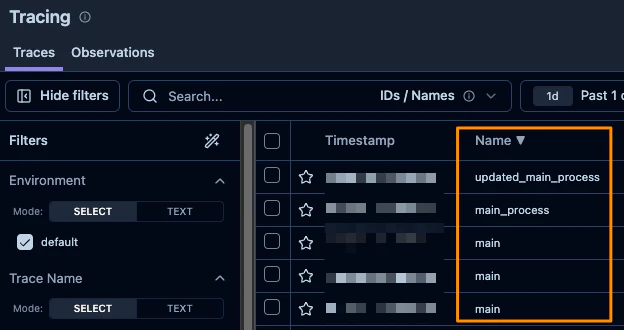
Traceのnameは、Tracing画面のName列に表示される情報です。そのため、後から見返したときに処理内容が分かるよう、できるだけ分かりやすい名前を付けたいのです。
ドキュメントを読め、という話なのかもしれない
「全部ドキュメントに書いてある」って、ばあちゃんも言ってた気がします。
ということで読んでみました。
Traceの属性を設定する方法については、以下のドキュメントに記載があります。
要点をまとめると、以下のようです。
- Traceのnameは、デフォルトでは Root Observationのname になる
-
update_traceまたはupdate_current_traceを使えば Trace の name を変更できる
豆知識ですが、Langfuse v2 と v3 では Trace 周りの挙動が少し異なります。
- v2では、Root Observation 自体が Trace として扱われていた
- v3では、Root Observation とは別に Trace が作成される
まだ v3 に移行していない方は、覚えておくと役に立つかもしれません。
やってみる
まず、Root Observation の name がそのまま Trace の name になっていることを確認します。下記は、Root Observation の name がそのまま Trace の name に利用される例です。最初に呼ばれるObservationの名前がmain_processなので、それが Traceの nameに設定されています。
コード
import time
from langfuse import observe,get_client

@observe()
def process_task(task_id: int) -> str:
    print(f"Task {task_id} started")
    time.sleep(1)
    result = f"Task {task_id} completed"
    print(result)
    return result

@observe(name="main_process")
def main():
    for i in range(3):
        process_task(i)

if __name__ == "__main__":
    main()

次に、update_current_trace を使って Trace の name を変更してみます。 以下は、main_process を updated_main_process に変更する例です。
コード
import time
from langfuse import observe,get_client

@observe()
def process_task(task_id: int) -> str:
    print(f"Task {task_id} started")
    time.sleep(1)
    result = f"Task {task_id} completed"
    print(result)
    return result

@observe(name="main_process")
def main():
    get_client().update_current_trace(name="updated_main_process")
    for i in range(3):
        process_task(i)
if __name__ == "__main__":
    main()
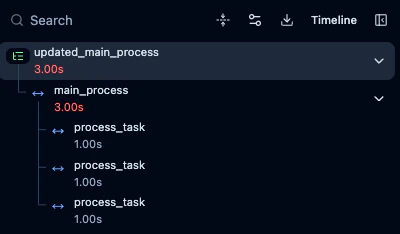
変更できてるのでは?
ここまでのような シングルスレッド なケースでは問題ありません。しかし、実際のアプリケーションでは マルチスレッド で処理したいケースが多くあります。例えばPythonの場合は、ThereadPoolExecutorなどが利用できます。
では、ThreadPoolExecutor を使った場合、Trace の name はどのように扱われるのでしょうか?
以下のコードでは、
- Root Observation の name は main_process
- update_current_trace で Trace の name を Demo に変更
しているように見えます。
import time
from concurrent.futures import ThreadPoolExecutor, as_completed
from langfuse import observe,get_client

@observe()
def process_task(task_id: int) -> str:
    print(f"Task {task_id} started")
    time.sleep(1)  # Sleep for 1 second
    result = f"Task {task_id} completed"
    print(result)
    return result

@observe(name="main_process")
def main():
    num_tasks = 5
    max_workers = 3

    langfuse_client = get_client()
    observation_id = langfuse_client.get_current_observation_id()
    trace_id = langfuse_client.get_current_trace_id()

    langfuse_client.update_current_trace(
        name="Demo",
    )

    with ThreadPoolExecutor(max_workers=max_workers) as executor:
        futures = [
            executor.submit(
                process_task,
                i,
                langfuse_trace_id=trace_id,
                langfuse_parent_observation_id=observation_id,
            )
            for i in range(num_tasks)
            ]

        results = []
        for future in as_completed(futures):
            result = future.result()
            results.append(result)

    langfuse_client.flush()

if __name__ == "__main__":
    main()
しかし、実際に上記のコードを実行すると下記のようになります。main_processやDemoではなく、process_taskになります。なぜこうなるのか、正直よく分かっていません…。

process_task の中で update_current_trace を呼べば、Trace の name を変更すること自体は可能です。ただし、process_task は処理の末端にある関数で複数回呼ばれます。そこで Trace 全体の name を変更するのは構造的に不自然な気もします。
さいごに
という話をDiscussionsに起票しているので、誰か方法を知っている方がいれば教えてください
こういう問題は、だいたい自分のしょうもないミスだったりするので、まだ回答が出ていない段階でブログにするのは少し躊躇しました。が、あまりにも分からなかったので書いてしまいました 🙏
もし良い方法をご存じの方がいれば、ぜひ教えてください 😭
2/2追記
どうやら、トレース周りの処理にバグがあるみたいですね。