
はじめに
LINEのMessaging APIが2020年12月にアップデートされました。
Messaging API リリースノートを参照すると、スタンプのメッセージタイプにkeywordsプロパティが追加されたらしいです。
また、keywordsプロパティの説明として以下の記載がありました。
今まで開発者は、Webhookイベントオブジェクトを見ただけでは、実際に送られたスタンプが「どんな気持ちを表現しているスタンプなのか」を把握することはできませんでした。
今回追加されたkeywordsプロパティで、スタンプが表現しているキーワードを確認できるようになりました。
なにそれ!!、見てみたい!!!
ということで、LINEスタンプのkeywordsプロパティを表示させてみたいと思います。
また、LINEのスタンプの中にはどういう気持ちを表現しているのかよく分からないスタンプがあるかと思います。(個人の感想です)
例えば下記のジェー〇スのスタンプとか・・・諦めの涙なのか、喜びの涙なのかetc

今回は上記のスタンプのkeywordsプロパティを確認して、スタンプの気持ちを考えてみたいと思います。
前提
以下の環境にkeywordsプロパティを確認するための変更を加えていきます。
環境はCloud Functions入門用にLINE Botを作ってみるを参考に作成しました。
- Line Bot作成済み
- Google Cloud Functions登録済み
- Line BotとGoogle Cloud Functionsを連携しボット作成済み
いざ作成
プログラム
以下のようなプログラムを作成しGoogleCloudFuncitonsに登録する。
import os
import base64, hashlib, hmac
import logging

from flask import abort, jsonify

from linebot import (
    LineBotApi, WebhookParser
)
from linebot.exceptions import (
    InvalidSignatureError
)
from linebot.models import (
    MessageEvent, TextMessage, TextSendMessage, StickerMessage
)

def main(request):
    channel_secret = os.environ.get('LINE_CHANNEL_SECRET')
    channel_access_token = os.environ.get('LINE_CHANNEL_ACCESS_TOKEN')

    line_bot_api = LineBotApi(channel_access_token)
    parser = WebhookParser(channel_secret)

    body = request.get_data(as_text=True)
    hash = hmac.new(channel_secret.encode('utf-8'),
        body.encode('utf-8'), hashlib.sha256).digest()
    signature = base64.b64encode(hash).decode()

    if signature != request.headers['X_LINE_SIGNATURE']:
        return abort(405)

    try:
        events = parser.parse(body, signature)
    except InvalidSignatureError:
        return abort(405)

    for event in events:
        if not isinstance(event, MessageEvent):
            continue
        # スタンプ以外の場合
        if not isinstance(event.message, StickerMessage):
            line_bot_api.reply_message(
                event.reply_token,
                TextSendMessage(text='スタンプを送って!')
            )
            continue
        # スタンプの場合、kewordsを取得
        tmp = "と".join(event.message.keywords)
        line_bot_api.reply_message(
            event.reply_token,
            TextSendMessage(text='そのスタンプの気持ちは' + tmp + 'だよ')
        )
    return jsonify({ 'message': 'ok'})
動作確認
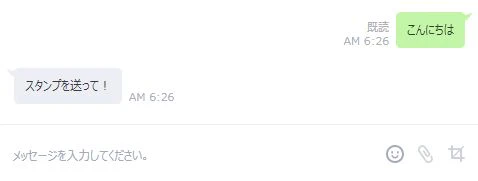
テキストメッセージを送ると「スタンプを送って!」と返却される。
次にLINEのキャラクタースタンプを送ってみると、そのスタンプのキーワードが返された。
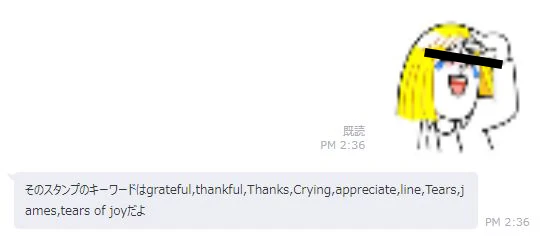
キーワードに対するGoogle翻訳結果は以下のような感じであり、このスタンプが泣いて感謝するスタンプであることが分かった。
- grateful : ありがたい
- thankful : 感謝している
- Crying : 泣いて
- appreciate : 感謝する。
- tears : 涙
- tears of joy : 喜びの涙
また、LINEの公式キャラクター以外のスタンプも同様にキーワードが返されます。
例えば、シュタゲのまゆしーが「トゥットゥルー」と言うスタンプは「"Hang in there" ( がんばれ )」と表示されます。
他にも、コードギアスのルルーシュがギアスを使って「我に従え」と言うスタンプは「"Joke"と"Pleese"」と表示されます。
(ギアスをジョークで使うのか・・・)
雑感
- keywordsプロパティを使用することで、感情不明なスタンプも気持ちがなんとなく察せそうであった。
- LINEキャラクター以外のスタンプもキーワードを表示することができる。(誰がキーワード分類してるんだろ・・・)