
はじめに
免責事項
本ページおよび、これに対応するコメント記載については、投稿者本人の個人的意見であり、シスコの意見ではありません。本サイトの内容は、情報の提供のみを目的として掲載されており、シスコや他の関係者による推奨や表明を目的としたものではありません。各利用者は、本Webサイトへの掲載により、投稿、リンクその他の方法でアップロードした全ての情報の内容に対して全責任を負い、本Web サイトの利用に関するあらゆる責任からシスコを免責することに同意したものとします。
この記事はCisco Systems Japan Advent Calendar 2025の一記事として投稿しています。よろしければ、他のエンジニアのGeekな記事もぜひご覧になってください。
今回のTIPS
やりたいこと
- SDWAN C8000V(cEdge)をBYODで、クラウド(AWS、Azure)にデプロイする時、同時に、SDWANコントローラが持つcEdgeのライセンスを付与して、SDWANコントローラへ所属させたい。
背景
まっさらな状態でC8000V(cEdge)をデプロイした後に、手動で設定でもOKですが、デプロイ時にSDWANと自動で連携したら、その後のConfig templateの適用も楽に。ゼロタッチプロビジョニングしたいです。
ドキュメント読めばわかる、でも、パッと理解しずらいので手順を書いてみました。
前提条件
- C8000V(cEdge) IOS-XE 17.15.4
- SDWAN controller 20.18
- インターネットへ接続できるPublic subnetのインターフェースをアタッチ(vPCのInternet GatewayとElastic IPはC8000Vデプロイ時に設定する(AWS))
How?
AWSやAzureでC8000V(cEdge)をBYODでデプロイするときに、あらかじめ、Bootstrapを作成します。
これをAWSやAzureでC8000Vをデプロイする時に、User-Data/Custom-dataへ設定しておくと、その後、生まれたてのC8000VがSDWANコントローラへ迷いなく到達できます。
クラウド提供型SDWANコントローラと通信するために、Public subnetがC8000Vにアタッチされていて、かつ、Transport VPNとManagement VPNが設定されているのが前提です。この設定もUser-data/Custom-dataに含めます。
まずはcEdgeを立ち上げてから、手動で設定を入れ、SDWANコントローラと連携させる方法もあります。
Bootstrapの作成
AWSでのcEdgeデプロイ方法は以下を参照するとして、
SDWANでBootstrapを作成する方法はCLI/GUIともに、以下が参照です。
実際、GUI でやってみよう
今回はSystem ProfileとTransport & Management Profileのみアタッチされてますが、完成形のコンフィグを作り込んでおくとAWS/Azureからデプロイされた時に、コンフィグを読み込み、デプロイ後に、想定通りの設定が入った状態のcEdgeが作れます。
System Profileおよび、Transport & Management Profileは設定します。
Transport & Management Profileには、Transport VPNとManagement VPNのプロファイルも設定してください。
Configuration > Configuration Groupsから、コンフィグテンプレートでコンフィグを作ったのち、今回デプロイする仮想のcEdgeのテンプレートの中の、Assosiatedの’+ Add’をクリックし、ライセンスをアタッチします。
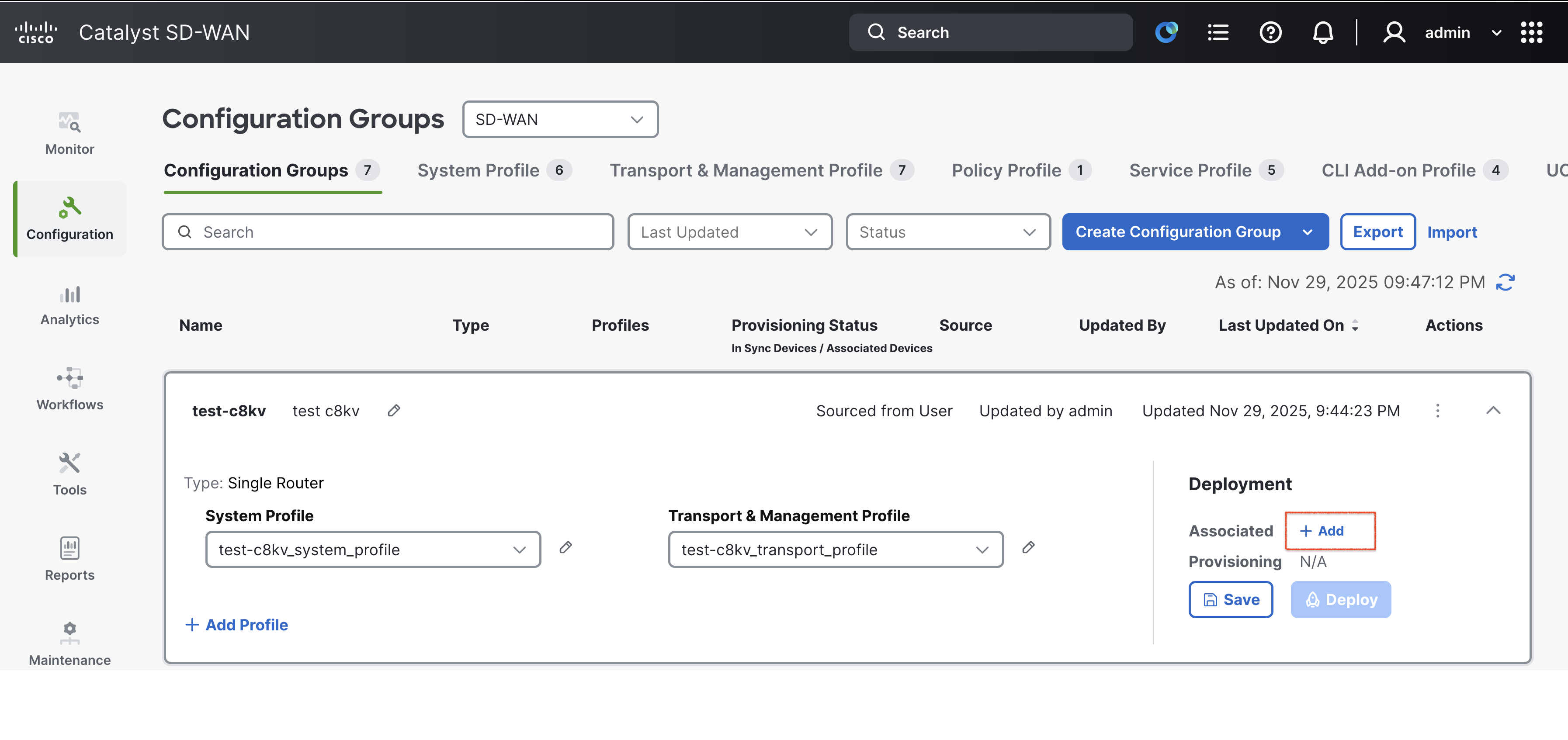

(↑のBoxをチェックして、Saveします)
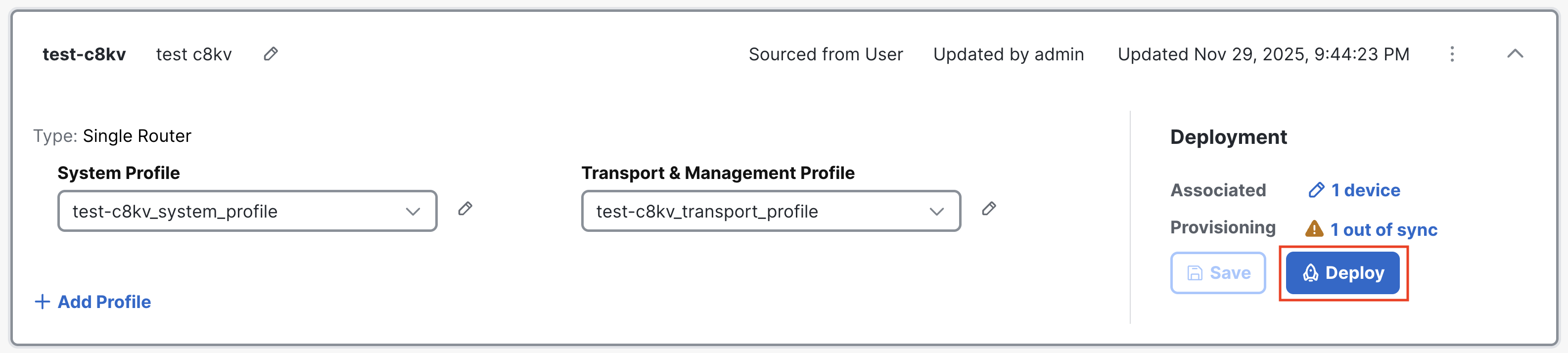
Configuration groupにライセンスのAddが完了したら、'Deploy'をクリックします。
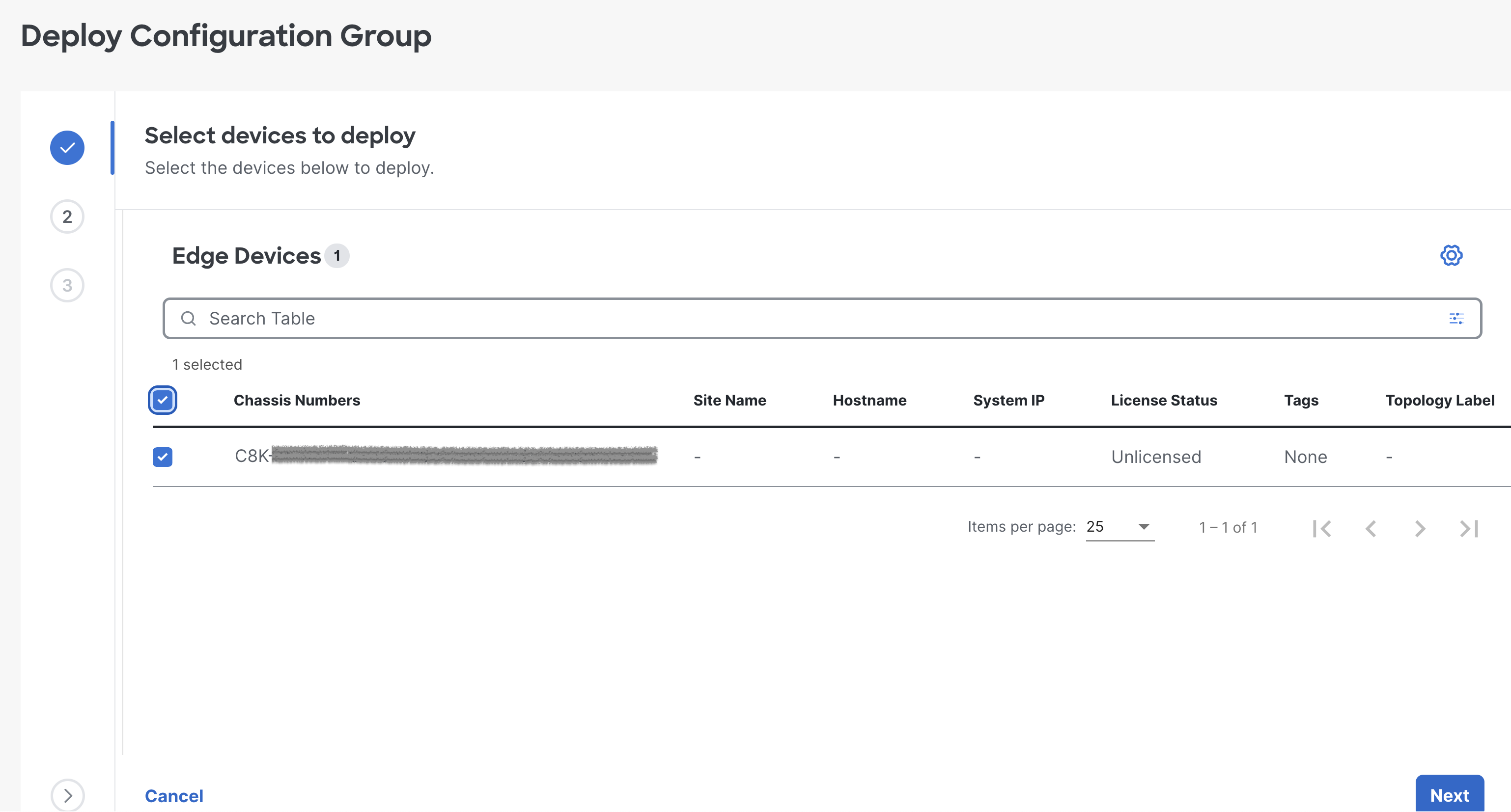
まずは、先ほど選択したライセンスのデバイスを選択して次へ
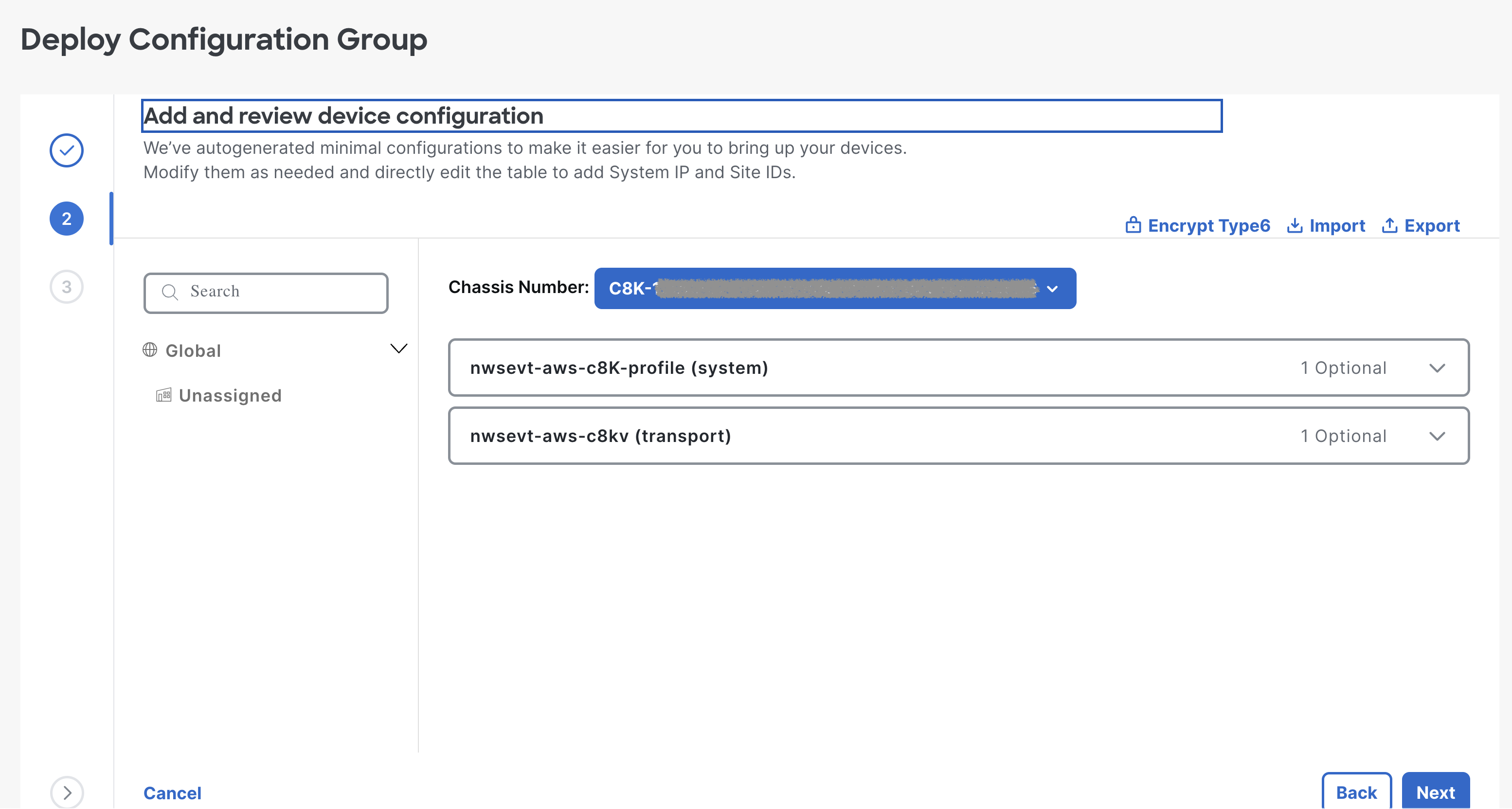
システムIP、ホスト名、SiteIDの設定など入っていることを確認して次へ
最終確認後、問題なければ、次へ。
右上のPreview CLIで設定を確認することができるので、適用されるコンフィグを確認しても良いですね!

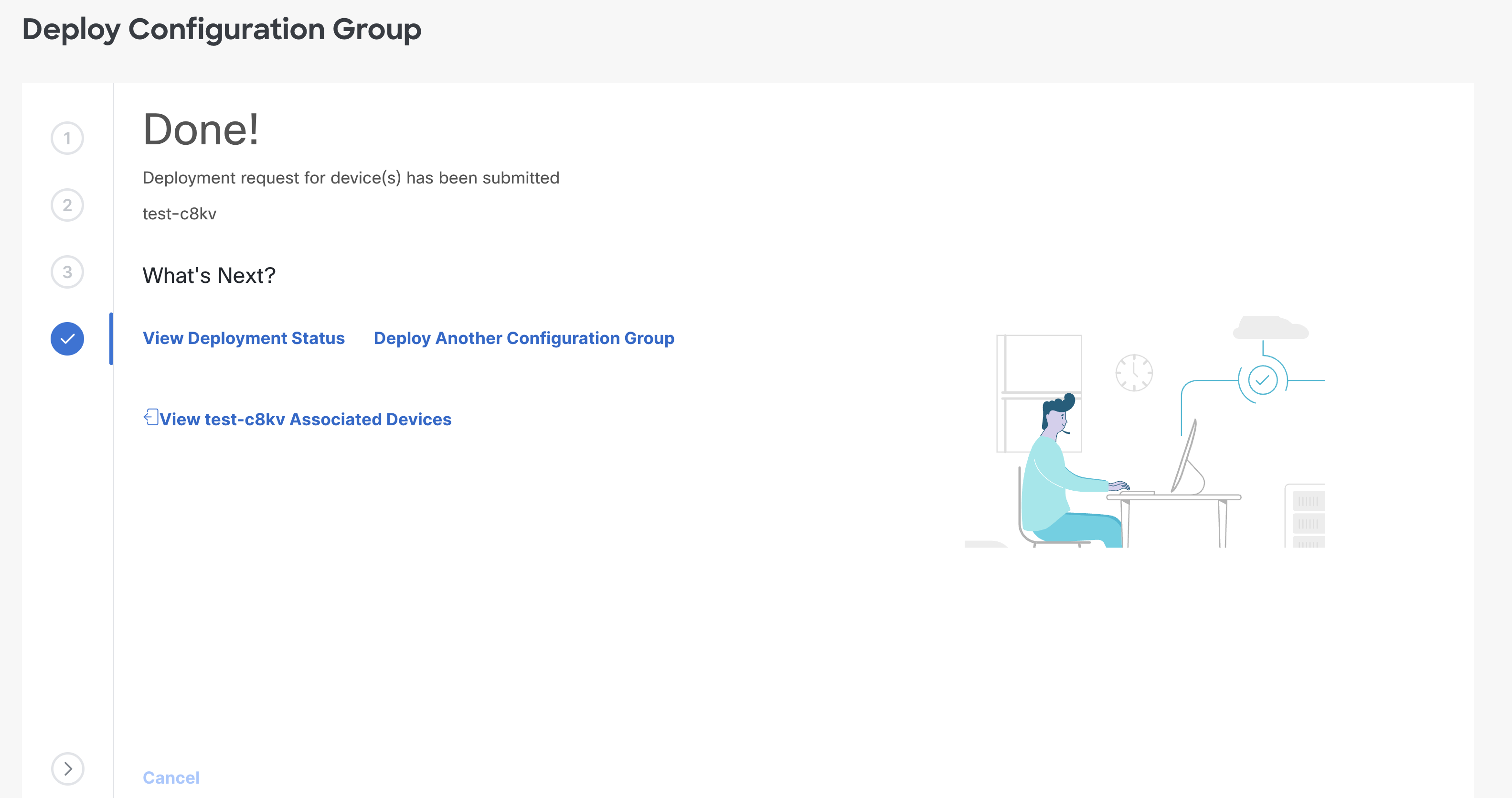
Done!となったら、次へ行きましょう
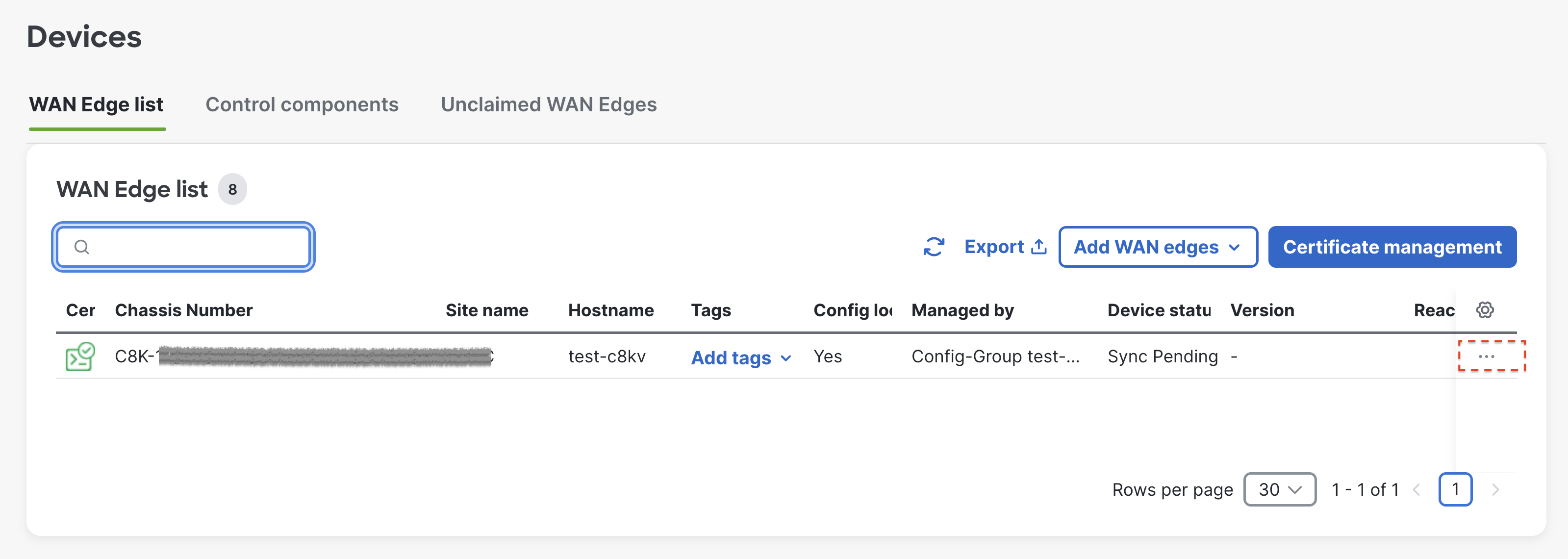
Configuration > Devices > WAN Edgeへ行き、'...’をクリックします。
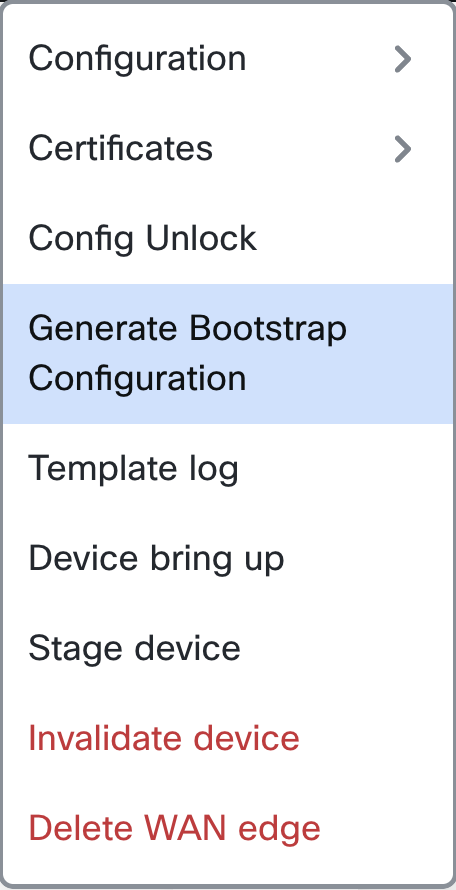
Generate Bootstrap Configurationを選択します。
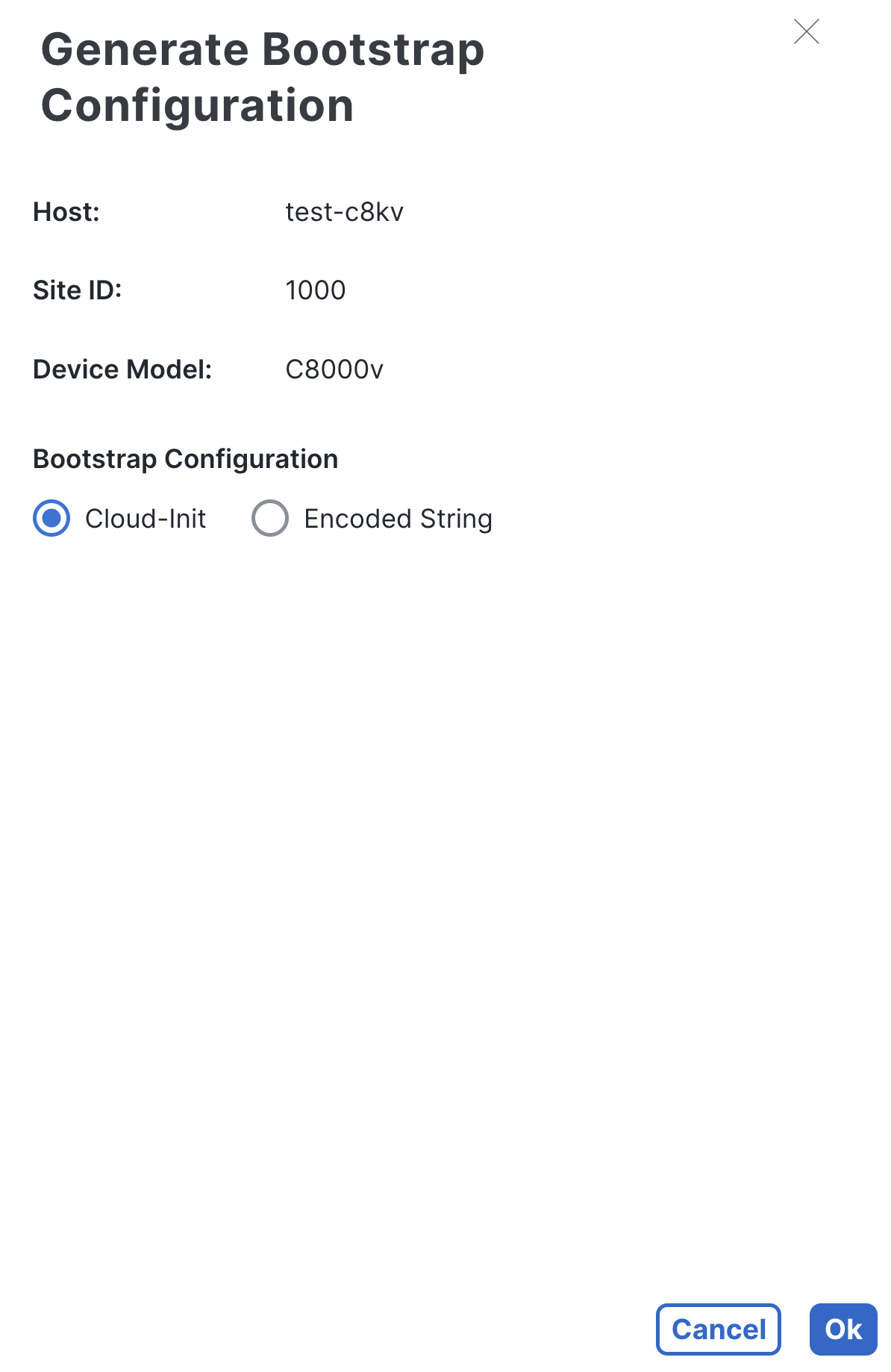
Cloud-Initか、Encoded Stringどちらも選べます。コンフィグ読みたい方はCloud-Init、EncodeされたものでよければEncoded Stringを選びます。
できあがり。DownloadからBootstrapをダウンロードできます。
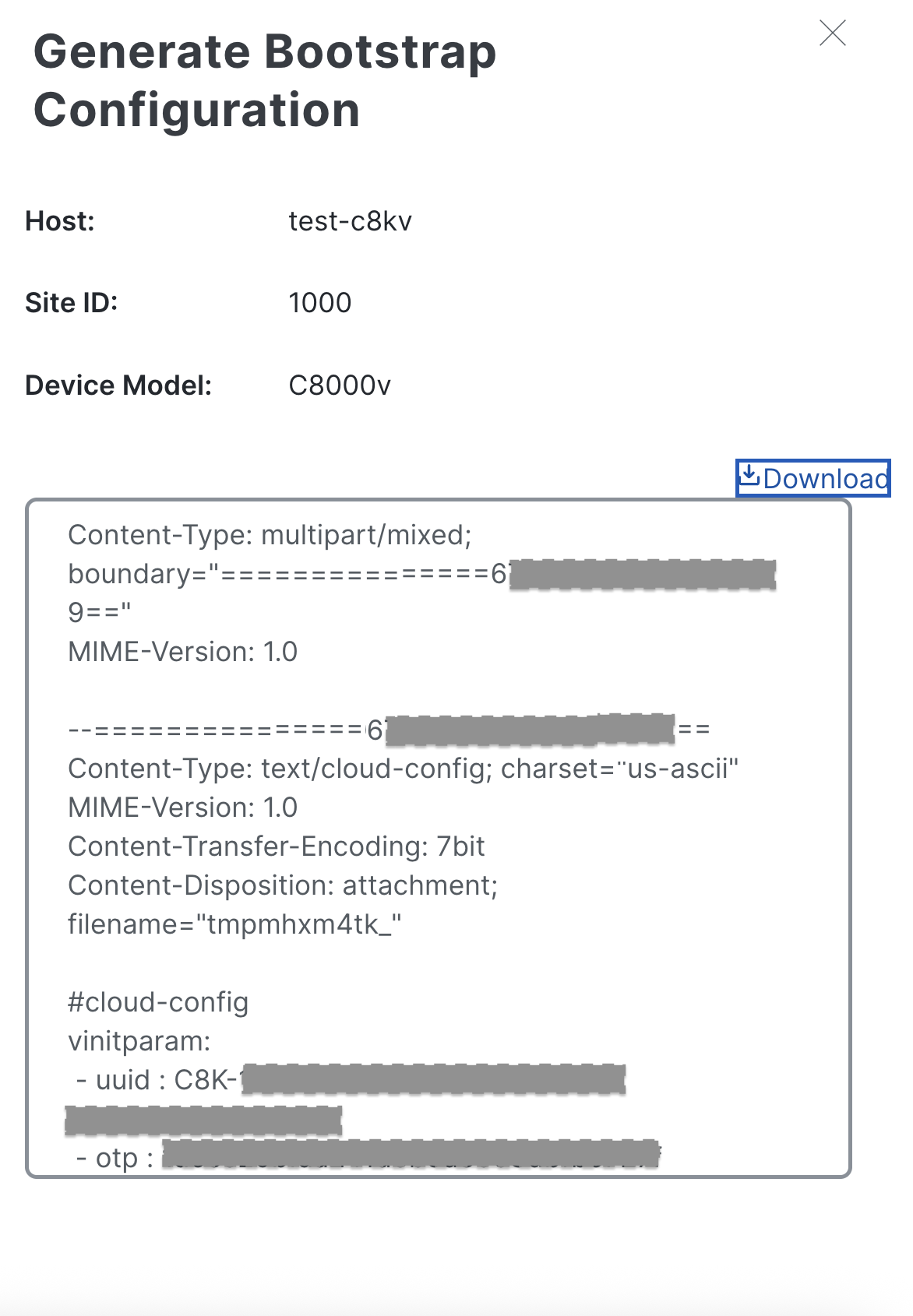
一部マスキング加工(*)ですが、Bootstrapの出力例はこちら。
Content-Type: multipart/mixed; boundary="===============6****************49=="
MIME-Version: 1.0

--===============6****************49==
Content-Type: text/cloud-config; charset="us-ascii"
MIME-Version: 1.0
Content-Transfer-Encoding: 7bit
Content-Disposition: attachment; filename="tmpmhxm4tk_"

#cloud-config
vinitparam:
 - uuid : C8K-********-****-****-****-************
 - otp : **************************
 - vbond : *******.******.com
 - org : A********Z

--===============6****************49==
Content-Type: text/cloud-boothook; charset="us-ascii"
MIME-Version: 1.0
Content-Transfer-Encoding: 7bit
Content-Disposition: attachment; filename="config-C8K-********-****-****-****-************.txt"

#cloud-boothook
config
  system
   ztp-status            success
   pseudo-confirm-commit 300
   personality           vedge
   device-model          vedge-C8000V
   chassis-number        C8K-********-****-****-****-************
   system-ip             3.3.3.3
   overlay-id            1
   site-id               1000
   ipv6-strict-control   false
   port-offset           0
   control-session-pps   300
   admin-tech-on-failure
   sp-organization-name  A********Z
   organization-name     A********Z
   port-hop
   track-transport
   track-default-gateway
   console-baud-rate     9600
   config-template-name  test-c8kv
   no on-demand enable
   on-demand idle-timeout 10
   vbond *******.******.com port *****
  !
  bfd default-dscp 48
  bfd app-route multiplier 6
  bfd app-route poll-interval 600000
  sslproxy
   no enable
   rsa-key-modulus      ****
   certificate-lifetime 730
   eckey-type           P256
   ca-tp-label          PROXY-SIGNING-CA
   settings expired-certificate  drop
   settings untrusted-certificate drop
   settings unknown-status       drop
   settings certificate-revocation-check none
   settings unsupported-protocol-versions drop
   settings unsupported-cipher-suites drop
   settings failure-mode         close
   settings minimum-tls-ver      *****
   dual-side optimization enable
  !
  sdwan
   interface GigabitEthernet1
    tunnel-interface
     encapsulation ipsec weight 1
     no border
     color default
     no last-resort-circuit
     no low-bandwidth-link
     no vbond-as-stun-server
     vmanage-connection-preference 5
     port-hop
     no full-port-hop
     carrier                       default
     nat-refresh-interval          5
     hello-interval                1000
     hello-tolerance               12
     no allow-service all
     no allow-service bgp
     allow-service dhcp
     allow-service dns
     allow-service icmp
     no allow-service sshd
     no allow-service netconf
     no allow-service ntp
     no allow-service ospf
     no allow-service stun
     allow-service https
     no allow-service snmp
     no allow-service bfd
    exit
   exit
   interface GigabitEthernet2
   exit
   appqoe
    no tcpopt enable
    no dreopt enable
    no httpopt enable
   !
   omp
    no shutdown
    send-path-limit  4
    ecmp-limit       4
    graceful-restart
    no as-dot-notation
    timers
     holdtime               300
     advertisement-interval 1
     graceful-restart-timer 43200
     eor-timer              300
    exit
    address-family ipv4
     advertise connected
     advertise static
     distance 251
    !
    address-family ipv6
     advertise connected
     advertise static
     distance 251
    !
   !
  !
  service tcp-keepalives-in
  service tcp-keepalives-out
  no service tcp-small-servers
  no service udp-small-servers
  hostname test-c8kv
  username admin privilege 15 secret 9 **************
  vrf definition Mgmt-intf
   rd 1:512
   address-family ipv4
    route-target export 1:512
    route-target import 1:512
    exit-address-family
   !
   address-family ipv6
    exit-address-family
   !
  !
  ip arp proxy disable
  no ip dhcp use class
  ip forward-protocol nd
  no ip forward-protocol udp
  no ip ftp passive
  ip bootp server
  no ip source-route
  no ip ssh bulk-mode
  ip tcp RST-count 10 RST-window 5000
  no ip http server
  no ip http secure-server
  no ip http ctc authentication
  ip nat inside source list nat-dia-vpn-hop-access-list interface GigabitEthernet1 overload
  ip nat translation tcp-timeout 3600
  ip nat translation udp-timeout 60
  interface GigabitEthernet1
   no shutdown
   arp timeout 1200
   ip address dhcp client-id GigabitEthernet1
   no ip redirects
   ip dhcp client default-router distance 1
   ip mtu    1500
   ip nat outside
   load-interval 30
   mtu           1500
   negotiation auto
  exit
  interface GigabitEthernet2
   no shutdown
   arp timeout 1200
   vrf forwarding Mgmt-intf
   ip address dhcp client-id GigabitEthernet2
   no ip redirects
   ip dhcp client default-router distance 1
   ip mtu    1500
   load-interval 30
   mtu           1500
   negotiation auto
  exit
  interface Tunnel1
   no shutdown
   ip unnumbered GigabitEthernet1
   no ip redirects
   ipv6 unnumbered GigabitEthernet1
   no ipv6 redirects
   tunnel source GigabitEthernet1
   tunnel mode sdwan
  exit
  clock timezone JST 9 0
  logging persistent size 104857600 filesize 10485760
  logging buffered 512000
  logging console
  no logging queue-limit
  aaa authentication login default local
  aaa authorization exec default local
  aaa server radius dynamic-author
  !
  radius-server cache expiry 24
  no crypto ikev2 diagnose error
  no crypto isakmp diagnose error
  no network-clock revertive
  snmp-server ifindex persist
  fhrp version vrrp v2
  line con 0
   speed    9600
   stopbits 1
  !
  line vty 0 4
   transport input ssh
  !
  line vty 5 80
   transport input ssh
  !
  ntp server *****.*****.com source GigabitEthernet1 prefer version 4
  ntp source GigabitEthernet1
  no process cpu extended history
  no acc-gyro enable
  no ignition sense
  no ignition enable
  lldp run
  nat64 translation timeout tcp 3600
  nat64 translation timeout udp 300
 !
!

--===============6****************49==--
これでBootstrapができました!
AWS/Azureでのデプロイ時、または、Terraformなどに組み込めます。
Happy holiday!