
0. 概要
高専ロボコンで1年生のときに教えてもらった理論のメモ
ロボットに二つのオドメトリとジャイロをつけて自己位置推定したい時に使う
新入生教育用に思い出したかったので文章に起こしてみる
1. 正面を向いた直線移動のみ
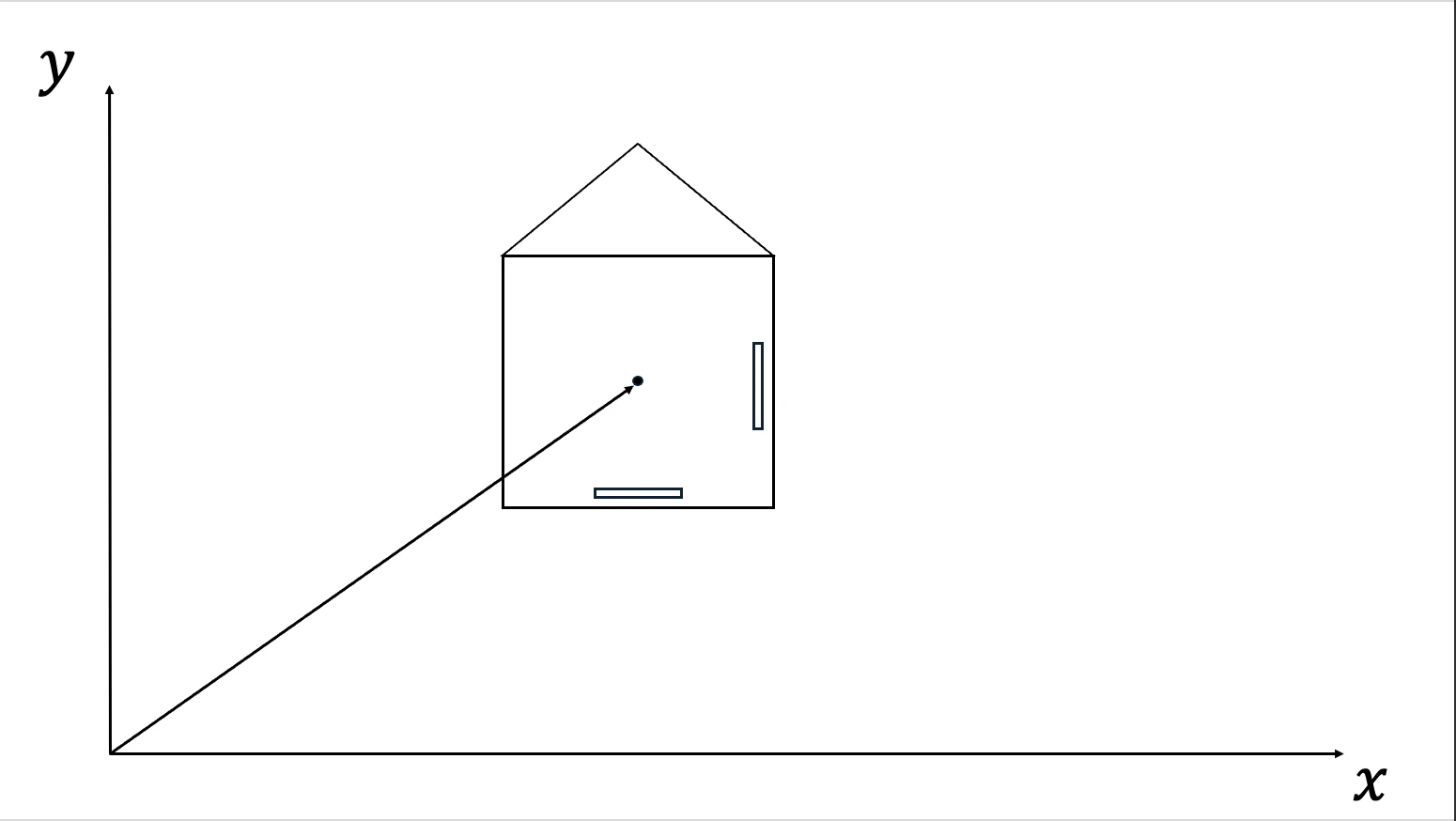
- $D$: オドメーター車輪の直径
- $C_x,C_y$: オドメーター値
- $N$: 分解能(一回転あたりのパルス数)
となる時,1パルスあたりの進む距離はこう定義できる.
$$
K = \dfrac{D \cdot \pi }{N}
$$
- $K$: Distance per pulse(1パルスあたりの移動距離)
正面を向いたままの回転を伴わない直線移動を考慮した時,
$$
\begin{aligned}
x_{total} = K \cdot C_x \\
y_{total} = K \cdot C_y
\end{aligned}
$$
となる.エンコーダーの値がそのまま単純な比例関係で出力になる.
2. 直線移動のみ
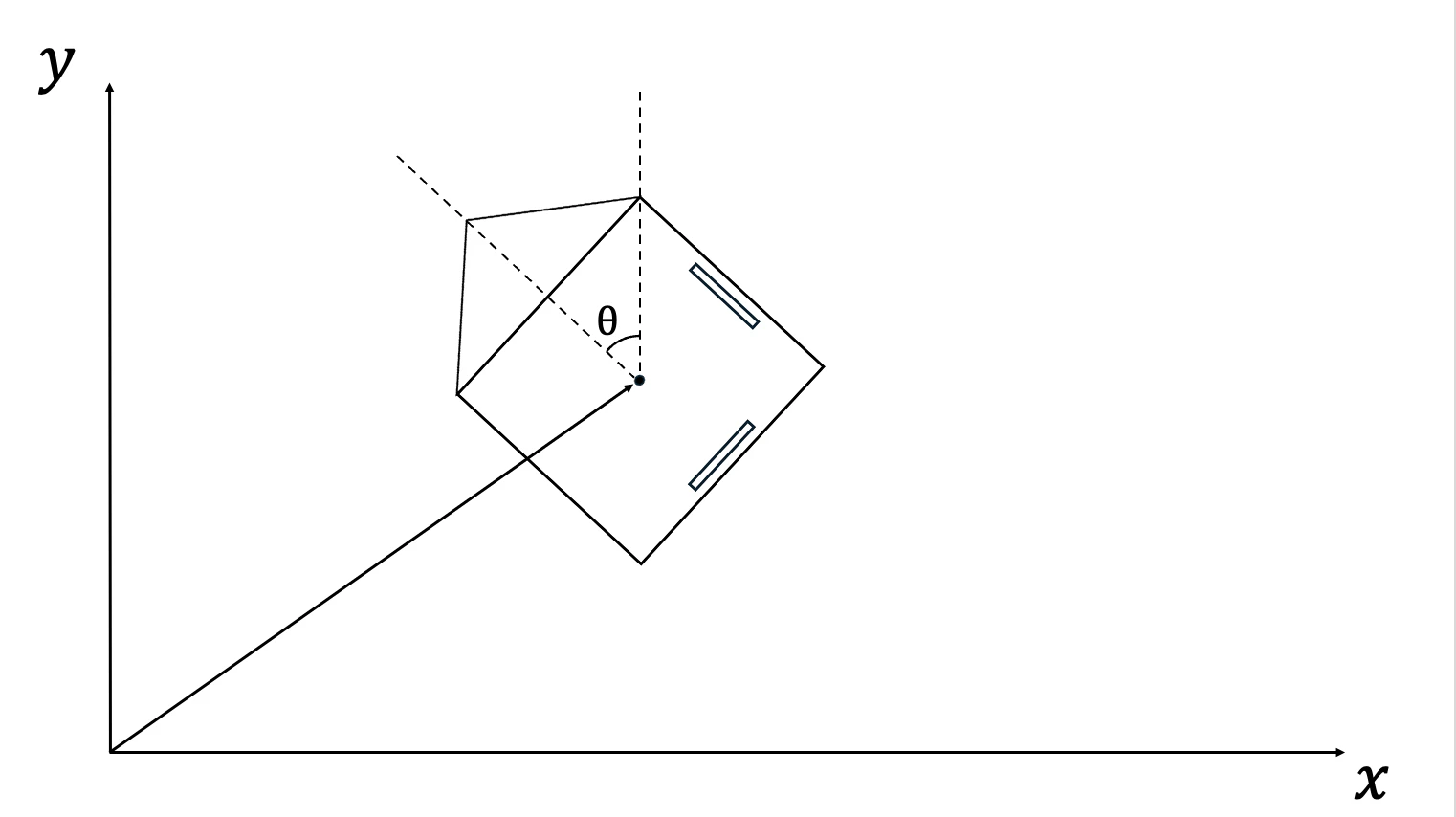
先ほどの式とは違い,ロボットの傾きを考慮する必要がある.
例えば,ロボットが90度反時計回り(ロボット工学
的には反時計回りを正方向として扱うことが多い)に回転していた場合,x軸のエンコーダーはy方向に移動したときに変化し,逆にy軸のエンコーダーはx方向に移動したときに変化する.
これらの関係は三角関数を用いて表すことができる.
$$
\begin{aligned}
x_{total} = K \cdot C_x \cdot \cos{θ} - K \cdot C_y \cdot \sin{θ} \\
y_{total} = K \cdot C_x \cdot \sin{θ} + K \cdot C_y \cdot \cos{θ}
\end{aligned}
$$
なお,ここの符号はエンコーダーがついている向きによって変わることがある.
今回は,x軸エンコーダーが下側,y軸エンコーダーが右側を想定している.
3. 回転移動のみ
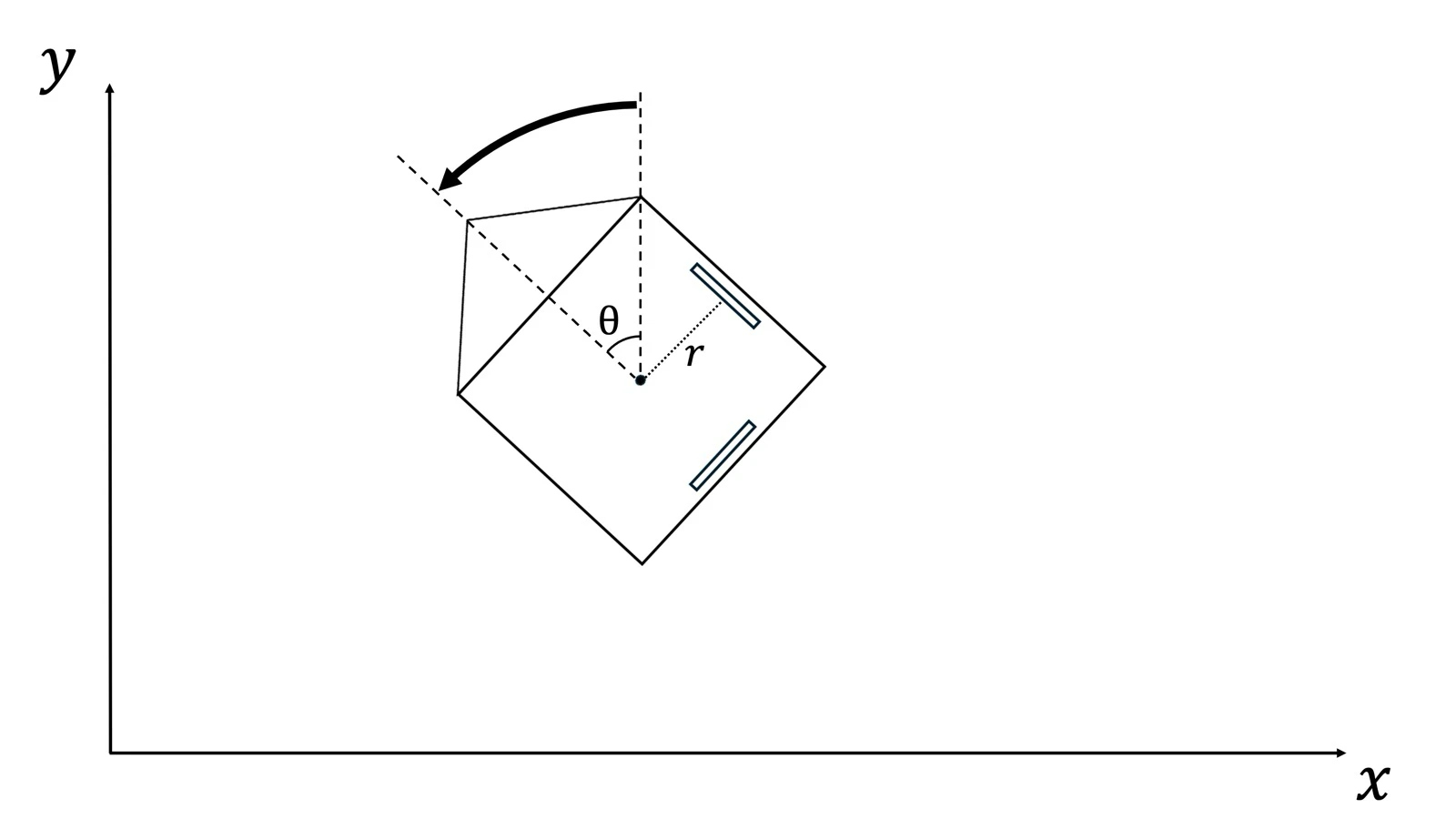
回転運動のみを考慮した際,位置は変化していないにも関わらず,エンコーダーの値が変化してしまうことが分かる.今回のエンコーダーの配置だと,正方向への回転で両方のエンコーダーの値が増加してしまうため,それを補償しなければならない.
$$
\begin{aligned}
x_{local} = K \cdot C_x - r \cdot θ \\
y_{local} = K \cdot C_y - r \cdot θ
\end{aligned}
$$
オドメトリの距離と変化した角度から,オドメトリが誤認識した部分を引いてやると,真の位置を求めることができる.
4. 差分を考慮した完成式
これらを組み合わせると,自己位置推定を行うことができる.
ただし,ここでは差分を扱う必要がある.
直線移動と回転移動を組み合わせた場合,到着地点でのエンコーダー及びジャイロの値からは,どのような経路を通って来たのか不明なため,移動しながら上記の計算を行い,現在座標を更新し続ける必要がある.
- $C_x(t)$: $C_x$の現在の値
- $C_x(t-1)$: $C_x$の前回の値
- $ΔC_x$: $C_x(t) - C_x(t-1)$ 前回の値からの差分
- $θ_{average}$: $\dfrac{θ(t) + θ(t-1)}{2}$ 中点角度(前回と今回の角度の平均)
これらを用いて
$$
\begin{gather}
Δx_{local} = K \cdot ΔC_x - r \cdot Δθ \\
Δy_{local} = K \cdot ΔC_y - r \cdot Δθ \\
x_{total}(t) = x_{total}(t-1) + Δx_{local} \cdot \cos{θ_{average}} - Δy_{local} \cdot \sin{θ_{average}} \\
y_{total}(t) = y_{total}(t-1) + Δx_{local} \cdot \sin{θ_{average}} + Δy_{local} \cdot \cos{θ_{average}}
\end{gather}
$$
と記述することで,更新式に落とし込むことができる.
こうして,オドメーターとジャイロのみを用いて自己位置推定を行うことができる.
LiDARとのカルマンフィルタなどによる値のフュージョンやLaserを用いた壁との距離測定による補正などでさらに精度を上げることができるが,ここでは割愛する.
5. コードにする
C++で起こすと
#include <cmath>
#include <cstdint>

struct Pose2D {
    float x{0.0f};
    float y{0.0f};
    float yaw_rad{0.0f};
};

struct SensorData {
    int32_t pulse_x{0};
    int32_t pulse_y{0};
    float yaw_deg{0.0f};
};

class Odometry {
private:
    static constexpr float WHEEL_DIAMETER = 50.0f;
    static constexpr float RESOLUTION = 2048.0f;
    static constexpr float CENTER_DISTANCE = 150.0f;
    static constexpr float PI = 3.141592653589793f;

    static constexpr float DIST_PER_PULSE = (WHEEL_DIAMETER * PI) / RESOLUTION;
    static constexpr float DEG_TO_RAD = PI / 180.0f;

    Pose2D m_pose;
    int32_t m_prev_pulse_x{0};
    int32_t m_prev_pulse_y{0};
    float m_prev_yaw_rad{0.0f};

public:
    Odometry(const Pose2D& initial_pose = {}) : m_pose(initial_pose) {}

    void reset(const Pose2D& pose = {}) {
        m_pose = pose;
        m_prev_pulse_x = 0;
        m_prev_pulse_y = 0;
        m_prev_yaw_rad = m_pose.yaw_rad;
    }

    void update(const SensorData& sensor) {
        float current_yaw_rad = sensor.yaw_deg * DEG_TO_RAD;

        int32_t diff_x = sensor.pulse_x - m_prev_pulse_x;
        int32_t diff_y = sensor.pulse_y - m_prev_pulse_y;

        float delta_pulse_x = static_cast<float>(diff_x);
        float delta_pulse_y = static_cast<float>(diff_y);

        float delta_yaw_rad = current_yaw_rad - m_prev_yaw_rad;

        // ローカル移動量
        float delta_x_local = (DIST_PER_PULSE * delta_pulse_x) - (CENTER_DISTANCE * delta_yaw_rad);
        float delta_y_local = (DIST_PER_PULSE * delta_pulse_y) + (CENTER_DISTANCE * delta_yaw_rad);

        // 中点角度
        float average_yaw = m_prev_yaw_rad + (delta_yaw_rad * 0.5f);

        // グローバル座標の更新
        m_pose.x += (delta_x_local * std::cos(average_yaw)) - (delta_y_local * std::sin(average_yaw));
        m_pose.y += (delta_y_local * std::cos(average_yaw)) + (delta_x_local * std::sin(average_yaw));
        m_pose.yaw_rad = current_yaw_rad;

        // 状態の保存
        m_prev_pulse_x = sensor.pulse_x;
        m_prev_pulse_y = sensor.pulse_y;
        m_prev_yaw_rad = current_yaw_rad;
    }

    [[nodiscard]] const Pose2D& getPose() const noexcept {
        return m_pose;
    }
};
終わりに
楽しくロボコン
(RoDEPでは九工大で一緒にロボットを作るメンバーや支援して下さる方を募集しています!興味がある方はぜひ 公式X(旧Twitter) まで連絡をお願いします🙇)