

はじめに
VSCodeの「Ansible」拡張機能は、AnsibleのPlaybook作成を支援するツールです。
特に、Ansibleの標準的なLintツール ansible-lint と統合されており、VSCode上で開いたPlaybookに対してLintチェックを簡単に実行できます。
今回は、WindowsPC上でPlaybook開発する際に、VSCodeのAnsible拡張機能でLintを実行する方法を紹介します。
構成の検討
各ツールのインストール要件
-
Ansible拡張機能
VSCodeServerのあるシステムに以下がインストールされていること。* ansible-dev-tools(pythonパッケージ) * サポートされているバージョンのansible-core * devcontainer.yaml(オプション)ansible-dev-toolsに含まれるパッケージは以下の通り。
Lintやシンタックスハイライト等に必要なのは、以下のうちansible-core,ansible-lintだと思われます。* ansible-core * ansible-builder * ansible-creator * ansible-lint * ansible-sign * molecule * pytest-ansible * tox-ansible * ansible-dev-environment -
ansible-core,ansible-lint
ともにWindows上へのインストールはサポートされていません。
構成
- 上記より、WindowsPC上に直接インストールしたVSCodeでAnsible拡張機能を利用することはできないため、以下の構成を考えます。
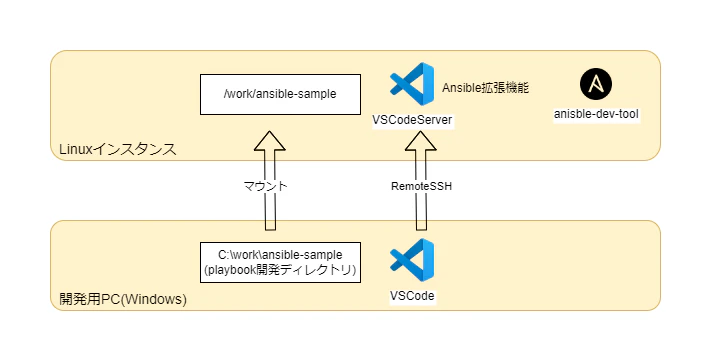
- さらに、Linuxインスタンスにansible-dev-toolをインストールする代わりに、Ansible拡張機能からAnsible EE(Execution Environment)を利用してAnsibleやansible-lintを実行することができます。
Ansible EE(Execution Environment)とは
Ansible Automation Platform(AAP)で導入された、Ansibleの実行環境をコンテナ化したものです。
Ansible実行に必要なパッケージ類(Ansibleや関連ツール、Pythonライブラリなど)を含んだコンテナイメージとして提供されます。
従来は、Ansibleコントロールノードにパッケージ類を直接インストールしてAnsibleを実行していましたが、EEではPlaybook等のあるディレクトリをマウントしコンテナ上でAnsibleを実行します。
-
これらを踏まえて、今回は以下の環境を構成します。
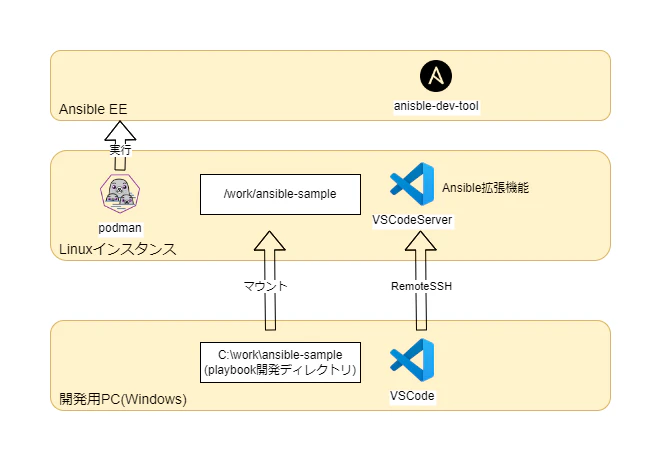
- 検証したバージョン
- 開発用PC: Windows10
- Linuxインスタンス: RockyLinux9 vagrantVM (box ="bento/rockylinux-9", box_version ="202508.03.0")
- 検証したバージョン
構成手順
- 前提条件
- 開発用PCにVSCodeおよび拡張機能Ansible、Remote-SSHがインストールしてあること
- 開発用PCのplaybook開発フォルダがLinuxインスタンスの適当なディレクトリにマウントされていること
- 開発用PC → LinuxインスタンスにVSCode RemoteSSH接続していること
- RemoteSSH接続先に拡張機能Ansibleをインストールしてあること
-
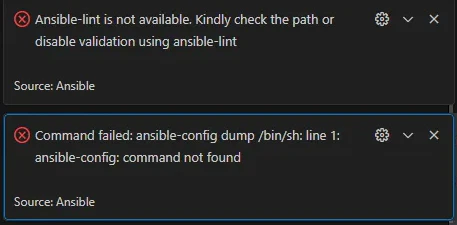
この時点でplaybookを開くとansible-lint,ansible-configコマンドが実行できない旨のエラーが出ている。
-
Linuxインスタンスにpodmanがインストールされていることを確認する。
※今回検証した環境ではデフォルトでインストールされていたが、インストールされていない場合はdockerまたはpodmanをインストールする。Linuxインスタンス[vagrant@localhost ansible-sample]$ podman --version podman version 5.4.0 -
Ansible拡張機能の設定にてAnsible EEを有効化する。
- Ansible拡張機能に関する設定は[Settings]にて
@ext:redhat.ansibleで検索できる - EEに関するパラメータは
Ansible ▸ Execution Environment配下。Enabledのみdisable→enableに変更し、他はデフォルト通りとしておく。

Imageについて
デフォルトで指定されている ghcr.io/ansible/community-ansible-dev-tools は無償で利用できるADT(ansible-dev-tools)入りのコンテナイメージ。
他にADT入りのコンテナイメージとして registry.redhat.io/ansible-automation-platform-22/ee-supported-rhel8 があるが、こちらは有償(AAPのサブスクリプションが必要)。 - Ansible拡張機能に関する設定は[Settings]にて
-
確認
- playbookを開くと、Lintが効いていることを確認できる。
- fqcn[action-core]というansible-lintルールに違反している。ルールモジュール名はFQCNで指定すべきとのこと。
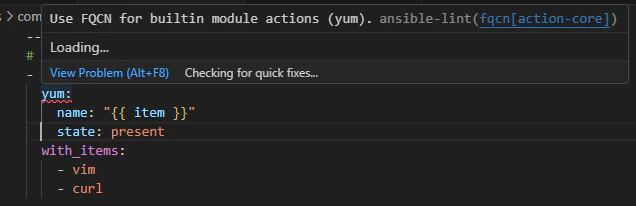
- fqcn[action-core]というansible-lintルールに違反している。ルールモジュール名はFQCNで指定すべきとのこと。
- OUTPUTパネルにてAnsibleSupportの出力をフィルタして、ログを確認する。
-
Ansible ▸ Execution Environment:Imageで選択したイメージを探し、Linuxインスタンスローカルに無いことが分かるとpullしているOUTPUTcheck for container image with command: 'podman image inspect ghcr.io/ansible/community-ansible-dev-tools:latest' Error: ghcr.io/ansible/community-ansible-dev-tools:latest: image not known 'ghcr.io/ansible/community-ansible-dev-tools:latest' image inspection failed, image assumed to be corrupted or missing Pulling image 'ghcr.io/ansible/community-ansible-dev-tools:latest' with pull-policy 'missing' and image-tag 'latest' Running pull command: 'podman pull ghcr.io/ansible/community-ansible-dev-tools:latest' Getting image source signatures Copying blob sha256:73a6de397bbb06dd15c3f81d9a03d875414ff13724994ce4378e3849f715af67 ~略~ Copying blob sha256:4f4fb700ef54461cfa02571ae0db9a0dc1e0cdb5577484a6d75e68dc38e8acc1 Copying config sha256:3672c3f6fc0ad13a371e2856cd2d121a4c8cfdba614d9d6752c7f45ae8a3296d Writing manifest to image destination [Info - 9:11:37 AM] Container image 'ghcr.io/ansible/community-ansible-dev-tools:latest' pull successful - Linuxインスタンスの/work/ansible-sampleディレクトリ(=VSCodeワークスペース)をコンテナ内の同名ディレクトリにマウントし、コンテナ内でansible-config,ansible-lintコマンドを実行している
OUTPUT
 container engine invocation: podman run --rm --workdir /work/ansible-sample -v /work/ansible-sample:/work/ansible-sample -e ANSIBLE_FORCE_COLOR=0 --group-add=root --ipc=host --quiet --name als_9c2cfa4b-b4e2-4cdc-a1ed-18bf062dbcf2 ghcr.io/ansible/community-ansible-dev-tools:latest ansible-config dump
container engine invocation: podman run --rm --workdir /work/ansible-sample -v /work/ansible-sample:/work/ansible-sample -v /work/ansible-sample/roles/common/tasks:/work/ansible-sample/roles/common/tasks -e ANSIBLE_FORCE_COLOR=0 --group-add=root --ipc=host --quiet --name als_e3239f23-cd27-4045-bd11-b626358f3a16 ghcr.io/ansible/community-ansible-dev-tools:latest ansible-lint  --offline --nocolor -f codeclimate "/work/ansible-sample/roles/common/tasks/main.yml"
-
- playbookを開くと、Lintが効いていることを確認できる。
- pullされたコンテナにログインしてみる。
- ディストリビューションはFedora 41、ADT(ansible-dev-tool)は2025/9時点の最新版v25.8.3がインストールされている
 [vagrant@localhost ansible-sample]$ podman images
 REPOSITORY                                   TAG         IMAGE ID      CREATED      SIZE
 ghcr.io/ansible/community-ansible-dev-tools  latest      3672c3f6fc0a  2 weeks ago  1.33 GB
 [vagrant@localhost ansible-sample]$
 [vagrant@localhost ansible-sample]$
 [vagrant@localhost ansible-sample]$
 [vagrant@localhost ansible-sample]$ podman run -it --rm 3672c3f6fc0a /bin/bash
 bash-5.2#
 bash-5.2#
 bash-5.2#
 bash-5.2# cat /etc/system-release
 Fedora release 41 (Forty One)
 bash-5.2#
 bash-5.2# adt --version
 ansible-builder                          3.1.0
 ansible-core                             2.18.7
 ansible-creator                          25.8.0
 ansible-dev-environment                  25.8.0
 ansible-dev-tools                        25.8.3
 ansible-lint                             25.8.2
 ansible-navigator                        25.8.0
 ansible-sign                             0.1.2
 molecule                                 25.7.0
 pytest-ansible                           25.8.0
 tox-ansible                              25.8.0
まとめ
以上で、WindowsPC上のPlaybookに対しLintを実行できました。
特にAnsible EEを利用することで、Linuxインスタンスに直接ansible-lint等をインストールする場合に比べセットアップが容易になり、また実行環境を共通化できることが分かりました。
チームでAnsible開発を行う際は EE を活用できるとよいなと思いました。
参考
- Ansible拡張機能
https://ansible.readthedocs.io/projects/vscode-ansible/ - ansible-dev-tools
https://github.com/ansible/ansible-dev-tools - ansible-lint
https://ansible.readthedocs.io/projects/lint/ - Ansible拡張機能でEEを使う手順
https://developers.redhat.com/articles/2024/03/05/create-efficient-ansible-development-environment-vs-code#