

Flutterアプリ開発で重いデータ処理を実装しようとしたとき、非同期処理と並んで頭に浮かぶのが Isolate です。
Isolateとは?
Dartにおけるネイティブスレッドです。ただしいくつか特徴的な制約があるためThreadとは呼ばずIsolateという名称になっているようです。
特徴1. 決まったエントリポイントが必要
インスタンスメソッドなどではなく、トップレベルの関数かクラスのstaticメソッドとして実装します。
Isolate自体の実行はIsolate.runかIsolate.spawnを使います。
キャンセル処理などでIsolateインスタンスを操作したい場合はspawnを選択することになります。
// Isolate.run - 単発の計算向け(結果を直接受け取る)
final result = await Isolate.run(() => heavyComputation());

// Isolate.spawn - 継続的な通信向け(SendPort経由でやりとり)
final receivePort = ReceivePort();
final isolate = await Isolate.spawn(heavyComputation, receivePort.sendPort);
特徴2. メモリを共有しない
CやJavaとは異なりIsolateは専用のメモリ空間で実行されます。これがIsolateという命名の由来だと思います。
たとえば以下のコードをIsolateで実行すると、メインIsolateとは無関係に必ず11が返ることになります。
static int someGlobalVariable = 10;

int increment() {
  return ++someGlobalVariable;
}
この挙動に関して、プログラマーのメンタルモデルとしてはProcessが一番マッチしそうですね。
また、メモリを共有しないということは、Isolateを生成する毎にそれなりのメモリを消費するということです。
メモリ使用量について
あまり参考になるグラフではありませんが、以下はサンプルで作ったアプリのメモリ使用量チャートです。
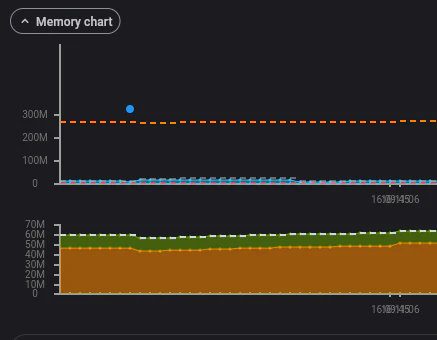
X軸の底辺を這っている青い破線がアプリのメモリ使用量です。青いドットはGCが発生していることを表しています。
| 状態 | メモリ使用量 |
|---|---|
| Isolateがない | 11.5MB |
| Isolate存在中 | 12.4MB |
IsolateをspawnするたびにGCが起こっているので、そこでGCの閾値を超える処理が走るのかもしれません。そしてIsolateのアーキテクチャ上、アプリのstaticなメモリ使用量が増えるにつれてIsolateのメモリ使用量も増えるのが想像できます。
特徴3. ポートによってデータをやりとりする
Linuxのプロセス間通信や、Erlangのメッセージパッシングのような機構で、Isolateとデータをやりとりします。
- SendPort : データをIsolate側に送る (今回は扱いません)
- ReceivePort : Isolateからデータを受け取る
メモリを共有しないというポリシーのため、参照ではなくコピーを送受信することになります。
これには以下のメリット・デメリットがあります。
- シングルスレッドで動くFlutterをブロックしない
- 純粋な処理しかできない (画面への反映などはメインIsolate側でやる必要がある)
- データの受け渡しのためにメモリコピーが発生する (大量のデータ転送が負荷になる)
メモリの参照を渡せるケース
Uint8ListなどTypedDataではTransfereableTypedDataを使ってコピーなしにデータをIsolateに渡すことができます。
Rustの所有権に似た考え方が導入されていて、データを渡した後、もとのIsolateからは利用できなくなります。
特徴4. MethodChannelを利用できない
IsolateからはMethodChannelを利用できません。
が、2025年初頭にisolate_channelというパッケージが登場し、なんとか使えるようになったようです。
ユースケース
Isolateの出番といえば大量のデータを処理したい場合かと思います。メモリの参照を渡せるケースで触れたTransferableTypedDataを使うことになりそうです。
- 何かしらの検索
- データ圧縮
何か作ってみる
以下のような機能のカウンターアプリを作って、メインIsolateとサブIsolateからカウントしてみます。
- メインIsolateからカウンターをインクリメント
- Isolateからカウンターをインクリメント
- Isolate実行中はプログレスバーを表示
- 実行中のIsolateをキャンセルできる

実行画面
Isolateは空のタイトループが入っていて最適化なしのときには結構な時間を消費しますが、UIが動いていることがわかります。
また、Isolateのカウンターは常に3で、メモリ空間が別れていることもわかります。
ソースコード
実行可能なソースコードです。Flutter 3.38.9で実装しています。
import 'dart:async';
import 'dart:isolate';

import 'package:flutter/material.dart';

import 'computation.dart';

void main() {
  runApp(const MyApp());
}

class MyApp extends StatelessWidget {
  const MyApp({super.key});

  @override
  Widget build(BuildContext context) {
    return MaterialApp(
      title: 'Isolate Sample',
      theme: ThemeData(
        colorScheme: ColorScheme.fromSeed(seedColor: Colors.deepPurple),
      ),
      home: const IsolateSample(),
    );
  }
}

class IsolateSample extends StatefulWidget {
  const IsolateSample({super.key});

  @override
  State<IsolateSample> createState() => _IsolateSampleState();
}

/// Isolateから受け取る計算結果を格納するクラス
class _ComputationResult {
  final int random;
  final int isolateCounter;

  _ComputationResult({required this.random, required this.isolateCounter});
}

class _IsolateSampleState extends State<IsolateSample> {
  final List<_ComputationResult> _results = [];
  bool _isLoading = false;
  double _progress = 0.0;

  /// 生成したIsolateへの参照。キャンセル時にkill()するために保持する。
  Isolate? _isolate;

  /// Isolateからメッセージを受信するためのReceivePort。
  /// Isolate間の通信はSendPort/ReceivePortのペアで行う。
  ReceivePort? _receivePort;

  /// ReceivePortのlistenで返されるSubscription。キャンセル時に解除するために保持する。
  StreamSubscription<dynamic>? _subscription;

  Future<void> _runInIsolate() async {
    setState(() {
      _isLoading = true;
      _progress = 0.0;
    });

    // ReceivePortを作成。このportでIsolateからのメッセージを受信する。
    _receivePort = ReceivePort();

    // Isolate.spawnで新しいIsolateを生成。
    // 第1引数: Isolateで実行する関数(トップレベル関数またはstatic関数である必要がある)
    // 第2引数: Isolateに渡すメッセージ(ここではSendPortを渡して通信経路を確立)
    _isolate = await Isolate.spawn(heavyComputation, _receivePort!.sendPort);

    // キャンセルによってnullになっている可能性があるためチェック
    final receivePort = _receivePort;
    if (receivePort == null) {
      return;
    }

    // ReceivePortをlistenして、Isolateからのメッセージを段階的に受信する。
    // Isolateは複数回send()でき、その都度このコールバックが呼ばれる。
    _subscription = receivePort.listen((message) {
      final data = message as Map<String, dynamic>;
      final type = data['type'] as String;

      if (!mounted) return;

      // メッセージのtypeに応じて処理を分岐
      if (type == 'progress') {
        // 進捗更新
        setState(() {
          _progress = data['progress'] as double;
        });
      } else if (type == 'result') {
        // 最終結果を受信。Isolate内のカウンター値はメインと独立している。
        setState(() {
          _results.add(_ComputationResult(
            random: data['random'] as int,
            isolateCounter: data['isolateCounter'] as int,
          ));
          _isLoading = false;
        });
        _cleanup();
      }
    }, onError: (e) {
      debugPrint(e.toString());
      _cleanup();
    });
  }

  /// 実行中のIsolateをキャンセルする
  void _cancelIsolate() {
    // Isolate.killで強制終了。priorityでタイミングを指定できる。
    // Isolate.immediate: 即座に終了
    // Isolate.beforeNextEvent: 次のイベント処理前に終了
    _isolate?.kill(priority: Isolate.immediate);
    _cleanup();
    setState(() {
      _isLoading = false;
      _progress = 0.0;
    });
  }

  /// リソースのクリーンアップ
  void _cleanup() {
    _subscription?.cancel();
    _subscription = null;
    // ReceivePortをcloseしないとメモリリークの原因になる
    _receivePort?.close();
    _receivePort = null;
    _isolate = null;
  }

  @override
  void dispose() {
    _cancelIsolate();
    super.dispose();
  }

  @override
  Widget build(BuildContext context) {
    return Scaffold(
      appBar: AppBar(
        backgroundColor: Theme.of(context).colorScheme.inversePrimary,
        title: const Text('Isolate Sample'),
      ),
      body: Column(
        children: [
          // メインIsolateのカウンター表示エリア
          // computation.dartにも同名の変数があるが、Isolateのメモリ空間は独立しているため
          // こちらの値がIsolate内の処理で変更されることはない。
          Container(
            padding: const EdgeInsets.all(16.0),
            color: Theme.of(context).colorScheme.primaryContainer,
            child: Row(
              mainAxisAlignment: MainAxisAlignment.spaceBetween,
              children: [
                Text(
                  'Main Isolate Counter: ${getCurrentCounter()}',
                  style: Theme.of(context).textTheme.titleMedium,
                ),
                ElevatedButton(
                  onPressed: () {
                    setState(() {
                      incrementCounter();
                    });
                  },
                  child: const Text('Increment'),
                ),
              ],
            ),
          ),
          // 結果リスト
          // Isolate Counterは毎回0からスタートするため常に3になる(3回インクリメントしている)
          // これはIsolateが毎回新しいメモリ空間で実行されることを示している。
          Expanded(
            child: _results.isEmpty
                ? const Center(child: Text('No results yet'))
                : ListView.builder(
                    itemCount: _results.length,
                    itemBuilder: (context, index) {
                      final result = _results[index];
                      return ListTile(
                        leading: CircleAvatar(child: Text('${index + 1}')),
                        title: Text('Random: ${result.random}'),
                        subtitle: Text('Isolate Counter: ${result.isolateCounter}'),
                      );
                    },
                  ),
          ),
          // 進捗表示
          if (_isLoading)
            Padding(
              padding: const EdgeInsets.symmetric(horizontal: 16.0),
              child: Column(
                children: [
                  LinearProgressIndicator(value: _progress),
                  const SizedBox(height: 8),
                  Text('${(_progress * 100).toInt()}%'),
                ],
              ),
            ),
          Padding(
            padding: const EdgeInsets.all(16.0),
            child: ElevatedButton(
              onPressed: _isLoading ? _cancelIsolate : _runInIsolate,
              child: _isLoading
                  ? const Text('Cancel')
                  : const Text('Run Computation'),
            ),
          ),
        ],
      ),
    );
  }
}
import 'dart:isolate';
import 'dart:math';

// =============================================================================
// このファイルの変数・関数はIsolate内で実行される。
// main.dartでもこのファイルをimportしているが、Isolateで実行すると
// 別のメモリ空間にコピーされるため、メインIsolateからの操作とは完全に独立する。
// =============================================================================

/// カウンター
int _counter = 0;

/// 現在のカウンターの値を取得する
int getCurrentCounter() {
  return _counter;
}

/// カウンターをインクリメントし、その値を返す
int incrementCounter() {
  return ++_counter;
}

/// Isolateで実行される重い計算処理
///
/// Isolate.spawnで呼び出される関数は以下の制約がある:
/// - トップレベル関数またはstatic関数であること
/// - 引数は1つのみ(通常はSendPortを渡して通信経路を確立する)
///
/// [sendPort] メインIsolateへメッセージを送信するためのport。
/// SendPort.send()で送信したデータは、メインIsolateのReceivePortで受信できる。
void heavyComputation(SendPort sendPort) {
  const totalIterations = 4000000000;
  const progressPoints = [0.25, 0.50, 0.75];
  var nextProgressIndex = 0;

  // 進捗0%を送信
  sendPort.send({'type': 'progress', 'progress': 0.0});

  // 重い計算処理(タイトループ)
  // 進捗ポイントに達したらメインIsolateに通知する
  for (var i = 0; i < totalIterations; i++) {
    if (nextProgressIndex < progressPoints.length) {
      final progressPoint = progressPoints[nextProgressIndex];
      if (i >= totalIterations * progressPoint) {
        // SendPort.send()は非同期的にメッセージを送信する。
        // メインIsolateのReceivePort.listen()で受信される。
        sendPort.send({'type': 'progress', 'progress': progressPoint});
        nextProgressIndex++;
      }
    }
  }

  // Isolate内でカウンターを3回インクリメント
  // このIsolateは毎回新しいメモリ空間で実行されるため、_counterは常に0からスタートする。
  // そのため、ここでの結果は常に3になる。
  incrementCounter();
  incrementCounter();
  final isolateCounter = incrementCounter();

  // 最終結果を送信
  // Mapやプリミティブ型など、シリアライズ可能なオブジェクトを送信できる。
  // 注意: 関数やクロージャなど、一部のオブジェクトは送信できない。
  sendPort.send({
    'type': 'result',
    'random': Random().nextInt(1000),
    'isolateCounter': isolateCounter,
  });
}
最後に
株式会社ボトルキューブではFlutterを使ったお仕事を募集中です。
お問い合わせフォームからご連絡ください。
また、一緒に働く仲間も募集しています。
詳細は採用情報ページをご覧ください。