
はじめに
皆さんはクリスマスや年末はどのように過ごす予定ですか?1日中布団にくるまって寝るもよし、外に出てスキー、温泉、雪景色を楽しむもよし。それでも暇だ!っていう人にはこれ!!ツリーランゲーム!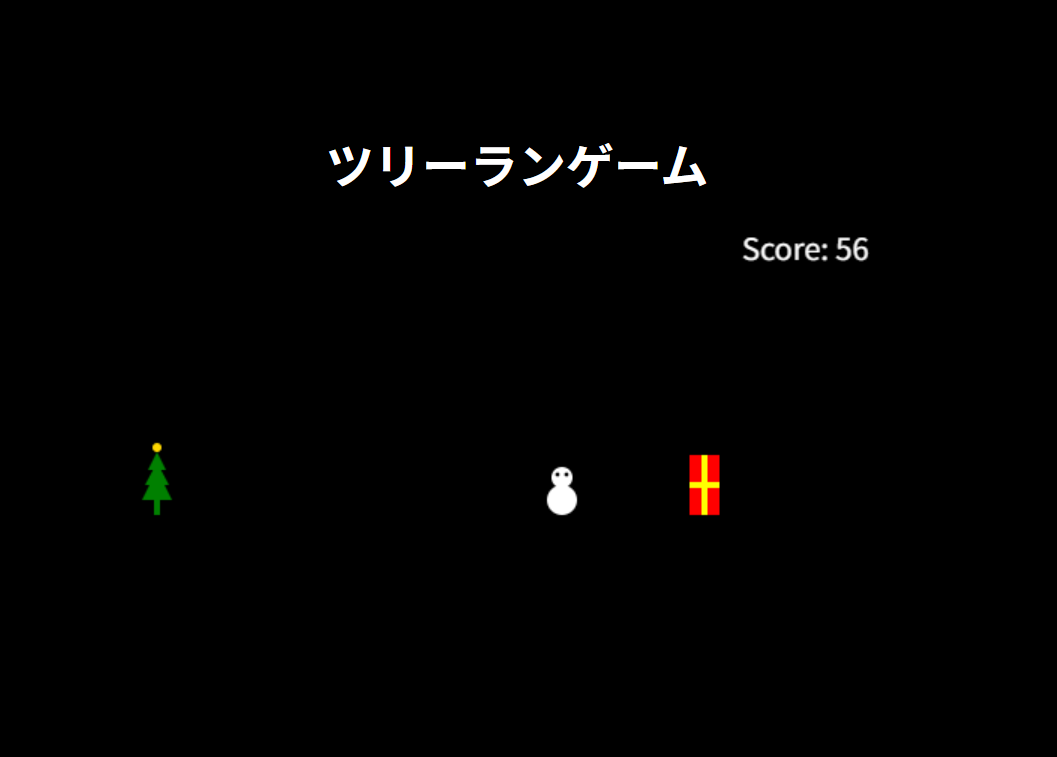
内容
これはクリスマスの夜を駆けるクリスマスツリーです。プレイヤーのクリスマスツリーは雪だるまやプレゼント、靴下の障害物をジャンプして避けてハイスコアを稼ぐ、そんな感じです。
html
<!DOCTYPE html>
<html lang="ja">
<head>
  <meta charset="UTF-8">
  <title>ツリーランゲーム</title>
  <link rel="stylesheet" href="style.css">
</head>
<body>
  <h1>ツリーランゲーム</h1>
  <canvas id="game" width="600" height="300"></canvas>
  <script src="main.js"></script>
</body>
</html>
css
body {
  background-color: black;
  color: white;
  display: flex;
  flex-direction: column;
  align-items: center;
  justify-content: center;
  height: 100vh;
  margin: 0;
}
javascript
const cv = document.getElementById('game');
const ctx = cv.getContext('2d');

let playerY = 150;// ツリー(プレイヤー)の位置
let velocityY = 0;
let jumpCount = 0;//ジャンプ回数のカウント
const maxjumps = 2;//ジャンプ回数上限
let canPress = true;

//回転
let rotation = 0;
let rotating = false;

let gravity = 0.7;
let obstacles = [];
let score = 0;
let gameOver = false;

//ツリー
function drawPlayer() {
  ctx.save();
  ctx.translate(60, playerY + 20);
  if (rotating) ctx.rotate(rotation);

  ctx.fillStyle = "green";

  ctx.fillRect(-2, 10, 4, 10); // 幹

  // 下・中・上の三角
  [[-10, 10, 10, 10, 0, -10],
   [-8, 0, 8, 0, 0, -15],
   [-6, -10, 6, -10, 0, -22]].forEach(p => {
    ctx.beginPath();
    ctx.moveTo(p[0], p[1]);
    ctx.lineTo(p[2], p[3]);
    ctx.lineTo(p[4], p[5]);
    ctx.closePath();
    ctx.fill();
  });

  // 星
  ctx.fillStyle = "gold";
  ctx.beginPath();
  ctx.arc(0, -25, 3, 0, Math.PI * 2);
  ctx.fill();

  ctx.restore();
}

function drawObstacles() {
  obstacles.forEach(o => {
    if (o.type === "snowman") {//雪だるま
      ctx.fillStyle = "white";
      ctx.beginPath();
      ctx.arc(o.x+10, o.y+30, 10, 0, Math.PI*2);
      ctx.fill();
      ctx.beginPath();
      ctx.arc(o.x+10, o.y+15, 7, 0, Math.PI*2);
      ctx.fill();
      ctx.fillStyle = "black";
      ctx.beginPath();
      ctx.arc(o.x+7, o.y+13, 1.5, 0, Math.PI*2);
      ctx.arc(o.x+13, o.y+13, 1.5, 0, Math.PI*2);
      ctx.fill();
    }
        else if (o.type === "gift"){//クリスマスプレゼント箱
        ctx.fillStyle = "red";
        ctx.fillRect(o.x, o.y, o.w, o.h);
        ctx.fillStyle = "yellow";
        ctx.fillRect(o.x+8, o.y, 4, o.h);
        ctx.fillRect(o.x, o.y+18, o.w, 4);
        }
            else if (o.type === "sock") {//靴下
            ctx.fillStyle = "red";
            ctx.beginPath();
            ctx.moveTo(o.x, o.y);
            ctx.lineTo(o.x + 10, o.y);
            ctx.lineTo(o.x + 10, o.y - 20);
            ctx.lineTo(o.x + 5, o.y - 20);
            ctx.lineTo(o.x, o.y - 20);
            ctx.closePath();
            ctx.fill();
            ctx.fillStyle = "white";
            ctx.fillRect(o.x, o.y - 25, 10, 5);
            }
    });
}

function restartGame() {
  playerY = 150;
  velocityY = 0;
  jumpCount = 0;
  rotation = 0;
  rotating = false;
  obstacles = [];
  score = 0;
  gameOver = false;
  update();
}

document.addEventListener('keydown', e => {
  if (e.code === 'Space' && canPress) {
    canPress = false;
    if (gameOver) {
      restartGame();
    } else if (jumpCount < maxjumps) {
      velocityY = -12;
      jumpCount++;
      if (jumpCount === 2) {
        rotating = true;
        rotation = 0;
      }
    }
  }
});

document.addEventListener('keyup', e => {
  if (e.code === 'Space') canPress = true;
});

function update() {
  ctx.clearRect(0, 0, cv.width, cv.height);

  //プレイヤー更新
  velocityY += gravity;
  playerY += velocityY;
  if (playerY >= 150) {
    playerY = 150;
    velocityY = 0;
    jumpCount = 0;
    rotating = false;
    rotation = 0;
  }

  //2段ジャンプ時の回転の処理
  if (rotating) {
    rotation += 0.3;
    if (rotation >= Math.PI * 2) {
      rotation = 0;
      rotating = false;
    }
  }

  drawPlayer();

  //障害物生成
  if (Math.random() < 0.017) {//障害物の量
    const types = ["snowman", "gift", "sock"];
    const choice = types[Math.floor(Math.random() * types.length)];
    obstacles.push({x:600, y:150, type:choice, w:20, h:40});
  }

  //障害物の更新
  obstacles.forEach(o => o.x -= 5);
  obstacles = obstacles.filter(o => o.x > -20);
  drawObstacles();

  //当たり判定
  obstacles.forEach(o => {
    if (50 < o.x+o.w && 70 > o.x && playerY < o.y+o.h && playerY+40 > o.y ) {
      gameOver = true;
    }
  });

  //スコア
  score++;
  ctx.fillStyle = "white";
  ctx.fillText("Score: " + score, 450, 20 );

  //ゲームオーバー時の表示
  if (gameOver) {
    ctx.fillStyle = "white";
    ctx.font = "20px sans-serif";
    ctx.fillText("おおっと残念、ゲームオーバー!スコア: " + score, 100, 80 );
    ctx.fillText("スペースキーでリスタート", 170, 110);
    return;
  }

  requestAnimationFrame(update);
}

update();
課題
・スペース長押しではジャンプしない
・2回目のジャンプで画面からクリスマスツリーが半分消える
・障害物が重なることがある
・障害物がランダム生成なため、どうしても詰むステージが出てくる
追加したかったもの
・ジャンプ時の効果音
・背景に星々や雲、月、サンタクロースなどをいれたかった
おわりに
今回は時間がかなり迫った状態で作ったのでMicrosoft Copilot様に一部教えていただいたり、整えてもらったりしました。課題はまだ多くありますが、気軽にあそんでみてください。